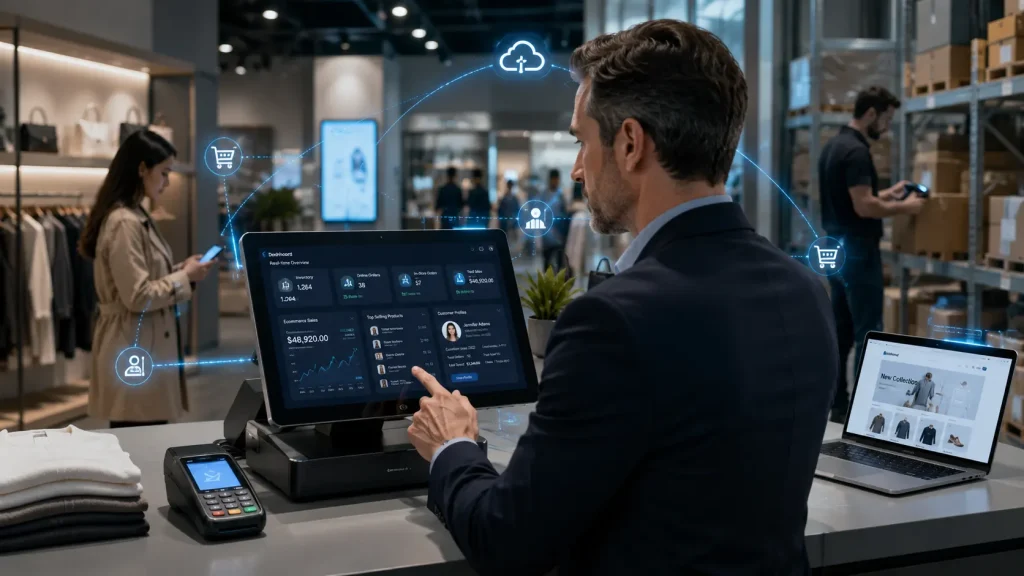
Here’s a scenario most multi-channel retailers know all too well.
A customer finds a jacket on your website, confirms it’s in stock at your local store, makes the trip — and your staff can’t find it because it sold an hour ago and no one updated the system. Or worse: a shopper buys the last unit online at 2 PM, and your in-store team sells the same unit at 3 PM. Now you have two customers, one product, and a customer service nightmare.
This is what disconnected retail systems produce every single day.
Omnichannel retail integration solves this at the root. It connects your physical POS system, ecommerce store, mobile app, marketplace listings, and social commerce channels into a single unified operation — where inventory, orders, customer data, and fulfillment flow in real time across every touchpoint.
The business case is clear. According to Capital One Shopping Research, businesses with strong omnichannel engagement retain 89% of their customers — compared to just 33% for single-channel retailers. Omnichannel shoppers also spend an average of 16% more per order and shop 70% more frequently than customers who only use one channel.
Yet despite those numbers, only 5% of retailers have achieved true unified commerce, even though 99% of executives agree it would improve profitability, according to Ringly.io’s 2026 Omnichannel Statistics report. The gap between knowing you need it and actually building it is exactly where most businesses get stuck.
This guide closes that gap.
What you’ll learn:
- What omnichannel retail integration actually is (and how it differs from multichannel)
- The real difference between omnichannel and unified commerce
- How POS-ecommerce integration works technically — explained without the developer jargon
- The three integration architecture types and which suits your business
- BOPIS, BORIS, and ship-from-store: how they work and what they require
- The measurable business case, backed by 2026 data
- A step-by-step implementation roadmap with timelines
- How much it costs — the honest breakdown no one else publishes
- Common mistakes that derail integration projects
- Where omnichannel is heading next
Let’s get into it.
What Is Omnichannel Retail Integration? (And Why It Matters in 2026)
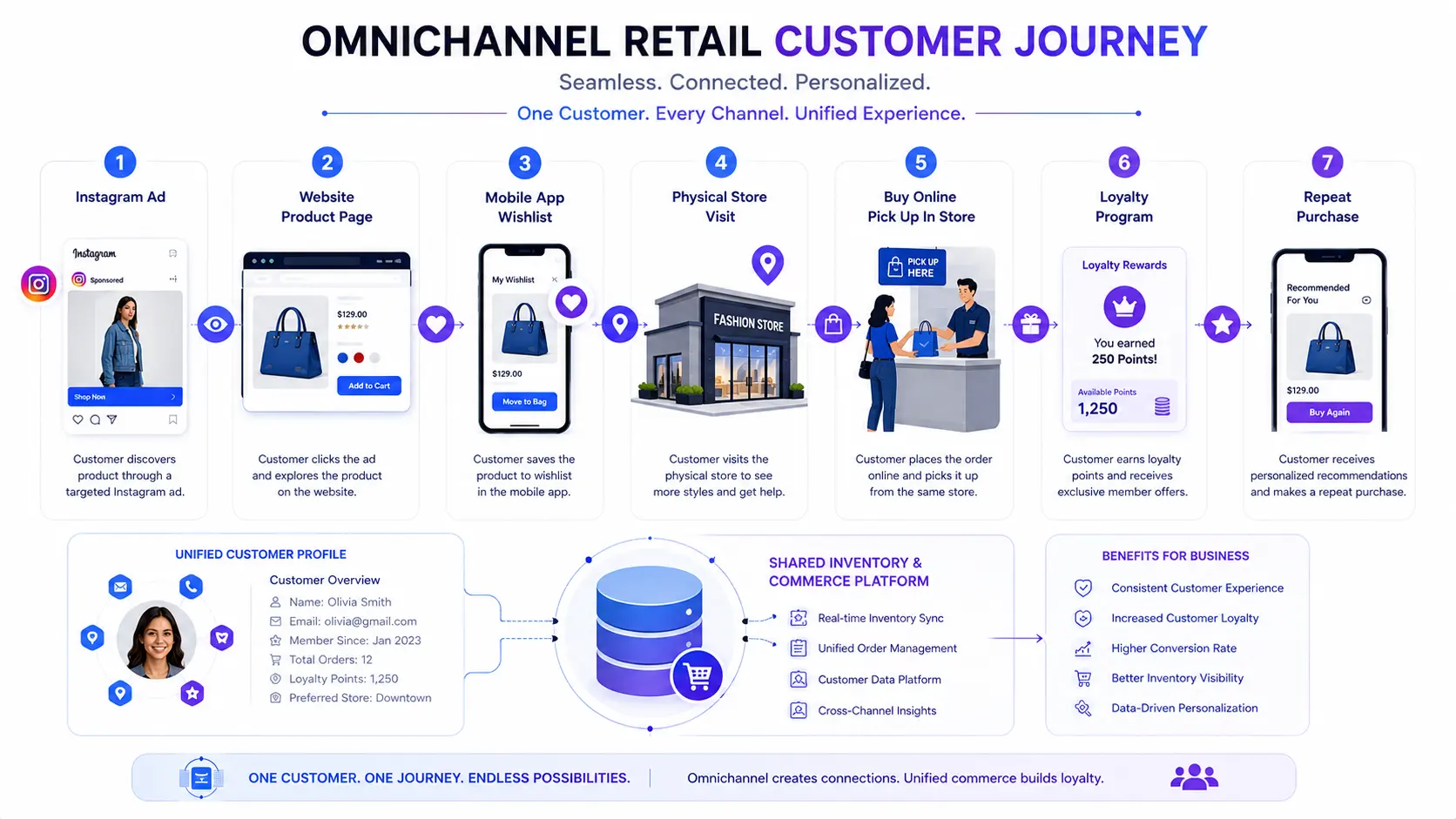
Omnichannel retail integration is the process of connecting every sales channel — your physical store POS, ecommerce website, mobile app, marketplace listings, and social commerce — into a single, unified operational layer. Every channel shares the same real-time inventory, the same customer data, and the same order management system.
When a customer buys online, every channel immediately reflects the updated stock. When a staff member looks up a customer at the POS terminal, they see the full purchase history — in-store, online, and mobile — in one view. When your marketing team runs a promotion, it applies consistently across every channel at the same time.
That’s the outcome. What makes it possible is the integration infrastructure underneath.
The Problem It Solves
Without integration, retail businesses run on islands of data. Your ecommerce platform knows about online orders. Your POS knows about in-store transactions. Your warehouse management system tracks physical stock. And none of these systems talk to each other unless someone manually reconciles them — usually at the end of the day, after the damage is done.
The operational cost of this fragmentation is significant:
- Overselling: Products sold in-store remain listed as available online, resulting in failed fulfillment and refund workflows
- Inventory blind spots: You don’t know where your stock actually is across locations, leading to both stockouts and overstock simultaneously
- Split customer profiles: Your most loyal customers have two identities — an in-store record and an online account — with no connection between them
- Manual reconciliation: Staff spend hours every week manually syncing spreadsheets that should update automatically
According to Digital Applied’s 2026 Omnichannel Strategy Guide, unified inventory management alone reduces fulfillment costs by 20–30% and enables BOPIS — which remains the highest-ROI omnichannel capability available to retailers today.
Omnichannel vs. Multichannel — The Critical Difference
These terms are used interchangeably, but they describe fundamentally different operating models.
Multichannel retail means you sell through multiple channels — website, store, marketplace — but each channel operates independently. Inventory, customer data, and orders are managed separately per channel. It’s better than single-channel, but the data still lives in silos.
Omnichannel retail means all channels share a connected data layer. A sale in any channel immediately updates inventory in every channel. A customer who shops online and in-store has one unified profile, not two separate records. The experience is consistent and continuous, regardless of where the customer engages.
| Dimension | Single-Channel | Multichannel | Omnichannel |
|---|---|---|---|
| Sales channels | One | Multiple (separate) | Multiple (connected) |
| Inventory management | Per-channel | Per-channel | Centralized, real-time |
| Customer data | One system | Fragmented | Unified profile |
| Order management | Channel-specific | Per-channel | Cross-channel |
| Staff visibility | Limited | Channel-specific | Full cross-channel view |
| Customer experience | Basic | Inconsistent | Seamless, continuous |
Omnichannel vs. Unified Commerce — Which Is Right for Your Business?
This is where most articles get vague. Let’s be precise.
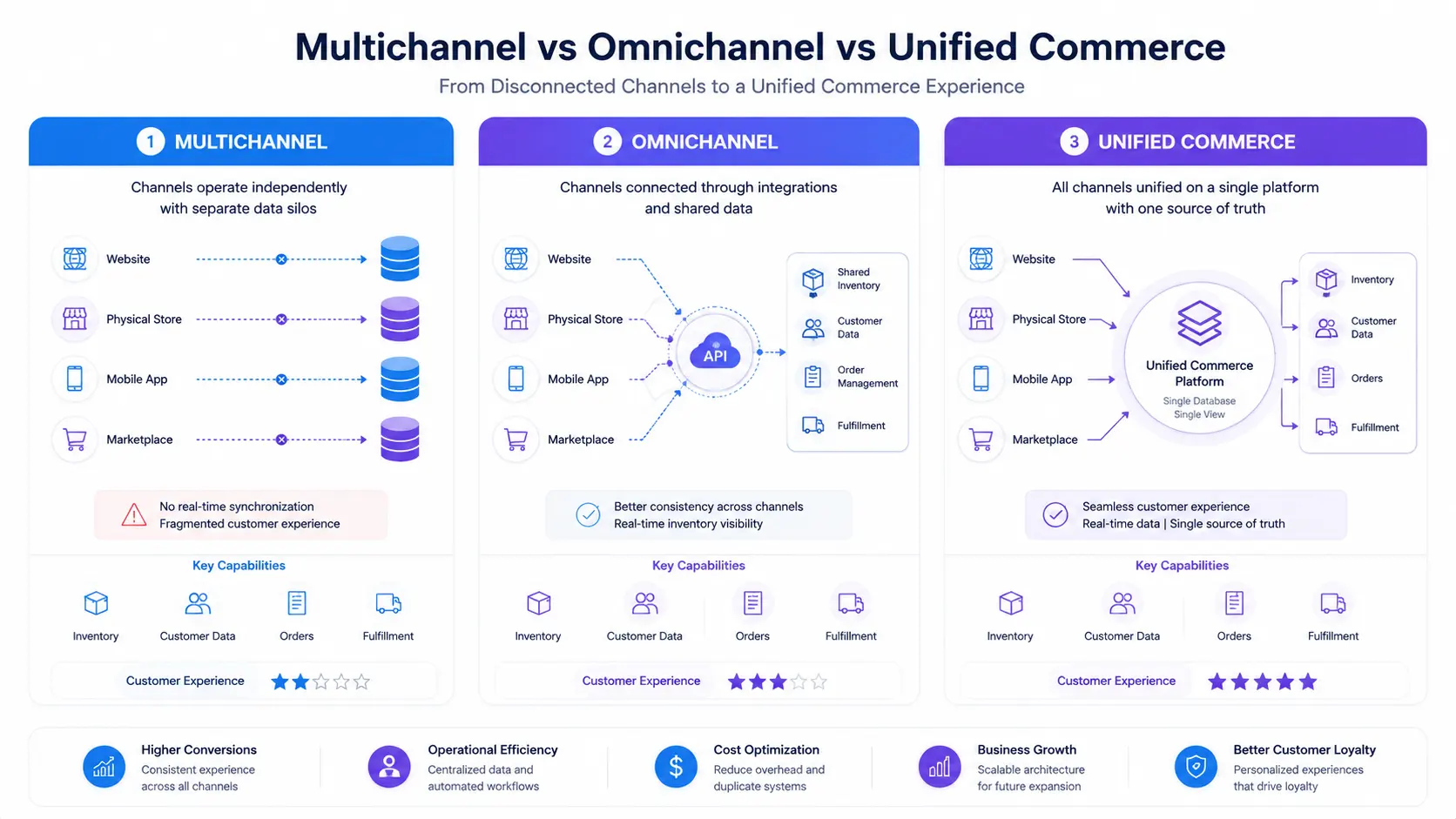
Omnichannel commerce connects your existing channels at the data level — typically through APIs and middleware — so they share inventory, customer records, and order information. The frontend experience is consistent. The backend systems, however, can still be separate applications that happen to be well-integrated.
Unified commerce takes this further by running all channels — in-store, online, mobile, marketplace — on a single backend platform. There’s no integration layer to maintain because everything lives in one system. A single database serves every channel simultaneously, with true real-time data flow and no sync latency.
The clearest analogy: omnichannel is like a team of specialists who are trained to communicate with each other. Unified commerce is one person who handles everything.
| Factor | Multichannel | Omnichannel | Unified Commerce |
|---|---|---|---|
| Channel connectivity | None (siloed) | Connected via APIs | Single platform |
| Inventory visibility | Per-channel | Near real-time sync | True real-time |
| Customer data | Fragmented | Shared across channels | 360° unified profile |
| Backend architecture | Fully separate | Integrated but separate | Single shared backend |
| Operational complexity | Low | Medium | High (upfront) |
| Long-term TCO | Low → grows fast | Medium | Higher upfront, lower long-term |
| Customization | Limited | Moderate | Unlimited |
| Best for | Very small, simple operations | Growing retailers, 2–20 locations | Enterprise, complex operations |
According to Ringly.io’s 2026 data, only 5% of retailers have achieved true unified commerce — yet 99% of retail executives agree it improves profitability. The gap exists because unified commerce requires either a single platform commitment (vendor lock-in) or a sophisticated custom build.
For most growing retailers, omnichannel integration built on a solid API-first architecture is the right starting point — with unified commerce as the strategic destination. Corexta’s retail and ecommerce software development team specializes in building this integration layer with unified commerce architecture in mind from day one.
How POS and Ecommerce Integration Works — The Technical Mechanics
Most content on this topic stops at “your systems connect and share data.” That’s not good enough if you’re making a significant technology investment. Here’s what’s actually happening under the hood — explained for business decision-makers, not just developers.
The Three Integration Architecture Types
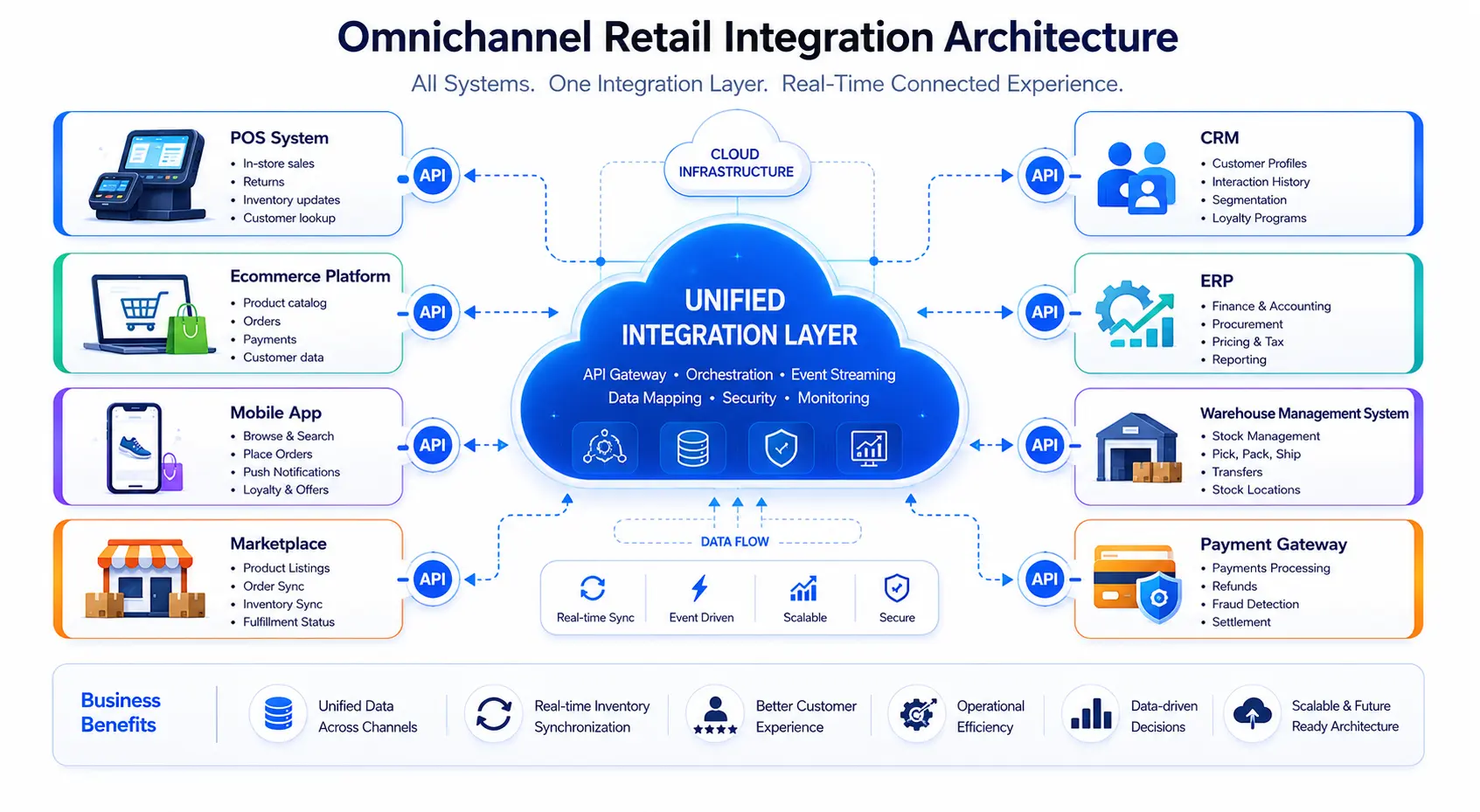
Not all integration approaches are created equal. The right choice depends on your existing systems, your budget, your customization needs, and your long-term growth plans.
1. Native Platform Integration
This is when your POS and ecommerce platform come from the same vendor — think Shopify POS connected to a Shopify online store, or Lightspeed Retail connected to Lightspeed ecommerce.
Since both products share the same underlying database, inventory and order data are synchronized by default — no integration layer required.
Advantages: Fastest to deploy, lowest maintenance burden, data consistency guaranteed, single vendor support.
Limitations: You’re locked into one vendor’s ecosystem. If Shopify doesn’t build a feature you need, you wait for their roadmap. Transaction fees, pricing, and feature access are entirely controlled by the vendor. And if you ever want to migrate, you’re rebuilding everything.
Best for: Startups and small businesses with standard workflows who prioritize speed-to-market over flexibility.
2. Middleware / Connector Integration
Middleware tools (such as API2Cart, Pipe17, SKULabs, or Linnworks) sit between your existing POS and ecommerce systems, acting as a data broker. They translate data formats between your two systems and trigger synchronization events.
If you already have a POS you’re happy with (say, a restaurant using Toast) and a separate ecommerce platform (WooCommerce), middleware lets you connect them without rebuilding either.
Advantages: Works with existing systems, faster than custom development, no platform migration required.
Limitations: Middleware becomes a single point of failure — if it goes down, your sync stops. You’re paying an ongoing subscription for what is essentially data plumbing. Customization is limited to what the middleware vendor supports. And complex workflows (custom pricing rules, multi-warehouse logic, B2B-specific requirements) often exceed middleware capabilities.
Best for: Businesses with established systems in place that need basic synchronization without a full rebuild.
3. Custom API Integration
A fully custom integration, built specifically for your systems and workflows, connects your POS and ecommerce platforms through direct API-to-API architecture. Your development team builds the data flows, sync logic, and business rules from scratch — tailored precisely to your operational requirements.
This is the approach Corexta takes with clients who need custom POS development and ecommerce integration that their off-the-shelf options simply can’t deliver.
Advantages: Complete flexibility — any system, any workflow, any integration. You own the code and the data. No ongoing middleware subscription. Fully scalable as your business grows.
Limitations: Higher upfront investment and longer implementation timeline. Requires a qualified development partner with POS and ecommerce experience.
Best for: Growing retailers with complex needs, businesses with existing legacy systems, multi-location operations, and enterprises building for long-term scale.
| Architecture Type | Setup Cost | Monthly Cost | Customization Level | Time to Launch |
|---|---|---|---|---|
| Native Platform | $0–$5,000 | $50–$500 (platform fees) | Limited | Days to 4 weeks |
| Middleware Connector | $5,000–$25,000 | $200–$2,000 | Moderate | 4–8 weeks |
| Custom API Integration | $30,000–$200,000+ | Hosting + maintenance | Unlimited | 3–9 months |
| Enterprise Omnichannel Build | $150,000–$500,000+ | Significant infra + support | Unlimited | 6–18 months |
How Real-Time Inventory Synchronization Actually Works
Real-time sync is the foundational mechanism that makes omnichannel integration valuable. Here’s the process in plain terms.
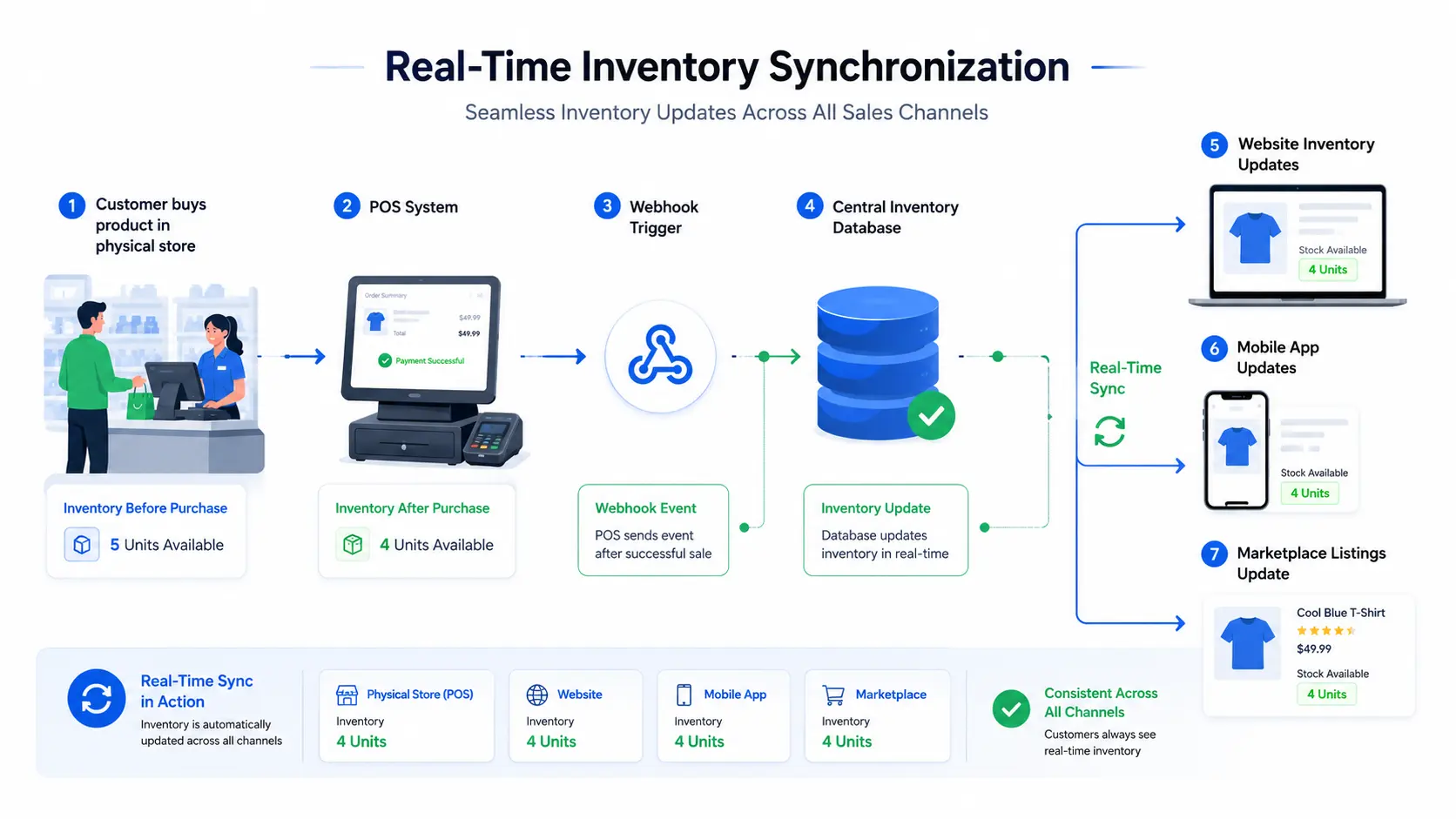
When a product sells — whether in-store or online — the system that processed that transaction needs to immediately notify all other systems to reduce their available stock count. There are two technical approaches to making this happen.
Webhooks (event-driven sync): The modern and preferred approach. When a sale occurs, the selling system automatically “fires” a notification — called a webhook — to all connected systems instantly. The ecommerce platform receives it, decrements inventory, and the updated stock count is live within seconds. No human action required. This is how a customer browsing your website sees “Only 1 left in stock” update in real time after someone buys it in your store.
API Polling (scheduled sync): The older approach. Your integration checks the POS system on a schedule (every 5 minutes, every 15 minutes, or every hour) and pulls any changes. It works, but the delay creates risk — a product can sell in-store and still show available online for several minutes, creating overselling windows.
For any business running meaningful transaction volumes, webhook-based bidirectional sync is non-negotiable.
Bidirectional is the other key word. Sync must flow both ways:
- In-store → online: Customer buys the last red sweater at the physical register. Webhook fires. Ecommerce site marks the item out of stock within seconds.
- Online → in-store: Customer places an order online. POS inventory decrements immediately. Staff can’t accidentally sell the same unit in-store.
One additional protective measure: most well-built integrations apply safety stock thresholds — holding 1–2 units in reserve per location. This buffer absorbs the small latency window between a transaction and a sync completing, preventing overselling during peak traffic.
What Data Gets Synchronized?
A complete POS-ecommerce integration synchronizes every data layer that customers and staff interact with:
| Data Layer | What Gets Synced |
|---|---|
| Product Catalog | SKUs, variants, descriptions, pricing, images, categories |
| Inventory Levels | Real-time stock counts per location and channel |
| Customer Profiles | Purchase history, loyalty points, contact details, preferences |
| Orders | Online orders visible at POS; in-store transactions in ecommerce backend |
| Pricing & Promotions | Consistent discounts, sale prices, promo codes across channels |
| Tax Configuration | Location-aware tax rates applied correctly per transaction |
| Returns & Refunds | Cross-channel return processing with unified order lookup |
| Staff / Access Controls | Role-based permissions reflected across systems |
The Business Case for Omnichannel Integration — What the 2026 Data Says
Before committing budget to integration, most decision-makers need hard numbers. Here they are.
The 2026 omnichannel statistics research from Capital One Shopping makes the revenue case clearly:
- Omnichannel customers spend 16% more per order than single-channel shoppers
- They shop 70% more frequently than single-channel customers
- Converting a single-channel customer to omnichannel increases their basket size and shopping frequency by 8%
- The US click-and-collect (BOPIS) market reached $177.9 billion in 2026, up 15.3% year-over-year
Retention numbers are equally compelling. Research cited by Marketing LTB shows that businesses with strong omnichannel strategies see 179% faster revenue growth than those without integrated channels. And companies with strong cross-channel engagement share customer data across 77% of their channels — versus just 48% for weaker implementations.
From a fulfillment perspective, Digital Applied’s 2026 Omnichannel Strategy analysis found:
- Unified inventory reduces fulfillment costs by 20–30%
- Retailers with a unified customer data platform see 15–25% higher customer lifetime value
- 75% of BOPIS customers make an additional in-store purchase at the time of pickup
| Metric | Single-Channel Retailers | Strong Omnichannel Retailers |
|---|---|---|
| Customer Retention Rate | ~33% | ~89% |
| Average Order Value | Baseline | +16% per order |
| Shopping Frequency | Baseline | +70% more frequent |
| Annual Customer Spend | Baseline | 3–4x more |
| Cart Abandonment Rate | Baseline | 18% lower |
| BOPIS Upsell Rate | N/A | 75% make additional purchase |
| Revenue Growth Rate | Baseline | 179% faster |
| Fulfillment Cost | Baseline | 20–30% lower |
Real-world proof: Canadian luggage retailer Bentley implemented unified POS and ecommerce across their 125-location network, enabling real-time inventory visibility, BOPIS, and ship-from-store. The results: 129% year-over-year revenue growth, 74% lift in online sales, and 17% growth in POS transactions — all within the first year post-launch.
That’s not an outlier. That’s what integrated systems unlock when the data flows cleanly.
BOPIS, BORIS, and Ship-from-Store — The Omnichannel Fulfillment Models That Change Everything
Omnichannel integration isn’t just about synchronized inventory. It enables entirely new fulfillment capabilities that customers increasingly expect as standard. These are the three models every retail business needs to understand.
Buy Online, Pick Up In-Store (BOPIS)
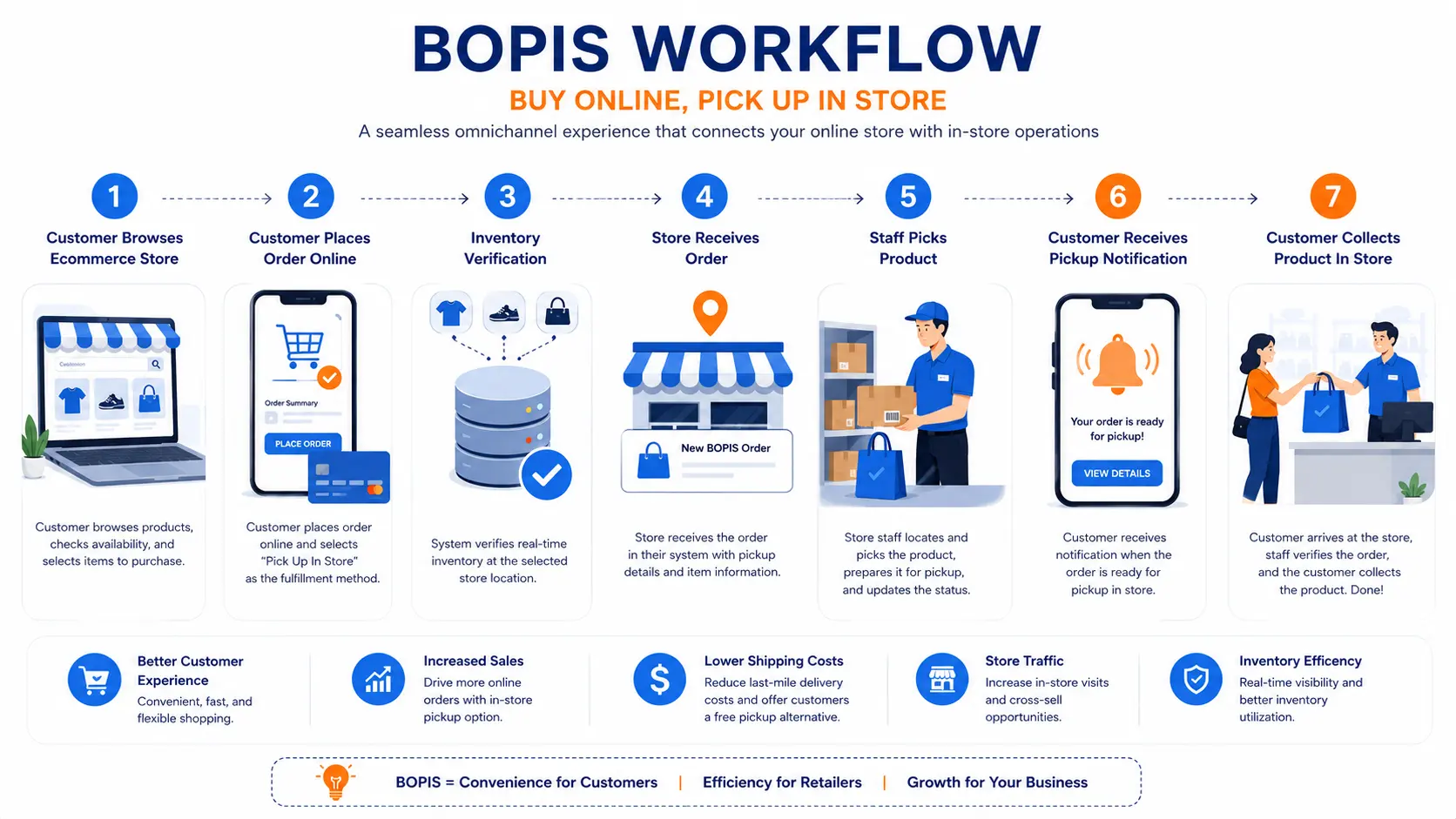
BOPIS lets customers place an order online and collect it at a physical store location — often within hours of ordering. It combines the convenience of online shopping with the immediacy of in-store pickup, eliminating shipping costs and wait times.
According to Capital One Shopping, BOPIS sales in the US reached $177.9 billion in 2026, representing 19.9% of all multichannel ecommerce sales. Among the top 1,000 US retailers, offering curbside pickup increased conversion rates by 25.8%.
What BOPIS requires technically:
- Real-time inventory visibility at the individual store level (not just warehouse-level totals)
- Automatic order routing to the nearest store with stock
- Staff notification workflow when a BOPIS order is placed
- Customer notification system (order ready for pickup confirmation)
- POS lookup capability for staff to locate and fulfill the order efficiently
Without proper POS-ecommerce integration, none of this is possible. If your ecommerce platform doesn’t know what your individual stores have in stock right now, you can’t promise same-day pickup. And if your POS staff can’t look up online orders, the fulfillment falls apart operationally.
Buy Online, Return In-Store (BORIS)
BORIS allows customers who purchased online to return or exchange items at a physical store. This sounds simple but requires surprisingly deep integration.
For BORIS to work, in-store staff need to look up an online order — placed through a completely different system — verify the customer’s identity, process the return against the original transaction, and update inventory in both systems simultaneously.
Without integration, this typically results in the customer service equivalent of a cold bucket of water: “I’m sorry, that was an online order — you’ll have to mail it back.”
Business impact of BORIS:
- Eliminates return shipping costs (typically $5–$15 per return)
- Drives in-store traffic from online customers
- Creates upsell and exchange opportunities at the point of return
- Significantly improves customer satisfaction with the return experience
Ship-from-Store
Ship-from-store uses physical store inventory to fulfill online orders — bypassing the central warehouse entirely when a store location has stock and is geographically closer to the customer.
This reduces last-mile delivery distance, speeds up fulfillment, and reduces pressure on centralized warehouse capacity during peak periods.
What ship-from-store requires technically:
- Real-time inventory at the location level (not just system-wide totals)
- Intelligent order routing logic (which store fulfills which order based on proximity, stock, and capacity)
- Staff workflow integration (printable pick lists, packing instructions, carrier label generation)
- Inventory adjustment back to both POS and ecommerce when the item ships
| Fulfillment Model | Customer Benefit | Retailer Benefit | Key Technical Requirement |
|---|---|---|---|
| BOPIS | Convenience, no shipping cost, immediate | In-store traffic, upsell at pickup | Real-time store-level inventory + order routing |
| BORIS | Flexible, friction-free returns | In-store visits, exchange opportunities | Cross-channel order history accessible at POS |
| Ship from Store | Faster delivery, lower shipping cost | Warehouse relief, lower last-mile cost | Location-level inventory + fulfillment rule engine |
| Curbside Pickup | Maximum convenience, contactless | Reduces in-store operational load | BOPIS + arrival check-in notification system |
Key Benefits of POS and Ecommerce Integration
If you’re building an internal business case for integration investment, here are the seven outcomes your organization can realistically expect.
1. Eliminated overselling — permanently. Real-time bidirectional sync means a product sold anywhere is immediately unavailable everywhere. No more apologetic “we’re sorry, that item went out of stock” emails to customers who already paid. This alone reduces customer service overhead significantly for businesses running meaningful transaction volumes.
2. Unified customer profiles that enable real personalization. Every purchase — in-store, online, on mobile — maps to one customer record. Your marketing team gains the complete picture: when this customer last purchased, what categories they favor, whether they’re a BOPIS user or a home-delivery buyer. According to Digital Applied, retailers with a unified customer data platform see 15–25% higher customer lifetime value compared to those operating channel-specific profiles.
3. Centralized, accurate inventory across every location. One dashboard. Every SKU. Every location. Real-time. Reorder triggers fire based on actual stock positions, not yesterday’s count. Warehouse planning becomes data-driven instead of gut-driven.
4. Consistent pricing, promotions, and product information. A promotion configured in your backend applies simultaneously across your ecommerce site, POS terminal, mobile app, and marketplace listings. No accidental price discrepancies. No customers showing a lower price on their phone than what appears on the terminal.
5. Cross-channel analytics that reveal what single-channel data can’t. Integration unlocks insight that siloed systems make impossible: which in-store products drive online research, which online promotions convert to in-store visits, which customer segments are truly cross-channel buyers. Marketing LTB reports that 83% of customers research products online before visiting a physical store — understanding that journey requires integrated data.
6. Faster, lower-cost omnichannel fulfillment. BOPIS, ship-from-store, and curbside pickup all require integration to function reliably. These fulfillment modes reduce shipping cost, drive in-store traffic, and deliver the convenience that today’s customers expect as a baseline.
7. Empowered in-store staff. Instead of saying “I can’t look that up, that was an online order,” your in-store staff can access a customer’s complete history at the POS terminal — see their online purchases, apply their loyalty points, process a return from any channel, and make genuinely informed product recommendations. According to Marketing LTB, 72% of in-store shoppers use their smartphones to compare prices or check reviews while standing on the floor. An integrated system means your staff always know more than the customer’s phone does.
Which POS Systems Integrate with Ecommerce Platforms?
If you’re evaluating existing platforms before deciding whether to build custom, here’s an honest look at the major POS systems and their ecommerce integration capabilities.
| POS System | Native Ecommerce Integration | API Access | Best For | Key Limitation |
|---|---|---|---|---|
| Shopify POS | Shopify (native) | Open API | Online-first brands expanding to retail | Full Shopify ecosystem lock-in |
| Square POS | Square Online (native) | Limited API | Small businesses, cafés | Customization ceiling; transaction fees scale fast |
| Lightspeed | Lightspeed ecommerce (native) | Yes | Specialty retail with complex inventory | High cost; configuration complexity |
| Toast POS | Online ordering module only | Partial | Restaurants | Restaurant-only; zero retail ecommerce capability |
| Clover POS | Limited (App Market) | Yes | SMBs, quick-service | Opaque pricing; limited scalability |
| NetSuite | Multiple (via connectors) | Yes (ERP-level) | Enterprise | High implementation cost; long timeline |
| Custom POS | Any platform | Full custom | Complex/unique/scaling operations | Higher upfront development investment |
A few things worth noting about this table.
Shopify POS is genuinely good for online-first businesses adding a physical retail presence — the native integration is seamless. But the moment your workflow diverges from what Shopify has built, you hit a wall. Custom pricing logic, complex multi-warehouse rules, industry-specific requirements (restaurant table management, B2B customer-specific pricing, franchise-level reporting) are all out of scope.
Toast dominates the restaurant POS space for good reason — but it is, by design, a restaurant system. If you’re running a food-and-retail hybrid (a brewery with a taproom and an online shop, for example), Toast cannot serve your ecommerce needs in any meaningful way.
Lightspeed is strong for specialty retail with deep inventory needs, but the cost is substantial and the integration configuration is complex for non-technical operators.
When your business needs integrations, workflows, or fulfillment capabilities that none of these platforms support natively — or when you need to own your data and eliminate transaction fees at scale — custom POS development becomes the logical path forward.
How Much Does Omnichannel POS Ecommerce Integration Cost?
This is the question every business owner has and almost no article answers honestly. Here’s the real breakdown.
Cost by Integration Type
| Integration Approach | Setup / Development Cost | Ongoing Monthly Cost | Typical Timeline |
|---|---|---|---|
| Native Platform (same-vendor POS + ecom) | $0–$5,000 (config + setup) | $50–$500 in platform fees | Days to 4 weeks |
| Middleware Connector | $5,000–$25,000 | $200–$2,000 in subscriptions | 4–8 weeks |
| Semi-Custom / API Extension | $15,000–$60,000 | $500–$2,000 | 8–16 weeks |
| Full Custom Integration Build | $30,000–$200,000+ | Hosting + 15–20% maintenance/yr | 3–9 months |
| Enterprise Omnichannel Platform | $150,000–$500,000+ | Significant infra + team | 6–18 months |
What Drives Cost Up
Every integration is unique, but these factors reliably increase total project cost:
- Number of channels to connect — Every additional channel (Amazon, eBay, Instagram Shop, physical locations) adds development scope
- Transaction volume — Higher volumes require more robust infrastructure, load testing, and performance engineering
- Number of physical locations — Each location-level inventory sync point adds complexity
- Legacy system compatibility — Older POS systems often lack modern API support, requiring custom connectors
- Required third-party integrations — ERP, CRM, loyalty platforms, WMS, and accounting systems each add development hours
- Real-time vs. batch sync requirements — True real-time sync (webhook-driven) costs more to build and operate than scheduled batch sync
- Custom business rules — Custom pricing tiers, location-specific promotions, franchise-level reporting, B2B account management
What Drives Cost Down
Equally important: what brings the number down without sacrificing quality.
- MVP-first approach: Start with inventory sync + order management. Add loyalty, AI analytics, and multi-warehouse routing in V2.
- Clean data foundation: Mismatched SKUs and duplicate customer records will cost you significantly more to reconcile post-integration than to clean pre-integration.
- Cloud-native architecture: Builds on AWS, GCP, or Azure are more cost-efficient to scale than on-premise solutions.
- Phased integration: Launch with your two most critical integrations (payment gateway + inventory sync). Schedule secondary connections for later releases.
- Experienced development partner: A team that has built POS-ecommerce integrations before brings reusable architecture, established compliance processes, and fewer expensive trial-and-error hours.
For businesses ready to scope a custom omnichannel integration, Corexta’s custom ecommerce software development team provides realistic project estimates based on your actual system stack — not a generic ballpark.
How to Implement Omnichannel POS Ecommerce Integration — A Step-by-Step Roadmap
Implementation is where the business case becomes reality — or where it falls apart. Here’s the phase-by-phase framework used in successful omnichannel integration projects.
Phase 1: Audit and Requirements Mapping (Weeks 1–3)
Before a single line of code is written, you need a complete map of your current state.
- Document every system in your stack: which POS, which ecommerce platform, which ERP or accounting software, which loyalty program, which WMS
- Map current data flows — and where they break down or require manual intervention
- Define integration requirements: which data syncs in which direction, how frequently, and which business rules govern edge cases
- Identify and prioritize the critical pain points to solve in Phase 1 versus what gets scheduled for V2
The quality of this phase determines the quality of everything that follows. Teams that rush requirements gathering inevitably build the wrong thing — and rebuilding is always more expensive than building right the first time.
Phase 2: Architecture Selection and Data Governance (Weeks 2–4)
With requirements documented, your development team selects the integration architecture that fits your stack, complexity, and budget (native, middleware, or custom API — as covered earlier).
In parallel, you establish the single source of truth for inventory — the authoritative system that all others defer to when there’s a conflict. For most businesses, this is either the ERP or a dedicated Order Management System (OMS). Getting this decision right at Phase 2 prevents ongoing data conflicts at Phase 6.
Data governance decisions made here include:
- SKU format standardization across all systems
- Customer identity rules (how to merge in-store and online customer records)
- Pricing hierarchy (which system controls master pricing)
- Conflict resolution protocol (what happens when two systems disagree)
Phase 3: Integration Development (Weeks 4–16)
This is where the technical build happens. Key development workstreams:
- API connections: Building and testing the API connections between POS and ecommerce backend
- Bidirectional inventory sync: Webhook configuration, sync frequency, safety stock thresholds
- Customer data unification: Merging in-store and online customer records into one profile
- Order management integration: Cross-channel order routing, status updates, fulfillment triggers
- Payment integration: Ensuring consistent payment method support across channels (card, mobile wallet, gift card, loyalty points)
- BOPIS workflow: Store-level inventory lookup, order routing, staff notification, customer confirmation
Development time varies significantly by scope. A basic inventory + order sync between two systems: 6–10 weeks. A full omnichannel platform with BOPIS, loyalty, ERP integration, and multi-location support: 12–20 weeks.
Phase 4: Testing and Quality Assurance (Weeks 12–18)
Integration testing is not optional. POS-ecommerce integrations handle real financial transactions and customer data — failures are expensive and trust-destroying.
A thorough QA process covers:
- Inventory sync accuracy testing: Simulate sales at all channels; verify sync completes within defined thresholds (typically sub-60 seconds for webhook-based systems)
- Load testing: Simulate peak traffic (Black Friday volumes) to verify the system handles concurrency without sync failures
- BOPIS end-to-end testing: Complete the full customer journey — order online, receive confirmation, staff fulfills, customer picks up — and verify every step
- Cross-channel return testing: Process a return in-store for an online order; verify inventory restoration and refund processing work correctly
- Security and PCI compliance audit: Any system processing payment data across multiple channels has an expanded PCI compliance surface area. This audit is legally required, not optional.
Phase 5: Staff Training and Pilot Launch (Weeks 16–20)
Technical integration success doesn’t guarantee operational success. Staff who don’t understand how to use the unified system become the weakest link in your omnichannel experience.
Training priorities:
- In-store associates: unified customer lookup at POS, BOPIS order fulfillment, cross-channel returns
- Managers: cross-channel reporting dashboard, inventory exception alerts
- Customer service: cross-channel order lookup, unified refund processing
Launch with a pilot at one or two locations. Monitor sync accuracy, document edge cases, iterate before full rollout.
Phase 6: Full Rollout and Continuous Optimization (Ongoing)
Scale to all locations. Activate advanced capabilities — AI-powered analytics, cross-channel promotion engine, predictive inventory replenishment. Establish a KPI dashboard that tracks cross-channel performance, not just per-channel metrics.
| Phase | Typical Timeline | Key Deliverable | Cost as % of Total |
|---|---|---|---|
| Audit & Requirements | Weeks 1–3 | Integration specification document | 5–8% |
| Architecture + Data Governance | Weeks 2–4 | Tech stack plan + governance rules | 5–8% |
| Integration Development | Weeks 4–16 | Live API connections, sync active | 40–50% |
| QA & Testing | Weeks 12–18 | Tested, compliant integration | 15–20% |
| Staff Training + Pilot | Weeks 16–20 | Operational team + pilot data | 8–10% |
| Full Rollout + Optimization | Ongoing | Fully deployed, continuously improved | Maintenance |
Common Omnichannel Integration Mistakes — And How to Avoid Them
Most integration projects that fail don’t fail because of bad technology. They fail because of predictable, avoidable mistakes made before or during implementation.
1. Building one-way sync instead of bidirectional. The most common technical error. A team sets up online-to-POS sync (online orders decrement POS inventory) but forgets in-store-to-online (in-store sales don’t update ecommerce stock). The result: in-store sales create ghost inventory online, and overselling resumes within days of launch.
2. Choosing a connector based on monthly subscription cost, not workflow fit. A middleware connector that handles standard retail won’t support your custom pricing logic, multi-warehouse rules, or B2B account-specific pricing. These gaps get filled with manual workarounds that accumulate into a second data reconciliation problem — the exact problem you were trying to solve.
3. Skipping data hygiene before integration. Mismatched SKUs (the same product listed as “BLU-JAC-M” in one system and “BluJacketMedium” in another), duplicate customer records, and inconsistent product naming will corrupt your unified data from day one. Data cleansing is not glamorous, but doing it before integration is far cheaper than doing it after. Budget 1–2 weeks for a thorough data audit.
4. Designing for today’s transaction volume, not tomorrow’s. An integration that handles 500 daily transactions cleanly can fail catastrophically at 5,000 — creating sync backlogs, inventory inaccuracies, and system timeouts during your busiest trading periods. Load testing under peak conditions is non-negotiable before any launch.
5. Underestimating staff change management. Technical integration can be perfect while operational adoption fails completely. In-store staff who revert to manual inventory adjustments because “it’s faster” undermine the entire system. Include staff in the pilot phase, gather their feedback, and build the operational workflows around their real-world constraints — not ideal-state assumptions.
6. Operating without a defined single source of truth. When two systems disagree on inventory count, which one wins? Without a clearly defined authority system (documented in your governance rules from Phase 2), you’ll have perpetual data conflicts with no systematic resolution. Define this before you write a line of code.
7. Treating security as an afterthought. Cross-channel systems handle payment data across a broader attack surface than single-channel systems. Your PCI DSS compliance scope expands with integration. A post-launch security audit that finds vulnerabilities is orders of magnitude more expensive than building to compliance standards from the start.
The Future of Omnichannel Commerce — What’s Changing in 2026 and Beyond
Omnichannel retail is not a solved problem — it’s an evolving one. The next wave of change is already underway, and understanding where things are heading helps you build infrastructure that won’t be obsolete in three years.
1. AI-Powered Personalization Across Every Channel
According to Ringly.io’s 2026 research, AI is already used by 95.4% of B2C marketers in their omnichannel strategy. Retailers using AI at scale report 15% lower operational costs and 10% revenue growth compared to non-AI-enabled peers.
The specific application that matters most for omnichannel: AI-driven cross-channel personalization. A customer’s in-store purchase history informs their online product recommendations in real time. Their browse behavior on your mobile app influences what your in-store associates suggest when they walk through the door. This level of personalization is only possible when your data is truly unified — which is why the integration infrastructure you build now directly determines your AI capability ceiling later.
2. Agentic Commerce and AI Shopping Assistants
Deloitte’s 2026 Outlook identifies agentic AI — systems that can take autonomous action on behalf of customers — as having moved from concept to implementation priority. As customers increasingly use AI interfaces rather than traditional search engines to discover and purchase products, your POS and ecommerce backend needs to expose real-time inventory, pricing, and availability to these agents via clean, standardized APIs.
Retailers without an API-first architecture won’t be able to participate in this distribution channel at all.
3. Headless and Composable Commerce Architecture
Headless commerce separates the frontend customer experience (what shoppers see and interact with) from the backend commerce logic (inventory, orders, pricing, fulfillment). This architecture allows the same backend to simultaneously power a POS terminal, a self-checkout kiosk, a mobile app, an ecommerce storefront, and a voice interface — without rebuilding anything.
Composable commerce takes this further: assembling your commerce stack from best-of-breed components (best CMS, best OMS, best search, best POS) rather than relying on one monolithic platform. This approach requires stronger technical foundations but delivers dramatically better flexibility as your business evolves.
For retailers planning major system investments in 2026, building on an API-first architecture is the difference between future-proofing and technical debt. Corexta’s custom ecommerce software development approach is designed specifically around API-first, composable architecture principles.
4. BOPIS as a Revenue Driver, Not Just a Convenience Feature
The US BOPIS market is projected to reach $509 billion by 2033 — growing at a compound annual rate of 16.45%. Click-and-collect is no longer a customer convenience add-on; it’s a primary revenue channel.
The retailers winning on BOPIS in 2026 are moving beyond basic pickup to scheduled pickup windows, curbside arrival detection via mobile app, in-store digital experiences that activate at pickup, and ship-from-store hybrid fulfillment that optimizes which location fulfills each order based on proximity, cost, and capacity.
All of this requires integration infrastructure that most businesses haven’t yet built.
5. Physical Stores as Experience and Fulfillment Hubs
According to the 2026 omnichannel trend analysis from dbbnwa.com, physical locations are being reimagined as “relationship engines” — playing dual roles as fulfillment nodes (for BOPIS, ship-from-store, and curbside) and brand experience spaces that create emotional connections no digital channel can replicate.
This dual role requires POS systems that handle both customer engagement workflows and logistics routing simultaneously. It’s a capability that purpose-built custom POS systems deliver far more effectively than off-the-shelf alternatives designed for a simpler retail era.
Frequently Asked Questions About Omnichannel POS Ecommerce Integration
What is omnichannel retail integration?
Omnichannel retail integration connects your physical POS system, ecommerce store, mobile app, marketplace, and social commerce channels into a single unified operational layer — sharing real-time inventory, customer data, and order management across every touchpoint. When a customer buys anywhere, every channel reflects the update immediately, preventing overselling and enabling consistent experiences regardless of where a customer shops.
How does POS and ecommerce integration work?
POS and ecommerce integration works through APIs that enable real-time data exchange between systems. When a sale occurs at either endpoint, a webhook (an automatic notification) fires to all connected systems, triggering immediate inventory updates. Bidirectional sync ensures in-store sales update online stock and online purchases update POS inventory simultaneously. The result is a single, accurate inventory count reflected consistently across every channel.
Why is real-time inventory synchronization important?
Real-time synchronization prevents the two most damaging retail failures: overselling (selling something you no longer have) and inventory blind spots (not knowing where your stock actually is). Both result in failed fulfillment, customer service costs, and lost trust. Real-time sync also enables BOPIS — which requires knowing, at the individual store level, what’s available right now — and supports accurate, data-driven reordering decisions.
What is the difference between omnichannel and unified commerce?
Omnichannel connects separate frontend channels (store, website, app) through a shared data layer — typically via APIs and middleware. The backend systems remain distinct but integrated. Unified commerce goes further: all channels run on a single backend platform, eliminating the integration layer entirely. Omnichannel is the current standard for growing retailers. Unified commerce is the destination — but only 5% of retailers have achieved it, according to Ringly.io.
Which POS systems integrate with ecommerce platforms?
The major POS systems all offer some level of ecommerce integration. Shopify POS integrates natively with Shopify’s ecommerce platform. Square POS connects to Square Online. Lightspeed integrates with Lightspeed ecommerce. Toast connects to its online ordering module (restaurants only). For businesses with complex workflows, multi-location requirements, or systems that don’t fit a single vendor’s ecosystem, custom API-based integration is the most flexible and scalable option.
How much does omnichannel POS ecommerce integration cost?
Costs range from near-zero (native same-vendor platforms like Shopify) to $200,000+ for full custom enterprise integration. Middleware connectors typically cost $5,000–$25,000 to implement plus $200–$2,000/month in ongoing subscription fees. Custom API-based integration — the most flexible and scalable approach — generally runs $30,000–$200,000 depending on the number of channels, locations, and business logic complexity, plus hosting and annual maintenance.
What is BOPIS, and how does it depend on POS-ecommerce integration?
BOPIS (Buy Online, Pick Up In-Store) allows customers to purchase online and collect their order at a physical store location — often within hours. It requires real-time store-level inventory visibility, automated order routing to the correct location, staff notification workflows, and customer confirmation systems. Without proper POS-ecommerce integration, you cannot guarantee that what the ecommerce site shows as available at a specific store actually is — making reliable BOPIS technically impossible.
What are the biggest challenges of omnichannel integration?
The most common challenges are: data quality issues (mismatched SKUs, duplicate customer records) that corrupt the unified data layer; one-way sync that misses in-store-to-online inventory updates; integration architecture that doesn’t scale with transaction volume; staff change management (technology adoption without operational training); and the absence of a clearly defined single source of truth for inventory when multiple systems disagree.
How long does omnichannel POS ecommerce integration take?
Timeline depends entirely on scope. A basic two-system inventory and order sync between existing platforms: 4–8 weeks. A full custom integration covering inventory, orders, customer profiles, BOPIS, loyalty, and ERP connection: 4–9 months. Enterprise-scale builds with multiple locations, complex business logic, and custom reporting: 9–18 months. The discovery and requirements phase (2–4 weeks) should always precede development — it consistently prevents the far more expensive mistakes of building the wrong thing.
What is the future of omnichannel commerce?
Omnichannel is evolving toward unified commerce (single-backend architecture), AI-powered cross-channel personalization, headless and composable technology stacks, agentic commerce (AI shopping assistants that need real-time API access to your inventory and pricing), and physical stores operating simultaneously as fulfillment hubs and branded experience spaces. Businesses building API-first integration infrastructure now are directly building the foundation their AI and agentic commerce capabilities will run on in 2027 and beyond.
Build Your Omnichannel Retail Platform with Corexta
If you’ve made it this far, you understand what omnichannel integration actually requires — technically, operationally, and financially. You know the difference between a middleware connector that solves today’s problem and a custom integration architecture that grows with your business.
Corexta builds custom omnichannel retail platforms for businesses that have outgrown what off-the-shelf solutions can deliver.
Our work spans the full integration stack:
- Custom POS Development — Fully custom POS systems built around your specific workflow, with native ecommerce integration architecture built in from day one
- Retail & Ecommerce Software Development — Unified retail and ecommerce platforms that sync inventory, orders, and customer data across every channel in real time
- Custom Ecommerce Software Development — API-first ecommerce infrastructure built for omnichannel from the ground up — composable, scalable, and integration-ready
We don’t sell you a product and call it a solution. We scope your specific integration requirements, design an architecture that fits your existing systems, and build what your business actually needs.
Get a free integration consultation →
No commitment. No generic pitch. Just an honest conversation about your current stack, your operational goals, and what a real omnichannel integration would look like for your business specifically.
Sources
- Capital One Shopping Research (2026)
- Digital Applied — Omnichannel Strategy Guide (2026)
- Ringly.io — 50 Omnichannel Retail Statistics (2026)
- Marketing LTB — Omnichannel Statistics (2026)
- Shopify — Bentley Case Study
- Business Wire / ResearchAndMarkets — BOPIS Market Report (2025)
- dbbnwa.com — Top 10 Omnichannel Retail Trends (2026)
- Envive — Omnichannel Retail Engagement Statistics (2026)
- Shopify — BOPIS Guide (2026)