

Choosing the right project management software can significantly impact how efficiently your team plans, collaborates, and delivers work. With organizations managing increasingly complex projects across multiple departments, businesses need tools that go beyond basic task tracking and provide visibility, automation, reporting, and collaboration capabilities in a single platform.
Two of the most widely used solutions in this space are ClickUp and Smartsheet. While both platforms help teams organize projects, manage workflows, and improve productivity, they take very different approaches to project management.
ClickUp positions itself as an all-in-one work management platform that combines tasks, documents, goals, dashboards, chat, automation, and AI-powered productivity features. It is designed to replace multiple workplace tools and provide teams with a highly customizable workspace for managing projects of all sizes.
Smartsheet, on the other hand, is built around a spreadsheet-style interface that feels familiar to users who regularly work with Excel or Google Sheets. It focuses heavily on structured project planning, resource management, workflow automation, and enterprise-level reporting, making it particularly appealing to operations, IT, construction, and project management teams.
The challenge for many organizations is determining which platform aligns best with their workflows. Do you need a flexible workspace with multiple project views and built-in collaboration tools? Or would a spreadsheet-based system with powerful reporting and portfolio management capabilities be a better fit?
In this comparison, we’ll examine ClickUp and Smartsheet in detail, including their features, strengths, weaknesses, pricing, and ideal use cases, helping you decide which project management solution delivers the most value for your team.
ClickUp vs. Smartsheet at a Glance
Before diving deeper into each platform, here’s a quick overview of how ClickUp and Smartsheet compare across key categories.
| Feature | ClickUp | Smartsheet |
|---|---|---|
| Primary Focus | All-in-one work management platform | Spreadsheet-based project management |
| Best For | Teams seeking flexibility and customization | Teams that prefer structured project planning |
| Task Management | Advanced | Strong |
| Project Views | List, Board, Calendar, Gantt, Timeline, Mind Map, Workload, and more | Grid, Gantt, Calendar, Board, Timeline |
| Collaboration Tools | Docs, Whiteboards, Chat, Comments, Proofing | Comments, Conversations, Attachments |
| Automation | Extensive no-code automation | Advanced workflow automation |
| AI Features | Native AI capabilities and workflow assistance | AI-powered formulas, summaries, and analysis |
| Reporting | Custom dashboards and reporting | Enterprise-grade reporting and dashboards |
| Free Plan | Yes | No permanent free plan |
| Learning Curve | Moderate to high | Moderate |
| Enterprise Features | Available | Strong focus on enterprise project management |
Both tools are capable project management solutions, but they cater to different working styles. ClickUp emphasizes flexibility, customization, and collaboration, while Smartsheet focuses on structure, scalability, and spreadsheet-driven project execution.
ClickUp Overview
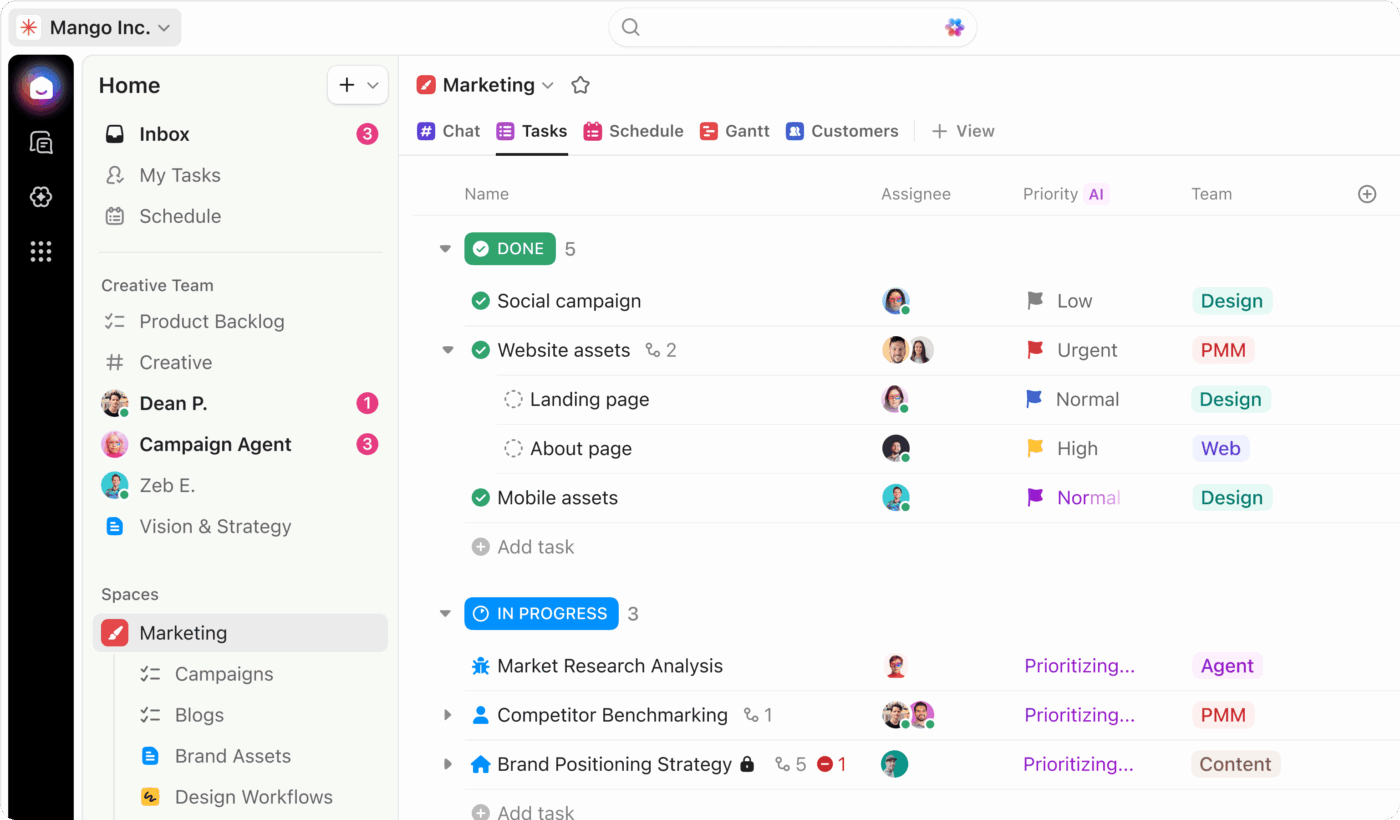
ClickUp is a comprehensive work management platform designed to centralize projects, tasks, documents, communication, reporting, and automation into a single workspace. It has become increasingly popular among startups, agencies, software development teams, marketing departments, and growing businesses looking to reduce tool sprawl.
One of ClickUp’s biggest advantages is its flexibility. Teams can customize workflows, create unique project structures, automate repetitive processes, and choose from multiple project views depending on how they prefer to work. The platform also includes built-in collaboration features, reducing the need for separate communication and documentation tools.
Best Features:
- Multiple project views including List, Board, Calendar, Gantt, Timeline, Workload, and Mind Map
- Built-in documents and collaborative knowledge management
- Native team chat and communication tools
- Custom dashboards and reporting
- Goal and portfolio management
- Time tracking and resource management
- Extensive workflow automation
- Custom fields and workflow customization
- Whiteboards for brainstorming and planning
- AI-powered productivity features and content assistance
- Large integration ecosystem with popular business applications
- Unlimited tasks, even on the free plan
Pros:
Highly customizable workspace
Teams can configure workflows, statuses, fields, automations, and views to match virtually any business process.
Excellent value for growing teams
The platform offers one of the most generous free plans in the project management market, making it attractive for startups and small businesses.
Multiple project visualization options
Users can switch between different views without changing the underlying project data.
Strong collaboration capabilities
Built-in documents, whiteboards, comments, and chat help teams work together without constantly switching applications.
Comprehensive feature set
Many organizations can replace several separate tools with a single ClickUp workspace.
Cons:
Steeper learning curve
Because ClickUp offers extensive customization options, new users may initially feel overwhelmed by the number of features available.
Interface complexity
Some teams report that the platform can feel crowded, particularly when managing large workspaces with numerous projects and custom configurations.
Feature limitations on lower tiers
Certain advanced capabilities, automation allowances, and usage limits may require upgrades to higher-priced plans. Some users have also expressed concerns about plan restrictions and additional costs for advanced features.
Pricing:
ClickUp offers several pricing tiers designed to accommodate different team sizes and requirements. According to its current pricing structure:
Free Forever
- $0
- Unlimited tasks
- Unlimited members
- Kanban boards
- Calendar view
- Collaborative docs
- Basic project management capabilities
Unlimited Plan
- $7 per user/month (billed annually)
- Unlimited storage
- Unlimited integrations
- Unlimited Gantt charts
- Time tracking
- Goal management
- Resource management
Business Plan
- $12 per user/month (billed annually)
- Advanced dashboards
- Enhanced automation
- Additional security and administration controls
- Advanced reporting features
Enterprise Plan
- Custom pricing
- Enterprise security
- Advanced permissions
- Dedicated support
- Large-scale deployment features
Smartsheet Overview
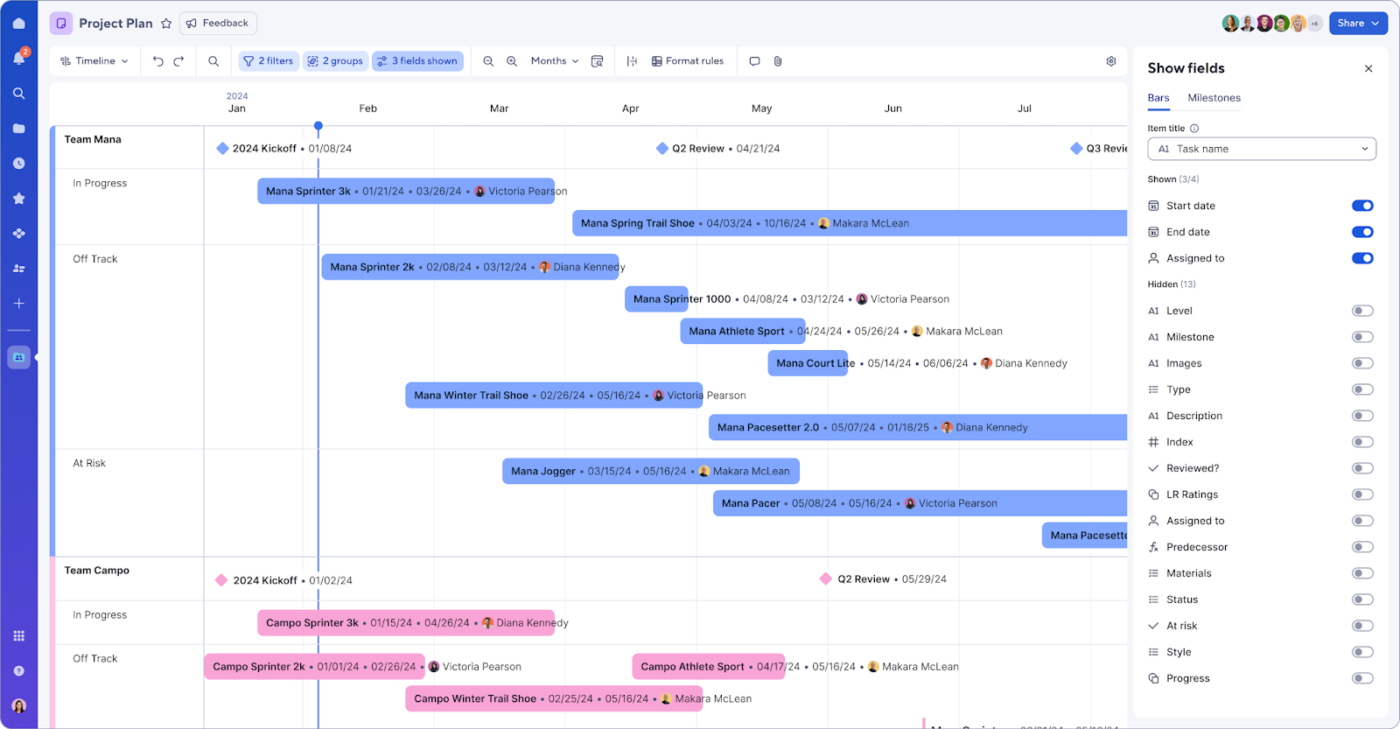
Smartsheet is a work execution and project management platform that combines the familiarity of spreadsheets with advanced project planning, automation, collaboration, and reporting capabilities. It is widely used by enterprises, PMOs, operations teams, construction firms, and organizations managing large-scale projects.
Unlike traditional project management software, Smartsheet’s spreadsheet-style interface allows users to organize and track projects in a familiar tabular format while adding advanced functionality such as Gantt charts, automated workflows, dashboards, and portfolio reporting.
Its strength lies in structured project planning, process management, and enterprise reporting rather than highly customizable team workspaces. Organizations that already rely heavily on spreadsheets often find Smartsheet easier to adopt than more complex project management platforms.
Best Features:
- Spreadsheet-style project management
- Grid, Gantt, Calendar, Card, and Timeline views
- Advanced workflow automation
- Enterprise reporting and dashboards
- Resource and workload management
- Portfolio and program management
- Forms for data collection
- Approval workflows
- AI-powered formulas, summaries, and data analysis
- Enterprise-grade governance and security
- Extensive integrations with major business platforms
- Scalable project and portfolio management capabilities
Pros:
Familiar spreadsheet interface
Teams comfortable with Excel can typically adapt to Smartsheet quickly.
Powerful reporting capabilities
The platform excels at creating executive dashboards, portfolio reports, and organizational-level visibility.
Strong automation engine
Users can automate approvals, notifications, requests, and recurring workflows without coding.
Enterprise scalability
Smartsheet is designed to support large organizations with governance, compliance, and portfolio management requirements.
Excellent for structured projects
The platform performs particularly well in environments where projects follow repeatable processes and require detailed tracking.
Cons:
No permanent free plan
Unlike some competitors, Smartsheet does not offer a robust free-forever option for long-term use.
Less flexible for creative workflows
Teams seeking highly visual or customizable project management experiences may find the platform restrictive.
Can become expensive at scale
Advanced features, add-ons, and enterprise functionality can significantly increase costs for larger organizations.
Limited built-in collaboration compared to modern work hubs
While collaboration features exist, they are not as extensive as platforms that combine project management with documents, chat, and whiteboarding.
Pricing:
Smartsheet’s current pricing structure includes the following plans:
Pro Plan
- $9 per member/month (billed annually)
- Up to 10 members
- Unlimited sheets, forms, and reports
- Grid, Board, Gantt, and Calendar views
- 250 automations per month
Business Plan
- $19 per member/month (billed annually)
- Unlimited members
- Unlimited automations
- Timeline view
- Workload tracking
- Advanced administrative capabilities
- 1 TB attachment storage
Enterprise Plan
- Custom pricing
- Enterprise-grade security
- Governance controls
- Advanced administration
- Premium integrations
- Enterprise support
Advanced Work Management
- Custom pricing
- Portfolio management
- Advanced workflow applications
- Enterprise process automation
- Additional premium capabilities
For organizations seeking structured project execution, portfolio oversight, and spreadsheet-based planning, Smartsheet remains one of the strongest enterprise-focused project management solutions available today. However, teams looking for greater flexibility, built-in collaboration, and broader work management functionality may find ClickUp to be the more versatile option.
ClickUp vs. Smartsheet Feature Comparison
While both ClickUp and Smartsheet are powerful project management platforms, they excel in different areas. ClickUp focuses on flexibility, collaboration, and all-in-one work management, whereas Smartsheet emphasizes structured project planning, spreadsheet-based workflows, and enterprise project execution.
Let’s compare their most important features side by side.
Which Tool Has Stronger AI and Automation?
Artificial intelligence and workflow automation have become essential components of modern project management software. Both platforms have invested heavily in these capabilities, but their approaches differ significantly.
ClickUp
ClickUp offers a comprehensive AI-powered productivity assistant that integrates directly into project workflows. Teams can use AI to:
- Generate project plans and task descriptions
- Create meeting summaries
- Draft emails and documentation
- Brainstorm ideas
- Summarize conversations and updates
- Automate repetitive administrative work
Beyond AI, ClickUp provides powerful no-code automation capabilities that allow users to create custom workflows using triggers and actions. Teams can automate status changes, task assignments, notifications, due dates, approvals, and recurring processes without technical expertise.
Smartsheet
Smartsheet has introduced AI-powered features focused on data analysis, formulas, summaries, and workflow optimization. Its AI capabilities are particularly useful for teams managing large datasets and complex project portfolios.
The platform also includes advanced workflow automation that can:
- Route approvals automatically
- Send alerts and reminders
- Update project records
- Trigger workflows across multiple sheets
- Support enterprise process management
Winner: ClickUp
While both tools offer strong automation capabilities, ClickUp delivers a more comprehensive AI experience for day-to-day work management. Its AI features are more deeply integrated into content creation, task management, and collaboration workflows, making it the stronger choice for teams seeking productivity-focused AI assistance.
Which Tool Handles Task Management and Project Views Better?
Task management is the foundation of any project management platform. The ability to organize, prioritize, and visualize work can significantly impact team productivity.
ClickUp
ClickUp is one of the most flexible task management platforms available today.
Users can manage projects using multiple views, including:
- List View
- Board View
- Calendar View
- Gantt View
- Timeline View
- Workload View
- Mind Map View
- Table View
- Whiteboard View
Tasks can contain:
- Custom statuses
- Priorities
- Dependencies
- Checklists
- Custom fields
- Time estimates
- Time tracking
- Goals and milestones
This flexibility allows different departments to work in the format that suits them best while maintaining a unified project structure.
Smartsheet
Smartsheet approaches project management from a spreadsheet perspective. Users organize tasks in grid-based sheets and can switch between:
- Grid View
- Gantt View
- Card View
- Calendar View
- Timeline View
The platform excels at managing structured projects with clear timelines, dependencies, and resource requirements.
However, customization options are generally more limited compared to ClickUp’s highly configurable workspace.
Winner: ClickUp
ClickUp offers significantly more project views and customization options, making it the better solution for teams with diverse workflows and project management styles.
Which Tool Is Better for Collaboration and Communication?
Successful project management depends heavily on team communication and collaboration.
ClickUp
ClickUp was designed as an all-in-one workspace, and collaboration is one of its strongest areas.
Built-in collaboration features include:
- Real-time document editing
- Team chat
- Comments and mentions
- Collaborative whiteboards
- Task discussions
- Screen recordings
- File sharing
- Proofing and feedback tools
Because these capabilities are built directly into the platform, teams often reduce their dependence on separate communication tools.
Smartsheet
Smartsheet provides collaboration features such as:
- Comments
- Conversations
- File attachments
- Approval requests
- Shared workspaces
- Automated notifications
These tools work well for project coordination but are more focused on project updates and stakeholder communication than real-time collaboration.
Winner: ClickUp
For organizations looking to centralize communication, documentation, and project management in one platform, ClickUp provides a more complete collaboration experience.
How Do They Compare on Integrations?
Modern teams rely on multiple software tools, making integrations a critical consideration.
ClickUp
ClickUp integrates with hundreds of popular business applications, including:
- Google Workspace
- Microsoft 365
- Slack
- Zoom
- GitHub
- GitLab
- Dropbox
- OneDrive
- HubSpot
- Salesforce
- Zapier
The platform also provides API access and extensive automation possibilities through third-party integration platforms.
Smartsheet
Smartsheet offers strong enterprise-grade integrations with:
- Microsoft 365
- Google Workspace
- Salesforce
- Jira
- ServiceNow
- Tableau
- Power BI
- Slack
- Adobe Creative Cloud
- DocuSign
Its integration ecosystem is particularly appealing to larger organizations that rely on enterprise software stacks.
Winner: Tie
Both platforms provide excellent integration capabilities. ClickUp offers broader flexibility for growing teams, while Smartsheet shines in enterprise environments that require advanced business system connectivity.
Which Tool Wins on Reporting and Dashboards?
Project visibility is essential for managers and executives who need to monitor performance and make informed decisions.
ClickUp
ClickUp offers highly customizable dashboards that allow teams to track:
- Project progress
- Team workloads
- Time tracking
- Goals
- Sprint performance
- Productivity metrics
- Resource allocation
Dashboards can be tailored to different stakeholders and updated in real time.
Smartsheet
Reporting is one of Smartsheet’s greatest strengths.
The platform provides:
- Executive dashboards
- Portfolio reporting
- Resource analytics
- Cross-project visibility
- Program management reporting
- Enterprise performance tracking
Organizations managing large portfolios often appreciate the depth and sophistication of Smartsheet’s reporting tools.
Winner: Smartsheet
While ClickUp offers excellent dashboards, Smartsheet has a slight advantage for enterprise reporting, portfolio management, and executive-level visibility.
Which Tool Is Easier to Learn and Adopt?
Ease of adoption can directly impact implementation success and user satisfaction.
ClickUp
ClickUp’s extensive customization options provide tremendous flexibility but can create a steeper learning curve for new users.
Teams may need time to:
- Configure workflows
- Customize workspaces
- Build dashboards
- Create automation rules
- Understand the platform’s many features
Smartsheet
Smartsheet benefits from its spreadsheet-like interface, which feels familiar to users who regularly work with Excel or Google Sheets.
Many teams can begin using the platform quickly without extensive training.
However, advanced features such as portfolio management and automation may still require onboarding.
Winner: Smartsheet
For most users, especially those already comfortable with spreadsheets, Smartsheet is easier to learn and adopt initially.
Should You Choose ClickUp or Smartsheet?
The right choice ultimately depends on your organization’s needs, workflows, and priorities.
Choose ClickUp if you need:
- An all-in-one work management platform
- Advanced collaboration tools
- Flexible project views
- Strong AI capabilities
- Extensive customization
- A generous free plan
- Cross-functional team collaboration
Choose Smartsheet if you need:
- Spreadsheet-based project management
- Enterprise reporting and governance
- Portfolio and program management
- Structured workflows
- Advanced resource planning
- Familiar spreadsheet interfaces
- Large-scale project oversight
In general, ClickUp is often the better choice for teams seeking flexibility and modern collaboration, while Smartsheet is ideal for organizations that prioritize structured project execution and enterprise reporting.
Why Corexta Become The Best Alternative
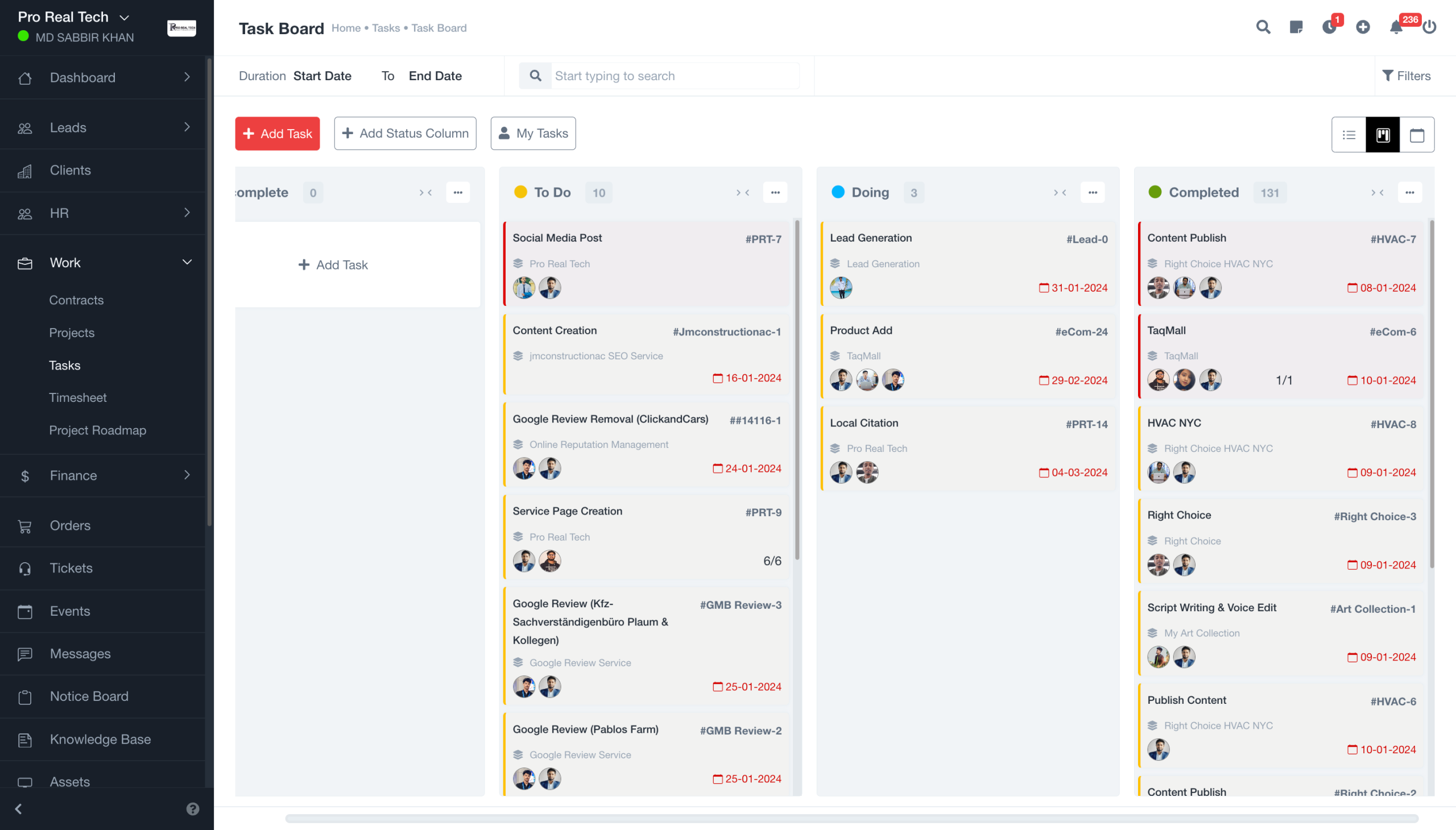
While ClickUp and Smartsheet are both powerful platforms, many businesses find themselves paying for features they don’t use or managing overly complex systems that require extensive setup and training.
This is where Corexta stands out.
Corexta is designed to provide a complete business management experience without the complexity that often comes with traditional project management software. Instead of focusing solely on project tracking, it brings together project management, CRM, client management, invoicing, team collaboration, and business operations within a single platform.
Simplified Yet Powerful Project Management
Corexta helps teams organize projects, manage tasks, track deadlines, and monitor progress through an intuitive interface that is easy to understand from day one.
Unlike many enterprise-focused tools, businesses can get started quickly without spending weeks configuring workflows.
Built for Growing Businesses
Small and mid-sized companies often need more than project management software. They need a platform that supports their entire operation.
Corexta combines:
- Project management
- CRM functionality
- Client management
- Team collaboration
- Workflow organization
- Business reporting
This eliminates the need to purchase and manage multiple disconnected tools.
Improved Team Collaboration
Corexta keeps teams aligned through centralized communication, task tracking, project updates, and shared workspaces, ensuring everyone stays informed and productive.
Better Value for Money
Many organizations struggle with rising software costs as teams grow. Corexta provides a comprehensive set of business management features at a competitive price point, helping companies maximize their return on investment.
Easier Adoption Across Teams
One of Corexta’s biggest advantages is its user-friendly design. Teams can onboard faster, reduce training requirements, and start managing projects effectively without a steep learning curve.
If you’re comparing ClickUp and Smartsheet but want a solution that combines project management, CRM, team collaboration, and business operations in one platform, Corexta is worth serious consideration.
Whether you’re managing client projects, coordinating internal teams, tracking business performance, or scaling your operations, Corexta provides the tools you need to work smarter and grow faster.
Ready to streamline your projects and business operations from a single platform? Try Corexta free today and discover why more growing businesses are choosing a simpler, more efficient way to manage work.
Read More: 7 Top-Rated Collaboration Tools for Small Businesses








