

Choosing the right project management software is no longer just about organizing tasks. Modern teams need platforms that can coordinate projects, streamline communication, automate repetitive work, manage approvals, and provide visibility across departments. As organizations grow, the ability to centralize work in a single system becomes increasingly important.
Two platforms that often appear in project management discussions are Workzone and ClickUp. Both help teams plan projects, track progress, assign responsibilities, and collaborate more effectively. However, they approach work management from very different perspectives.
ClickUp positions itself as an all-in-one productivity platform designed to replace multiple workplace tools. It combines project management, task tracking, documentation, collaboration, dashboards, automation, and AI-powered features within a highly customizable environment. This flexibility has made it popular among startups, agencies, software teams, operations departments, and growing businesses that want to manage diverse workflows from a single workspace.
Workzone, on the other hand, focuses on structured project management and operational visibility. It is particularly known for supporting marketing, creative, and professional service teams that need standardized processes, detailed project oversight, workload management, and approval workflows. Its emphasis on organization and accountability appeals to teams that prefer a more guided and less customizable experience.
While both platforms solve similar challenges, the differences become clear when you examine areas such as automation, customization, collaboration tools, integrations, reporting, and scalability. Some organizations prioritize flexibility and innovation, while others value simplicity, consistency, and process control.
In this comparison, we’ll break down the strengths, limitations, and key features of both platforms to help you determine which solution aligns best with your team’s size, workflow complexity, and long-term business goals.
ClickUp vs. Workzone at a Glance
| Category | ClickUp | Workzone |
|---|---|---|
| Best For | Teams looking for an all-in-one work management platform with extensive customization | Teams that need structured project management with strong oversight and approval processes |
| Ease of Setup | Requires initial configuration to match workflows | Faster adoption with more predefined structures |
| Task Management | Advanced hierarchy with Spaces, Folders, Lists, Tasks, and Subtasks | Traditional project-task-subtask organization |
| Customization | Highly customizable workflows, views, fields, statuses, and dashboards | Moderate customization with a focus on consistency |
| AI Features | Built-in AI capabilities for writing, summarization, task assistance, and productivity | Limited native AI functionality |
| Automation | Advanced workflow automation with numerous trigger-action combinations | Rule-based workflow automation for common project processes |
| Collaboration Tools | Docs, comments, chat, whiteboards, task discussions, and real-time collaboration | Comments, approvals, file sharing, and team communication tools |
| Approval Workflows | Available through custom workflows and automations | One of the platform’s strongest capabilities, especially for creative reviews |
| Reporting & Dashboards | Highly customizable dashboards and analytics | Strong project reporting with executive-level visibility |
| Workload Management | Team workload tracking and resource planning tools | Comprehensive workload and capacity management features |
| Views Available | List, Board, Calendar, Timeline, Gantt, Table, Workload, Mind Map, and more | List, Calendar, Gantt, and project-focused views |
| Integrations | Extensive integration ecosystem with hundreds of business applications | Smaller but practical integration library |
| Scalability | Suitable for startups, SMBs, and enterprise organizations | Well-suited for mid-sized teams and established organizations |
| Learning Curve | Moderate to high due to extensive feature depth | Lower learning curve with a more structured interface |
| Primary Advantage | Flexibility, AI capabilities, and all-in-one functionality | Process consistency, visibility, and approval management |
| Potential Challenge | Can feel overwhelming for teams that want simplicity | Less flexible for highly customized workflows and complex cross-functional operations |
Both platforms deliver solid project management capabilities, but they cater to different operational styles. ClickUp is often the stronger choice for organizations seeking flexibility, automation, and a centralized workspace for multiple business functions. Workzone tends to appeal to teams that prioritize structure, accountability, resource visibility, and formal project execution processes.
ClickUp Overview
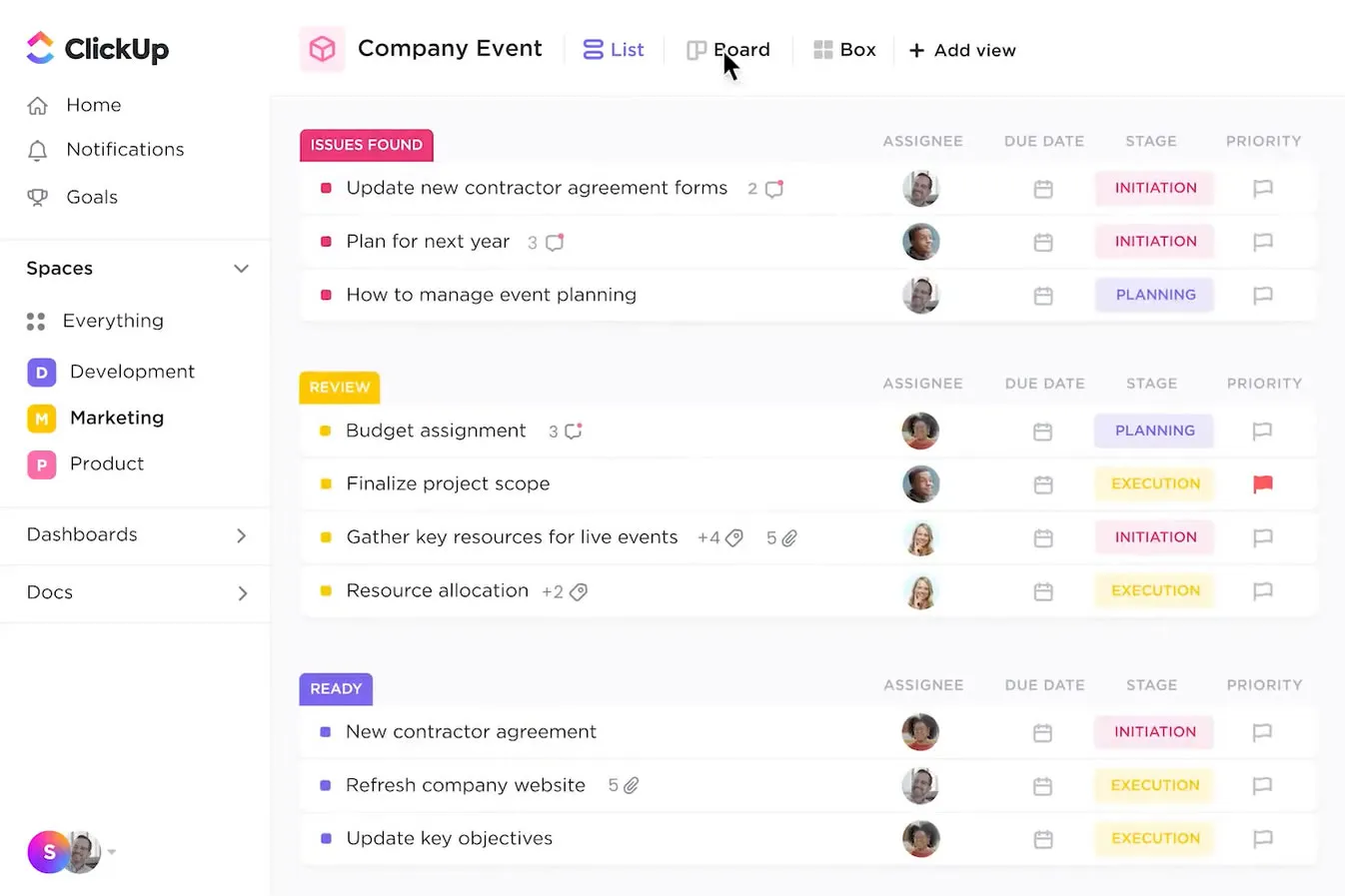
ClickUp has evolved from a traditional project management platform into a comprehensive work management ecosystem designed to centralize tasks, documentation, communication, planning, reporting, and automation in a single workspace. Rather than focusing solely on project tracking, the platform aims to reduce tool sprawl by bringing multiple workplace functions together under one roof.
Today, organizations use ClickUp for everything from project planning and software development to marketing operations, client management, HR workflows, and company-wide collaboration. Its biggest differentiator is flexibility. Teams can build highly customized workflows that match their existing processes instead of adapting their work to rigid software limitations.
The platform is particularly popular among growing companies, cross-functional teams, agencies, startups, and enterprises that need a scalable solution capable of supporting diverse departments and workflows. Recent product updates have also strengthened its position in the AI-powered productivity market, introducing intelligent automation, AI-assisted work management, and autonomous workflow capabilities.
Key Features Include
Extensive Project and Task Management
At its core, ClickUp provides a sophisticated task management system built around a hierarchical structure that can scale from individual projects to organization-wide operations.
Work can be organized using Spaces, Folders, Lists, Tasks, and Subtasks, giving teams multiple levels of structure and visibility. This hierarchy allows organizations to manage everything from daily to-do lists to large multi-department initiatives within a single platform.
Teams can create custom task statuses, dependencies, priorities, milestones, recurring tasks, and workflows that reflect how their business actually operates.
Multiple Project Views
Different teams prefer different ways of visualizing work. ClickUp addresses this by offering a wide range of project views that can be customized based on individual preferences or project requirements.
Popular options include:
- List View
- Board (Kanban) View
- Calendar View
- Timeline View
- Gantt Charts
- Table View
- Workload View
- Mind Maps
- Forms
- Whiteboards
- Document Views
This flexibility helps executives, project managers, marketers, developers, and operations teams view the same data in formats that are most useful to them.
AI-Powered Productivity Tools
One of the most significant developments in ClickUp’s recent evolution is the expansion of its AI ecosystem.
The platform now includes AI-powered features capable of helping teams:
- Generate content and documentation
- Summarize projects and tasks
- Create meeting notes
- Produce status updates
- Draft workflows
- Answer workspace questions
- Generate action items
- Automate repetitive knowledge work
Because the AI is integrated directly into the workspace, it can access project context, tasks, documents, conversations, and historical information to deliver more relevant responses than standalone AI tools.
For teams seeking to reduce administrative overhead, these capabilities can significantly improve efficiency and reporting speed.
Automation and Workflow Optimization
Manual administrative work often becomes a major productivity bottleneck as organizations grow.
ClickUp offers advanced automation capabilities that allow teams to automate repetitive processes through trigger-and-action workflows. Common examples include:
- Updating task statuses automatically
- Assigning work when conditions are met
- Sending notifications
- Creating follow-up tasks
- Adjusting due dates
- Moving tasks between workflows
The platform’s automation tools help reduce human error while ensuring processes continue to move forward without constant oversight.
Built-In Collaboration Tools
Many project management systems still require external communication tools to keep teams connected. ClickUp takes a different approach by embedding collaboration features directly into the workspace.
Teams can collaborate using:
- Real-time chat
- Comments and mentions
- Shared documents
- Collaborative whiteboards
- Task discussions
- Meeting notes
- Internal messaging
This integrated approach helps preserve context by keeping discussions attached to the work itself rather than scattered across separate applications.
Reporting and Dashboards
Visibility becomes increasingly important as projects grow in complexity.
ClickUp provides customizable dashboards that enable managers and executives to monitor:
- Team productivity
- Project progress
- Workload distribution
- Time tracking
- Goal achievement
- Resource allocation
- Task completion rates
Because dashboards can be tailored to specific teams or leadership needs, organizations can create reporting systems that align with their operational priorities.
Knowledge Management and Documentation
Beyond task management, ClickUp includes native documentation capabilities that allow teams to build internal knowledge bases, project plans, SOPs, meeting records, and collaborative documents.
This integration helps eliminate the disconnect that often occurs when project information is stored in separate documentation systems. Teams can link documents directly to projects and tasks, creating a more connected work environment.
Considerations
Despite its extensive feature set, ClickUp is not the perfect solution for every organization.
Steeper Learning Curve
One of the platform’s most commonly cited challenges is its complexity.
The same flexibility that makes ClickUp powerful can also make it overwhelming for new users. Teams often require onboarding, training, and workflow planning before they can fully utilize the platform’s capabilities. Organizations seeking a simple plug-and-play solution may find the initial setup process demanding.
Configuration Requires Time
ClickUp’s customization options are extensive, but they also require thoughtful implementation.
Without clear governance and planning, organizations can create overly complex workspaces that become difficult to maintain. Teams often need dedicated administrators or project champions to establish best practices and maintain consistency across departments.
Feature Overload for Smaller Teams
Not every business needs advanced AI tools, multiple project views, sophisticated automation, and enterprise-level reporting.
Smaller teams with straightforward project management requirements may find themselves paying for capabilities they rarely use. In these cases, a more focused project management platform may provide a simpler user experience.
Performance Can Vary in Large Workspaces
Some users managing highly complex workspaces report occasional performance challenges when dealing with large datasets, extensive customizations, or resource-intensive workflows. While the platform continues to improve performance through ongoing updates, organizations managing thousands of projects and tasks should carefully evaluate their specific requirements during testing.
Workzone Overview
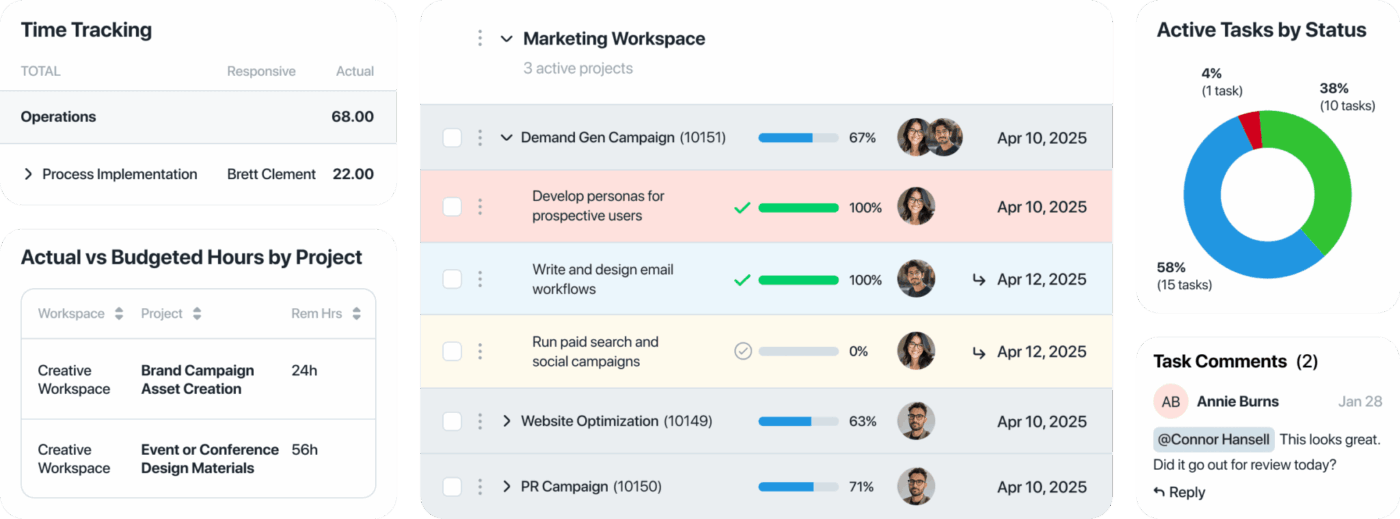
Workzone takes a noticeably different approach to project management.
Rather than positioning itself as an all-in-one productivity platform, Workzone focuses on helping teams execute projects through structured workflows, clear accountability, resource visibility, and operational oversight. The platform is designed for organizations that prioritize consistency and control over extensive customization.
Workzone has developed a strong reputation among marketing teams, creative agencies, professional services firms, educational institutions, and operational departments that need a centralized environment for managing projects, approvals, deadlines, and workloads.
Its philosophy is straightforward: provide teams with the tools necessary to plan, execute, monitor, and complete projects efficiently without overwhelming users with excessive complexity.
Key Strengths
Structured Project Management Environment
Workzone’s biggest advantage is its structured approach to project execution.
Unlike highly customizable platforms that require extensive setup, Workzone provides a more guided framework that helps teams adopt standardized project management practices quickly. This structure often results in faster implementation and more consistent adoption across departments.
Strong Project Visibility
Project managers and executives benefit from Workzone’s emphasis on visibility.
The platform is known for providing clear insight into project timelines, task ownership, upcoming deadlines, and team workloads. Managers can quickly identify bottlenecks, delayed tasks, and resource constraints before they impact project outcomes.
Excellent Approval and Review Workflows
Many marketing and creative teams choose Workzone specifically because of its approval capabilities.
Projects involving content reviews, design approvals, stakeholder sign-offs, and client feedback often require multiple review stages. Workzone helps organize these processes through structured approval workflows that improve accountability and reduce communication gaps.
Resource and Workload Management
Resource planning remains one of Workzone’s strongest operational features.
Managers can monitor team capacity, balance workloads, identify resource shortages, and make informed staffing decisions based on actual project demand. This level of visibility is particularly valuable for service-based organizations and departments managing multiple concurrent projects.
Easier User Adoption
Compared with highly configurable platforms, Workzone typically offers a shorter learning curve.
New users can often become productive more quickly because workflows are more standardized and navigation is less dependent on custom configuration.
Potential Drawbacks
Limited AI Capabilities
As AI becomes increasingly integrated into modern work management platforms, Workzone remains more focused on traditional project management functionality.
Organizations seeking advanced AI-generated summaries, intelligent assistants, content generation, autonomous workflows, and contextual workplace AI may find Workzone less competitive in this area.
Less Customization Flexibility
While structured workflows simplify adoption, they also limit flexibility.
Teams with highly unique operational processes may find it more difficult to tailor Workzone compared to platforms that support extensive customization of workflows, views, fields, and automation rules.
Smaller Integration Ecosystem
Although Workzone supports integrations with important business applications, its ecosystem is generally smaller than platforms that position themselves as comprehensive workplace operating systems.
Organizations with complex technology stacks may need to evaluate integration requirements carefully.
Fewer Collaboration and Workspace Tools
Workzone focuses heavily on project execution and oversight. However, organizations seeking built-in documentation systems, collaborative whiteboards, advanced chat functionality, knowledge management tools, and AI-powered workplace collaboration may find the platform less comprehensive than newer all-in-one work management solutions.
Ultimately, Workzone excels when teams prioritize structure, accountability, project visibility, and approval management. ClickUp, meanwhile, tends to appeal to organizations seeking broader flexibility, deeper customization, extensive automation, and an expanding AI-powered productivity ecosystem.
ClickUp vs. Workzone Feature Comparison
While both ClickUp and Workzone help teams organize projects, manage tasks, and improve visibility across work, their approaches are fundamentally different. ClickUp focuses on flexibility, customization, automation, and AI-powered productivity, while Workzone emphasizes structured project execution, accountability, and operational oversight.
The right choice depends largely on how your team works, how much customization you need, and whether you prefer an all-in-one workspace or a more traditional project management environment.
Let’s compare the two platforms across the features that matter most.
AI and Automation Capabilities
Artificial intelligence has become one of the biggest differentiators in modern project management software. Teams increasingly expect their work management platform to reduce manual effort, streamline communication, and automate repetitive tasks.
ClickUp has invested heavily in AI-driven productivity tools. The platform includes built-in AI capabilities that can help users generate content, summarize tasks, create meeting notes, draft project updates, answer questions about workspace information, and automate routine administrative work.
For project managers, this means spending less time compiling status reports and more time managing strategic initiatives. Marketing teams can use AI to draft content outlines and campaign briefs. Operations teams can automate recurring workflows and reduce repetitive data entry.
Beyond AI, ClickUp offers advanced workflow automation that allows organizations to create sophisticated trigger-and-action rules. Teams can automatically assign tasks, update statuses, notify stakeholders, generate follow-up work, move projects between stages, and trigger approvals based on predefined conditions.
This level of automation becomes increasingly valuable as organizations scale because it reduces manual coordination and ensures processes continue moving without constant intervention.
Workzone approaches automation differently.
Rather than emphasizing AI-powered productivity, Workzone focuses on workflow consistency and process management. The platform includes automation features for common project management scenarios, helping teams streamline approvals, task assignments, and recurring project activities.
For organizations that primarily need project tracking and operational visibility, these automations may be sufficient. However, Workzone currently lacks the breadth of AI functionality found in platforms that are aggressively incorporating artificial intelligence into everyday workflows.
As AI continues to reshape workplace productivity, organizations seeking intelligent assistance, automated content generation, and AI-powered workflow optimization may find ClickUp better aligned with future work management trends.
Winner: ClickUp
Its combination of native AI capabilities and advanced automation provides significantly more opportunities to reduce administrative work and improve operational efficiency.
Views and Customization Options
No two teams manage work exactly the same way.
Software developers may prefer Kanban boards, executives often want dashboards, marketers frequently rely on calendars, and project managers typically need timeline or Gantt chart views. The ability to adapt software to different workflows can have a major impact on adoption and productivity.
Customization is one of ClickUp’s strongest competitive advantages.
The platform allows teams to configure nearly every aspect of their workspace, including:
- Task statuses
- Custom fields
- Workflows
- Dashboards
- Permissions
- Project structures
- Reporting systems
- Automation rules
- Team-specific views
Users can visualize work through numerous view options, including:
- List View
- Board View
- Calendar View
- Timeline View
- Gantt Charts
- Table View
- Workload View
- Mind Maps
- Whiteboards
- Forms
- Document Views
This flexibility makes ClickUp suitable for organizations with diverse teams and varying operational requirements.
A software engineering department can use agile boards while the marketing team relies on calendars and the leadership team monitors dashboards—all within the same platform.
Workzone takes a more structured approach.
The platform offers several project visualization options, including lists, calendars, workload reports, and Gantt charts. These views provide strong project oversight and planning capabilities, particularly for teams managing deadlines, deliverables, and client-facing projects.
However, Workzone intentionally limits customization compared to ClickUp.
This design philosophy creates a more standardized experience that can simplify onboarding and reduce workspace complexity. Teams don’t have to spend as much time configuring workflows because many processes are already structured.
For organizations that value consistency and simplicity, this can be an advantage.
For teams that require extensive customization, however, ClickUp provides substantially greater flexibility.
Winner: ClickUp
Organizations seeking maximum customization and multiple ways to visualize work will generally find ClickUp more adaptable to their unique workflows.
Task Management and Project Structure
Task management forms the foundation of any project management platform.
The way a system organizes projects, tasks, dependencies, milestones, and workloads directly affects how efficiently teams can execute work.
ClickUp uses a hierarchical structure designed to support both simple and highly complex organizational environments.
Work can be organized through:
- Spaces
- Folders
- Lists
- Tasks
- Subtasks
- Checklists
This multi-layered architecture allows organizations to manage everything from personal projects to enterprise-scale operations.
Teams can also create:
- Task dependencies
- Milestones
- Custom priorities
- Time estimates
- Recurring tasks
- Sprint workflows
- Goal tracking systems
Because the structure is highly flexible, organizations can build workflows that mirror their existing operational models.
However, this flexibility comes with a tradeoff.
Teams often need to spend time designing their workspace architecture before realizing the platform’s full potential.
Workzone prioritizes simplicity and visibility.
Projects are typically organized using a more traditional project-task-subtask framework that is easier for new users to understand. Teams can quickly establish projects, assign responsibilities, track deadlines, and monitor progress without extensive configuration.
One area where Workzone performs particularly well is project oversight.
Managers gain clear visibility into project timelines, workload distribution, upcoming deadlines, and project health. This makes it especially useful for marketing departments, agencies, and service-based organizations that manage large volumes of concurrent projects.
For straightforward project execution, Workzone’s structure is often easier to adopt.
For organizations managing highly complex cross-functional initiatives, ClickUp generally offers more flexibility and scalability.
Winner: Depends on Use Case
- Choose ClickUp for flexibility, scalability, and complex workflows.
- Choose Workzone for structured project execution and easier adoption.
Collaboration and Approval Workflows
Project management is no longer just about tracking tasks. Teams need effective communication, document sharing, stakeholder feedback, and approval management to keep projects moving efficiently.
ClickUp has expanded significantly beyond traditional project management by integrating collaboration directly into the workspace.
Teams can collaborate using:
- Real-time comments
- Mentions
- Shared documents
- Team chat
- Collaborative whiteboards
- Task discussions
- Knowledge bases
- Meeting notes
This integrated approach reduces context switching because conversations remain connected to the work itself.
Instead of jumping between multiple communication platforms, team members can collaborate directly within projects and tasks.
ClickUp also supports approval workflows through task statuses, custom automations, and workflow configurations. Organizations can build approval processes that align with internal requirements and business rules.
Workzone’s collaboration capabilities are more focused on project execution and stakeholder review processes.
This is where the platform shines.
Many marketing teams, creative departments, and agencies choose Workzone specifically because of its approval and review functionality. Projects involving creative assets, content production, design reviews, and client approvals often require multiple review stages and stakeholder sign-offs.
Workzone helps formalize these processes through structured approval workflows that improve accountability and reduce confusion around project ownership and approval status.
For organizations managing client-facing deliverables, this can be a significant advantage.
While ClickUp offers broader collaboration functionality, Workzone often provides a stronger experience for approval-driven project environments.
Winner: Split Decision
- ClickUp wins for overall collaboration and communication.
- Workzone wins for formal review and approval processes.
Integrations and Connected Tools
Modern businesses rely on dozens of applications to support daily operations.
A project management platform’s ability to connect with other tools directly impacts productivity and workflow efficiency.
ClickUp has built a large integration ecosystem designed to connect with popular business applications across multiple categories.
Integrations support:
- Communication tools
- CRM systems
- Cloud storage platforms
- Development environments
- Marketing software
- Customer support systems
- Productivity applications
- Time tracking tools
This extensive connectivity allows organizations to centralize workflows without abandoning existing technology investments.
Teams can automatically sync information across platforms, reducing duplicate work and maintaining consistent project data.
Workzone also supports integrations with important business tools but offers a smaller ecosystem overall.
For many organizations, the available integrations will adequately support day-to-day operations. However, businesses with highly customized technology stacks or advanced integration requirements may encounter limitations compared to more integration-focused platforms.
As organizations continue expanding their software ecosystems, integration flexibility becomes increasingly important.
This is an area where ClickUp currently maintains a noticeable advantage.
Winner: ClickUp
Its broader integration ecosystem and workflow connectivity provide greater flexibility for growing organizations.
Should You Choose ClickUp or Workzone?
The answer depends less on which platform is objectively better and more on which platform aligns with your team’s working style.
Choose ClickUp if your organization:
- Wants an all-in-one work management platform
- Needs advanced AI capabilities
- Requires extensive workflow customization
- Manages multiple departments within one workspace
- Relies heavily on automation
- Uses a large number of third-party applications
- Plans to scale processes across teams and departments
- Wants documentation, collaboration, reporting, and project management in one system
ClickUp is particularly well-suited for startups, technology companies, operations teams, growing businesses, and organizations seeking a highly flexible workspace that can evolve alongside their needs.
Choose Workzone if your organization:
- Prefers structured project management processes
- Values operational visibility and accountability
- Requires strong approval workflows
- Manages marketing, creative, or client-facing projects
- Wants a simpler implementation experience
- Prioritizes project oversight over extensive customization
- Needs workload and resource management tools without excessive complexity
Workzone is often an excellent fit for marketing departments, creative agencies, educational institutions, professional services firms, and organizations that benefit from standardized project execution processes.
Ultimately, ClickUp offers greater flexibility, broader functionality, deeper automation, and stronger AI capabilities. Workzone excels at structured project management, approval workflows, and operational visibility. The best choice depends on whether your team values customization and innovation or consistency and process control.
Why Corexta Become The Best Alternative?
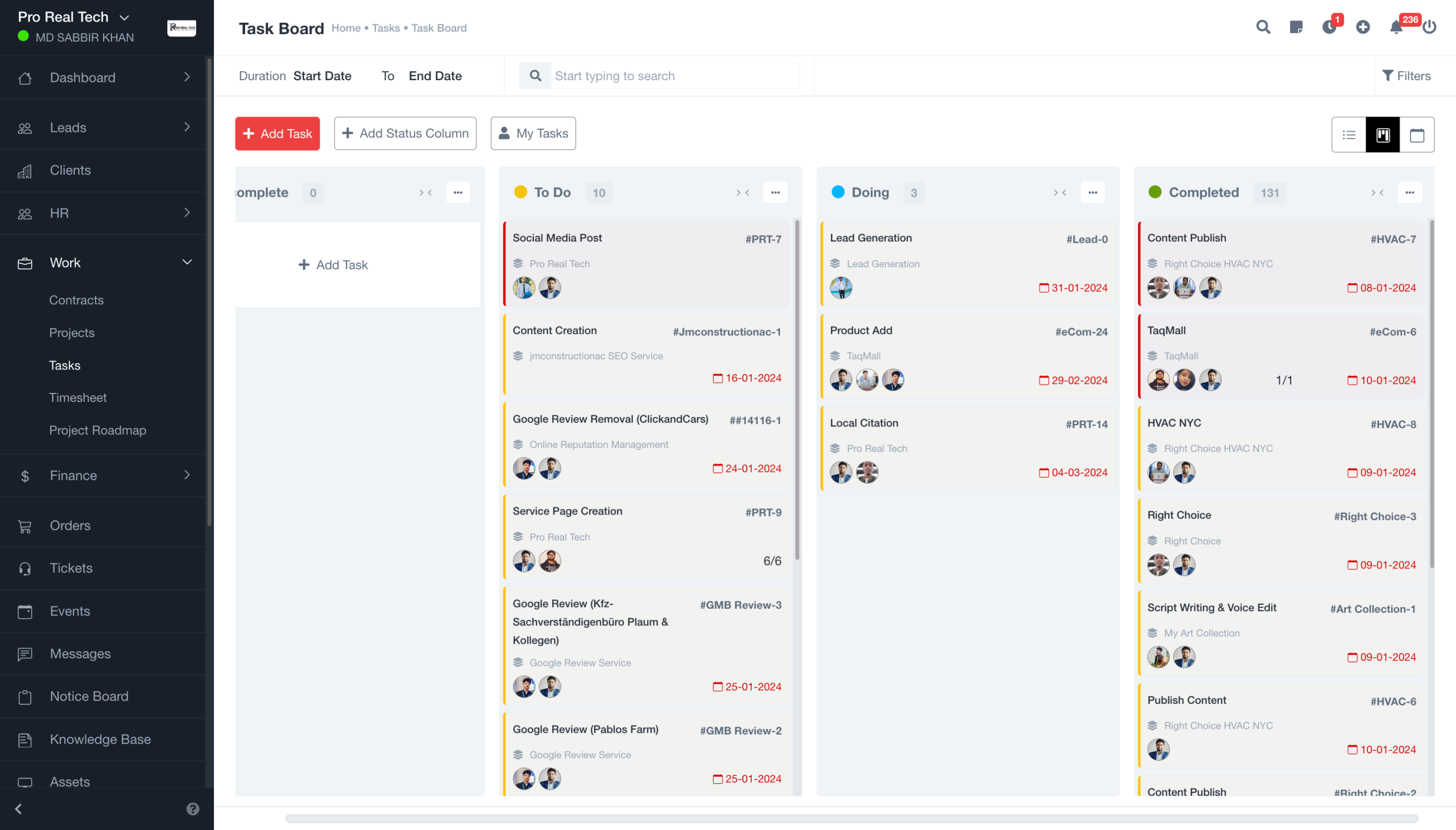
If neither ClickUp nor Workzone fully meets your organization’s needs, Corexta emerges as a compelling alternative by taking a fundamentally different approach to business management.
While ClickUp focuses primarily on work management and productivity, and Workzone specializes in structured project execution, Corexta combines project management with CRM, HR, finance, payroll, asset management, and recruitment in a single connected platform. Instead of requiring multiple subscriptions and integrations, Corexta is designed to help businesses operate from one centralized system.
For many growing agencies, service businesses, and operational teams, this unified approach addresses a common problem: managing work across disconnected tools.
One Platform Instead of Multiple Software Subscriptions
One of the biggest challenges businesses face is software fragmentation.
A typical company may use:
- A project management platform
- A CRM system
- Payroll software
- HR software
- Accounting tools
- Asset management software
- Recruitment platforms
Managing data across multiple systems often creates duplicate work, reporting inconsistencies, and operational inefficiencies.
Corexta addresses this by bringing seven core business functions into one platform:
- Project Management
- CRM & Client Management
- HR Management
- Payroll
- Finance Management
- Asset Management
- Recruitment
Because these modules are connected natively, information flows across departments without requiring third-party integrations or manual data transfers.
Project Management That Connects to Business Operations
Unlike traditional project management tools that operate independently, Corexta links projects directly with client records, financial data, timesheets, and team resources.
Teams can manage projects using:
- Kanban Boards
- Gantt Charts
- Task Lists
- Project Roadmaps
- Milestone Tracking
- Time Tracking
- Contract Management
This creates a more complete operational picture.
For example, project managers can not only track progress but also understand project profitability, resource utilization, and client billing status from the same system.
This level of visibility is particularly valuable for agencies, consulting firms, and service-based organizations.
Built-In CRM and Client Management
One area where both ClickUp and Workzone often require additional software is customer relationship management.
Corexta includes a built-in CRM and client management module that enables businesses to manage the entire client lifecycle within the same platform.
Key capabilities include:
- Client Profiles
- Communication Tracking
- Proposal Management
- Contract Storage
- Task Assignments
- Invoice Generation
- Client Activity History
Instead of switching between project management software and CRM tools, teams can manage both relationships and project execution from a single workspace.
For client-service organizations, this can significantly simplify operations.
HR and Payroll Integration
Most project management platforms stop at work management.
Corexta goes further by integrating HR and payroll into the operational workflow.
Organizations can manage:
- Employee Records
- Attendance Tracking
- Leave Requests
- Department Structures
- Shift Scheduling
- Payroll Processing
- Payslip Generation
Attendance and leave data can automatically feed into payroll calculations, reducing administrative work and minimizing manual errors.
This makes Corexta particularly attractive for businesses that want operational management and workforce management within the same ecosystem.
Financial Visibility Across the Business
Understanding profitability is critical for growing companies.
Corexta’s finance module connects directly with projects, clients, payroll, and expenses, giving leaders a more complete view of business performance.
Teams can manage:
- Invoicing
- Expense Tracking
- Profitability Reporting
- Accounts Receivable
- Cash Flow Monitoring
- Financial Dashboards
Rather than exporting information between separate systems, financial insights are available alongside project and operational data.
This integration helps decision-makers understand the true financial impact of projects, clients, and teams.
Better for Growing Agencies and Service Businesses
ClickUp is often a strong choice for flexible work management.
Workzone is well-suited for structured project execution.
Corexta differentiates itself by addressing the broader operational needs of growing businesses.
Its platform is particularly valuable for:
- Digital Agencies
- Marketing Agencies
- Consulting Firms
- Professional Service Organizations
- SaaS Companies
- Multi-Department Businesses
- Operations-Driven Teams
Rather than adding separate tools as the business grows, organizations can manage operations through one connected system.
Reduced Administrative Overhead
As companies scale, administrative work often grows faster than revenue.
Corexta helps reduce this burden through connected workflows between departments.
Examples include:
- Attendance automatically updating payroll
- Project milestones triggering invoices
- Recruiting workflows creating employee records
- Client information syncing with project activities
Because these processes occur within the same platform, businesses spend less time reconciling data and managing software integrations.
A More Unified Alternative
The biggest advantage Corexta offers is operational unity.
ClickUp excels at productivity and customization.
Workzone excels at project visibility and approvals.
Corexta focuses on connecting the entire business—from clients and projects to HR, payroll, and finance—through a single platform. For organizations looking to reduce software complexity while maintaining visibility across departments, this approach can provide significant long-term value.
Ready to Simplify Your Business Operations?
If you’re tired of switching between project management tools, CRM platforms, payroll systems, and finance software, Corexta offers a smarter way to manage everything in one place.
Start with a free trial, explore the platform firsthand, and see how a truly connected business management system can help your team work faster, collaborate better, and scale with confidence.
Final Verdict
Both ClickUp and Workzone are capable project management solutions, but they serve different audiences.
Choose ClickUp if your team values flexibility, advanced automation, AI-powered productivity, and extensive customization.
Choose Workzone if your organization prioritizes structured project execution, resource visibility, and formal approval workflows.
However, if you’re looking for a solution that goes beyond project management and helps run your entire business from one platform, Corexta is worth serious consideration. By combining project management, CRM, HR, payroll, finance, asset management, and recruitment into a unified system, it eliminates the need for multiple disconnected tools and creates a more streamlined operational experience.
Read More: Deep Work: How to Build Unbreakable Focus








