
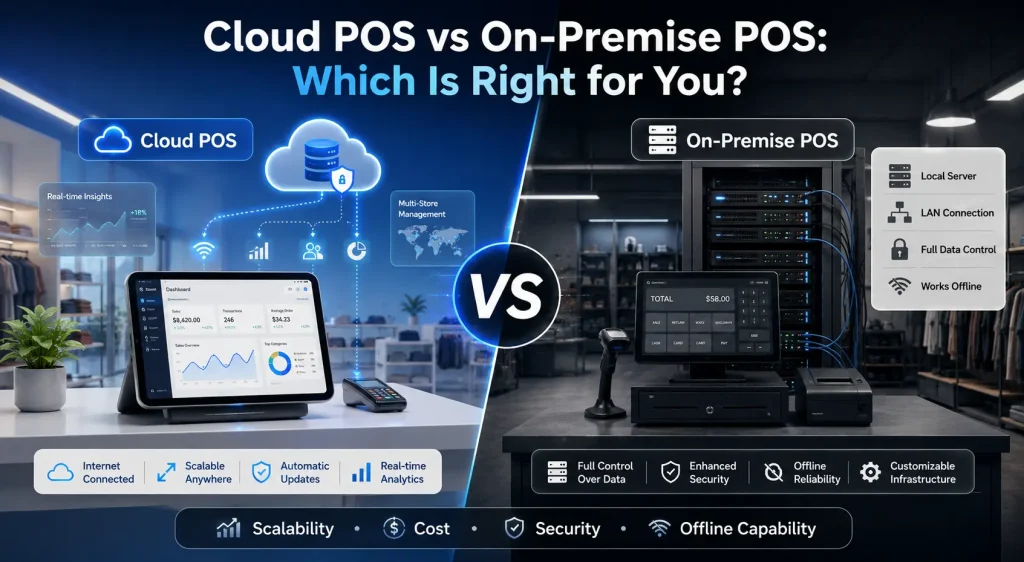
Picture this: it’s a Saturday afternoon — your busiest trading period of the week. In the debate of cloud POS vs on-premise POS, the difference becomes obvious in real-world pressure. The store is packed, checkout lines are building, and your internet goes down. If you’re running a cloud-only POS, every terminal freezes. Transactions stop. Staff revert to pen and paper while customers abandon their carts and walk out.
Now flip the scenario. You’re a fast-growing retail chain opening your 12th location. Your on-premise POS vendor sends an engineer to each new store to configure a dedicated server, configure the local network, install software, and test every terminal. That’s six weeks minimum — and $15,000 per location in server hardware alone — before your first sale.
Both scenarios are real. Both happen regularly. And both are the reason the cloud vs. on-premise POS decision is one of the most consequential technology choices a retail or restaurant business makes.
Here’s the honest upfront answer:
A cloud POS system stores your software and data on remote servers managed by the vendor, accessible via the internet from any device. An on-premise POS installs and runs entirely on hardware at your physical location, operating over a local network with no internet dependency. The right model isn’t the one with the longest feature list — it’s the one whose architecture fits your connectivity environment, transaction volume, compliance requirements, and long-term cost model.
The global cloud POS market reached $7.32 billion in 2026, growing at a 16.96% CAGR toward a projected $16.01 billion by 2031, according to Mordor Intelligence. Cloud adoption is accelerating. But that doesn’t automatically make it the right answer for every business. On-premise systems still dominate in regulated industries, high-security environments, and operations where internet reliability is a genuine concern.
This guide gives you everything you need to make the right call — with real numbers, real trade-offs, and no vendor bias.
What this guide covers:
- How cloud and on-premise POS actually work under the hood
- Full feature-by-feature comparison — including what most guides skip
- Total cost of ownership: honest 5-year numbers for both models
- Security and PCI DSS compliance: who is responsible for what
- Offline capability: the reality vs. the marketing
- Scalability for single locations, multi-location chains, franchises, and enterprises
- Data ownership: what your SaaS contract actually says
- Hybrid POS: the third option most businesses don’t know exists
- When custom POS development is the smarter long-term answer
- Industry-specific recommendations: retail, restaurant, franchise, enterprise
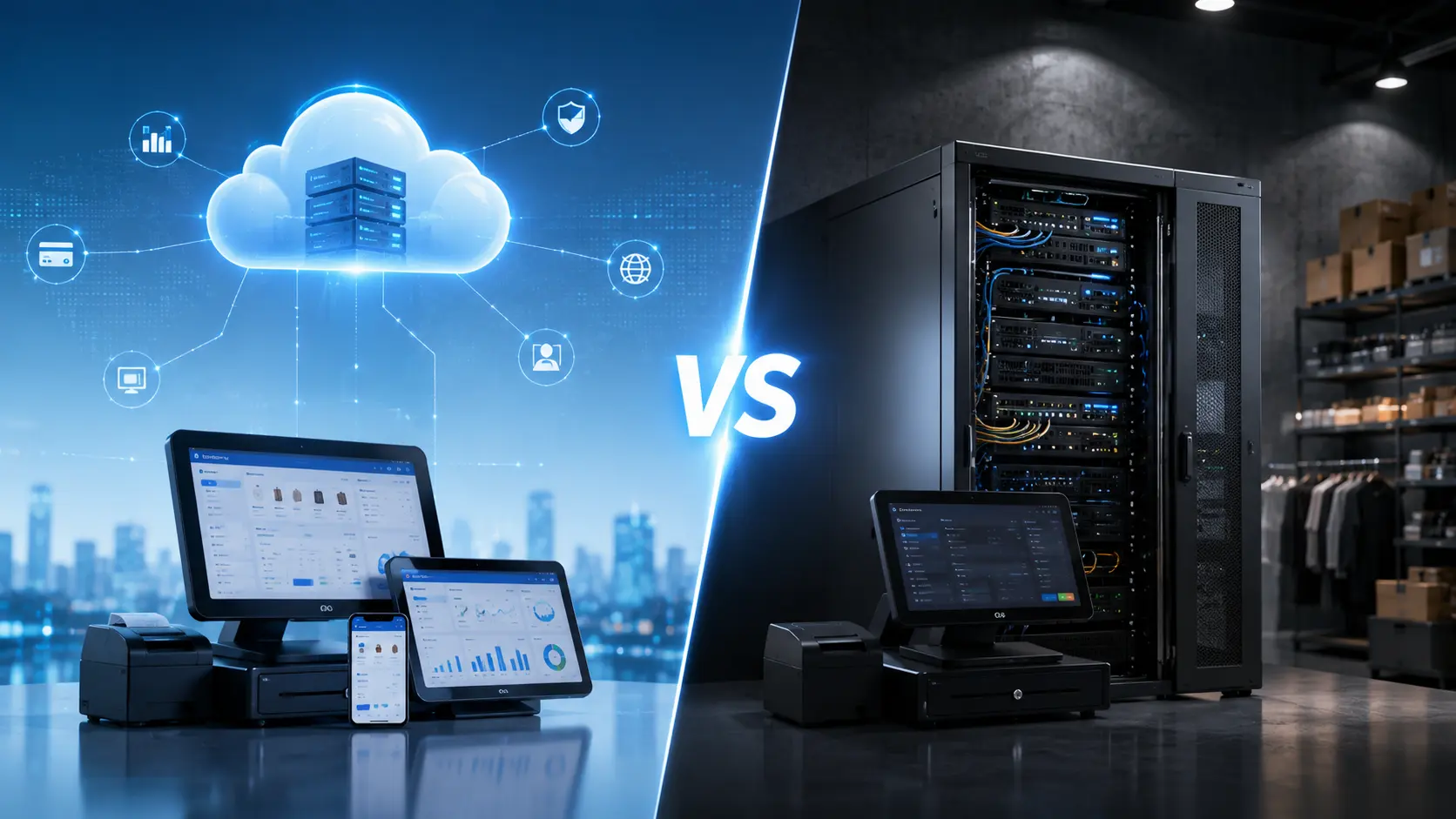
What Is a Cloud POS System — And How Does It Work?
A cloud POS (also called SaaS POS or web-based POS) is a point-of-sale system where the software runs on remote servers owned and managed by the vendor. You access it through a web browser or dedicated app on a tablet, smartphone, or desktop — from anywhere with an internet connection.
Every transaction, inventory update, and customer record is stored on the vendor’s cloud infrastructure (typically AWS, Microsoft Azure, or Google Cloud) rather than on hardware at your location.
The model is fundamentally SaaS (Software as a Service): you pay a monthly subscription fee, the vendor maintains the servers, pushes software updates automatically, and manages the underlying infrastructure.
How Cloud POS Works Under the Hood
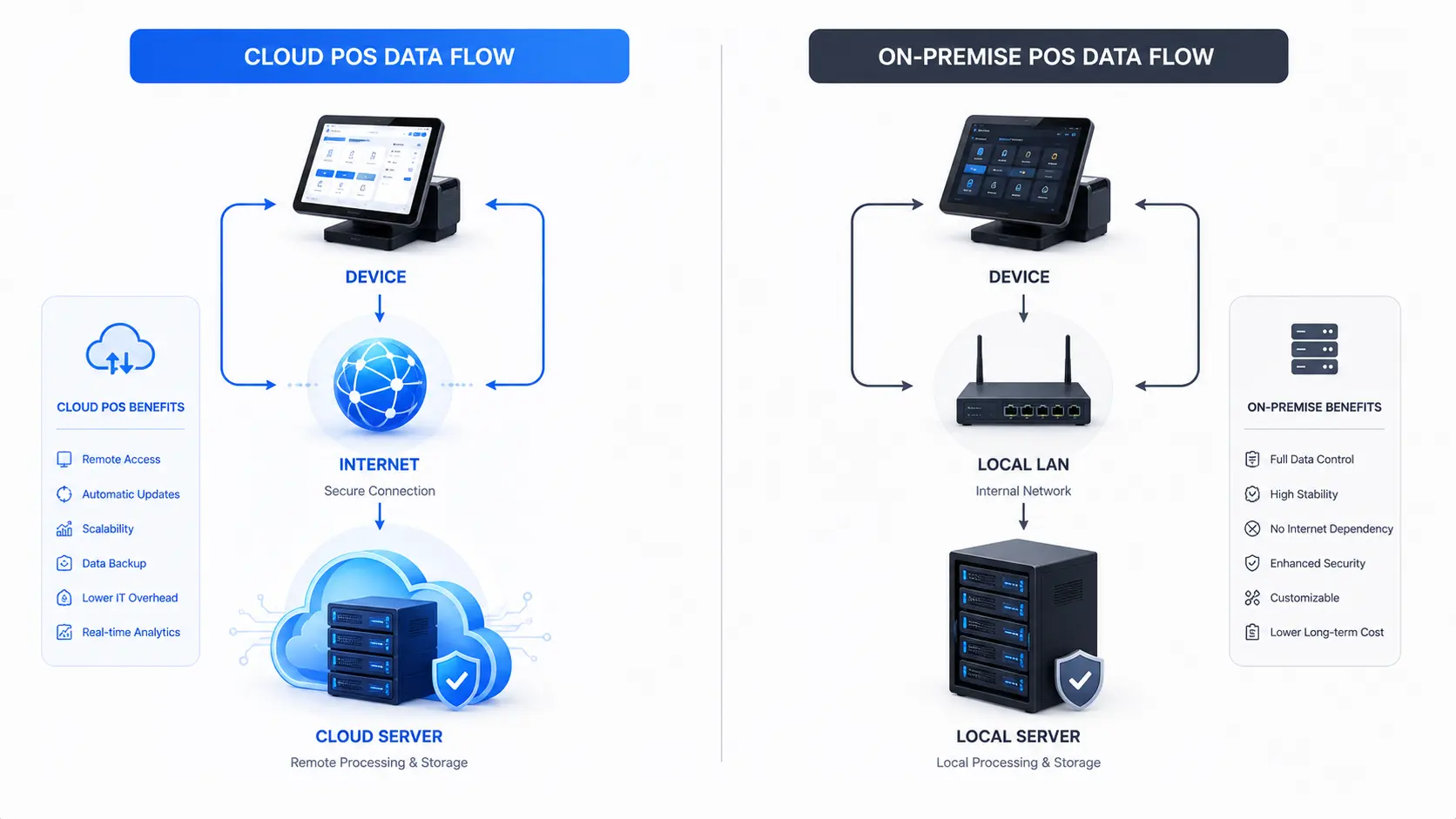
When a staff member processes a sale at a cloud POS terminal:
- The transaction request travels from your device to the vendor’s cloud server over an encrypted HTTPS connection
- The server processes the transaction, applies any business logic (discounts, tax rules, loyalty points), and authorizes payment through the connected payment processor
- Inventory is decremented in the cloud database in real time
- A receipt is generated and sent digitally or to a connected printer
- The sale appears in your reporting dashboard — accessible from your phone, your back office, or your home — within seconds
This entire round-trip typically completes in under 500 milliseconds on a reliable internet connection. The cloud architecture means multiple terminals at multiple locations all share the same live data — there’s no synchronization lag, no end-of-day data upload, and no location-specific database to manage.
Cloud POS: Key Characteristics
- Multi-tenant architecture: Your business shares cloud server infrastructure with other businesses on the same platform. Enterprise plans often offer dedicated instances.
- Automatic updates: Software patches, security updates, and new features deploy automatically — no manual patching, no version management.
- Any-device access: Runs on iPads, Android tablets, standard laptops, and dedicated POS terminals. No proprietary hardware required by most modern cloud systems.
- Remote management: Owners and managers can view live sales, run reports, and manage inventory from any location, on any device.
- Uptime SLA: Major cloud POS vendors guarantee 99.9%+ uptime — equating to less than 9 hours of potential downtime per year.
Examples: Square POS, Shopify POS, Toast, Lightspeed, Clover
What Is an On-Premise POS System — And How Does It Work?
An on-premise POS (sometimes called a local POS or traditional POS) installs its software and stores all data on servers or dedicated hardware physically located at your business. It operates over your local area network (LAN) — with no internet connection required for core transaction processing.
This is the architecture that powered retail and hospitality for decades before cloud computing became viable, and it remains the preferred choice for specific business types and operating environments in 2026.
How On-Premise POS Works Under the Hood
When a staff member processes a sale at an on-premise POS terminal:
- The terminal communicates with the local server over your internal LAN — no external network connection involved
- The server processes the transaction locally, applying business rules stored in the local database
- Payment authorization goes out through a payment gateway (this does require internet), while all other transaction data stays local
- Inventory updates instantly in the local database
- Reports are generated from local data and typically require a VPN or manual export for off-site access
The key technical distinction: only the payment authorization step touches the internet. Everything else — inventory lookups, customer profiles, pricing logic, reporting — runs entirely on your local infrastructure.
On-Premise POS: Key Characteristics
- Perpetual license model: Typically purchased with a one-time license fee rather than monthly subscriptions, though ongoing maintenance contracts apply.
- Manual updates: Security patches and software updates must be applied deliberately by your IT team or a vendor engineer. This creates a patching window — and a vulnerability window if updates are delayed.
- Hardware-dependent: Requires dedicated server infrastructure at each location — typically a rack-mount or mini-tower server running Windows Server or Linux.
- LAN-dependent: Full functionality requires a healthy local network. Internet outages have zero impact on transaction processing.
- Data sovereignty: Your data never leaves your premises unless you explicitly export it.
Examples: Oracle MICROS, Revel Systems (local mode), NCR Silver, Lightspeed (self-hosted), legacy systems from hospitality-specific vendors
Cloud POS vs On-Premise POS — The Complete Feature Comparison
Most comparison articles give you a short table covering five or six factors. The decision most businesses are making deserves more than that. Here is the comprehensive feature comparison across every dimension that actually affects your operations and bottom line.
| Factor | Cloud POS | On-Premise POS |
|---|---|---|
| Data storage location | Remote cloud servers (vendor-managed) | Local servers (your premises) |
| Internet dependency | Required for full function | Not required (LAN only) |
| Upfront cost | Low ($0–$500 setup + hardware) | High ($5,000–$50,000+ server + install) |
| Monthly recurring cost | $50–$500/terminal + transaction fees | Low ($100–$2,000 maintenance only) |
| Transaction fees | 2.4%–2.9% + per-transaction charge | None (choose any processor) |
| 5-Year TCO (mid-size) | $45,000–$120,000+ | $30,000–$100,000 |
| Software updates | Automatic (vendor-managed) | Manual (IT team or vendor visit) |
| Scalability | Instant (digital provisioning) | Hardware-dependent at each site |
| Remote management access | Full (any device, any location) | Limited (on-site or VPN only) |
| Data ownership | Vendor holds and hosts your data | You own and control everything |
| Customization level | Platform-limited (vendor roadmap) | Unlimited (with technical resource) |
| Offline capability | Partial (varies by vendor) | Full (LAN-independent) |
| PCI DSS responsibility | Shared (vendor handles infrastructure) | Full (your responsibility) |
| Security patching | Automatic (vendor) | Manual (IT team) |
| IT staff requirement | Low | High |
| Hardware requirements | Standard tablet/device | Dedicated server infrastructure |
| Multi-location management | Easy (unified dashboard) | Complex (replication required) |
| Vendor lock-in risk | High | Low |
| Disaster recovery | Vendor-managed (cloud redundancy) | Self-managed (local backup required) |
| Integration flexibility | API-dependent on vendor’s ecosystem | Full custom control |
| Implementation timeline | Days to 4 weeks | Weeks to 3+ months |
| Data export if you leave | Varies by contract | Always available |
| Performance under peak load | Dependent on internet bandwidth | LAN speed (faster, more consistent) |
| Compliance visibility | Vendor audit reports (shared trust model) | Direct access to your own CDE |
The True Cost Comparison — Cloud POS vs On-Premise POS
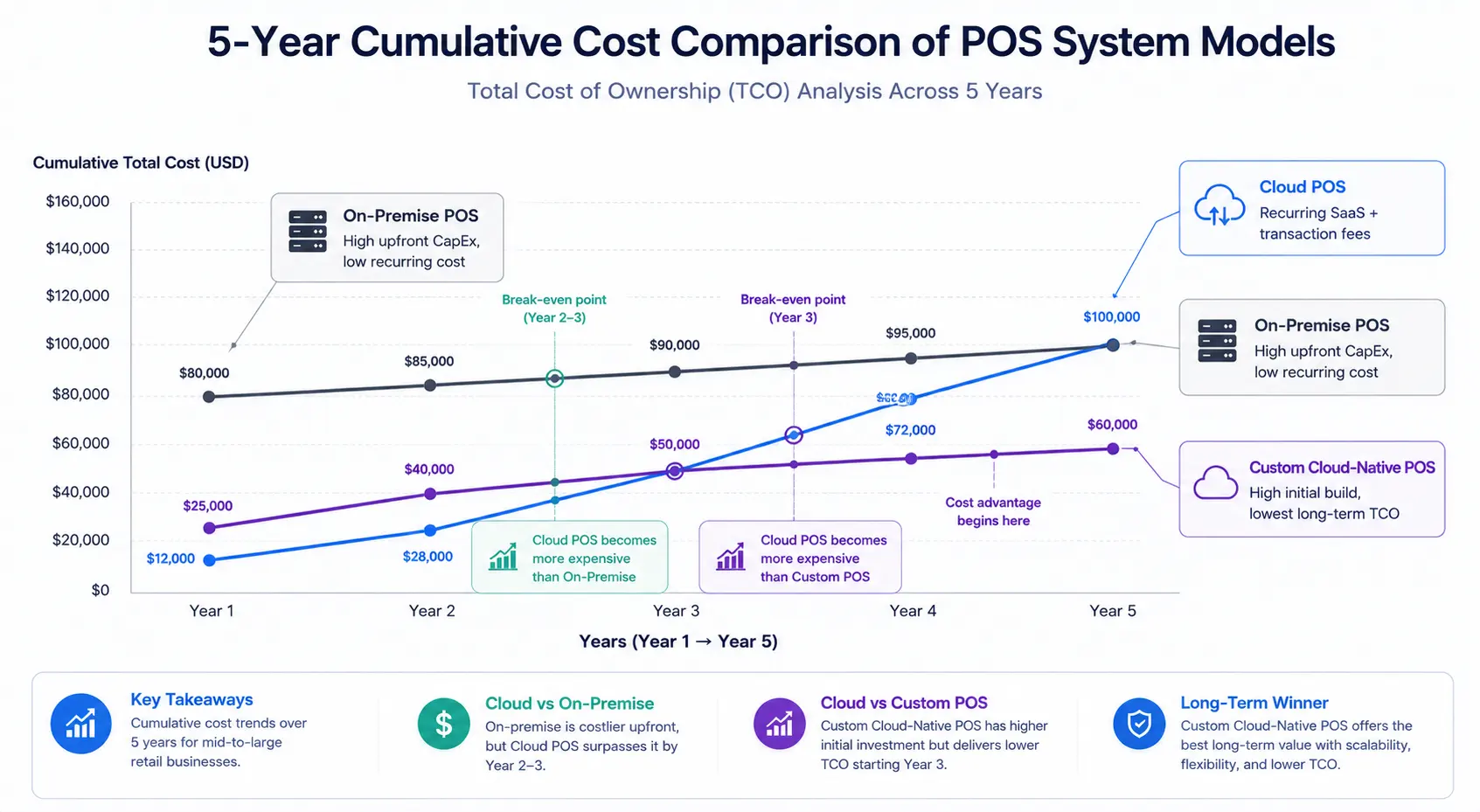
This section covers what no competing article addresses properly: what each model actually costs your business over time. The upfront vs. subscription comparison is only the surface. Total cost of ownership over three to five years tells a very different story depending on your transaction volume.
For a full breakdown of custom POS development pricing, see our detailed guide: How Much Does POS Software Development Cost in 2026?
Cloud POS Cost Breakdown (2026)
| Cost Component | Small Business (1 location) | Mid-Tier (3–10 locations) | Enterprise (50+ locations) |
|---|---|---|---|
| Monthly software fee | $0–$69/month | $69–$199/month | $199–$500+/month |
| Per-terminal cost | $0–$50/month | $50–$150/month | Custom pricing |
| Transaction fees (card) | 2.4%–2.9% + $0.10–$0.15 | 2.4%–2.9% + flat | Custom / negotiated |
| Hardware (per terminal) | $100–$500 | $300–$800 | $500–$1,500 |
| Setup / onboarding | $0–$500 | $500–$2,000 | $2,000–$15,000 |
| Annual cloud total (est.) | $1,200–$8,000/yr | $8,000–$50,000/yr | $50,000–$300,000+/yr |
The transaction fee trap most businesses underestimate:
On a standard cloud SaaS POS at 2.6% per transaction, a business processing $500,000/year in card sales pays $13,000/year in transaction fees — on top of software subscriptions. Scale that to $1,000,000/year: $26,000/year in fees. Over five years: $130,000 in transaction fees alone. Custom or on-premise POS with a direct payment processor eliminates this cost entirely, which is why the break-even math matters enormously for growing businesses.
On-Premise POS Cost Breakdown (2026)
| Cost Component | Small Business | Mid-Tier | Enterprise |
|---|---|---|---|
| Software license (perpetual) | $1,000–$5,000 | $5,000–$20,000 | $20,000–$100,000+ |
| Server hardware | $1,500–$5,000 | $5,000–$15,000 | $15,000–$50,000+ |
| Installation and configuration | $500–$2,000 | $2,000–$8,000 | $8,000–$30,000 |
| Annual maintenance / support | $500–$2,000/yr | $2,000–$8,000/yr | $8,000–$30,000/yr |
| IT management cost | $0 (DIY) | $12,000–$30,000/yr | $40,000–$120,000+/yr |
| Server hardware refresh (5-yr) | $1,500–$4,000 | $4,000–$15,000 | $15,000–$80,000 |
The on-premise cost that surprises most businesses:
IT management overhead. A cloud POS vendor handles infrastructure, patching, and server management. On-premise shifts all of that to you. For businesses without an in-house IT team, this means either a managed services provider ($1,500–$3,500/month for retail-grade IT support) or costly vendor call-outs for every significant issue.
5-Year Total Cost of Ownership (TCO) Comparison
This is the number that should drive your decision — not the monthly software fee.
| Business Profile | Cloud POS 5-Yr TCO | On-Premise 5-Yr TCO | Custom Cloud POS 5-Yr TCO | Break-Even Verdict |
|---|---|---|---|---|
| Single-location café ($250K/yr card volume) | $12,000–$28,000 | $14,000–$28,000 | Not justified at this scale | Comparable — cloud wins on simplicity |
| Single-location retail ($500K/yr card volume) | $30,000–$65,000 | $15,000–$35,000 | Not usually justified | On-premise often cheaper at 5 years |
| Restaurant chain, 5 locations ($2M/yr volume) | $90,000–$200,000 | $60,000–$120,000 | $80,000–$160,000 | On-premise or custom wins by Year 3 |
| Retail chain, 10 locations ($5M/yr volume) | $200,000–$500,000 | $100,000–$250,000 | $120,000–$280,000 | Custom cloud or on-premise wins |
| Enterprise, 50+ locations ($20M+/yr volume) | $1M–$3M+ | $400,000–$900,000 | $300,000–$700,000 | Custom cloud-native almost always wins |
The CapEx vs. OpEx framing also matters at the board level. Cloud POS = operating expenditure (predictable monthly cost, no large upfront). On-premise = capital expenditure (large upfront, lower ongoing). Your CFO and accountant evaluate these differently — CapEx is depreciated over time, while OpEx is expensed immediately. For some businesses, the on-premise CapEx model is actually more favorable from a tax perspective.
Calculating your real 5-year TCO requires your actual transaction volume, number of locations, and current system costs. Corexta’s POS development team can model this against a custom-built solution at no cost — so you know the real comparison before committing.
Security — Which POS Model Is Actually More Secure in 2026?
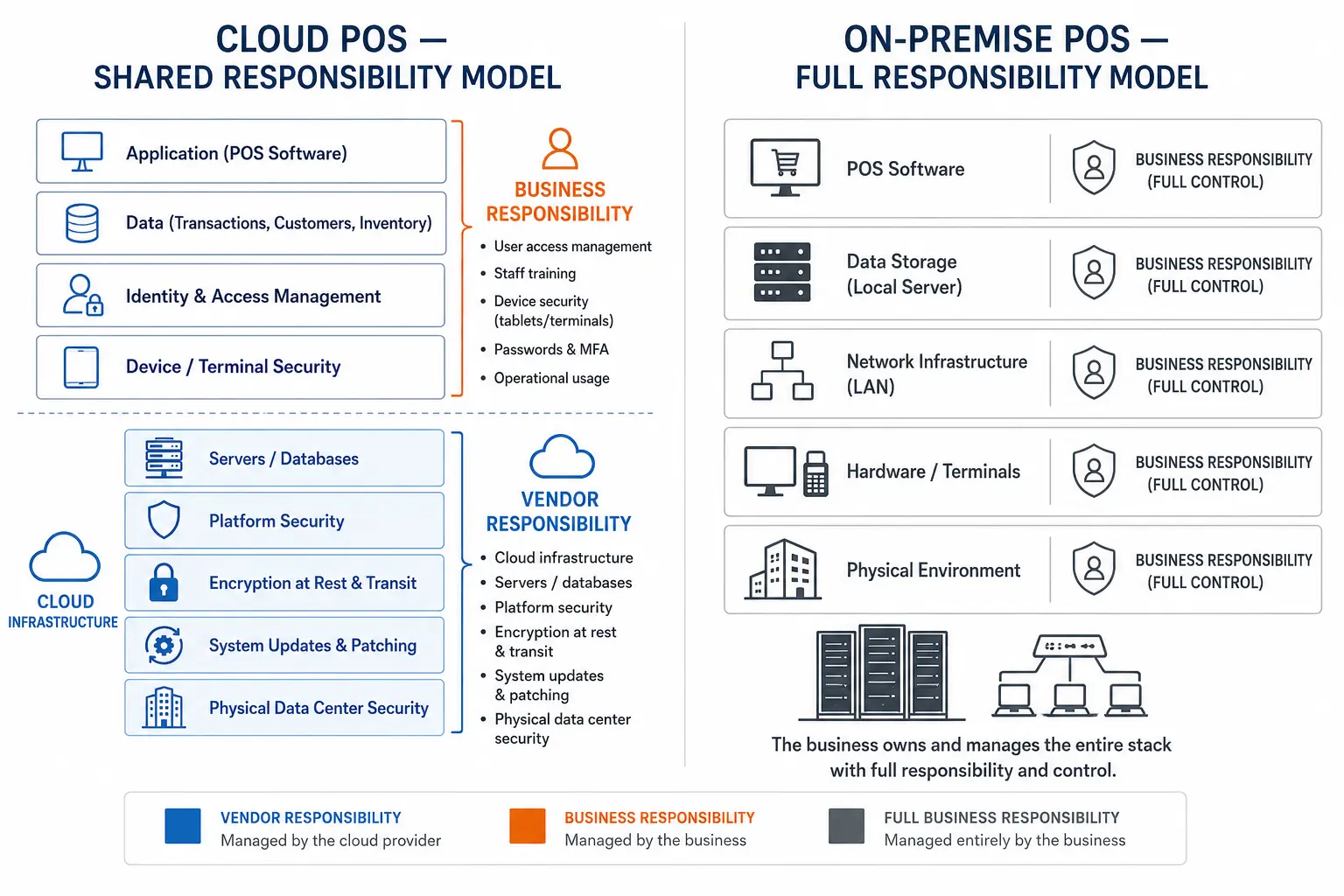
Security is where most cloud vs. on-premise comparisons go shallowest. Both models are secure when implemented correctly. Both are vulnerable when they’re not. The real question isn’t which model is inherently safer — it’s which model your team is best equipped to operate securely.
Cloud POS Security: What the Vendor Handles
Major cloud POS vendors invest in enterprise-grade security infrastructure that most individual retailers couldn’t match independently:
- Dedicated security operations centers running 24/7 threat monitoring
- SOC 2 Type II and ISO 27001 certification — independently audited security programs
- Automatic security patching with zero deployment window for businesses
- Encryption in transit (TLS 1.3) and encryption at rest for all stored data
- Multi-factor authentication (MFA) enforcement at the application level
- Physical data center security: biometric access, CCTV surveillance, redundant power, geographic replication
According to AMS Retail’s 2026 cloud POS analysis, most major cloud POS providers maintain PCI DSS Level 1 compliance, SOC 2 Type 2 certification, and ISO 27001 standards — security certifications that would cost a mid-size retailer $500,000–$2,000,000 to build and maintain independently.
Cloud POS security vulnerabilities to know:
The security model shifts — but it doesn’t disappear. The primary attack vectors for cloud POS are:
- Credential compromise: Phishing attacks targeting staff login credentials are the most common cloud POS breach vector. Once an attacker has valid credentials, they have access to your entire cloud dashboard — including customer data, transaction history, and potentially connected payment accounts.
- Vendor-side breach: A breach at the cloud POS provider affects every merchant on that platform simultaneously. You have no control over the vendor’s internal security posture, and a vendor-side incident can expose thousands of businesses at once.
- Endpoint device security: Cloud POS runs on tablets and general-purpose devices. If those devices are stolen, compromised, or running outdated operating systems, the POS system’s cloud security doesn’t protect you from device-level exposure.
On-Premise POS Security: The Full Responsibility Model
With on-premise POS, your business owns the entire security stack — from the server room to the terminal screen.
On-premise security advantages:
- Data never leaves your premises (except for payment authorization). Air-gapped configurations prevent remote access entirely.
- Contained breach radius: A breach at your business affects only your data — not thousands of other businesses sharing your vendor’s infrastructure.
- POSZEO’s 2026 retail POS analysis reports that on-premise solutions reduce third-party data breach risks by 60% compared to cloud-hosted systems, citing PCI Security Standards Council data. The same research found that 72% of large-format enterprise retailers use on-premise systems specifically to maintain direct oversight of their payment processing environments.
- No vendor dependency: Your security posture doesn’t change based on your vendor’s decisions, staffing, or incidents.
On-premise security vulnerabilities to know:
- Manual patching creates vulnerability windows: A security patch released today that isn’t applied for two weeks leaves a known vulnerability open for two weeks. This is how most on-premise POS breaches occur — not through sophisticated attacks, but through delayed maintenance.
- Physical security is your responsibility: Server room access controls, hardware disposal procedures, and physical theft protection are all internal responsibilities.
- In-house security expertise gap: Most retail and restaurant operations don’t employ dedicated cybersecurity staff. The average small business IT generalist is not equipped to design and maintain a defense-in-depth security architecture.
PCI DSS Compliance — Cloud vs On-Premise: Who Is Responsible for What
This is the most important security sub-topic — and the one no competitor addresses adequately.
The Payment Card Industry Data Security Standard (PCI DSS v4.0.1, now fully mandatory as of 2025) applies to any business that stores, processes, or transmits cardholder data. In 2026, compliance requirements are significantly stricter — particularly for web-facing payment environments.
The compliance scope differs dramatically between cloud and on-premise deployments:
Cloud POS and PCI DSS: Your vendor handles the infrastructure layer of compliance — server security, network segmentation, encryption, physical data center controls. This dramatically reduces your compliance scope. Your responsibilities are narrowed to: access control management (strong passwords, MFA), physical terminal security, staff training, and ensuring your connected devices meet endpoint security standards.
The practical financial impact: a small business on a cloud POS platform may qualify for PCI DSS SAQ A or SAQ A-EP (the simplest self-assessment questionnaire levels), reducing compliance cost to $1,500–$5,000 annually rather than the $10,000–$50,000+ a full assessment requires.
On-Premise POS and PCI DSS: You own the entire Cardholder Data Environment (CDE). That means every element of the PCI DSS framework is your responsibility — network security, server hardening, vulnerability scanning, penetration testing, quarterly reviews, and annual assessment documentation.
According to Redsec Labs’ 2026 PCI DSS Cost Analysis, PCI DSS compliance costs vary 5–10x based on architecture and scope, and scope creep causes 30–50% cost inflation on its own. For on-premise operators, first-time PCI audits cost 2–4x more than renewals — plan for $15,000–$60,000 for a comprehensive initial assessment at mid-market scale.
The cost of non-compliance: Fortinet reports non-compliance penalties of $5,000–$100,000 per month while out of compliance — plus potential card brand fines and mandatory forensic investigations following a breach.
Security Comparison Table:
| Security Factor | Cloud POS | On-Premise POS |
|---|---|---|
| Security patching | Automatic (vendor) | Manual (IT team) |
| PCI DSS scope | Reduced (shared responsibility) | Full (business responsibility) |
| Physical data security | Low (data off-site) | High (data on premises) |
| Breach blast radius | Wide (shared infrastructure) | Contained to your system |
| Enterprise-grade security tools | Included (vendor provides) | Self-funded or outsourced |
| Compliance cost (annual, mid-tier) | $1,500–$5,000 | $10,000–$60,000 |
| Primary attack vector | Credential compromise | Delayed patching / physical |
| Security team requirement | Low (vendor-managed infra) | High (in-house or MSP) |
| Vendor security audit visibility | Limited (reports only) | Full access to your own environment |
The bottom line on security: Cloud POS offers better security outcomes for businesses without dedicated IT/security staff — the vendor’s investment in security infrastructure is simply out of reach for most SMBs. On-premise offers better security control for enterprises with the IT resources to operate it correctly, regulated industries with specific data residency requirements, and businesses for whom vendor-side breach exposure is an unacceptable risk.
Offline Capability and Business Continuity — The Reality vs. the Marketing
Internet connectivity is the cloud POS Achilles heel that every vendor downplays. Here’s what actually happens when the connection drops.
Cloud POS Offline Mode: What Vendors Say vs. What Actually Happens
Most cloud POS vendors now advertise offline capability. The marketing makes it sound seamless. The reality is more nuanced.
What offline mode typically supports:
- Basic transaction processing (card-present sales, with delayed authorization)
- Receipt printing to locally-connected printers
- Cash transactions
What offline mode typically does NOT support:
- Real-time inventory lookup (stale local cache only)
- Customer profile and loyalty point access
- Gift card processing (requires server validation)
- Split payments across multiple methods
- Ecommerce order visibility
- Live reporting and dashboards
The sync conflict risk: When your cloud POS has been operating offline and internet connectivity restores, the system must reconcile the offline transactions with the central server. If another terminal at the same or different location sold the same product during the outage, you have an inventory conflict — and depending on the vendor’s conflict resolution logic, you may have oversold.
Shopify’s 2026 edge computing analysis confirms the core risk: “A laggy connection can slow self-checkout kiosks. Edge computing reduces these vulnerabilities by running critical workloads locally.” Even Shopify — one of the world’s largest cloud POS vendors — acknowledges that cloud-only architectures can become single points of failure.
Key question to ask any cloud POS vendor before signing: “Give me your specific documentation on offline mode capabilities. Which features are available, which are not, and what is your conflict resolution protocol when connectivity restores?”
On-Premise POS and Business Continuity
On-premise POS operates completely independently of internet connectivity. A cut fiber line, ISP outage, or regional network failure has zero impact on transaction processing, inventory management, or customer lookup — everything runs over your local network.
The business continuity risk for on-premise is different in nature: hardware failure. A failed server at 2 PM on a Friday during peak service is a potentially business-crippling event if you haven’t invested in redundancy.
Properly designed on-premise business continuity requires:
- Redundant server configuration (RAID storage, backup server on hot standby)
- Local backup systems (daily encrypted backups to external media or private cloud storage)
- Documented failover procedure your staff can execute without IT support
- Hardware replacement SLA with your vendor — typically 4-hour to next-business-day response
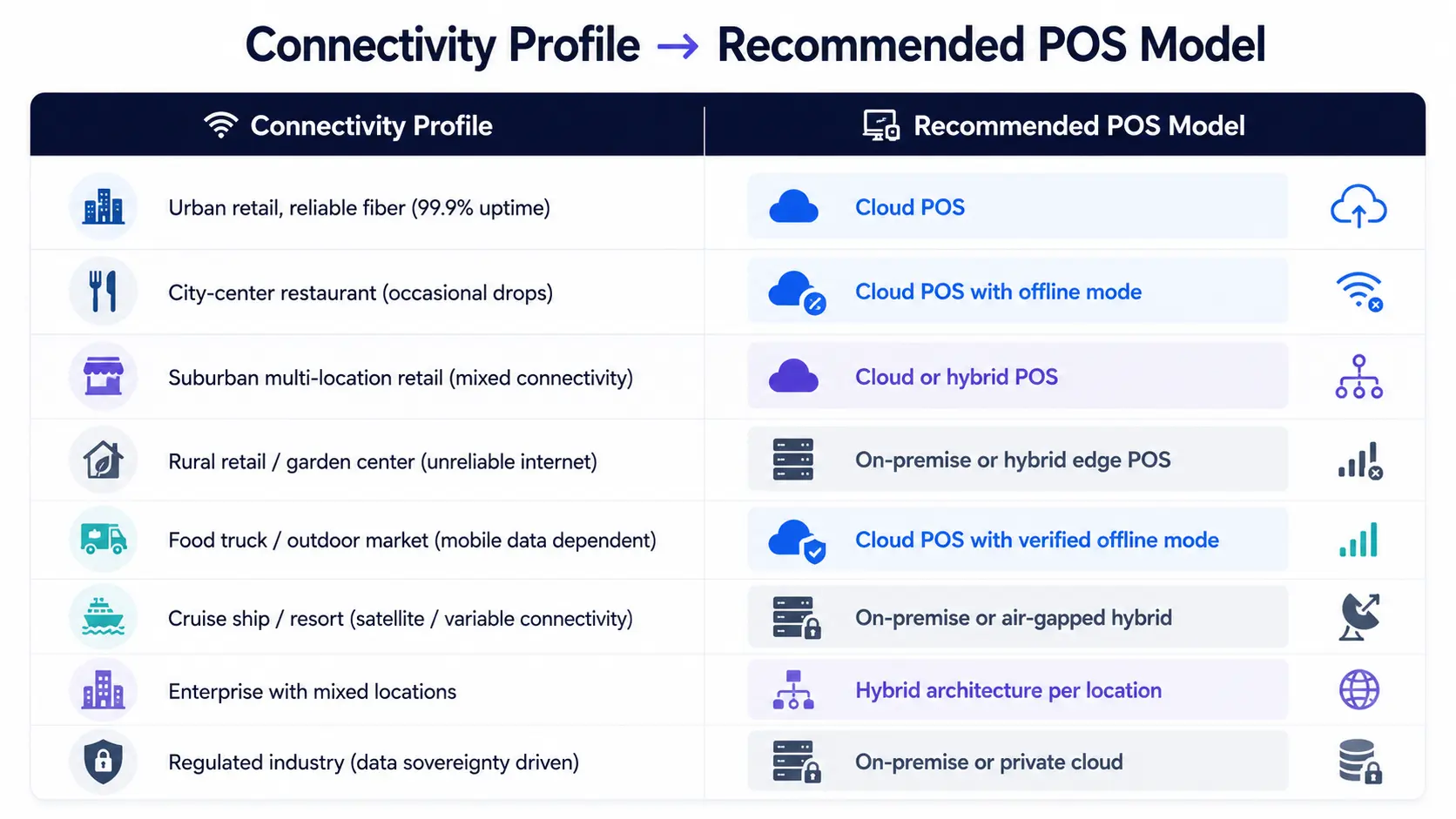
Connectivity Decision Matrix
| Business Environment | Typical Connectivity Profile | Recommended POS Model |
|---|---|---|
| Urban retail, reliable fiber | 99.9%+ uptime | Cloud POS — full benefit, minimal risk |
| City-center restaurant | Generally reliable, occasional drops | Cloud POS with offline mode documented and tested |
| Suburban multi-location retail | Mixed quality across locations | Cloud with edge backup, or hybrid |
| Rural retail / garden center | Unreliable internet | On-premise or hybrid edge architecture |
| Food truck / outdoor market | Mobile data dependent | Cloud POS with verified offline mode |
| Cruise ship / resort | Highly variable, satellite-dependent | On-premise or air-gapped hybrid |
| Enterprise with mixed locations | Varies by store | Hybrid architecture assessed per location |
| Regulated industry (pharmacy, etc.) | Irrelevant — data sovereignty drives choice | On-premise or private cloud |
Scalability — Growing from One Location to Many
Scalability is where cloud POS has its most decisive advantage — and where on-premise shows its most significant operational friction. This section matters most for businesses planning growth within the next 24 months.
Scaling with Cloud POS
Adding a new location to a cloud POS ecosystem is a primarily digital process:
- Purchase additional terminal hardware (standard tablet or dedicated device)
- Create a new location in your cloud dashboard
- Configure location-specific settings (tax rates, staff, inventory allocation)
- Log in — the terminal is live
Timeline: 1–3 days for a simple new location on an existing cloud POS.
A compelling real-world example: AMS Retail reports that retailer EVEREVE (a Shopify POS deployment) brought 103 stores live within six weeks — an average of approximately 2–3 store activations per business day. This rollout speed is architecturally impossible with on-premise deployment.
For multi-location omnichannel operations, cloud POS also integrates naturally with omnichannel retail and ecommerce platforms, enabling real-time inventory synchronization across physical and digital channels from day one.
Cloud POS scaling costs grow linearly and predictably: each new terminal adds a per-terminal monthly fee. There’s no infrastructure investment, no installation team, no network configuration.
Scaling with On-Premise POS
Adding a new location to an on-premise POS deployment is a physical infrastructure project:
- Procure server hardware ($1,500–$15,000 depending on spec)
- Ship and install hardware at the new location
- Configure local network infrastructure (routers, switches, cabling)
- Install and configure POS software
- Test all terminals, payment devices, and peripherals
- Set up data replication to central reporting system (if applicable)
- Train staff
Timeline: 2–8 weeks per location, depending on IT resource availability and vendor scheduling.
On-premise scaling costs grow in CapEx spikes: each new location requires a hardware investment before the first transaction. For a 10-location chain, that’s 10 separate hardware deployments — potentially $50,000–$150,000 in server infrastructure alone before accounting for ongoing maintenance.
Centralized management across multiple on-premise locations is possible but architecturally deliberate: it requires WAN-based data replication, a central reporting server, and consistent IT management across every site. Without this infrastructure, each location is effectively operating an independent system.
Scalability also extends to connected systems. Growing businesses need their POS to integrate with inventory management software across locations, and order management and fulfillment platforms as they add ecommerce and multi-channel fulfillment. Cloud POS connects to these via APIs. On-premise requires custom integration work at each connection point.
| Scale Scenario | Cloud POS Timeline & Cost | On-Premise Timeline & Cost |
|---|---|---|
| Add 1 new location | 1–3 days; $300–$800 hardware | 2–8 weeks; $7,000–$25,000 total |
| Scale to 5 locations | 1–2 weeks total; predictable monthly | 3–6 months; $35,000–$125,000 CapEx |
| Scale to 20 locations | 3–5 weeks; proportional monthly | 6–12 months; $140,000–$500,000 CapEx |
| Central reporting across all | Included in dashboard | Custom architecture required ($10,000–$50,000) |
| International expansion | Straightforward (geography-agnostic) | Complex (local compliance + infrastructure per country) |
Data Ownership — What Your Cloud POS Contract Actually Says
Data ownership is an increasingly important boardroom concern — particularly for businesses operating under GDPR, CCPA, or sector-specific data governance requirements. Most businesses sign cloud POS agreements without reading the data clauses carefully. Here’s what to look for.
Cloud POS and Your Data: The Five Questions You Must Ask
1. Who legally owns the data stored on the vendor’s servers? Most SaaS POS agreements state that the business retains ownership of its data, but the vendor is granted a broad license to host, process, and in some cases use anonymized transaction data for benchmarking, product development, or market intelligence. Read Section 8 (or equivalent) of any SaaS agreement carefully.
2. What happens to your data if you cancel? Standard clauses give businesses 30–90 days to export data after cancellation. Some vendors purge data within 30 days of account closure. If you fail to export on time, your complete transaction history and customer records may be permanently deleted.
3. Where is your data physically stored? For EU-based businesses, GDPR requires that personal data of EU citizens be stored in GDPR-compliant jurisdictions. For US government contractors and healthcare-adjacent businesses, data residency requirements may preclude data being stored in certain countries. Most US cloud POS vendors store data in US-based AWS or Azure data centers by default — verify this if your business has international customers.
4. Can the vendor use your transaction data? Some SaaS POS agreements grant the vendor rights to use anonymized or aggregated transaction data for market research, competitive benchmarking, or product improvement. If your transaction data represents proprietary business intelligence (pricing strategy, customer mix, purchase patterns), this is a material concern.
5. What happens to your data if the vendor is acquired or goes bankrupt? In a vendor acquisition, your data and contractual rights transfer to the acquiring entity — whose terms of service may be different. Vendor bankruptcy can interrupt service and data access with very little notice.
On-Premise POS and Data Control
With on-premise POS, these questions don’t arise. Your data lives on servers you own, in facilities you control. You decide how long it’s retained, who can access it, and what happens to it when you upgrade or replace the system.
This level of control is why on-premise remains the mandated architecture for:
- Pharmacies and healthcare-adjacent retail: HIPAA-adjacent data governance requirements
- Government contractors: Defense and federal procurement regulations often require on-premise or FedRAMP-authorized systems
- Regulated financial services: Banking and financial institution POS environments have specific data residency and audit trail requirements
- European retailers with cross-border operations: GDPR data residency enforcement is increasingly rigorous in 2026
- Businesses with proprietary transaction intelligence: Competitors should not be able to derive insights from your aggregated transaction data through a shared SaaS platform
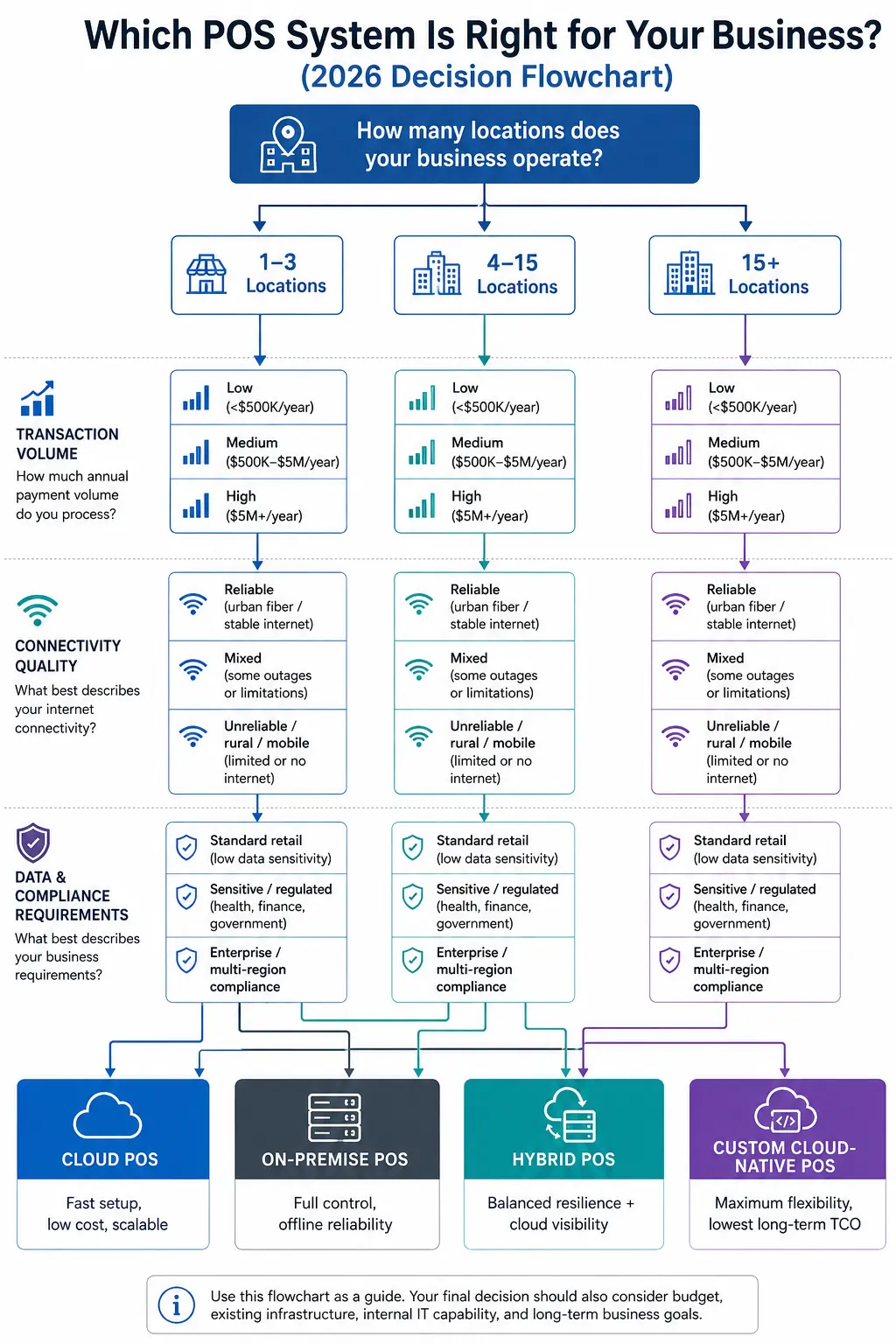
Which POS Model Is Best for Your Business? Industry-Specific Guidance
The right deployment model depends heavily on your industry vertical, transaction volume, and operational complexity. Here’s an honest recommendation for each business type.
Small Businesses (1–3 Locations)
Recommendation: Cloud POS for most scenarios.
Low upfront investment, zero IT overhead, fast deployment, and access to enterprise-grade security infrastructure the business couldn’t fund independently — cloud POS wins for small operations with standard workflows.
The key watch point: transaction fees. At $250,000/year in card volume, you’re paying approximately $6,500/year in transaction fees on a standard cloud POS. That’s $32,500 over five years — added to software subscriptions. For high-volume small businesses (cafés, quick-service restaurants), running a five-year TCO comparison before committing is worth 30 minutes of math.
When to choose on-premise instead:
- Internet connectivity is genuinely unreliable at your location
- You sell regulated products (licensed products, pharmaceuticals) with specific data handling requirements
- Your transaction volume is high enough that fee savings justify hardware investment within three years
Restaurants (Independent and Multi-Location)
Recommendation: Cloud POS for independent restaurants; hybrid or custom for multi-location chains.
Cloud POS excels at the capabilities restaurants need most: table management, kitchen display integration, split billing, online ordering integration, mobile ordering, and contactless payments. Toast, Square for Restaurants, and Lightspeed Restaurant are all cloud-native and built specifically for food service workflows.
For multi-location restaurant groups — particularly those processing $2M+ per year across all locations — the transaction fee math becomes decisive. At 2.6% on $2M annual card volume: $52,000/year in fees. A custom-built restaurant POS with direct payment processing, built by a team like Corexta’s custom POS development team, can eliminate this cost entirely within 3–4 years of operation.
Order management software that integrates with both in-house POS and delivery platforms becomes critical for restaurant groups managing dine-in, takeout, delivery, and catering channels simultaneously.
Multi-Location Retail Chains (5–50 Locations)
Recommendation: Cloud POS for 5–15 locations with standard requirements; custom cloud-native POS for 15+ locations or complex needs.
At this scale, cloud POS’s scalability advantage is compelling — new locations deploy in days, not months. Centralized inventory management, cross-location reporting, and real-time stock visibility across every store are all standard cloud POS capabilities.
The inflection point comes at approximately 15–20 locations, or when transaction volume exceeds $3–5M/year. At that scale, transaction fees ($78,000–$130,000/year), vendor limitations, and the inability to build proprietary features typically justify the investment in retail and ecommerce software development with a custom POS at the center.
Franchise Operations
Recommendation: Custom cloud-native POS — almost universally.
Franchise POS requirements are fundamentally incompatible with standard off-the-shelf platforms:
- Centralized control of pricing, promotions, and menu/product catalog at the franchisor level
- Franchisee-level operational independence with clear permission boundaries
- Royalty calculation and automated reporting to franchisors
- Location-specific tax and compliance configurations
- Custom KPI dashboards per franchisee vs. consolidated network view
No standard cloud POS platform supports all of these simultaneously. Franchise networks that try to force off-the-shelf systems into their requirements end up with complex workarounds that break with every platform update. Custom-built POS with cloud architecture is the right foundation for any franchise network that takes its technology seriously.
Enterprise Retailers (50+ Locations, $10M+ Annual Card Volume)
Recommendation: Custom cloud-native POS or hybrid architecture — with deep ERP and WMS integration.
At enterprise scale, every SaaS POS limitation compounds:
- Transaction fees at $10M/year card volume (2.6%): $260,000/year. Over five years: $1.3 million in fees.
- ERP integration (SAP, Oracle, NetSuite) typically requires custom development beyond what any SaaS POS API supports natively
- Custom analytics, reporting, and BI requirements exceed every platform’s out-of-the-box capability
- Data governance at enterprise scale makes vendor-hosted data increasingly problematic
Enterprise retailers building for long-term competitive advantage invest in custom ecommerce software development with POS at the center — owning the data architecture, eliminating transaction fees, and building capabilities their competitors can’t purchase.
Decision Summary Table
| Business Type | Recommended Model | Primary Reason |
|---|---|---|
| Single-location small retail | Cloud POS (SaaS) | Low cost, fast launch, zero IT overhead |
| Independent café / restaurant | Cloud POS with offline mode verified | Speed, online ordering, simplicity |
| High-volume restaurant (chain) | Hybrid or custom cloud | Transaction fee savings, customization |
| Growing retail (5–15 locations) | Cloud POS or custom cloud-native | Scalability + centralized management |
| Franchise network | Custom cloud-native POS | Centralized control + franchisee independence |
| Enterprise retailer (50+ locations) | Custom cloud-native or hybrid | TCO, compliance, no transaction fees |
| Regulated industry | On-premise or private cloud | Data sovereignty + compliance |
| Connectivity-constrained location | On-premise or hybrid edge | Offline reliability is non-negotiable |
The Third Option — Hybrid POS Architecture
Most cloud vs. on-premise comparisons present a binary choice. In 2026, the most sophisticated retail and restaurant deployments are choosing neither — or rather, both.
Hybrid POS architecture processes transactions locally (on-premise logic) while syncing data to the cloud for remote management, multi-location analytics, and centralized reporting. It delivers the offline reliability of on-premise with the visibility and management capabilities of cloud.
How Hybrid POS Works
The architecture separates transaction processing from data management:
- Local processing layer: An edge computing node (a small-form-factor server or embedded computing device) at each location handles all transaction processing, inventory lookups, and customer interactions locally. No internet required for any operational function.
- Cloud synchronization layer: Transaction data, inventory changes, and customer records sync to a central cloud platform when connectivity is available. Remote dashboards, cross-location analytics, and management tools run on the cloud layer.
- Conflict resolution protocol: The local system is the authority during connectivity gaps. When sync resumes, the cloud layer reconciles local transaction data with the central record — following pre-defined conflict resolution rules.
Shopify’s 2026 hybrid IT analysis describes exactly this pattern for enterprise retail: “Deploy edge computing at stores for local operations. Synchronize to central cloud when connectivity allows. Design for eventual consistency and conflict resolution.” The same source confirms: “For most retail organizations, the hybrid approach is a strong balance of resilience and manageability.”
Research from SUSE Communities found that 61% of infrastructure and architecture leaders at large retail organizations cite security, cybersecurity, and privacy as top challenges in edge deployments — confirming that hybrid/edge is no longer theoretical. It’s operational, at scale, and encountering real enterprise-grade challenges.
When Hybrid POS Is the Right Answer
- Multi-location retailers with mixed connectivity environments — some stores on reliable fiber, others on unreliable rural broadband or cellular backup
- Businesses that need both full offline reliability and cloud-based remote management and analytics
- Franchise operations requiring centralized oversight (the cloud layer) with local operational independence (the edge layer)
- Enterprise retailers transitioning from on-premise who want the migration benefits of cloud without accepting the connectivity dependency risk
- Businesses with high transaction volumes where the latency of cloud round-trips measurably impacts checkout speed
Hybrid POS Trade-offs
Hybrid architecture is the most technically complex of the three options. It requires experienced engineering to design the edge-cloud sync protocol, conflict resolution logic, and device management infrastructure. Off-the-shelf hybrid solutions exist but rarely cover the full scope of enterprise requirements. Custom-built hybrid POS, designed around your specific location infrastructure and business rules, delivers the best outcomes — but requires a qualified development partner with experience in both on-premise and cloud architecture.
When Custom POS Development Is the Smartest Long-Term Investment
Cloud and on-premise options both have ceilings. The ceiling is where the vendor’s roadmap stops. Custom POS development removes that ceiling entirely — you build what your business actually needs, on infrastructure you own, with no transaction fees and no vendor dependency.
Custom POS isn’t right for every business. But for the right business, it transforms from a cost center into a competitive asset.
The business case for custom becomes compelling when any of these apply:
- Transaction fee savings exceed development cost within 3–4 years. At $5M/year in card volume, a standard SaaS POS costs $130,000 in fees over five years. A custom-built POS for $100,000–$200,000 pays for itself and continues generating savings indefinitely.
- Your workflow requires integrations no platform supports natively. ERP systems (SAP, Oracle, NetSuite), proprietary loyalty platforms, WMS connections, and B2B customer-specific pricing are all common examples.
- Data ownership and sovereignty requirements preclude vendor-hosted solutions. Healthcare-adjacent, government-contracted, and GDPR-regulated businesses often have no choice.
- Competitive differentiation requires capabilities not on any vendor’s roadmap. The feature set of your POS is a competitive variable, not a commodity, when your operational workflows are genuinely unique.
- You’re building a SaaS POS platform yourself. If you’re developing a POS product to license to other businesses, custom development is the only path.
A well-built custom cloud-native POS from a specialist team can be cloud-deployed (same infrastructure reliability as SaaS), carry zero transaction fees, integrate with any system via API, and be maintained at roughly 15–20% of the development cost annually.
For detailed pricing, see our POS software development cost guide — and explore how Corexta’s custom POS development services approach custom builds for retail, restaurant, and enterprise clients.
Is custom POS the smarter path for your business? Talk to Corexta’s team for a no-obligation cost model comparing your current SaaS fees against a custom build over five years.
The Future of POS Deployment — What’s Changing in 2026 and Beyond
The cloud vs. on-premise debate is being reshaped by converging technology trends. Understanding where POS deployment is heading helps you make infrastructure decisions today that won’t be obsolete in three years.
1. Cloud Dominance Is Accelerating — But Not Total
The global cloud point-of-sale market reached $7.32 billion in 2026, growing from $6.26 billion in 2025, with projections showing $16.01 billion by 2031 at a 16.96% CAGR. The direction of travel is clear. But regulated industries, high-security enterprises, and connectivity-constrained operations will sustain on-premise deployments for the foreseeable future — the market share shift will be gradual, not absolute.
Digital and mobile wallet payments now make up 43% of global payments in 2026, per IMARC Group — a payment behavior that inherently favors cloud-connected POS infrastructure.
2. Edge Computing Is Obsoleting the Binary Choice
Edge computing reduces cloud-dependency vulnerabilities by running critical workloads locally. Shopify’s 2026 edge computing analysis describes the architecture clearly: edge devices process transactions, inventory lookups, and analytics locally, while sending only results to the cloud. When the internet goes down, transactions keep processing. When connectivity returns, data syncs.
This architecture is making the cloud vs. on-premise question increasingly irrelevant at the enterprise level. The real question is becoming: what’s the right edge-cloud split for your specific operating environment?
3. AI-Native POS Is a Cloud-First Capability
AI-powered POS features — predictive inventory replenishment, demand forecasting, customer personalization engines, fraud detection — are cloud-native by design. They require the processing power, data volumes, and ML infrastructure of cloud platforms that on-premise hardware cannot cost-effectively replicate.
Cloud-native POS systems are reshaping how commerce is conducted across physical and digital channels, creating a convergence of transaction processing, customer engagement, and back-office orchestration. Modern POS platforms have evolved from simple cash registers into platforms for loyalty, inventory optimization, and real-time decisioning.
Businesses that want AI capabilities in their POS infrastructure — and in 2026, that increasingly includes competitive necessity — must be on cloud or hybrid architecture to access them.
4. Headless and API-First POS Architecture
The most forward-looking POS deployments in 2026 are headless: the frontend experience (what staff and customers interact with) is decoupled from the backend commerce logic (inventory, transactions, customer data). This enables the same backend to power a tablet POS, a self-checkout kiosk, a mobile app, a drive-through ordering screen, and an ecommerce store — simultaneously.
Headless POS architecture is inherently API-first, which makes the cloud vs. on-premise distinction less important than the API quality underneath. A well-designed on-premise POS with robust APIs can connect to cloud analytics layers, mobile frontends, and ecommerce platforms as effectively as a cloud POS — the architecture just requires more deliberate engineering.
5. Data Sovereignty Legislation Is Strengthening On-Premise
As GDPR enforcement in Europe intensifies, CCPA expands in California, and new data residency regulations emerge in Brazil (LGPD), India (DPDPA), and other jurisdictions, the legal case for on-premise or private cloud deployment grows stronger for businesses with international operations. A SaaS POS vendor whose servers are located in a jurisdiction with different data protection standards may create compliance exposure that on-premise eliminates by design.
Frequently Asked Questions About Cloud POS vs On-Premise POS
What is the difference between cloud POS and on-premise POS?
A cloud POS stores software and data on remote servers managed by the vendor, accessible via the internet from any device. An on-premise POS installs and runs entirely on local servers at your business location, operating over a local area network without internet dependency. Cloud POS offers easier scalability, automatic updates, and remote access. On-premise offers full data control, offline reliability, and no transaction fees. Neither is universally superior — the right choice depends on your business size, connectivity environment, transaction volume, and compliance requirements.
Which POS system is better for small businesses?
For most small businesses, cloud POS is the better starting point. It requires minimal upfront investment, no IT infrastructure, and gives access to enterprise-grade security that would be unaffordable to build independently. The key exception: high-volume small businesses where transaction fees (typically 2.4%–2.9% per sale) represent a significant annual cost that on-premise would eliminate. Model your actual annual card volume against five-year SaaS subscription costs before deciding.
Is cloud POS more secure than on-premise POS?
Neither model is inherently more secure — both are secure when implemented correctly. Cloud POS offers better security outcomes for businesses without dedicated IT/security staff, because the vendor invests in enterprise-grade infrastructure (SOC 2 Type II, ISO 27001, 24/7 monitoring) that most SMBs couldn’t fund independently. On-premise offers better security control for businesses with the IT resources to operate it correctly, reducing third-party breach exposure and providing full data sovereignty. The primary cloud POS risk is credential compromise; the primary on-premise risk is delayed security patching.
What are the advantages of cloud-based POS systems?
Cloud POS offers seven primary advantages: lower upfront cost, automatic software updates (no patching burden), instant scalability (new locations in days, not months), remote access from any device and location, built-in disaster recovery (vendor-managed data redundancy), reduced PCI DSS compliance scope (vendor handles infrastructure), and integration with cloud-native analytics and AI capabilities. These advantages are most compelling for growing businesses, multi-location operations, and businesses without dedicated IT teams.
What are the disadvantages of cloud POS?
Cloud POS has four significant disadvantages. First, internet dependency — partial or full loss of functionality when connectivity fails, depending on the vendor’s offline mode implementation. Second, transaction fees — the 2.4%–2.9% per-transaction charge that compounds significantly at high volume. Third, vendor lock-in — your data, workflows, and integrations are dependent on a vendor whose pricing, features, and existence you don’t control. Fourth, limited customization — you can only build within what the vendor’s platform supports, regardless of your actual workflow requirements.
How much does a cloud POS system cost?
Cloud POS software typically costs $0–$69/month for basic tiers, $69–$199/month for standard plans, and $199–$500+/month for enterprise configurations. Add hardware ($100–$800 per terminal), transaction fees (2.4%–2.9% per card sale), and any integration or onboarding costs. A single-location business on a mid-tier plan processing $500,000/year in card sales can expect total annual cloud POS costs of $15,000–$25,000 when transaction fees are included — not the $99/month the software subscription suggests.
How much does an on-premise POS system cost?
On-premise POS involves a software license ($1,000–$100,000+), server hardware ($1,500–$50,000+), installation ($500–$30,000), and annual maintenance ($500–$30,000/year). Total first-year cost for a single-location mid-size business: $8,000–$40,000. The major advantages: no transaction fees, and costs don’t scale with sales volume. For high-volume businesses, on-premise becomes more cost-effective than cloud within three to five years despite the higher upfront investment.
Can cloud POS work offline?
Most cloud POS platforms now offer some offline mode, but the capability is partial. Offline mode typically supports basic cash and card-present transactions (with delayed authorization) and local receipt printing. It generally does not support real-time inventory lookup, customer loyalty programs, gift card processing, or cross-location data visibility. When connectivity restores, sync conflicts can arise if inventory was sold both in-store and online during the outage. For any business in a connectivity-constrained environment, verify offline mode capabilities specifically and in writing with any cloud POS vendor before signing.
Which POS deployment model is best for multi-location retailers?
Cloud POS is the right starting point for multi-location retail up to approximately 15–20 locations with standard requirements. Its scalability advantage — new locations deploying in days rather than weeks — and centralized management dashboard are compelling for growing chains. Beyond 15–20 locations, or when annual card transaction volume exceeds $3–5M, custom cloud-native POS typically delivers better total cost of ownership by eliminating transaction fees, enabling custom integrations, and removing vendor ceiling constraints.
What is a hybrid POS system?
A hybrid POS processes transactions locally using on-premise infrastructure (providing full offline reliability) while syncing data to a cloud layer for remote management, multi-location analytics, and centralized reporting. It combines the offline resilience of on-premise deployment with the visibility and scalability benefits of cloud management. Hybrid is increasingly the recommended architecture for multi-location enterprises, franchise networks, and retailers in mixed-connectivity environments. It is more complex to build and maintain than either pure model, and typically requires a specialist development partner.
Build the POS System Your Business Actually Needs — With Corexta
If this guide has shown you anything, it’s that the cloud vs. on-premise decision isn’t a simple checkbox. It’s a strategic technology choice that affects your cost structure, operational resilience, data governance, and competitive capability for the next five to seven years.
Corexta builds custom cloud-native, on-premise, and hybrid POS systems for retail businesses, restaurant groups, franchise operators, and enterprise clients who have outgrown what off-the-shelf platforms can deliver.
We don’t sell you a product and call it a solution. We map your existing systems, model your five-year TCO against alternatives, design an architecture that fits your specific requirements, and build software your business owns permanently — with zero transaction fees, unlimited customization, and no vendor roadmap ceiling.
Explore our relevant services:
- Custom POS Software Development — Full-cycle POS builds: cloud-native, on-premise, hybrid, and franchise-specific architectures
- Retail & Ecommerce Software Development — Unified retail and ecommerce platforms with POS at the center
- Custom Ecommerce Software Development — API-first ecommerce infrastructure built for POS integration from the ground up
- Custom Inventory Management Software — Real-time inventory systems across locations, channels, and fulfillment modes
- Order Management & Fulfillment Software — Multi-channel order routing, fulfillment, and operational automation
Further reading:
- How Much Does POS Software Development Cost in 2026? — Full custom POS pricing breakdown
- Omnichannel Retail: The Complete POS & Ecommerce Integration Guide — How to connect your POS to every sales channel
Get a free POS architecture consultation →
No commitment, no generic pitch. A straightforward conversation about your current systems, your growth plans, and which POS architecture — cloud, on-premise, hybrid, or custom — will genuinely serve your business best in 2026 and beyond.
Key Takeaways: Cloud POS vs On-Premise POS in 2026
- Cloud POS is best for small businesses without IT resources, growing multi-location operators who need fast deployment, and businesses where internet reliability is consistent.
- On-premise POS is best for high-volume operations where transaction fees make SaaS expensive, regulated industries with data sovereignty requirements, and connectivity-constrained environments.
- Hybrid POS is increasingly the enterprise standard — combining local processing resilience with cloud management visibility.
- Custom cloud-native POS becomes the best TCO at scale — typically when annual card volume exceeds $3–5M, or when workflow requirements exceed what any platform supports.
- The monthly software fee is almost never the right number to compare. Model the 5-year total cost of ownership, including transaction fees, IT overhead, and integration costs.
- PCI DSS compliance scope and cost differ significantly between cloud and on-premise — a factor most buying guides completely ignore.
- The cloud vs. on-premise debate is being reshaped by edge computing, headless architecture, and AI-native capabilities — all of which favor hybrid or custom cloud-native deployments.
Sources: Mordor Intelligence Cloud Point of Sale Market Report 2026; Research and Markets Cloud POS Market Forecast 2032; IMARC Group Cloud POS Market Report 2033; Research Nester Cloud POS Market 2035; AMS Retail Cloud POS vs On-Premise Analysis 2026; POSZEO Retail POS Systems Guide 2026; Redsec Labs PCI DSS Compliance Costs 2026; Fortinet PCI DSS Compliance Guide 2026; Shopify Edge Computing in Retail 2026; Shopify Hybrid IT Architecture 2026; SUSE Communities Edge Computing in Retail 2026; Celerant Cloud vs On-Premise POS Architecture Guide 2026; NFS Hospitality Cloud vs On-Premise POS Comparison; Feroot Security Enterprise PCI Compliance 2026.









