
Picture this: you close a $15,000 project with a client in London. The work is done, the client is happy, and you send the invoice. But without a proper multi currency invoicing system, two weeks later the payment arrives, and after the bank’s conversion rate, a hidden FX spread, and a wire transfer fee, you’re looking at $13,800 in your account. You didn’t lose that money to a bad client or a poorly scoped project. You lost it to a billing system that was never built for international work.
This is more common than most agencies admit. Research on cross-border invoicing consistently shows that businesses mishandling foreign currency billing lose between 3–7% of revenue on FX gaps, manual conversion errors, and delayed payments. For a $500K agency, up to $35,000 a year will be gone before anyone even notices.
The root cause is almost always the same. An agency starts with domestic clients, builds a simple billing workflow, and then wins its first international retainer. Instead of rebuilding the system, they patch it, a manual rate lookup here, a spreadsheet column there. It works well enough for one or two clients. By the time there are five or six, the cracks are showing up on every invoice.
The fix isn’t complicated, but it does require intentional setup. You need a reliable live exchange rate source. A billing workflow that locks and displays that rate and a way to detect client location, using something like IPGeolocation.io, so currency selection happens automatically, not manually, every single time.
This guide walks you through exactly how to do that, a practical system for agencies serious about protecting their margins across borders.
What Is Multi-Currency Invoicing?
Multi-currency invoicing is the practice of billing clients in their local currency using live or locked exchange rates, instead of asking them to convert from your home currency.
It’s not just a convenience feature. Done right, it protects your margins, speeds up payments, and removes the most common source of cross-border billing disputes.
| Standard Invoicing | Multi-Currency Invoicing |
| One fixed currency (your home) | Client’s preferred local currency |
| Manual FX conversion | Automated real-time rates |
| The client bears conversion risk | Rate locked at invoice creation |
| Single payment gateway | Multi-currency payment processing |
Why It Matters for Agencies in 2026
Cross-border agency work has grown significantly. More agencies are running fully remote teams, winning clients on other continents, and managing retainers across four or five currencies at once. In 2026, global freelance and agency revenue is projected to surpass $1.5 trillion, yet most billing infrastructure still hasn’t been built for it. Global payment rails have improved, but client expectations around transparency, speed, and local-currency billing have risen even faster.
Faster payments: When a client in Germany sees an invoice in EUR instead of USD, there’s nothing to calculate, question, or delay. Payment approval is faster.
Margin protection: If you quote a project but invoice two weeks later when the dollar has weakened by 3%, you’ve already lost money. Locking the rate at invoice time eliminates that exposure. Tools like CurrencyFreaks make this easy; you pull the rate at the exact moment the invoice is created, and it’s locked, logged, and attached to that document permanently.
Client trust: Billing in a client’s local currency signals you’re a professional global operation, not a US-first agency treating international clients as an afterthought.
4 Core Challenges (And What Causes Them)
Most agencies don’t have a currency problem. They have a process problem. The billing workflow was built for domestic clients and never updated when the first international retainer came in. Over time, that gap compounds.
| Challenge | What Actually Goes Wrong |
| Exchange rate fluctuations | Using yesterday’s rate or last week’s on today’s invoice |
| Manual errors | Copying rates from Google into spreadsheets; 39% of manual invoices contain errors |
| Tax compliance | Wrong VAT/GST treatment by region creates legal and accounting risk |
| Gateway FX markup | PayPal and some banks add a 2.5–3.5% conversion spread on top of stated fees |
None of these is hard to fix individually. The problem is that most agencies hit all four at once because they’re patching a domestic billing workflow rather than building an international one from the ground up.
Step-by-Step: How to Set Up Multi-Currency Invoicing
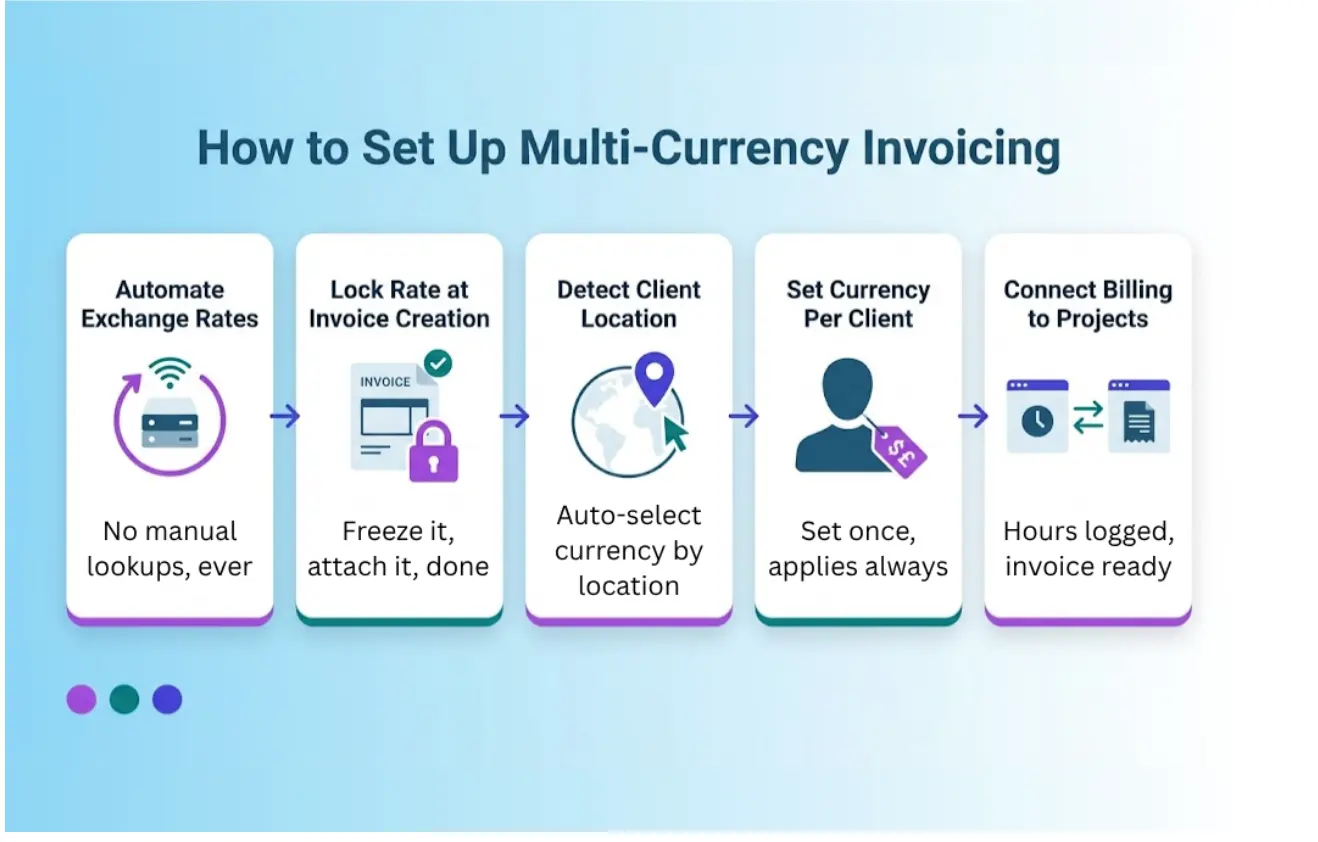
1. Automate Exchange Rates with an API
Stop pulling rates manually. A real-time currency exchange API delivers live, accurate FX rates directly into your billing workflow. Every invoice gets a rate that’s current, sourced, and recorded, with a full audit trail.
Request:
| $ curl ‘https://api.xyz.com/v2.0/rates/latest?apikey=YOUR_APIKEY&symbols=GBP,EUR,AUD’ |
Response:
| {
“date”: “2026-04-09 00:00:00+00”, “base”: “USD”, “rates”: { “AUD”: “1.42045”, “EUR”: “0.857743”, “GBP”: “0.746687” } } |
One API call. Every currency you bill in. No manual steps, no stale data.
2. Lock the Rate at Invoice Creation
Pull the live rate the moment the invoice is generated, not when the project started, not when the contract was signed. Lock it, display it on the invoice, and document the source.
A simple invoice footnote works: “EUR/USD rate: 0.857743 sourced from CurrencyFreaks API on 09-Apr-2026.”
This builds client trust and protects you if a rate dispute ever comes up.
3. Detect Client Location Automatically
Don’t ask every new client what currency they use. An IP geolocation tool for client detection identifies where a visitor is connecting from and auto-selects their country and billing currency during onboarding.
It also helps with:
- Auto-applying the correct VAT/GST treatment by region
- Pre-selecting payment methods common in that country
- Flagging high-risk locations before processing
4. Set Currency Per Client, Not Per Invoice
In your CRM or project tool, assign a default currency to each client once. Every invoice generated for that client automatically uses the right currency. No re-selecting it each time.
5. Connect Billing to Your Project Workflow
Multi-currency billing breaks down when systems are disconnected. Hours logged in your project tool should flow directly into invoices with the client’s currency already assigned. Contractor costs in different currencies should be logged in the original currency and reconciled at invoice time, not manually converted in a spreadsheet.
What Tools Do You Actually Need?
No single tool does everything. A well-built agency billing stack in 2026 is a connected set of layers, each handling one part of the problem cleanly. The goal isn’t to find the perfect all-in-one platform; it’s to make sure each layer talks to the next so currency data only has to be entered once.
| Layer | What to Look For |
| Exchange rate source | Real-time API feed, historical data, audit log
e.g., CurrencyFreaks |
| Client location detection | Country, currency, timezone by IP
e.g. IPGeolocation.io |
| Invoicing platform | Multi-currency native, VAT/GST by region, locked rate display |
| Payment processing | Low FX spread, multi-currency settlement. Wise, Stripe, Payoneer |
| Project + billing integration | Billable hours linked to the client’s invoice currency
e.g., Corexta |
The key question for any tool: Does it lock the rate at invoice creation, or does it let you enter rates manually? Manual rate entry is where errors live.
Pro Tips
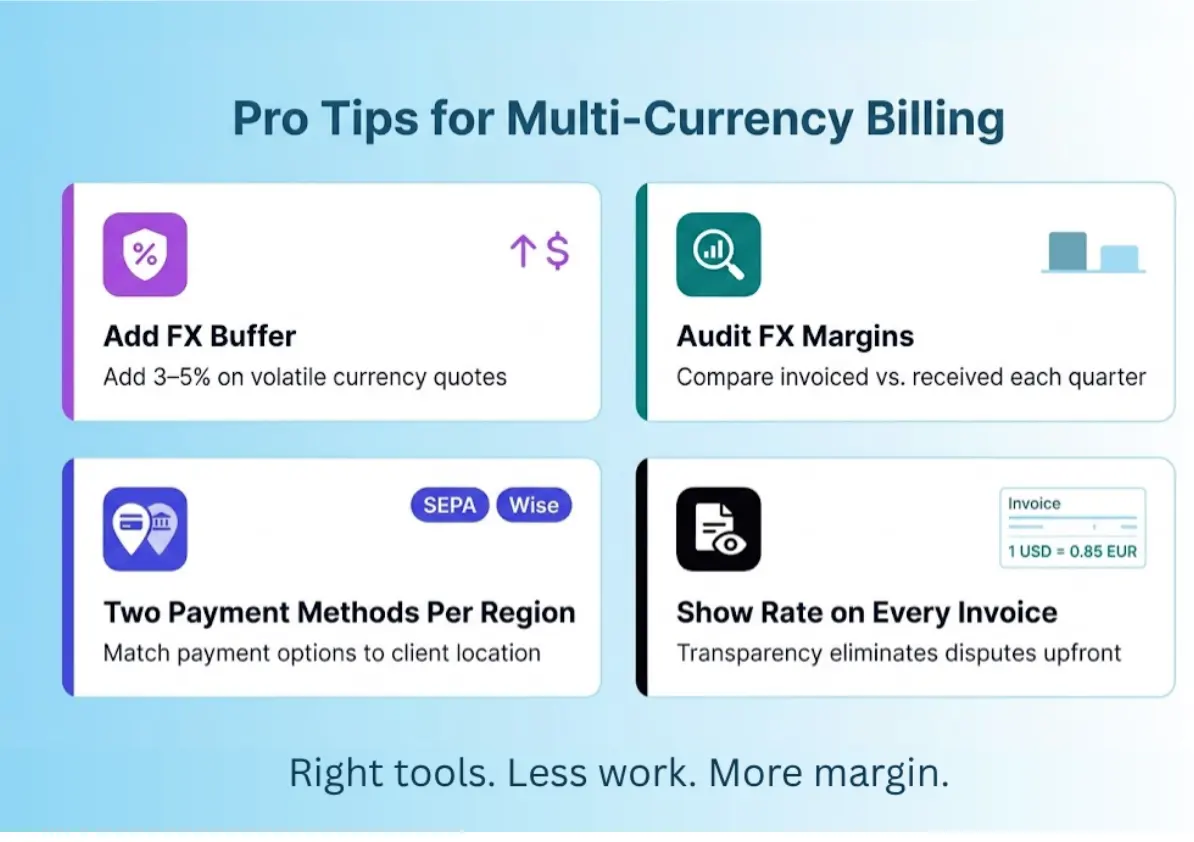
These are the small habits that make a real difference once the core system is in place, the kind of things you only learn after getting burned once.
- Add a 3–5% FX buffer: When quoting projects in volatile currencies (Turkish Lira, Nigerian Naira, South African Rand)
- Audit your FX margin quarterly: Compare the invoiced amount vs. the received amount in your home currency. If the gap is consistently negative, your gateway is eating it
- Offer two payment methods per region: SEPA for Europe, ACH/Stripe for the US, Wise or Payoneer everywhere else
- Show the exchange rate on every invoice: Transparency eliminates disputes before they start
Frequently Asked Questions
What currency should an agency use when billing international clients?
Bill in the client’s local currency, lock the rate at invoice time using a live API feed, and record the exchange in your accounting system. This gives the client clarity without exposing you to rate swings between invoice and payment.
How do agencies avoid losing money on exchange rate fluctuations?
Three things work together: use a live exchange rate API (not a bank rate), lock the rate at invoice generation, and for large contracts, build a 3–5% FX buffer into the quoted price. For very large contracts, a forward rate clause can lock in today’s rate for a future payment.
How does VAT work when invoicing EU clients from outside the EU?
For B2B services, the reverse charge mechanism usually applies. You don’t charge VAT, but you note it on the invoice (“VAT reverse charge, Article 196 EU VAT Directive”). For B2C digital services above €10,000/year across EU consumers, you may need to register for the EU One Stop Shop (OSS) scheme. Always confirm with a tax advisor for your specific situation.
Conclusion
Most agencies don’t realize how much they’re losing to poor currency handling until they actually run the numbers. A 3% FX gap on a $20,000 invoice is $600. Across twelve international clients over a year, that’s a significant sum, and it compounds silently because nobody flags it as a billing problem. It just looks like margin variance.
The good news is that this is one of the most fixable problems in agency operations. You don’t need a finance team or a complex treasury setup. You need three things working together: a live exchange rate API, something like CurrencyFreaks feeding accurate rates into your invoices, a client location detection layer (IPGeolocation.io handles this well) that removes manual currency selection, and a billing platform that locks and displays the rate so both you and the client see the same number.
From there, it’s about building the habits, locking rates at invoice creation, auditing your FX margins quarterly, showing the rate source on every document, and pricing in a buffer for volatile currencies before the project starts rather than absorbing the loss after.
Agencies that get this right don’t just protect their revenue. They look more professional to international clients, close payments faster, and scale their global operations without adding proportional admin overhead. That’s the real competitive edge, not better pitches or lower prices, but a billing system that actually works as well as the work you deliver.
The clients are out there. Make sure your invoicing is ready for them.









