
For small businesses, choosing the right project management software is not just about features—it’s about getting the most value for every dollar spent. Teams often start with a free plan, but as projects grow, they quickly encounter limits that require upgrading to paid tiers. Understanding how pricing works across different platforms can help businesses avoid unexpected costs and scale their operations more efficiently.
Three of the most widely used tools in this space are ClickUp, Monday.com, and Asana. Each platform offers free plans, multiple paid tiers, and optional add-ons such as automation or AI features. However, the way these platforms structure pricing is quite different. Some charge per user, others require minimum seat purchases, and many lock advanced features behind higher-tier plans.
For example, some tools offer generous free plans with unlimited users, while others limit the number of seats or features available at the entry level. Paid plans also vary significantly in price and functionality. ClickUp’s entry paid tier starts at around $7 per user per month, while Monday.com begins around $9 per user, and Asana’s paid plans typically start at about $10.99 per user per month when billed annually.
Because of these differences, the “cheapest” option on paper may not always be the most affordable in practice. Hidden costs—such as seat minimums, feature restrictions, or required upgrades—can significantly increase the total cost for growing teams.
Monday vs. Asana vs. ClickUp Pricing at a Glance
Before diving into detailed comparisons, it helps to look at the core pricing structure of each platform. The table below summarizes their starting plans, free-tier limitations, and general pricing approach.
| Platform | Free Plan | Starting Paid Plan | Key Pricing Notes |
|---|---|---|---|
| ClickUp | Yes (unlimited users, limited storage) | ~$7/user/month | Flexible per-user pricing with strong features even in lower tiers |
| Monday.com | Yes (up to 2 users) | ~$9/user/month | Paid plans require minimum seats and upgrade tiers for advanced features |
| Asana | Yes (limited features) | ~$10.99/user/month | Clean interface but advanced reporting and portfolio features require higher tiers |
ClickUp is often seen as the most budget-friendly option for small teams because its free plan supports unlimited users and its paid plans include features like time tracking and advanced reporting at lower price points.
Monday.com, on the other hand, focuses on visual workflows and collaboration. However, some essential features—such as timeline views, advanced automations, and time tracking—are only available in higher tiers.
Asana provides a streamlined task management experience that many teams find easy to adopt. Its pricing structure is straightforward, but some of its most powerful capabilities—like portfolios and workload management—are reserved for premium plans.
At first glance, the differences may seem small—just a few dollars per user. But when teams scale to 10, 20, or 50 users, those small differences can translate into hundreds or even thousands of dollars per year.
ClickUp Overview
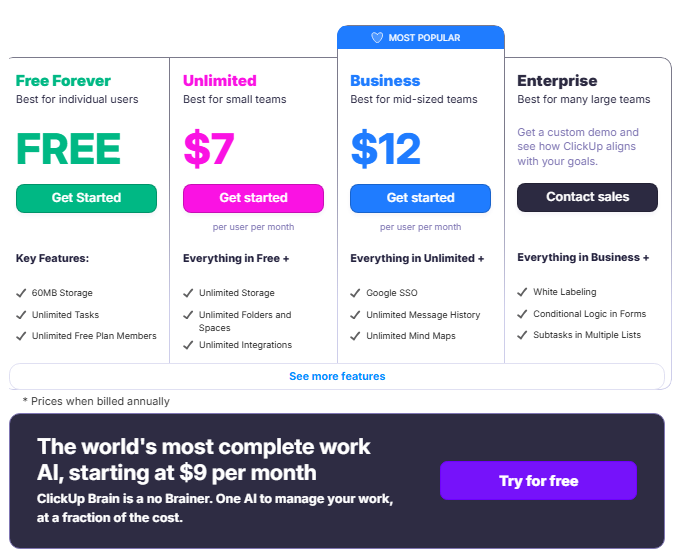
ClickUp is an all-in-one productivity and project management platform designed to help teams manage tasks, collaborate, track progress, and automate workflows in a single workspace. Its pricing structure is often considered attractive for small businesses because it offers a generous free plan and flexible paid tiers that scale as teams grow.
What do you get for your money with ClickUp?
ClickUp offers several pricing tiers—Free Forever, Unlimited, Business, and Enterprise—each designed to support different team sizes and project complexity levels.
1. Free Forever plan
The free plan is one of the most feature-rich entry tiers among project management tools. It includes:
-
Unlimited tasks and subtasks
-
Unlimited members in the workspace
-
Kanban boards, list views, and calendar views
-
Collaborative documents with real-time editing
-
Built-in chat and task comments for team collaboration
-
Sprint management for agile workflows
-
Basic integrations and automation templates
-
24/7 support and two-factor authentication
However, the free plan has limitations such as restricted storage (around 60–100MB), limited advanced reporting, and fewer integrations, which means growing teams often upgrade to access more advanced planning tools.
2. Unlimited plan
The first paid tier starts at roughly $7 per user per month when billed annually and removes many of the free plan’s limitations. Key features include:
-
Unlimited storage
-
Unlimited integrations with third-party tools
-
Gantt charts and advanced project views
-
Time tracking for productivity monitoring
-
Goals and portfolios to manage strategic initiatives
-
Resource management tools for team capacity planning
-
Permission-based guest access
This tier is typically suitable for small teams that need stronger reporting and project planning capabilities.
3. Business plan
The Business plan expands on the Unlimited tier with features aimed at larger teams or organizations managing multiple projects simultaneously. It includes:
-
Advanced dashboards and analytics
-
Unlimited timeline and activity views
-
Google SSO for secure access
-
Advanced automations and workflow customization
-
Mind maps and deeper reporting capabilities
Enterprise plans add even more capabilities such as advanced security, custom permissions, and dedicated onboarding for large organizations.
Overall, ClickUp’s pricing model focuses on feature density at lower price points, allowing small businesses to start with a powerful free plan and gradually upgrade only when they need more storage, integrations, or reporting capabilities.
Monday Overview
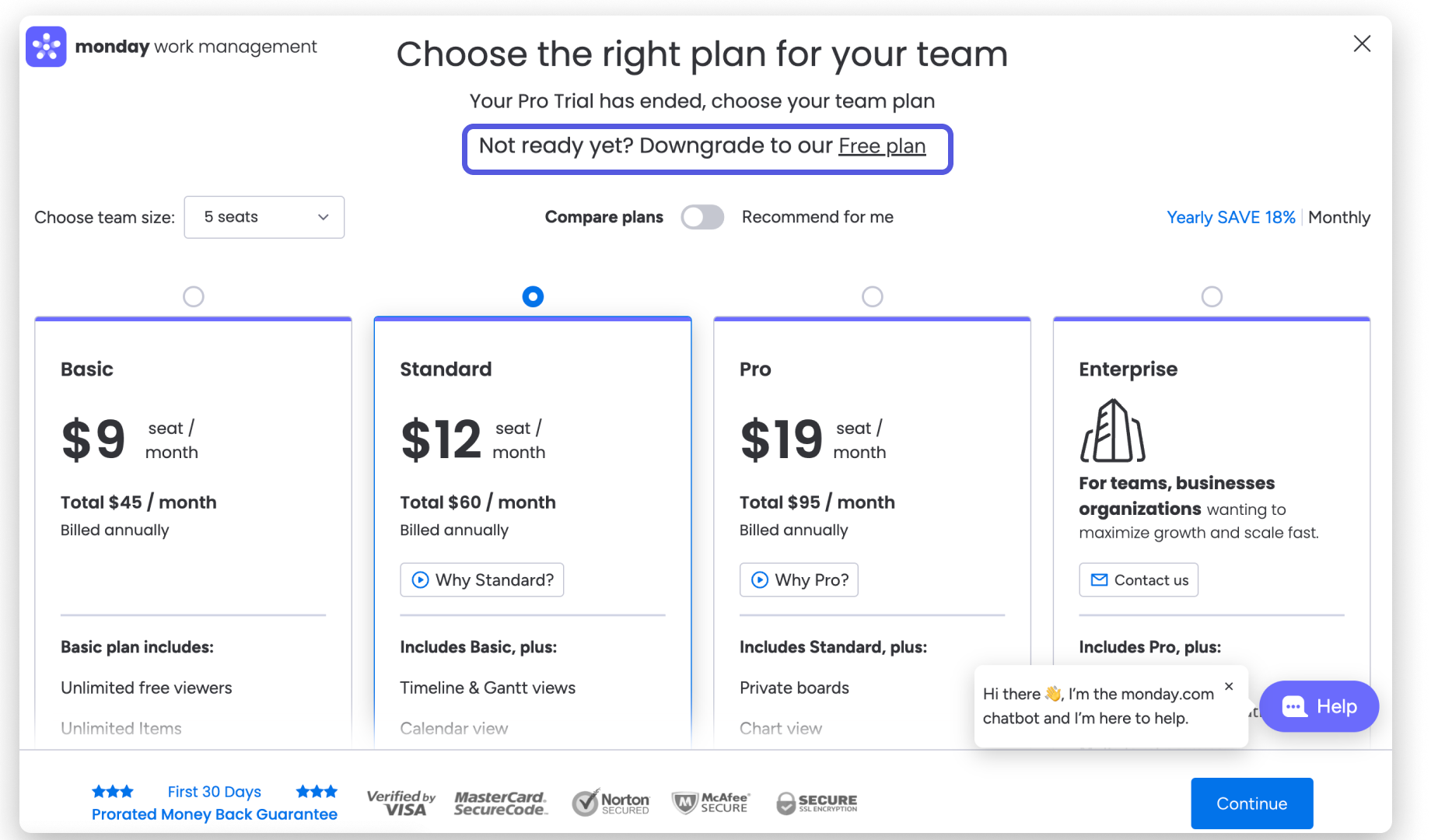
Monday.com is a visual work management platform that helps teams organize projects, track tasks, and collaborate through customizable boards and dashboards. The platform emphasizes visual workflows, automation, and flexible project tracking, making it popular among marketing teams, product teams, and operations departments.
What do you get for your money with Monday.com?
Monday.com offers four main pricing tiers: Free, Basic, Standard, Pro, and Enterprise, with pricing typically starting around $9 per user per month when billed annually.
1. Free plan
The free plan is designed primarily for individuals or very small teams and includes:
-
Up to 2 users
-
Up to 3 project boards
-
Basic task and workflow management
-
Collaborative documents
-
Access to over 200 project templates
-
Mobile apps for iOS and Android
While this tier allows teams to test the platform, the strict user and board limits mean that most businesses will need to upgrade quickly as their team grows.
2. Basic plan
The Basic plan introduces features that support real team collaboration, such as:
-
Unlimited project boards and items
-
5GB file storage
-
Dashboards based on a single board
-
Unlimited read-only viewers
-
Priority customer support
-
AI credits for trying Monday’s AI features
This plan is useful for small teams that need centralized project tracking but don’t require advanced visual planning tools.
3. Standard plan
The Standard plan is often considered the most popular tier because it adds advanced planning capabilities:
-
Timeline and Gantt views for project scheduling
-
Calendar view for task planning
-
Guest access for external collaborators
-
Workflow automations
-
Integration actions with other business tools
-
Dashboards combining multiple boards
These features help teams automate repetitive work and visualize project timelines more clearly.
4. Pro and Enterprise plans
The Pro plan introduces advanced features such as:
-
Time tracking
-
Private boards for restricted projects
-
Chart views for reporting
-
Higher automation and integration limits
Enterprise plans provide additional security, compliance features, and enterprise-level reporting tools.
Overall, Monday.com focuses heavily on visual project tracking and automation, making it especially useful for teams that prefer a highly customizable and visual workflow environment.
Asana Overview
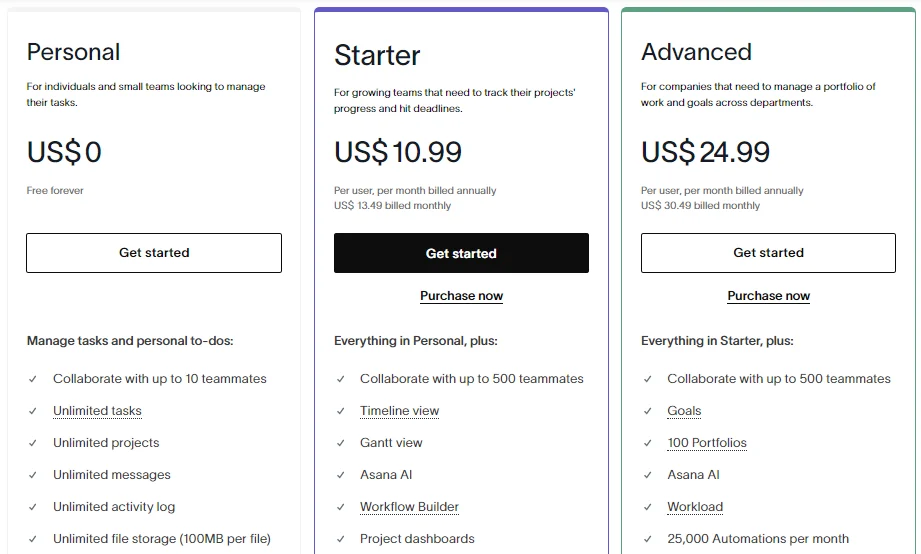
Asana is a popular work management and collaboration platform known for its clean interface, structured task management, and strong workflow organization. It is widely used by marketing teams, product managers, and cross-functional organizations that need to coordinate complex projects.
What do you get for your money with Asana?
Asana’s pricing structure typically includes Personal (Free), Starter, Advanced, Enterprise, and Enterprise+ tiers, with paid plans starting around $10.99 per user per month when billed annually.
1. Personal (Free) plan
The free plan is designed for individuals or small teams managing simple projects. It includes:
-
Task management with lists and boards
-
Basic collaboration tools such as comments and file attachments
-
Project templates for common workflows
-
Calendar and task scheduling features
-
Mobile and desktop access
This tier works well for simple task management, but it lacks many advanced project planning features needed by growing teams.
2. Starter plan
The Starter plan introduces more advanced workflow and project management capabilities, including:
-
Timeline view for project planning
-
Workflow builder for process automation
-
Project reporting tools
-
Custom fields to track additional data
-
Integrations with popular productivity tools
This plan is typically suitable for small to mid-sized teams managing multiple projects simultaneously.
3. Advanced plan
The Advanced tier adds features designed for larger organizations or teams handling complex operations, such as:
-
Portfolio management for tracking multiple projects
-
Workload management to balance team capacity
-
Advanced reporting and analytics
-
Custom rules and automations for workflow efficiency
Enterprise tiers add security features such as advanced permissions, audit logs, and enterprise-grade data protection.
Overall, Asana focuses on structured project management and intuitive task organization, making it ideal for teams that prioritize clarity, structured workflows, and detailed project planning.
ClickUp vs. Monday vs. Asana Pricing Compared
When evaluating project management tools, the advertised monthly price rarely tells the whole story. Each platform structures its pricing differently—through free tiers, scalable paid plans, and optional AI add-ons. Understanding these differences helps small businesses estimate the true long-term cost as their teams grow.
Tier #1: Free plan
Free plans are often the starting point for small businesses testing project management software. However, the capabilities and limitations of these tiers vary significantly across the three platforms.
ClickUp Free Forever plan
ClickUp’s free plan is one of the most generous among project management tools. It allows:
-
Unlimited users and tasks
-
Basic project views like lists, boards, and calendars
-
Real-time collaboration with comments and documents
-
Basic automation and integrations
-
60MB storage for files
Because it supports unlimited team members, many startups can run small projects without upgrading immediately.
Monday.com Free plan
Monday’s free tier is much more limited. It includes:
-
Up to 2 users
-
Up to 3 boards
-
Basic task tracking and templates
-
Mobile apps and basic collaboration
While useful for testing the platform, most teams exceed these limits quickly and need to move to a paid plan.
Asana Free plan
Asana’s free “Personal” plan is designed for individuals or very small teams and typically includes:
-
Basic task and project management
-
List and board views
-
Limited collaboration features
-
File attachments and comments
However, advanced capabilities like timelines, workflow automation, and reporting tools are restricted to paid tiers.
Free plan verdict
For startups and small teams exploring project management tools:
-
ClickUp offers the most flexibility due to unlimited users.
-
Monday.com and Asana impose stricter limits that often require early upgrades.
Tier #2: Paid tier structure for scalability
As teams grow, businesses must upgrade to paid plans for more storage, integrations, automation limits, and reporting capabilities. Each platform uses a slightly different pricing structure.
ClickUp paid tiers
Typical pricing structure:
-
Unlimited plan – around $7 per user/month
-
Business plan – around $12 per user/month
-
Enterprise – custom pricing
These tiers add features like unlimited storage, advanced dashboards, workload management, and deeper automation capabilities.
Because ClickUp charges strictly per user without seat minimums, teams can scale gradually as they add members.
Monday.com paid tiers
Monday’s pricing structure typically includes:
-
Basic plan – about $9 per user/month
-
Standard plan – about $12 per user/month
-
Pro plan – about $19 per user/month
-
Enterprise – custom pricing
Higher tiers unlock important features like:
-
Timeline and Gantt views
-
Workflow automations
-
Advanced dashboards
-
Time tracking and analytics
However, certain capabilities—like time tracking—are only available in higher-priced tiers.
Asana paid tiers
Asana’s paid plans typically follow this structure:
-
Starter/Premium plan – around $10.99 per user/month
-
Advanced/Business plan – around $24.99 per user/month
-
Enterprise plans – custom pricing
The higher tiers add advanced features such as:
-
Portfolio management
-
Workload tracking
-
Advanced reporting
-
Goals and organizational insights
These features are especially useful for teams managing multiple large projects simultaneously.
Tier #3: AI add-ons
Artificial intelligence is becoming a key feature in project management platforms, helping teams automate workflows, summarize updates, and generate project content. However, AI features often come with additional pricing considerations.
ClickUp AI
ClickUp’s AI system, often called ClickUp Brain, is typically offered as an optional add-on rather than included by default in all plans. It provides:
-
AI-powered writing and task generation
-
Workspace knowledge search
-
Automated summaries and planning
-
AI agents for automation
Pricing generally starts at about $9 per user per month for AI features depending on usage and plan.
Monday AI
Monday includes AI capabilities across its platform, enabling:
-
Workflow automation suggestions
-
Text generation
-
Data insights and summaries
Many of these AI features are included within paid plans rather than as separate add-ons.
Asana AI
Asana integrates AI features directly into its paid plans as well. These tools help teams:
-
Generate project summaries
-
Automate task updates
-
Identify workflow bottlenecks
-
Analyze project progress
This means teams using paid plans can access AI capabilities without an additional subscription layer.
Hidden Costs and Pricing Considerations
While base pricing is important, the total cost of ownership can vary depending on several hidden factors.
Seat minimums and scaling
Some platforms require minimum user counts or bundled seat purchases, which can increase costs for smaller teams. In contrast, tools that allow per-user scaling enable businesses to add members gradually as they grow.
Feature gating
Certain features are locked behind higher pricing tiers. For example:
-
Advanced reporting and analytics
-
Time tracking
-
Automation limits
-
Workload management
When these features become essential, teams may need to upgrade sooner than expected.
Integration requirements
Many teams rely on additional tools for communication, file storage, or documentation. For example, companies may still need to pay for services like Slack, Zoom, or documentation tools alongside their project management platform.
Automation and usage limits
Automation limits can affect productivity. Some plans restrict the number of automation actions or integrations per month, which may require upgrading as workflows grow more complex.
Best Value By Team Size
The most cost-effective platform often depends on how large your team is and how complex your workflows are.
Solo users and freelancers
For individuals managing personal projects or freelance work:
-
ClickUp Free plan provides strong functionality without requiring an upgrade.
-
Monday and Asana free plans may feel restrictive due to user limits.
Small teams (2–10 users)
Small teams often need collaboration features like shared dashboards, automation, and integrations.
-
ClickUp’s lower-cost paid tiers make it attractive for small teams.
-
Asana Starter is suitable for teams needing structured workflows.
-
Monday Standard works well for teams prioritizing visual project tracking.
Growing teams (10–50 users)
As organizations scale, they need advanced reporting, resource planning, and automation.
-
ClickUp Business provides extensive customization and automation at moderate cost.
-
Asana Advanced is strong for portfolio management and cross-team coordination.
-
Monday Pro supports advanced reporting and automation workflows.
Large teams and enterprises
For larger organizations with complex project portfolios:
-
Enterprise tiers from all three platforms provide security features, advanced permissions, and dedicated support.
-
Pricing becomes highly customizable and often negotiated based on team size.
Which Project Management Tool Has the Best Pricing for Your Team?
Choosing the best‑priced project management tool depends on your team size, workflow needs, and budget priorities. Let’s break down how Monday, Asana, and ClickUp stack up in terms of cost‑effectiveness for different use cases.
Small Teams and Startups
For teams just starting out or operating with fewer than 10 users:
-
ClickUp typically offers the most budget‑friendly path thanks to its generous Free Forever plan that supports unlimited users and unlimited tasks, giving startups extended runway before paying anything.
-
Asana’s free plan is also functional but limited in advanced features like timelines, automation, or detailed reporting.
-
Monday’s free plan allows only two users, which can feel restrictive very quickly for small teams.
As a result, if cost is the primary concern and your team needs essential project and task management without early upgrades, ClickUp’s Free plan often provides the best entry‑level value.
Growing Teams (10–50 Users)
Once teams grow, the value shifts from free plans to paid tier pricing and features:
-
ClickUp scales gradually with per‑user pricing and no seat minimums, meaning you only pay for what you need. Its paid plans unlock powerful dashboards, automation, and advanced views at competitive rates.
-
Asana offers structured feature sets in its mid and higher tiers, especially for cross‑project planning, workload balancing, and portfolio views — but at a higher per‑user cost.
-
Monday.com adds strong visual workflow and automation features at each upgrade level, but its seat minimums and bundled pricing can result in paying for seats you don’t use.
For teams that require deeper planning tools and collaborative features while still managing costs, ClickUp remains one of the most scalable price‑to‑feature options because it doesn’t force unnecessary seat purchases.
Teams Requiring Automation and AI
When AI capabilities or advanced automation become essential:
-
Asana and Monday include built‑in automation and intelligent suggestions in higher pricing tiers, which can be beneficial but increase subscription costs.
-
ClickUp’s AI features (e.g., ClickUp Brain) are often add‑ons, which means additional cost on top of the base plan.
The tool with the best AI value depends on whether native AI access in your base paid plan outweighs the flexibility to add or remove AI features as needed.
Which Project Management Tool Reigns Supreme?
After comparing pricing, scalability, and functional value, here’s a clear summary of where each tool excels:
🏆 Best for Cost‑Effective Scalability
ClickUp — Offers the most generous free tier, flexible per‑user pricing with no seat minimums, and robust features even at lower pricing tiers. This makes it ideal for startups and small businesses watching every dollar.
🧠 Best for Structured Process and Workflow Simplicity
Asana — With a clean interface and intuitive task organization, Asana is well‑suited for teams prioritizing simplicity paired with structured project views. Its free plan is solid, and its higher tiers support advanced portfolio and workload management.
📊 Best for Visual Planning and Automation
Monday.com — Its visual boards and automation capabilities are strong at higher tiers, though its pricing model (seat requirements and tier gating) can make it pricier as teams expand.
While all three tools can serve a wide range of businesses, ClickUp often delivers the strongest blend of pricing flexibility and feature breadth, especially for small and growing teams.
Why is Corexta Considered the Best Alternative of These Three?

When comparing project management tools like ClickUp, Monday.com, and Asana, Corexta stands out as a compelling alternative — especially for small to medium‑sized agencies or businesses that need more than just project tracking. Rather than selling itself purely as a task manager, Corexta unifies project management, CRM, finance, HR, and operational workflows into one centralized platform under a single subscription.
🔑 What Corexta Offers
1. All‑in‑One Business Management
Corexta goes beyond basic project planning to include features such as:
-
Project and task visualization with Kanban boards and Gantt charts
-
Client and lead management with contracts and e‑signatures
-
Finance tools including invoicing, expense tracking, and payment processing
-
HR capabilities like employee profiles, attendance, and leave tracking
-
Payroll and asset management tools in one place
-
Internal communication and real‑time collaboration tools
This broad range means that Corexta can replace multiple separate systems (e.g., PM software + CRM + HR + billing tools), which significantly reduces the total software footprint and ongoing subscription costs for agencies and small businesses.
2. Intuitive Task and Project Features
Corexta gives users robust task management features such as:
-
Customizable task views (Kanban, list, timeline)
-
Real‑time progress tracking
-
Timesheets and time tracking per project or task
-
Expense and earnings tracking integrated with project workflows
These capabilities provide functional parity with many paid tiers of ClickUp, Asana, or Monday but within a unified ecosystem.
3. Transparent and Affordable Pricing
Corexta’s pricing structure is straightforward and tailored to business size:
-
Free tier with basic tools for very small teams
-
Small business subscription ~ $9.99/month with expanded storage and users
-
Medium business ~ $19.99/month with broader feature access
-
Enterprise ~ $29/month with unlimited users and premium support
Unlike other tools that charge per user at varying rates and force seat minimums, Corexta lets organizations bundle a wide range of capabilities under one predictable monthly price, which can significantly reduce licensing complexity and budgeting overhead.
4. Built for Growing Agencies
With integrated CRM, employee management, finance, and HR modules built into a single platform, Corexta is ideal for agencies or service‑oriented businesses that want all aspects of their operations connected. This eliminates the need for multiple subscriptions, reduces data silos, and improves operational visibility.
If your business is looking for a unified and affordable alternative to traditional project management tools — one that combines task tracking, client management, finance, HR, and collaboration in one platform — Corexta could be the solution you’ve been searching for.
👉 Start your free trial now and experience how all‑in‑one business management can simplify your workflows and save money on multiple standalone subscriptions.
Frequently Asked Questions
How does ClickUp’s Free Forever plan compare to Monday and Asana’s free tiers?
ClickUp’s Free Forever plan stands out because it allows unlimited users and unlimited tasks, making it suitable for teams of any size who want to collaborate without immediate cost. Core features like task management, basic dashboards, comments, and multiple views (list, board, calendar) are included right away.
In contrast:
-
Monday’s free tier limits users to 2 members and a small number of boards, which quickly becomes restrictive for teams that grow or manage multiple projects.
-
Asana’s free plan offers basic project and task tracking with list and board views, but lacks advanced scheduling, automation, and reporting tools that are often vital once teams begin scaling.
Overall, ClickUp’s free offering typically provides the most functional capabilities before requiring a paid upgrade, while Monday and Asana free tiers serve more as introductory trials with quicker paths to paid plans.
How do ClickUp and Asana compare for teams with 10+ users?
For teams exceeding 10 members, the way platforms scale becomes crucial:
-
ClickUp scales with straightforward per‑user pricing and no seat minimums, allowing teams to add exactly the number of seats they need. Its paid tiers unlock valuable features like advanced dashboards, time tracking, automation rules, goals, and workload management without forcing teams to pay for unused seats.
-
Asana also scales well and offers powerful tools like timeline views, portfolio insights, workload balancing, and advanced reporting. However, its paid plans are typically priced slightly higher per user compared to ClickUp’s mid‑range options. While Asana excels in structured project planning, larger teams may find that ClickUp offers a better price‑to‑feature ratio at similar productivity levels.
In short, both tools can accommodate teams of 10+, but ClickUp’s flexible pricing and rich mid‑tier features often make it more cost‑effective for fast‑growing teams.
Why Corexta works best for startups scaling from free to paid plans?
Corexta is designed to help startups and small businesses transition from simple task management to full business operations without juggling multiple subscriptions. Instead of offering just project planning, Corexta integrates:
-
Task and project management
-
Client relationship management (CRM)
-
Finance features such as invoicing and expense tracking
-
HR and payroll tools
-
Collaboration and communication tools
This integrated approach means startups don’t need separate tools for CRM, billing, or HR as they grow—everything works in one platform, which significantly reduces overall software costs and simplifies workflows.
Moreover, Corexta’s pricing structure includes:
-
A free tier for initial testing and simple use
-
Predictable paid plans that expand functionality without per‑user complexities
-
A seamless upgrade path that aligns with business growth
These characteristics make Corexta especially well‑suited for startups and small teams transitioning from free tools to paid enterprise capabilities without ending up with fragmented systems or rising subscription expenses.
How does ClickUp Brain compare to Asana’s AI features?
Both ClickUp and Asana have incorporated AI into their platforms, but they approach it differently:
-
ClickUp Brain is often offered as an optional add‑on, enabling capabilities such as content generation, automated summaries, task suggestions, custom workflow insights, and AI‑powered workspace search. Because it’s an add‑on, teams can choose whether or not to include it in their subscription, giving more control over cost and usage.
-
Asana’s AI features are typically integrated into the higher paid plans, providing users with smart insights, automated task suggestions, and progress summaries as part of the standard workflow experience. Teams on those plans don’t generally pay extra for basic AI enhancements.
In practical terms, Asana’s AI is more baked into the product experience for paid users, while ClickUp gives teams the flexibility to add AI where needed without forcing it as part of the base plan. The best choice depends on whether a team prefers built‑in AI by default or optional AI to control costs more precisely.









