Choosing the right project management tool can shape how your team plans, builds, and delivers work. Many teams struggle to pick between tools that focus on strategy and those built for execution. This is where Aha! and Jira often come into the picture.
Both platforms are strong, but they serve different goals. Aha! focuses on product strategy, planning, and idea management. It helps teams decide what to build and why it matters. Jira, on the other hand, is built for software teams that need to track tasks, manage sprints, and ship code faster.
As teams grow, the gap between planning and execution becomes clear. Product managers want roadmaps and insights. Developers want clear tasks and workflows. Picking the wrong tool can slow things down or create confusion between teams.
This guide breaks down both tools in a simple way. You will learn what each one does best, where they fall short, and how they compare side by side. By the end, you will have a clear idea of which tool fits your team’s needs and how to use it effectively.
Aha! vs. Jira at a Glance
Aha! and Jira solve different parts of the product development process. One focuses on strategy, while the other focuses on delivery. Understanding this difference is key.
Aha! is built for planning. It helps product teams define goals, collect ideas, and create clear roadmaps. It gives a high-level view of what the team should work on next. It is often used by product managers and leaders who need to align work with business goals.
Jira is built for execution. It helps engineering teams manage tasks, track bugs, and run agile workflows. It is widely used for sprint planning, backlog management, and issue tracking. Developers rely on it to keep work organized and moving forward.
When you compare features, the gap becomes clearer. Aha! offers strong roadmapping tools with visual timelines and strategy views. Jira offers powerful agile boards with detailed tracking like velocity and burndown charts.
Aha! includes built-in tools for idea management and product discovery. Teams can collect feedback, score ideas, and turn them into features. Jira focuses more on managing tasks after they are already defined.
In terms of integrations, Jira has a much larger ecosystem. It supports thousands of apps, making it flexible for many workflows. Aha! offers fewer integrations but focuses more on connecting with development tools like GitHub and Azure DevOps.
Both tools have a learning curve. Aha! can feel complex because of its deep planning features. Jira can be hard for non-technical users due to its advanced workflows and setup.
In short, Aha! helps teams decide what to build. Jira helps teams build it.
What Is Aha!?
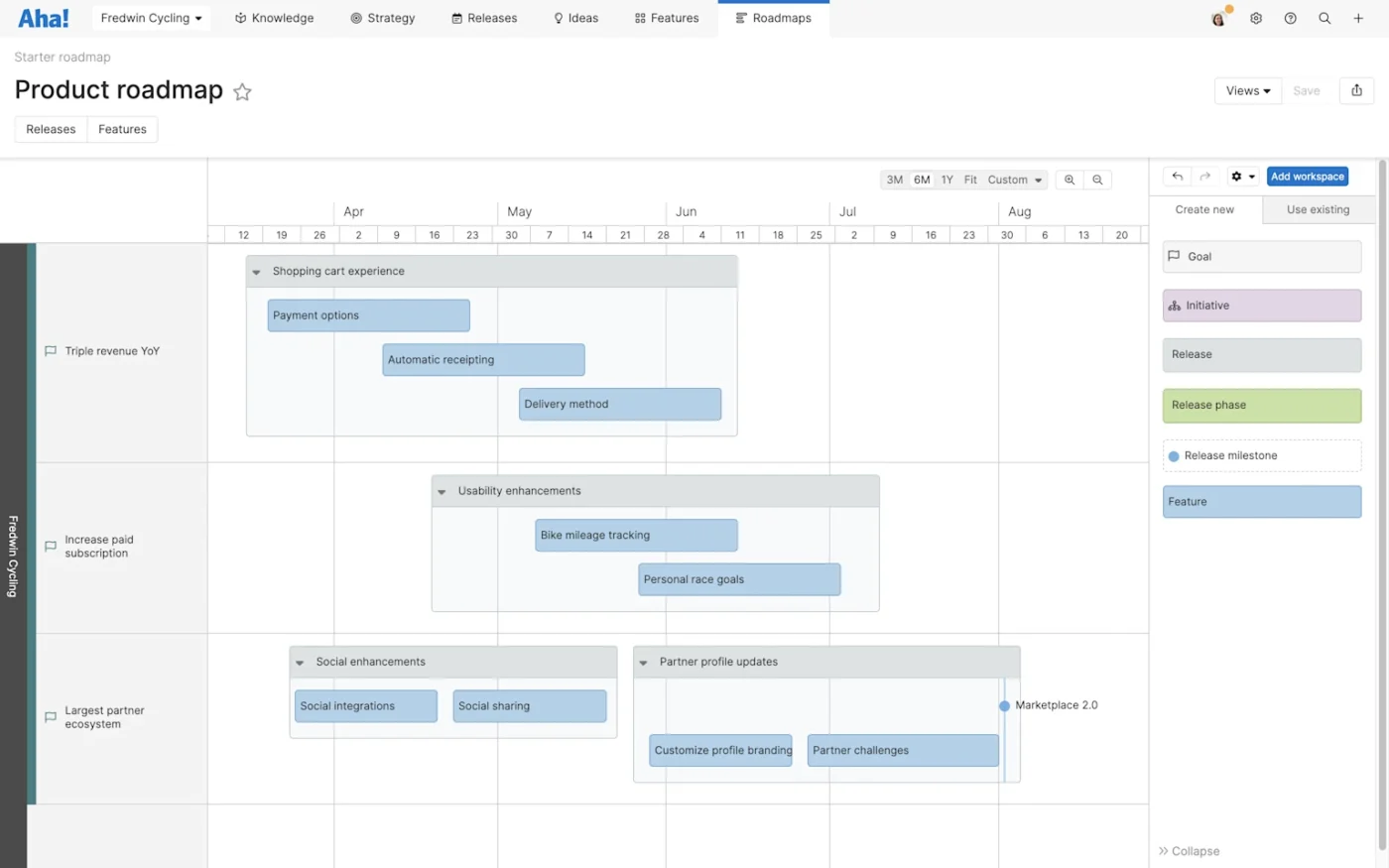
Overview of what Aha offers:
Aha! is a product management platform designed to help teams plan and manage product strategy. It focuses on the early stages of product development, where ideas are created, tested, and turned into clear plans.
The platform offers a full suite of tools for product managers. These include roadmaps, idea portals, goal tracking, and release planning. Teams can connect company goals to product features, making sure every task supports a bigger vision.
One of the key strengths of Aha! is its roadmapping feature. It allows teams to build visual timelines that show what will be delivered and when. These roadmaps can be shared with stakeholders, making it easy to keep everyone aligned.
Aha! also includes idea management tools. Customers, team members, and stakeholders can submit ideas. These ideas can then be reviewed, scored, and prioritized based on business value. This helps teams focus on what matters most.
The platform also supports product discovery. Teams can research problems, gather feedback, and define features before development starts. This reduces the risk of building the wrong product.
Aha! offers several modules, such as Roadmaps, Ideas, and Develop. Each module serves a different purpose, allowing teams to customize their setup based on their needs.
Pros:
Strong product strategy tools
Aha! excels at helping teams define goals and connect them to features. It keeps strategy at the center of product development.
Powerful roadmapping features
The platform provides clear, visual roadmaps that are easy to share with stakeholders. This improves communication across teams.
Idea management system
Teams can collect and organize ideas in one place. This makes it easier to prioritize features based on real feedback.
Good for product teams
Aha! is built with product managers in mind. It supports their workflow from planning to release.
Flexible customization
Users can create custom fields, scoring systems, and layouts to match their process.
Cons:
Steep learning curve
New users may find the platform complex. It takes time to understand all features and set them up correctly.
Limited agile execution tools
While Aha! offers basic task management, it is not as strong as tools built for development teams.
Higher cost for full features
Since Aha! uses separate modules, costs can increase quickly as teams add more features.
Requires integration for development work
Most teams still need another tool, like Jira, to handle actual development and issue tracking.
What Is Jira?
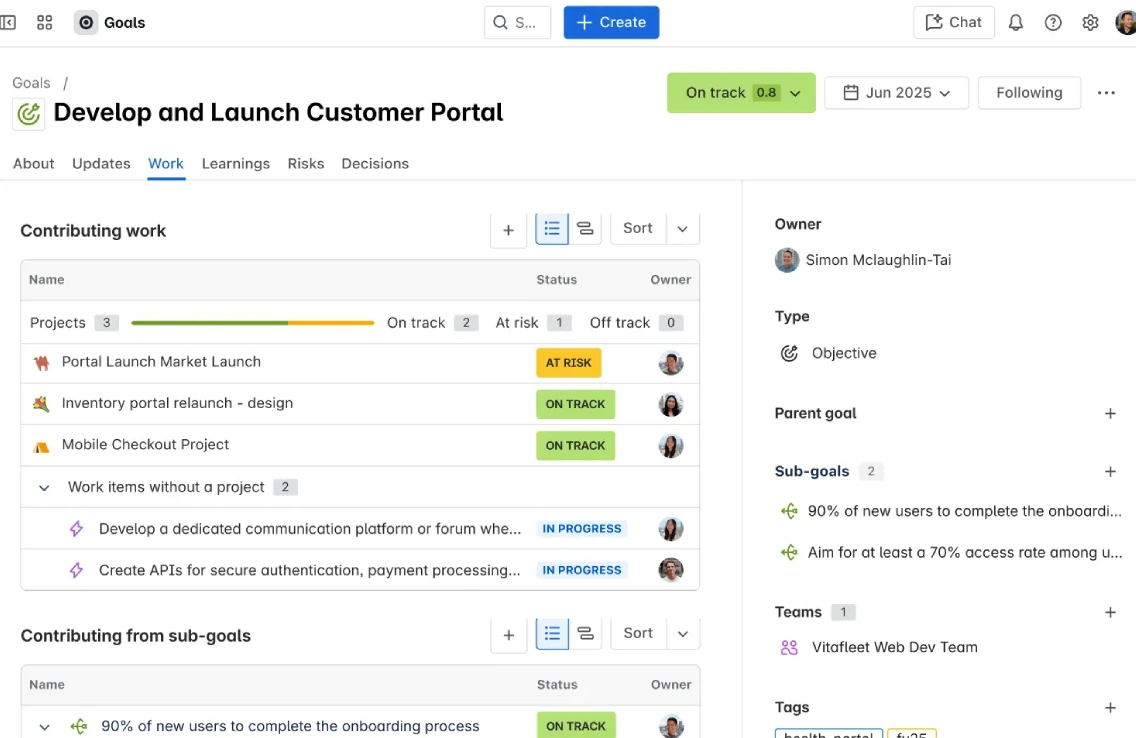
Overview of what Jira offers:
Jira is a project management tool designed mainly for software development teams. It is widely used for tracking issues, managing tasks, and running agile workflows.
The platform is built around agile principles. It supports Scrum and Kanban boards, making it easy for teams to manage sprints and track progress. Each task, or “issue,” can be assigned, tracked, and updated in real time.
Jira helps teams break down large projects into smaller tasks. These tasks can be organized into backlogs, prioritized, and moved through different stages of development. This keeps work structured and easy to follow.
One of Jira’s key strengths is its reporting features. Teams can track velocity, monitor sprint progress, and analyze cycle time. These insights help teams improve performance over time.
Jira also includes automation features. Teams can set rules to move tasks, send alerts, or update fields automatically. This reduces manual work and improves efficiency.
The platform supports a large number of integrations through its marketplace. Teams can connect Jira with tools for code management, testing, and communication. This makes it a central hub for development workflows.
Jira also offers advanced customization. Teams can create custom workflows, fields, and permissions. This allows the tool to fit almost any development process.
Pros:
Excellent for agile teams
Jira is built for Scrum and Kanban workflows. It supports sprint planning, backlog management, and task tracking.
Powerful reporting tools
Teams can track performance with detailed reports like burndown charts and velocity tracking.
Highly customizable
Jira allows deep customization of workflows, fields, and permissions. It can adapt to complex processes.
Large integration ecosystem
With thousands of apps available, teams can connect Jira with many other tools.
Automation features
Built-in automation helps reduce repetitive tasks and keeps workflows smooth.
Cons:
Complex for beginners
Jira can be hard to learn, especially for non-technical users. Setup often requires experience.
Not built for product strategy
The tool focuses on execution, not planning. It lacks strong features for roadmapping and idea management.
Can become cluttered
As projects grow, boards and workflows can become complex and hard to manage.
Requires ongoing administration
Many teams need a dedicated admin to manage workflows, permissions, and configurations.
Aha! vs. Jira Feature Comparison
Choosing between Aha! and Jira becomes easier when you look closely at their core features. Both tools are powerful, but they focus on different stages of the product lifecycle. Below is a detailed comparison across key areas that matter most to modern teams.
AI and automation capabilities
AI is becoming an important part of project management tools. Both Aha! and Jira now include AI features, but they use them in different ways.
Aha! uses AI to support product discovery and planning. It helps teams write ideas, draft product requirements, and summarize feedback. This makes early-stage work faster and more structured. Product managers can turn rough ideas into clear plans without spending too much time on writing and formatting.
Jira uses AI mainly to improve workflows and issue management. Its AI tools help teams analyze data, suggest actions, and automate repetitive tasks. For example, it can help with ticket triage, detect patterns, and provide insights into team performance. This is useful for engineering teams that handle large volumes of tasks.
Automation is strong in both tools, but Jira goes deeper. Jira allows teams to build complex automation rules that move issues, assign tasks, or update fields. Aha! also supports automation, but it is more focused on simplifying planning rather than managing execution.
Aha! uses AI to improve planning and writing, while Jira uses AI to improve execution and analysis.
Product roadmapping and strategic planning
This is where Aha! clearly stands out.
Aha! is built for product strategy. It allows teams to create detailed roadmaps that connect company goals with product features. Teams can define objectives, track key results, and align work with business priorities.
Roadmaps in Aha! are visual and easy to share. Stakeholders can see timelines, progress, and priorities at a glance. This helps teams stay aligned and make better decisions.
Aha! also supports idea management. Teams can collect feedback from users, score ideas, and decide which features to build next. This makes it easier to focus on high-impact work.
Jira offers basic roadmap features, but they are limited. It provides timeline views and simple planning tools, but it does not offer deep strategy features. Jira is better suited for managing tasks after the planning stage is complete.
If your team needs strong planning and clear direction, Aha! is the better choice. If you only need simple timelines, Jira can still work.
Agile boards and issue tracking
Jira leads in this area.
Jira is designed for agile development. It offers full support for Scrum and Kanban boards. Teams can manage sprints, track backlog items, and move tasks through different stages of development.
Jira also includes detailed tracking features. Teams can monitor velocity, sprint progress, and cycle time. These insights help teams improve performance and deliver work faster.
Issue tracking in Jira is very strong. Each task can include comments, attachments, and status updates. Teams can also link related issues and track dependencies.
Aha! offers basic task management through its development module. It includes simple boards, but they are not as advanced as Jira’s. Aha! is not built to replace a full agile tool.
For teams that focus on software development, Jira is the clear winner in this category.
Integrations and ecosystem
Jira has a much larger ecosystem.
Jira supports thousands of integrations through its marketplace. Teams can connect it with tools for code management, testing, design, and communication. This makes it a flexible hub for many workflows.
Aha! offers a smaller set of integrations, but they are well chosen. It connects with popular development tools like GitHub and Azure DevOps. It also integrates with Jira itself, which is common for teams that use both tools together.
The difference here is scale. Jira focuses on flexibility through a large ecosystem. Aha! focuses on quality integrations that support product management.
If your team uses many tools and needs deep connections, Jira is more suitable. If you need focused integrations for planning and development, Aha! is enough.
Ease of use and learning curve
Both tools have a learning curve, but for different reasons.
Aha! can feel complex because it includes many planning features. Users need time to understand how to create roadmaps, score ideas, and manage goals. Setup can also take time, especially for larger teams.
Jira can be difficult for non-technical users. Its workflows, fields, and permissions can be confusing at first. Teams often need an experienced admin to set it up and manage it.
Once set up, Jira becomes easier for developers to use. Aha! becomes easier for product managers once they understand its structure.
In general, Aha! is harder at the start due to strategy setup. Jira is harder for beginners due to technical complexity.
Customer support and resources
Both platforms offer strong support, but their approach is different.
Aha! focuses on guided support and learning. It offers detailed documentation, training resources, and onboarding help. This is useful for teams that are new to product management tools.
Jira provides a large knowledge base and community support. Since it has a wide user base, many problems already have solutions available online. It also offers support plans based on pricing tiers.
Jira’s large community is a major advantage. Aha! offers more focused support for product teams.
Pricing
Pricing is one of the biggest differences between Aha! and Jira.
Jira follows a tiered pricing model. It offers a free plan for small teams, which makes it easy to get started. Paid plans add more features, such as advanced reporting and analytics.
Here are Jira’s pricing tiers:
- Free (up to 10 users)
- Standard: $7.91 per user per month
- Premium: $14.54 per user per month (includes custom onboarding)
- Enterprise: Custom pricing (includes advanced analytics tools)
This pricing makes Jira accessible for startups and small teams. It can also scale for large organizations.
Aha! uses a modular pricing model. Each feature is sold as a separate product. This allows teams to choose only what they need, but it can become expensive as more modules are added.
Here are Aha!’s starting prices:
- Aha! Roadmaps: $59 per user per month
- Aha! Discovery: $39 per user per month
- Aha! Ideas: $39 per user per month
- Aha! Whiteboards: $9 per user per month
- Aha! Develop: $9 per user per month
- Aha! Teamwork: $9 per user per month
- Aha! Knowledge: $18 per user per month
While Aha! offers more specialized tools, the total cost can grow quickly. Jira is generally more budget-friendly, especially for engineering teams.
How to Choose Between Aha! and Jira?
Choosing between Aha! and Jira depends on your team’s role, goals, and workflow. Each tool serves a different purpose, so the right choice depends on what you need most.
Choose Aha! if:
- You focus on product strategy and planning
- You need clear roadmaps to share with stakeholders
- You want to collect and manage product ideas
- You work as a product manager or portfolio leader
- You need to align features with business goals
- You want strong tools for product discovery
Aha! is ideal for teams that decide what to build and why. It helps you stay focused on long-term goals and strategy.
Choose Jira if:
- You manage software development projects
- You follow agile methods like Scrum or Kanban
- You need strong issue tracking and sprint management
- You want detailed reports on team performance
- You need deep customization for workflows
- You rely on integrations with development tools
Jira is perfect for teams that build and deliver products. It helps manage daily tasks and keeps development on track.
Use cases for Aha! vs. Jira
Understanding real-world use cases can make the choice clearer.
Aha! is often used by product teams in SaaS companies. They use it to plan features, manage roadmaps, and align work with business goals. It is also useful for companies that need strong stakeholder communication.
Jira is widely used by engineering teams. It is common in software companies, IT teams, and DevOps environments. Teams use it to manage tasks, track bugs, and run sprints.
In many organizations, product teams use Aha! while development teams use Jira. This creates a workflow where planning happens in Aha! and execution happens in Jira.
Why Most Teams End up Running Both (and Why That’s a Problem)?
Many companies end up using both Aha! and Jira together. At first, this seems like the perfect solution. Aha! handles planning, and Jira handles execution. But this setup often creates new challenges.
One major issue is data duplication. Teams must sync information between both tools. Features planned in Aha! need to be recreated as tasks in Jira. This takes time and can lead to errors.
Another problem is misalignment. Product teams and engineering teams may see different data. If updates are not synced properly, teams can lose track of priorities.
There is also a learning challenge. Teams must learn two complex tools instead of one. This increases onboarding time and reduces efficiency.
Cost is another factor. Paying for both tools can be expensive, especially for growing teams.
Finally, managing integrations can be difficult. While Aha! and Jira can connect, the setup requires effort. Maintaining this connection over time can also be challenging.
In theory, using both tools gives you the best of both worlds. In practice, it often creates extra work, higher costs, and communication gaps.
For many teams, this leads to a key question: is there a better way to combine planning and execution in one place?