

In today’s fast-paced digital workplace, effective collaboration tools have become the backbone of successful team productivity. Whether you’re managing a remote team, working in a hybrid office environment, or running a startup, having the right tools in place can mean the difference between streamlined workflows and overwhelming miscommunication. Among the countless options available, Trello and Slack stand out as two of the most popular platforms for team collaboration—but they serve very different purposes.
Trello is primarily recognized as a visual project management tool that helps teams organize tasks, track progress, and manage projects through boards, lists, and cards. It’s designed to make complex workflows easier to understand and manage. On the other hand, Slack is known as a real-time communication platform that replaces long email threads with instant messaging, channels, and integrations that keep conversations organized and accessible.
While both tools aim to enhance productivity, they address different collaboration challenges. Trello focuses on task management and workflow visualization, while Slack emphasizes communication and team connectivity. This difference often leaves businesses wondering: should they choose Trello, Slack, or both? And if they had to pick just one, which would bring more value to their team’s collaboration style?
This blog dives deep into the key features, limitations, pricing, and user experiences of Trello and Slack. By the end, you’ll have a clear idea of how each platform works, their strengths and weaknesses, and which might be the better fit for your organization.
Trello vs Slack at a Glance
Before we dive into the details of each tool, let’s take a quick look at how Trello and Slack compare at a high level.
| Feature / Aspect | Trello | Slack |
|---|---|---|
| Primary Function | Project and task management | Team communication and collaboration |
| Core Design | Boards, lists, and cards for workflow tracking | Channels, threads, and direct messaging |
| Best For | Visual organization of projects and tasks | Instant communication and team connectivity |
| Strengths | Intuitive task tracking, workflow transparency | Real-time messaging, integrations, file sharing |
| Limitations | Limited communication features | Weak task management and project tracking |
| Pricing | Free plan + Paid tiers starting at $5/user/mo | Free plan + Paid tiers starting at $7.25/user/mo |
| Collaboration Style | Asynchronous project updates | Synchronous communication and quick responses |
| Integration Options | Works with Slack, Google Drive, Jira, etc. | Works with Trello, Google Workspace, Zoom, etc. |
At a glance, you can already see that Trello and Slack are complementary rather than competing tools. Trello helps teams manage projects and keep track of deliverables, while Slack makes it easier to discuss, clarify, and share updates instantly. However, some teams may only want to invest in one tool instead of two, which makes the comparison even more critical.
What Is Trello?

Trello is a visual project management and task organization tool developed by Atlassian. It allows teams to plan, manage, and track projects using an intuitive board-based interface. Instead of overwhelming spreadsheets or long email chains, Trello gives users a clear visual overview of work by using boards, lists, and cards. Each card can represent a task, project, or milestone, and can be customized with due dates, labels, attachments, and comments.
Trello is popular among teams of all sizes—startups, agencies, nonprofits, and even enterprise organizations—because of its simplicity and flexibility. It’s often used for project planning, content calendars, product roadmaps, HR workflows, and even personal task management.
Best Features of Trello
-
Boards, Lists, and Cards – The foundation of Trello is its Kanban-style layout that makes task tracking visual and simple.
-
Customizable Workflows – Users can set up boards to match specific processes like product launches, sprints, or editorial calendars.
-
Collaboration Tools – Team members can comment, tag colleagues, attach files, and assign due dates to keep everyone aligned.
-
Automation with Butler – Trello includes automation features (Butler) that let users set rules, commands, and scheduled triggers for repetitive tasks.
-
Power-Ups (Integrations) – Trello supports integrations with tools like Slack, Google Drive, Jira, Zoom, and more, extending its capabilities.
-
Templates – Pre-built templates for marketing campaigns, project tracking, and HR processes save time and improve consistency.
-
Cross-Platform Access – Available on web, desktop, and mobile apps for seamless productivity across devices.
Limitations of Trello
-
Limited Communication Features – While you can comment on cards, Trello lacks real-time messaging and video conferencing.
-
Scaling Challenges – For large or complex projects with multiple dependencies, Trello may feel too simple.
-
Over-Reliance on Power-Ups – Many advanced features require third-party integrations or premium plans.
-
Performance Issues with Large Boards – Boards with hundreds of cards can become slow and harder to manage.
-
Lack of Advanced Reporting – Compared to full project management suites, Trello has limited analytics and reporting capabilities.
Trello Pricing
-
Free Plan – Includes unlimited cards, up to 10 boards per workspace, basic Power-Ups, and simple task tracking.
-
Standard Plan ($5 per user/month) – Adds unlimited boards, advanced checklists, custom fields, and more collaboration features.
-
Premium Plan ($10 per user/month) – Best for larger teams; includes timeline view, calendar view, dashboard view, and priority support.
-
Enterprise Plan (Starts at $17.50 per user/month, billed annually) – Offers advanced security, permissions, and admin features for large organizations.
What Users Think About Trello for Team Collaboration
Users often highlight Trello’s simplicity and ease of use as its biggest strengths. Teams appreciate how quickly they can set up boards without requiring lengthy onboarding or technical expertise. Many organizations use Trello as their go-to project tracker because it’s visual, intuitive, and adaptable to different industries.
However, some users feel that Trello is too basic for complex workflows that involve multiple project dependencies. Others note that while Trello is great for organizing tasks, it works best when paired with a communication tool like Slack or Microsoft Teams. Overall, Trello is valued for its straightforward approach to task management but is not a complete all-in-one collaboration solution.
What Is Slack?

Slack is a real-time messaging and collaboration platform designed to replace traditional workplace communication methods like email. Launched in 2013, Slack has quickly become one of the most popular communication tools globally, especially among remote and hybrid teams. It centralizes conversations into channels, making it easy for teams to organize discussions by project, department, or topic.
Slack also integrates with hundreds of apps and services, allowing teams to share files, automate tasks, and access tools without leaving the platform. Its combination of chat, voice, video calls, and third-party integrations makes it a central hub for modern digital collaboration.
Best Features of Slack
-
Channels for Organization – Conversations are grouped into channels (public or private) to keep discussions organized.
-
Direct Messaging & Group Chats – Allows private one-on-one or small group discussions.
-
Threaded Conversations – Keeps conversations organized and prevents clutter in busy channels.
-
File Sharing & Storage – Supports file uploads, previews, and sharing from Google Drive, Dropbox, and more.
-
Audio & Video Calls – Enables voice and video conferencing within the platform.
-
Integrations & Apps – Over 2,000 integrations with tools like Trello, Google Workspace, Asana, Zoom, and GitHub.
-
Searchable History – All messages and files are indexed, making it easy to retrieve past conversations.
-
Workflow Builder – Automates routine communication and approvals using custom workflows.
-
Cross-Device Sync – Seamlessly works across desktop, web, and mobile apps.
Limitations of Slack
-
Information Overload – With too many active channels, users may find Slack overwhelming and distracting.
-
Limited Task Management – While great for communication, Slack lacks robust project and task management features.
-
Expensive for Large Teams – Pricing can become costly for organizations with many users.
-
Dependence on Internet – Requires a stable internet connection for smooth communication.
-
Learning Curve for New Users – Teams unfamiliar with real-time chat tools may take time to adapt.
Slack Pricing
-
Free Plan – Includes access to the last 90 days of message history, 10 integrations, and basic file sharing.
-
Pro Plan ($7.25 per user/month) – Offers unlimited message history, unlimited integrations, and voice/video calls with up to 50 participants.
-
Business+ Plan ($12.50 per user/month) – Adds advanced security, compliance features, and priority support.
-
Enterprise Grid (Custom pricing) – Designed for large organizations with multiple interconnected workspaces, enhanced compliance, and enterprise-level support.
What Users Think About Slack for Team Collaboration
Slack is praised for transforming workplace communication by reducing dependency on email and making conversations more dynamic. Teams love the speed, flexibility, and integrations that keep communication flowing smoothly. Remote teams especially benefit from its real-time collaboration and ability to centralize tools.
However, some users feel that Slack can become distracting and overwhelming with constant notifications and active channels. Others note that it lacks robust project management features, making it necessary to pair Slack with tools like Trello or Asana. Despite these drawbacks, Slack remains one of the most trusted communication platforms for keeping teams connected and informed.
Trello vs Slack: A Detailed Comparison
Now that we’ve looked at Trello and Slack individually, it’s important to understand how these tools stack up against each other. While they are often compared, it’s worth noting that Trello and Slack are not direct competitors. Instead, they serve complementary purposes—Trello manages work while Slack manages conversations. Still, when organizations must choose one over the other or decide how to use them together, a detailed comparison helps clarify their strengths and limitations.
1. Purpose and Core Functionality
-
Trello – Focuses on visual project management. It helps teams organize tasks, assign responsibilities, and monitor progress through boards and cards.
-
Slack – Built for real-time communication, providing instant messaging, file sharing, and integrations to keep discussions active and accessible.
Verdict: Trello is best for managing structured workflows, while Slack excels at fast-paced team communication.
2. Ease of Use
-
Trello – Extremely simple to get started with. The drag-and-drop interface makes it intuitive, even for non-technical users.
-
Slack – Also easy to use, but new users might feel overwhelmed by channels, threads, and integrations until they become familiar with the interface.
Verdict: Trello wins for ease of adoption, while Slack requires a short learning curve.
3. Communication and Collaboration
-
Trello – Provides comments on tasks, mentions, and file sharing, but lacks instant messaging and video conferencing.
-
Slack – Specializes in real-time messaging, group chats, and video calls, making it far more dynamic for team discussions.
Verdict: Slack is superior for direct communication, while Trello is more static and asynchronous.
4. Task and Project Management
-
Trello – A powerful task management tool with boards, lists, cards, automation, and workflow customization.
-
Slack – Limited task management; relies on integrations with tools like Trello or Asana to handle structured work.
Verdict: Trello is clearly stronger in project and task management.
5. Integrations and Ecosystem
-
Trello – Supports Power-Ups that connect with Slack, Jira, Google Drive, Zoom, and many others.
-
Slack – Offers one of the largest app ecosystems with 2,000+ integrations, including Trello itself.
Verdict: Slack offers more integration opportunities, though Trello has the essential ones most teams need.
6. Scalability
-
Trello – Works well for small to mid-sized teams but can struggle with complex enterprise-level project dependencies.
-
Slack – Scales effectively for both small teams and large enterprises, with its Enterprise Grid supporting global organizations.
Verdict: Slack is better suited for enterprise scalability, while Trello works best for simpler workflows or mid-sized teams.
7. Pricing and Value
-
Trello – More affordable for task management. Its free plan covers most small team needs, while paid plans start at $5 per user/month.
-
Slack – Pricier for communication, with paid plans starting at $7.25 per user/month, which can add up for large teams.
Verdict: Trello provides better value for budget-conscious teams, while Slack justifies its higher cost for organizations that rely heavily on real-time collaboration.
8. User Experience and Team Feedback
-
Trello Users Say – They love its simplicity, flexibility, and visual appeal but feel it lacks communication depth.
-
Slack Users Say – They appreciate its communication power but often note distraction and notification overload.
Verdict: Both tools are well-liked, but Trello is preferred for structure, and Slack for communication speed.
Final Comparison Table
| Feature / Aspect | Trello (Project Management) | Slack (Team Communication) |
|---|---|---|
| Purpose | Organize and track projects | Real-time team communication |
| Ease of Use | Very simple, drag-and-drop | Easy but can be overwhelming |
| Communication | Basic comments and mentions | Instant messaging, channels, video calls |
| Task Management | Robust task and workflow tools | Very limited |
| Integrations | Essential Power-Ups | 2,000+ integrations |
| Scalability | Best for small-mid teams | Excellent for enterprises |
| Pricing | Starts at $5/user/month | Starts at $7.25/user/month |
| Best For | Visual project tracking | Real-time conversations |
Trello and Slack are not “either/or” tools—they work best together. Trello provides the structured foundation for task management, while Slack enhances communication around those tasks. But if your organization only wants to invest in one, your choice should depend on whether your team’s biggest challenge is organizing projects (Trello) or staying connected in real time (Slack).
What Is Corexta? (The Best Alternative to Trello vs Slack)
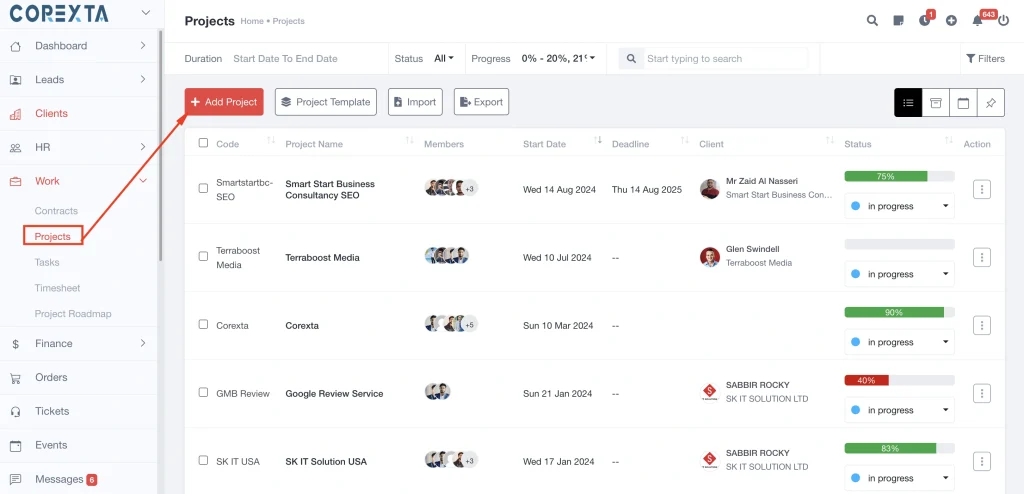
While Trello and Slack are popular for task management and team communication respectively, businesses often find themselves juggling between the two tools—or paying for both—just to cover the basics of team collaboration. This is where Corexta steps in as a powerful alternative.
Corexta is an all-in-one workspace management platform designed to centralize project management, communication, and team collaboration in one place. Unlike Trello, which focuses only on task management, or Slack, which emphasizes messaging, Corexta combines the strengths of both into a unified environment. With its integrated task tracking, real-time communication, document management, and reporting features, Corexta eliminates the need to switch between multiple tools, reducing complexity and costs for teams.
Corexta is especially useful for startups, remote teams, and growing businesses that need a scalable, customizable, and secure collaboration solution. It helps organizations manage not just tasks or messages, but the entire workflow—from project planning to execution and reporting—within a single platform.
Key Workspace Management Features in Corexta
-
Unified Workspace Dashboard – Corexta provides a centralized hub where teams can access projects, tasks, chats, and files without switching platforms.
-
Project & Task Management – Similar to Trello, Corexta offers Kanban boards, timelines, and Gantt charts for effective project planning.
-
Built-In Communication Tools – Includes instant messaging, group chats, and video conferencing to reduce reliance on external apps like Slack or Zoom.
-
Document & File Sharing – Secure file storage and real-time collaboration on documents within the platform.
-
Custom Workflows – Teams can design workflows tailored to their processes, whether it’s agile development, marketing campaigns, or HR recruitment.
-
Advanced Analytics & Reporting – Provides detailed project insights, productivity metrics, and performance dashboards.
-
Time Tracking & Resource Allocation – Helps managers optimize workload distribution and track billable hours.
-
Integration-Friendly – Corexta can integrate with popular tools like Google Workspace, Microsoft 365, and GitHub, making adoption seamless.
-
Automation – Automates repetitive tasks such as approvals, task assignments, and deadline reminders.
-
Scalable Security & Access Controls – Enterprise-level security features, including encrypted communication and role-based access.
Pros of Corexta
-
Combines task management and communication in a single tool.
-
Reduces the need for multiple paid subscriptions (like Trello + Slack).
-
Highly customizable workflows suitable for different industries.
-
Supports both synchronous (real-time) and asynchronous (task-based) collaboration.
-
Provides built-in reporting and analytics, which are missing in Trello and Slack.
-
Scales from small teams to large enterprises with advanced admin controls.
-
Improves efficiency by minimizing tool fatigue (the constant switching between apps).
Corexta Pricing
-
Free Trial – Allows new users to test features before committing.
-
Starter Plan (around $9.99 per user/month) – Covers essential project and communication features for small teams.
-
Professional Plan (around $19.99 per user/month) – Includes advanced task management, integrations, and enhanced reporting.
-
Enterprise Plan (Custom pricing) – Tailored for large organizations needing dedicated support, advanced compliance, and customization.
Compared to Trello and Slack, Corexta’s pricing is more cost-effective when considering it combines two platforms into one. Instead of paying $5 for Trello and $7.25 for Slack separately, teams can invest in Corexta and access both features in a unified platform.
What Users Think About Corexta for Team Collaboration
Corexta is often praised for its all-in-one functionality. Users highlight how it simplifies workflows by combining project tracking and communication under one roof. Teams appreciate the intuitive interface, which makes it easy to adopt even for non-technical members.
Remote teams especially value Corexta’s built-in video conferencing and chat tools, as it eliminates the need for juggling between Slack, Zoom, and Trello. Many users also note that Corexta’s analytics and reporting tools provide deeper insights into team productivity than Trello or Slack individually.
Some users have mentioned that because Corexta is relatively new compared to Trello and Slack, its ecosystem of third-party integrations is still expanding. However, most agree that its native features compensate for this limitation, making it a solid choice for organizations looking for a consolidated collaboration platform.
Why Choose Corexta Over Trello vs Slack?
Choosing between Trello and Slack often comes down to whether your team prioritizes task management or real-time communication. But for many organizations, this decision creates an unnecessary trade-off. In reality, modern teams need both effective project tracking and seamless communication. Corexta bridges this gap by offering an integrated solution that combines the best of both worlds.
Here’s why businesses should consider Corexta over Trello and Slack:
All-in-One Platform
-
With Trello, you manage tasks but need Slack for communication. With Slack, you chat but still need Trello (or Asana/Jira) for structured project tracking.
-
Corexta eliminates this two-tool dependency, saving time, effort, and subscription costs.
Cost-Effectiveness
-
Trello + Slack together can easily cost $12–15 per user/month (or more for advanced plans).
-
Corexta offers a consolidated pricing model with comparable or lower costs, making it budget-friendly for growing teams.
Better Workflow Efficiency
-
Switching between apps leads to “context switching,” which reduces productivity.
-
Corexta centralizes projects, tasks, messages, and files, ensuring smooth and uninterrupted workflows.
Enhanced Reporting and Analytics
-
Trello’s reporting is limited, and Slack doesn’t provide actionable productivity analytics.
-
Corexta provides comprehensive dashboards and reports to help managers make data-driven decisions.
Scalability for Modern Teams
-
Trello struggles with large-scale enterprise projects, while Slack can become overwhelming with too many channels.
-
Corexta is built to scale seamlessly with both startups and enterprises, offering role-based access, admin controls, and enterprise-level security.
Reduced Tool Fatigue
-
Teams often experience burnout when juggling between too many apps.
-
Corexta simplifies collaboration by replacing multiple subscriptions with one platform.
Support for Hybrid and Remote Work
-
Corexta’s mix of synchronous communication (chat, video) and asynchronous collaboration (boards, tasks) makes it ideal for hybrid and remote teams.
If your team is deciding between Trello and Slack, the truth is that neither tool alone can provide a complete collaboration ecosystem. Trello excels at task management but lacks real-time communication. Slack is perfect for messaging but falls short on structured project tracking.
Corexta stands out as the best alternative by combining the strengths of both into one streamlined platform. For teams that value simplicity, cost savings, scalability, and productivity, Corexta is not just an alternative—it’s the smarter long-term choice for team collaboration.









