Comparing Costs of the Top 10 ERP Systems
ERP software pricing varies based on deployment type, number of users, implementation complexity, industry requirements, and customization needs. In 2026, most ERP vendors now offer cloud-based subscription pricing, while some still support on-premise licensing for larger organizations that require more control and security.
Implementation costs are often the biggest expense in an ERP project. Many companies spend 1–3 times more on implementation, customization, training, and integrations than on software licenses alone.
Below is a detailed comparison of the top ERP systems and their estimated pricing ranges for 2026.
1. NetSuite ERP

NetSuite ERP remains one of the most popular cloud ERP systems for growing companies. It is widely used for financial management, inventory control, CRM, eCommerce, and supply chain operations.
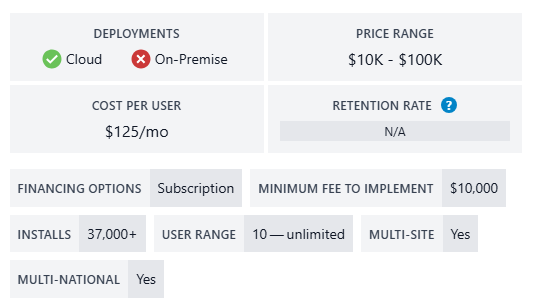
The platform serves more than 37,000 businesses globally and is especially popular among mid-sized organizations looking for a scalable cloud ERP solution.
Estimated Pricing in 2026
- Starting software cost: Around $125 per user/month
- Typical annual software cost: $10,000–$100,000+
- Minimum implementation cost: Around $10,000
- Average mid-market implementation: $40,000–$150,000
- Large enterprise deployments can exceed $500,000
Best For
- Fast-growing businesses
- Multi-location companies
- Retail and eCommerce businesses
- Companies needing strong financial reporting
Key Cost Drivers
- Advanced reporting modules
- CRM integration
- Multi-country operations
- Custom workflows
- Third-party integrations
Many businesses choose NetSuite because of its strong cloud infrastructure and real-time analytics. However, costs can increase quickly as additional modules and users are added.
2. Epicor Kinetic
Epicor Kinetic is designed mainly for manufacturing, distribution, and industrial businesses. It offers both cloud and on-premise deployment options.
The ERP focuses heavily on production planning, warehouse management, supply chain visibility, and manufacturing automation.
Estimated Pricing in 2026
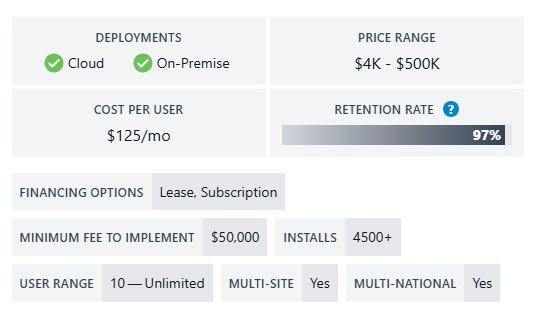
- Subscription pricing starts near $125 per user/month
- ERP software pricing range: $4,000–$500,000
- Minimum implementation cost: Around $50,000
- Enterprise implementations often exceed $250,000
Best For
- Manufacturers
- Industrial suppliers
- Distribution companies
- Global production businesses
Important Cost Considerations
- Manufacturing execution system (MES) setup
- Inventory management complexity
- Supply chain integrations
- Shop floor automation
- Multi-site deployment
Epicor projects often require larger implementation budgets because manufacturing workflows usually involve deep customization and process mapping.
3. Infor CloudSuite Industrial
Infor CloudSuite Industrial is a cloud-first ERP solution focused on manufacturing and industrial operations. It is known for industry-specific functionality and AI-powered analytics.
Infor provides advanced tools for demand planning, inventory management, production scheduling, and supply chain optimization.
Estimated Pricing in 2026
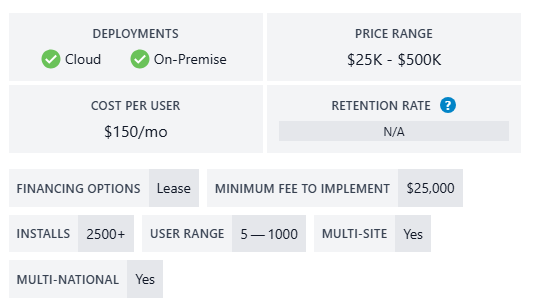
- Software subscriptions usually begin around $150–$250 per user/month
- Mid-market implementations typically range from $50,000–$300,000
- Large enterprise rollouts can exceed $1 million
Best For
- Process manufacturing
- Aerospace
- Automotive suppliers
- Industrial manufacturing
Key Pricing Factors
- AI forecasting tools
- Advanced analytics
- Industry-specific modules
- Multi-country support
- Cloud infrastructure scaling
Infor is often more expensive than basic ERP platforms because of its specialized industry capabilities.
4. Cetec ERP

Cetec ERP is a lower-cost cloud ERP solution focused on small manufacturers and electronics companies.
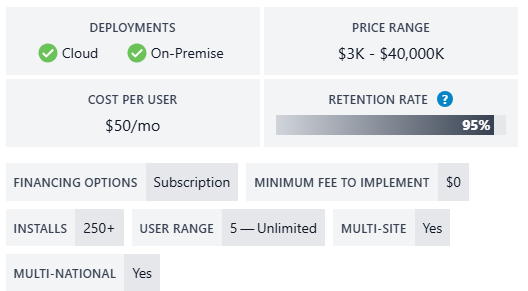
Compared to enterprise ERP systems, Cetec ERP offers affordable pricing and faster implementation timelines.
Estimated Pricing in 2026
- Monthly subscription costs start around $40–$50 per user
- Typical annual costs range from $2,000–$15,000
- Small business implementations often stay below $10,000
Best For
- Small manufacturers
- Electronics businesses
- Startups
- Small production shops
Main Advantages
- Lower upfront costs
- Faster deployment
- Cloud-based access
- Lightweight implementation
Cetec ERP is usually selected by businesses that want ERP functionality without enterprise-level pricing.
5. SAP S/4HANA
SAP S/4HANA is one of the most advanced ERP platforms available in 2026. It is designed mainly for large enterprises with complex global operations.
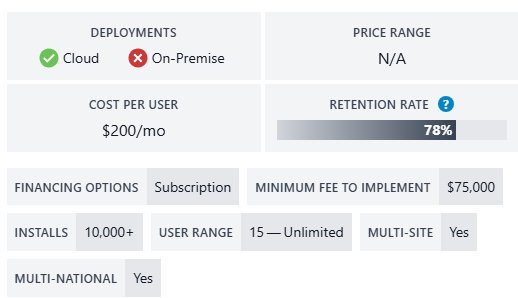
The system supports finance, procurement, HR, manufacturing, analytics, supply chain management, and AI-driven automation.
Estimated Pricing in 2026
- User pricing can range from $150–$400+ per month
- Enterprise implementation projects often start around $250,000
- Global enterprise deployments can exceed several million dollars
Best For
- Large enterprises
- Global corporations
- Multi-national manufacturers
- Highly regulated industries
Major Cost Drivers
- Long implementation timelines
- Advanced customization
- Global deployment requirements
- Data migration complexity
- Dedicated consulting teams
SAP implementations are known for being highly complex. Some enterprise projects may take 12–24 months or longer to complete.
6. Acumatica Cloud ERP

Acumatica uses a resource-based pricing model instead of charging purely by user count. This makes it attractive for companies with large teams.
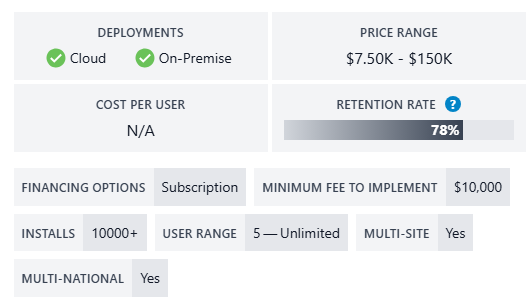
The ERP provides strong financial, inventory, project accounting, and distribution management features.
Estimated Pricing in 2026
- Pricing commonly ranges from $1,800–$5,000 per month
- Typical implementation costs begin around $10,000
- Mid-sized deployments often cost $50,000–$200,000 total
Best For
- Distribution companies
- Construction firms
- Service businesses
- Mid-sized manufacturers
Cost Advantages
- Unlimited user pricing structure
- Flexible cloud deployment
- Strong mobile functionality
- Modular purchasing options
Acumatica is popular among businesses that expect rapid user growth because licensing is based more on system usage than user seats.
7. Sage X3 ERP

Sage X3 is designed for mid-sized and large businesses that need strong financial management and supply chain control.
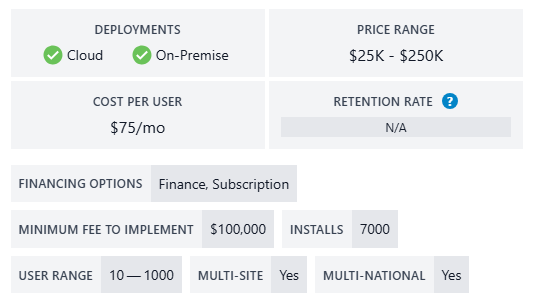
It supports both cloud and on-premise deployment models.
Estimated Pricing in 2026
- Cloud pricing starts around $75 per user/month
- On-premise licensing starts near $25,000
- Minimum implementation costs usually begin around $100,000
- Enterprise deployments can exceed $500,000
Best For
- Wholesale distribution
- Food manufacturing
- Chemical companies
- Multi-currency organizations
Major Cost Factors
- Workflow customization
- Global financial operations
- Multi-company support
- Reporting and analytics setup
Sage X3 is often selected by businesses that need flexible workflows and international business support.
8. Microsoft Dynamics 365 Business Central
Microsoft Dynamics 365 Business Central is one of the fastest-growing ERP systems for small and mid-sized businesses.
The ERP integrates deeply with Microsoft products like Excel, Teams, Power BI, and Office 365.
Estimated Pricing in 2026
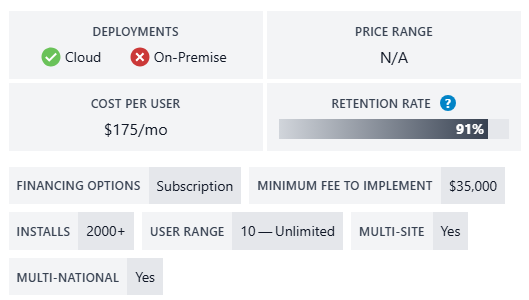
- Around $70–$175 per user/month
- Typical software cost for 25 users: $30,000–$50,000 annually
- Minimum implementation cost: Around $35,000
- Mid-sized implementations: $75,000–$180,000
Best For
- Microsoft-focused businesses
- SMBs
- Retail companies
- Service businesses
Important Cost Drivers
- Power BI integration
- Manufacturing add-ons
- CRM modules
- Data migration
- Custom reporting
Business Central is often considered one of the best ERP systems for balancing affordability, scalability, and functionality.
9. QAD Adaptive

QAD Adaptive ERP focuses heavily on manufacturing, automotive, pharmaceutical, and supply chain industries.
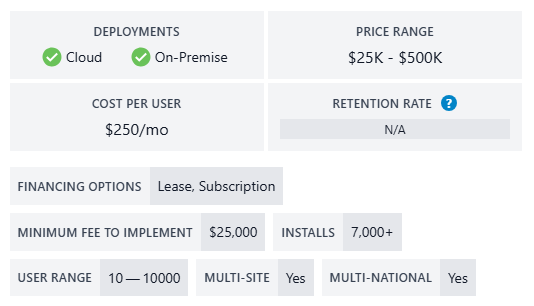
The platform includes advanced production management, quality control, and global trade compliance tools.
Estimated Pricing in 2026
- Subscription pricing usually starts around $150–$300 per user/month
- Typical implementation projects range from $100,000–$1 million+
Best For
- Automotive manufacturing
- Pharmaceutical companies
- Global supply chain businesses
- Enterprise manufacturers
Major Pricing Factors
- Compliance management
- Supply chain complexity
- International operations
- Industry-specific modules
QAD implementations are usually larger and more complex because they target highly regulated industries.
10. DELMIAWorks

DELMIAWorks, previously known as IQMS, combines ERP and manufacturing execution system (MES) capabilities into one platform.
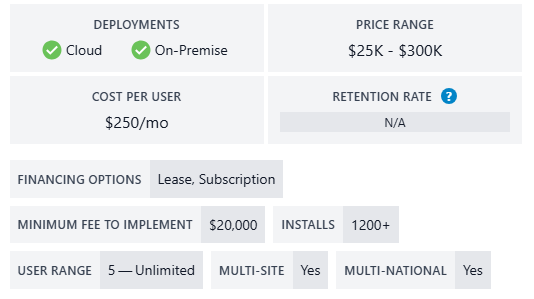
It is widely used by manufacturing companies that require real-time shop floor monitoring and production tracking.
Estimated Pricing in 2026
- ERP software pricing commonly starts around $25,000
- Mid-sized manufacturing deployments range from $75,000–$300,000
- Enterprise implementations may exceed $1 million
Best For
- Manufacturing companies
- Plastic injection molding
- Automotive suppliers
- Production-heavy operations
Main Cost Drivers
- MES integrations
- Production automation
- Real-time machine monitoring
- Warehouse management setup
DELMIAWorks is usually more expensive than lightweight ERP systems because it combines ERP functionality with advanced manufacturing tools.
What is an ERP System and Why is it Worth the Investment?
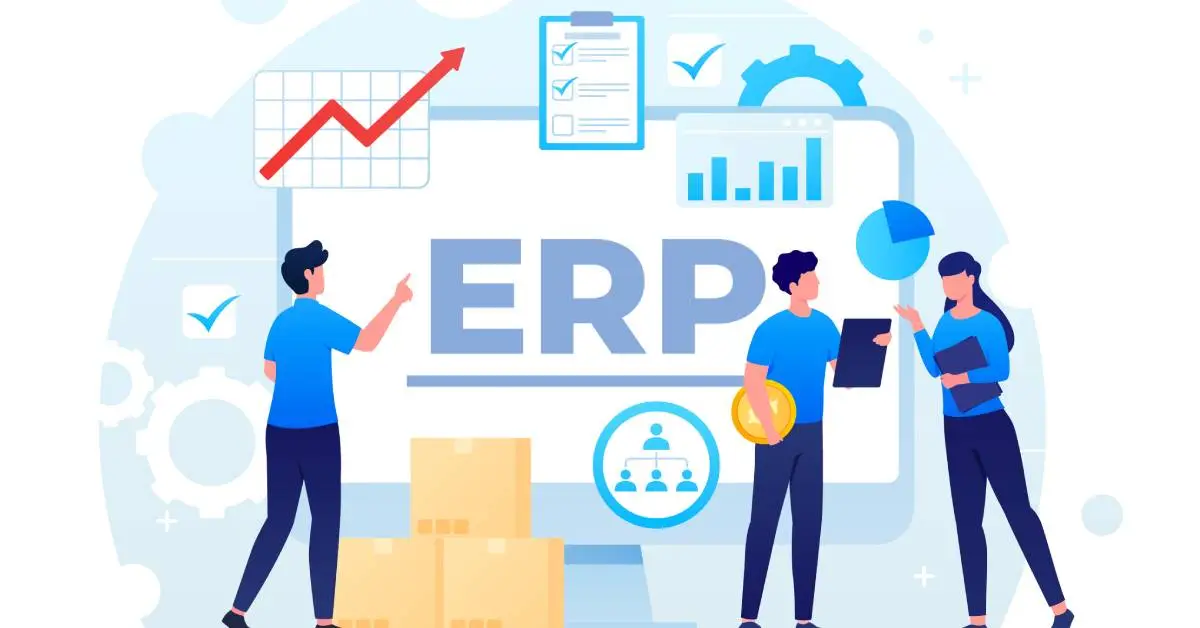
An ERP (Enterprise Resource Planning) system is business management software that connects core company operations into one centralized platform. Instead of using separate tools for accounting, inventory, sales, HR, manufacturing, purchasing, and customer management, ERP software allows businesses to manage everything through a single system.
Modern ERP platforms help companies automate repetitive tasks, improve reporting accuracy, reduce manual errors, and gain real-time visibility into operations. In 2026, ERP systems have become even more powerful because many now include AI-driven analytics, automation tools, predictive forecasting, and cloud-based collaboration features.
ERP software is no longer used only by large enterprises. Small and mid-sized businesses now adopt cloud ERP solutions because they are more affordable, scalable, and easier to deploy than older on-premise systems.
Why Businesses Invest in ERP Systems
Many businesses invest in ERP software to solve operational inefficiencies caused by disconnected systems and manual workflows. Without ERP software, companies often struggle with:
- Duplicate data entry
- Inventory inaccuracies
- Delayed reporting
- Poor communication between departments
- Slow financial closing processes
- Lack of real-time business visibility
ERP systems solve these problems by creating a unified business environment where all departments work from the same data source.
For example, when a sales order is created inside an ERP system, inventory levels update automatically, accounting records are adjusted in real time, and warehouse teams receive fulfillment instructions instantly. This level of automation reduces delays and improves operational efficiency.
Research in 2026 shows that businesses increasingly view ERP software as a long-term investment rather than simply a software expense. Many organizations now prioritize ERP systems because they improve productivity, support scalability, and strengthen decision-making through real-time analytics.
Key Business Benefits of ERP Software
Improved Efficiency
ERP systems automate routine business tasks such as invoicing, payroll, inventory tracking, procurement, and reporting. This reduces manual work and helps employees focus on higher-value activities.
Better Financial Visibility
ERP software gives finance teams access to real-time dashboards, automated reporting, and faster month-end closing processes. Businesses can monitor profitability, expenses, and cash flow more accurately.
Centralized Data Management
Instead of storing data across spreadsheets and disconnected applications, ERP software keeps information in one centralized database. This improves accuracy and reduces data duplication.
Better Decision-Making
Modern ERP systems provide advanced analytics and AI-powered forecasting tools. Companies can identify trends, predict demand, and respond faster to operational challenges.
Scalability for Growth
Cloud ERP platforms allow businesses to add users, modules, and features as they grow. This flexibility is especially important for rapidly expanding companies.
Improved Customer Experience
ERP systems improve order processing, delivery tracking, inventory availability, and customer communication. Faster operations often lead to higher customer satisfaction.
The Factors that Affect the Price of ERP
ERP pricing depends on many technical and business-related factors. The final cost can vary significantly between companies, even when using the same ERP platform.
Below are the most important factors that affect ERP pricing in 2026.
Business Size
Larger companies usually require more users, advanced workflows, deeper integrations, and additional modules. This increases software licensing, implementation, and support costs.
A small business may spend under $25,000 during the first year, while enterprise-level ERP projects can cost several million dollars.
Number of Users
Many ERP vendors use per-user pricing models. The more employees using the system, the higher the subscription or licensing cost becomes.
For example:
- 10 users may cost a few thousand dollars annually
- 100+ users may increase annual licensing into six figures
Some ERP vendors now offer unlimited-user pricing models, but these systems often charge based on system resources or transaction volume instead.
Deployment Method
ERP deployment type strongly affects total cost.
Cloud ERP
Cloud ERP systems usually require lower upfront investment because businesses pay monthly or annual subscription fees.
Benefits include:
- No server hardware costs
- Automatic updates
- Lower internal IT requirements
- Faster deployment
Cloud ERP systems typically reduce first-year costs by 40–60% compared to on-premise deployments.
On-Premise ERP
On-premise ERP requires businesses to purchase servers, infrastructure, licenses, and IT support systems.
Although upfront costs are much higher, some enterprises prefer on-premise ERP for:
- Greater customization
- Internal data control
- Compliance requirements
- Long-term ownership benefits
Customization Requirements
ERP customization is one of the largest hidden cost drivers.
Simple ERP deployments using standard workflows are cheaper and faster to implement. However, businesses with highly specific operational requirements often require:
- Custom dashboards
- Industry-specific workflows
- Specialized reports
- Third-party integrations
- Unique automation rules
Heavy customization can increase ERP implementation costs dramatically and also create higher maintenance expenses later.
ERP Modules
ERP systems are usually modular. Businesses only pay for the features they need.
Common ERP modules include:
- Finance and accounting
- CRM
- Inventory management
- Manufacturing
- HR and payroll
- Procurement
- Supply chain management
- Project management
Adding more modules increases both software and implementation costs.
Data Migration Complexity
Migrating old business data into a new ERP system can be expensive and time-consuming.
Data migration costs often include:
- Cleaning inaccurate records
- Formatting legacy data
- Importing large databases
- Testing migrated information
Many ERP projects allocate 10–20% of the implementation budget to data migration alone.
Employee Training
ERP systems require employee onboarding and training. Companies often underestimate these costs during budgeting.
Training expenses may include:
- Internal workshops
- Vendor-led training sessions
- Learning materials
- Temporary productivity losses during adoption
In 2026, change management and employee training commonly represent 5–15% of total ERP implementation budgets.
AI and Advanced Technologies
Modern ERP systems increasingly include:
- AI-powered forecasting
- Predictive analytics
- Intelligent automation
- AI copilots
- Machine learning tools
These advanced capabilities often increase subscription costs but can significantly improve operational efficiency.
Common Misconceptions About ERP Pricing
Many businesses misunderstand ERP pricing because vendors often advertise only the software subscription cost while excluding implementation and long-term operational expenses.
Here are the most common ERP pricing misconceptions in 2026.
“Cloud ERP is Always Cheap”
Cloud ERP systems reduce upfront costs, but subscription fees continue over time. Businesses may also face additional charges for:
- Extra storage
- API usage
- Advanced analytics
- Additional modules
- Increased user counts
Over several years, cloud ERP subscription costs can become significant.
“ERP Software Cost Equals Total ERP Cost”
Software licensing is often only a portion of the full ERP investment.
Implementation, customization, integrations, support, training, and maintenance can cost 1–3 times more than the software itself.
“ERP Implementation is Fast”
Many businesses assume ERP deployment takes only a few weeks. In reality:
- Small cloud ERP projects may take 3–6 months
- Mid-market deployments often require 6–12 months
- Large enterprise projects can take 12–24 months or longer
Complex customizations usually extend implementation timelines.
“More Features Always Mean Better Value”
Some companies overspend on advanced ERP modules they never fully use.
Choosing unnecessary modules increases:
- Licensing costs
- Training complexity
- Maintenance requirements
- User confusion
Businesses often achieve better ROI by selecting only the features they truly need.
“On-Premise ERP is Dead”
Although cloud ERP dominates the market in 2026, many large organizations still use on-premise or hybrid ERP systems because of:
- Data sovereignty regulations
- Compliance requirements
- AI infrastructure needs
- Security preferences
- Customization flexibility
Some industries continue investing heavily in hybrid and private ERP environments.
Comparing Different ERP Pricing Models
ERP vendors use different pricing structures depending on deployment type, business size, and product strategy. Understanding these pricing models helps businesses estimate long-term ERP costs more accurately.
User-Based ERP Software Pricing
User-based pricing is the most common ERP pricing model in 2026.
Businesses pay a monthly or annual fee for each user accessing the system.
For example:
- Basic users may cost $50–$100 per month
- Advanced users may cost $150–$400+ per month
This model works well for smaller organizations because companies only pay for active users.
However, costs increase quickly as businesses grow.
Advantages
- Predictable monthly costs
- Easy scalability
- Lower upfront investment
Disadvantages
- Expensive for large teams
- Higher long-term subscription costs
- User licensing management complexity
ERP Software Module Pricing
Some ERP vendors charge separately for each module added to the system.
For example, finance may be included in the base package, while manufacturing, CRM, HR, and advanced analytics require additional fees.
This model allows businesses to customize ERP functionality based on operational needs.
Common Paid Modules
- CRM
- Manufacturing
- Supply chain management
- AI analytics
- HR and payroll
- Warehouse management
Advantages
- Flexible pricing
- Businesses pay only for needed features
- Easier phased implementation
Disadvantages
- Costs grow as modules increase
- Integration complexity may rise
- Long-term pricing becomes harder to predict
Enterprise ERP Software Licenses
Traditional on-premise ERP systems often use perpetual licensing models.
Businesses pay a large upfront fee to own the software license permanently.
Additional costs usually include:
- Annual maintenance fees
- Infrastructure costs
- Upgrade expenses
- Internal IT staffing
Advantages
- Long-term ownership
- Greater customization control
- Lower recurring subscription fees
Disadvantages
- Very high upfront costs
- Expensive infrastructure requirements
- Ongoing maintenance responsibilities
Enterprise ERP licensing can easily exceed hundreds of thousands of dollars for large organizations.
Resource/Usage-Based Pricing of ERP Software
Some modern ERP vendors now use resource-based pricing instead of charging per user.
Pricing may depend on:
- Transaction volume
- Storage usage
- Processing power
- API requests
- Revenue tiers
Acumatica is a well-known example of this pricing structure.
This model is useful for companies with many users but moderate transaction volumes.
Advantages
- Better scalability for large teams
- Flexible growth model
- Lower user licensing restrictions
Disadvantages
- Harder to forecast costs
- Usage spikes may increase expenses
- Monitoring resource consumption becomes important
ERP Implementation Costs Vary by Pricing Model
ERP pricing models directly affect implementation costs.
For example:
| Pricing Model |
Typical Implementation Complexity |
Cost Impact |
| User-Based SaaS |
Moderate |
Lower upfront cost |
| Module-Based ERP |
Variable |
Costs rise with added modules |
| Enterprise Licensing |
High |
Very expensive setup |
| Resource-Based ERP |
Moderate to High |
Depends on system usage |
Implementation services commonly include:
- System configuration
- Workflow setup
- Data migration
- User training
- Integration services
- Testing and deployment
In many ERP projects, implementation becomes the largest expense, often representing 40% or more of total ERP investment.
Comparing Costs of Different ERP Deployment Models
ERP deployment choice has a major impact on total ownership cost, scalability, maintenance, and long-term flexibility.
The three main ERP deployment models are:
- On-premise ERP
- Cloud ERP
- Hybrid ERP
Each model has unique cost structures and operational advantages.
Costs to Consider for On-Premise ERP Systems
On-premise ERP systems are installed on a company’s internal servers and infrastructure.
This deployment method gives businesses more control but usually requires much higher upfront investment.
Main On-Premise ERP Costs
- Software licensing
- Server hardware
- Data centers
- IT infrastructure
- Security systems
- Backup systems
- Internal IT staff
- Upgrade expenses
- Maintenance contracts
Many on-premise ERP projects require upfront investments ranging from $100,000 to several million dollars.
Advantages of On-Premise ERP
- Full data control
- Deep customization flexibility
- Better support for highly regulated industries
- Internal infrastructure ownership
Disadvantages
- Very high upfront costs
- Longer implementation timelines
- Higher IT staffing needs
- Expensive upgrades and maintenance
Cost Factors for Cloud-Based ERP Solutions
Cloud ERP systems are hosted by ERP vendors and accessed through web browsers or mobile applications.
This deployment model has become the dominant ERP approach for SMBs and mid-market businesses in 2026.
Common Cloud ERP Costs
- Monthly subscriptions
- User licensing
- Cloud storage fees
- Implementation services
- Integration costs
- Premium support plans
Cloud ERP typically reduces infrastructure costs because businesses do not need to maintain internal servers.
Advantages of Cloud ERP
- Lower upfront investment
- Faster deployment
- Automatic updates
- Remote accessibility
- Reduced IT maintenance
Disadvantages
- Long-term subscription costs
- Limited customization compared to on-premise systems
- Possible data residency concerns
- Ongoing dependency on vendors
Cloud ERP implementations are often completed within 3–6 months, which is usually faster than traditional on-premise deployments.
Cost Considerations for Hybrid ERP Deployment
Hybrid ERP combines cloud and on-premise infrastructure.
Businesses may keep sensitive operations on internal servers while using cloud ERP for scalability and remote access.
Hybrid ERP adoption continues growing in 2026 because many organizations want both flexibility and control.
Common Hybrid ERP Costs
- Cloud subscriptions
- Partial on-premise infrastructure
- Integration management
- Security synchronization
- Additional IT administration
Advantages
- Flexible deployment strategy
- Better compliance management
- Gradual cloud migration
- Improved business continuity
Disadvantages
- More complex system management
- Higher integration costs
- Dual infrastructure maintenance
Hybrid ERP can provide strong long-term value for organizations balancing security, scalability, and operational flexibility.
Maximize the Return on Investment of a New ERP System
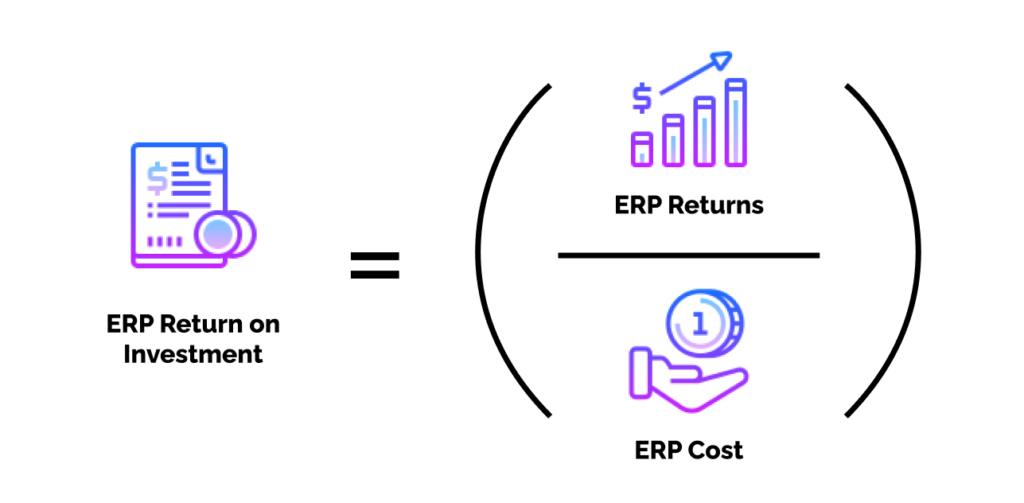
An ERP system is a major investment, so companies want to see strong returns from it. A successful ERP project can improve efficiency, reduce manual work, improve reporting, and support long-term growth. However, businesses only achieve these benefits when the implementation is planned properly. Research shows that most companies spend between 1% and 3% of annual revenue on ERP projects, so maximizing ROI is critical.
5 Ways to Maximize ROI When Purchasing an ERP System
Establish Clear Success Criteria
Before selecting an ERP platform, define what success looks like for your business. Many ERP projects fail because companies do not set measurable goals from the beginning.
Your success criteria may include:
- Reducing inventory costs
- Improving production planning
- Faster financial reporting
- Better customer service
- Reducing manual data entry
- Improving supply chain visibility
Clear goals help companies choose the right features and avoid paying for unnecessary modules. Businesses should also define KPIs before implementation starts. These KPIs may include reduced operational costs, shorter production cycles, or improved order accuracy.
Without measurable goals, it becomes difficult to evaluate whether the ERP investment actually delivered value.
Choose Wisely
Selecting the wrong ERP system can create long-term financial problems. Companies should focus on business fit instead of choosing software only based on price or popularity.
A good ERP solution should:
- Match current business processes
- Support future growth
- Integrate with existing tools
- Offer industry-specific functionality
- Scale with company expansion
- Provide strong vendor support
Businesses should also consider deployment flexibility, AI capabilities, mobile access, and customization needs. Modern cloud ERP systems now include built-in analytics and automation features that reduce operational costs over time.
Choosing an ERP with too many unnecessary features often increases implementation costs and employee confusion. On the other hand, choosing software with limited functionality may force expensive upgrades later.
Plan Ahead
ERP implementation requires careful preparation. Poor planning is one of the biggest reasons ERP budgets increase unexpectedly.
A strong implementation plan should include:
- Project timelines
- Data migration strategy
- Employee responsibilities
- Risk management plans
- Budget forecasts
- Integration requirements
- Testing schedules
Companies should also prepare for unexpected costs. Industry experts recommend adding a 20% budget buffer because implementation costs are often underestimated by 30% to 50%.
Businesses that rush ERP implementation usually face delays, poor adoption, and operational disruptions. A phased rollout often works better than deploying every module at once.
Invest in Employee Training
Even the best ERP system can fail if employees do not know how to use it properly. Training improves adoption and reduces mistakes after go-live.
Employee training should cover:
- Daily workflows
- Reporting tools
- Automation features
- Security procedures
- Department-specific tasks
Training should not stop after implementation. Businesses should continue educating employees as new features and updates become available.
Many organizations underestimate training costs, but poor training often creates productivity losses, workflow confusion, and resistance to change. According to ERP pricing research, training and change management can account for 5% to 15% of the total project budget.
Monitor Progress
ERP ROI does not happen overnight. Businesses should continuously monitor system performance after implementation.
Key areas to monitor include:
- Productivity improvements
- Cost reductions
- User adoption rates
- System downtime
- Reporting accuracy
- Inventory performance
- Customer satisfaction
Regular reviews help identify workflow problems early. Companies should also evaluate whether employees are using advanced ERP capabilities such as analytics, automation, and forecasting tools.
Modern ERP platforms often include dashboards and AI-powered reporting features that make performance tracking easier. Businesses that actively monitor ERP performance usually achieve faster ROI and better long-term value.
Hidden Costs of ERP Customization: What You Need to Know
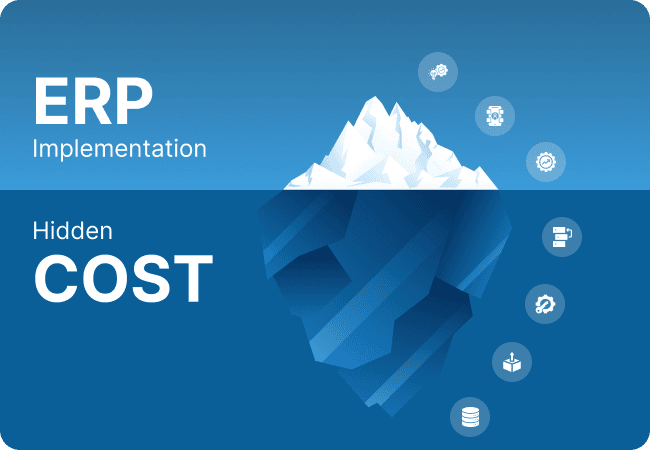
ERP customization allows businesses to adapt software to their specific workflows. While customization can improve efficiency, it can also create significant hidden costs if not managed carefully.
Many ERP projects exceed budgets because companies customize too much too early.
Smart vs. Costly Customization
Smart customization focuses on critical business needs. It improves workflows without making the system overly complex.
Examples of smart customization include:
- Industry-specific reporting
- Workflow automation
- Compliance features
- Essential integrations
Costly customization usually happens when businesses try to recreate every old process inside the new ERP system. This approach increases implementation time and creates future upgrade problems.
Experts often recommend adjusting business processes to fit ERP best practices instead of heavily modifying the software itself. Excessive customization can create technical debt and increase long-term maintenance costs.
Cost Impact of Customization
Customization affects ERP pricing in several ways.
Common cost increases include:
- Higher consulting fees
- Longer implementation timelines
- Increased testing requirements
- Additional developer resources
- Upgrade complications
- Integration complexity
Industry-specific modules alone can increase licensing costs by 10% to 30%. Third-party integrations may add thousands of dollars per integration depending on complexity.
Companies should also remember that every customization requires future support and updates.
ERP Software Cost
ERP software costs vary depending on:
- Number of users
- Deployment type
- Modules selected
- AI capabilities
- Customization level
- Industry requirements
Small businesses may spend between $3,000 and $25,000 during the first year, while large enterprises can spend millions depending on implementation scope.
Customization significantly increases these numbers because businesses must pay for additional development and support services.
Maintenance
Customized ERP systems often require ongoing maintenance after deployment.
Maintenance costs may include:
- Security updates
- Bug fixes
- Performance optimization
- Version upgrades
- Database management
- Integration monitoring
Cloud ERP systems generally reduce infrastructure maintenance, but customized cloud environments still require technical oversight.
Businesses should calculate long-term maintenance costs instead of focusing only on initial implementation pricing.
Staff Services
Many businesses require external consultants, developers, and implementation specialists during ERP deployment.
Staff service costs may include:
- ERP consultants
- Project managers
- Data migration specialists
- Trainers
- Developers
- Support teams
These services can become expensive during highly customized projects. Some ERP implementations cost two to three times more than the software licensing itself because of consulting and support expenses.
How to Choose the Right ERP Solution for Your Budget
Choosing an ERP system requires balancing functionality, scalability, and cost. Businesses should avoid selecting software based only on low pricing because hidden costs can quickly increase the total investment.
Here are important steps for choosing the right ERP solution within your budget:
Identify Core Business Needs
Start by identifying the most important business challenges. Focus on systems that solve operational problems instead of purchasing unnecessary features.
For example:
- Manufacturers may prioritize production planning
- Retailers may focus on inventory management
- Service businesses may need project tracking and CRM integration
Understand Total Cost of Ownership (TCO)
The ERP price is only part of the total cost.
Businesses must calculate:
- Licensing fees
- Implementation costs
- Training expenses
- Maintenance costs
- Hardware requirements
- Support services
- Upgrade costs
- Customization expenses
Experts recommend evaluating ERP costs across a 5- to 10-year period instead of only looking at first-year expenses.
Compare Deployment Models
Cloud ERP systems usually offer:
- Lower upfront costs
- Faster deployment
- Easier scalability
- Subscription pricing
On-premise ERP systems may offer:
- Greater control
- Long-term ownership
- More customization flexibility
Hybrid ERP deployments combine both approaches but may create additional integration complexity.
Evaluate Scalability
The ERP system should support future business growth. A system that works for 20 employees today may struggle with 200 employees later.
Businesses should consider:
- Multi-location support
- User scalability
- Advanced analytics
- AI automation
- International operations
- Industry expansion
Request Demos and Trials
Many ERP vendors offer free demos, sandbox environments, or trial periods. Testing the software helps businesses evaluate usability, reporting tools, and workflow compatibility before making a large financial commitment.
Work With Experienced ERP Consultants
ERP consultants help businesses avoid common mistakes during vendor selection and implementation planning.
Experienced consultants can help:
- Compare vendors
- Identify hidden costs
- Create realistic budgets
- Define implementation strategies
- Reduce customization risks
Frequently Asked ERP Pricing Questions
Is it possible to try ERP software before buying it?
Yes. Many ERP vendors offer free demos, trial environments, or guided product walkthroughs before purchase. These trials help businesses evaluate usability, reporting capabilities, workflows, and integration options before committing to a full implementation.
Some vendors also provide sandbox environments where businesses can test real business scenarios using sample data.
Is ERP software worth the cost?
For most growing businesses, ERP software is worth the investment because it improves efficiency, reduces manual work, and centralizes business data.
Research shows that many companies experience improved business processes after ERP deployment. Long-term benefits often include:
- Faster reporting
- Better inventory control
- Reduced operational costs
- Improved customer service
- Stronger data visibility
However, ROI depends heavily on proper planning, training, and implementation quality.
Why is ERP software so expensive?
ERP software is expensive because it manages multiple business functions inside one platform. ERP systems often include:
- Financial management
- Inventory control
- Supply chain management
- Human resources
- Production planning
- Analytics
- Automation tools
Implementation complexity also increases costs. Consulting, training, customization, integrations, and data migration often cost more than the software itself.
How much does a small business ERP cost?
Small businesses typically spend between $3,000 and $25,000 during the first year for ERP implementation depending on:
- Number of users
- Deployment type
- Required modules
- Customization level
- Vendor selection
Cloud ERP systems often provide more affordable entry points for smaller companies because they reduce hardware and infrastructure expenses.
What is the best-priced ERP system for a manufacturing company?
The best-priced ERP system depends on the manufacturing company’s size, complexity, production needs, and growth plans.
Smaller manufacturers often prefer modular or cloud-based ERP systems because they provide lower upfront costs and faster implementation. Larger manufacturers may require advanced production planning, supply chain management, and AI-powered analytics, which increase total costs.
Businesses should compare:
- Licensing structure
- Manufacturing modules
- Customization flexibility
- Implementation support
- Long-term scalability
- Industry-specific functionality
The cheapest ERP solution is not always the best value. Companies should focus on long-term operational improvements and total cost of ownership rather than only initial pricing.