As remote and hybrid work become the norm, teams need better tools to stay connected, productive, and engaged no matter where people are located. Sococo has been a popular solution that creates a virtual office space with rooms, voice, video, and chat. It lets teams see who is available, pop into conversations, and work together like they would in a physical office.
However, many teams today want platforms that do more than just mimic physical office layouts. They want tools that combine chat, video meetings, project tracking, task planning, workflows, and integrations with other apps. Some teams need immersive virtual spaces, others want deep task management or enterprise-level security. At the same time, price and scalability play a big role. Some companies need free or low-cost tools, while others need full business suite features with advanced analytics and integrations.
This guide introduces nine excellent alternatives to Sococo. These tools range from immersive virtual office platforms to comprehensive communication and collaboration suites. You’ll learn what they do, their best features, limitations, and real pricing so you can choose what fits your team’s size and work style best.
Why Go For Sococo Alternatives?
Sococo is a strong virtual office platform, but it may not fit every team’s needs. Some common reasons organizations look for alternatives include:
Broader Collaboration Needs: Teams might want more than just a virtual floor plan. They may need built-in task management, file storage, automation, or persistent chat channels to support their entire workflow. Many alternatives combine these capabilities to reduce the need for multiple apps.
Cost and Scalability: Sococo pricing can grow quickly as teams scale. Some alternatives offer more flexible pricing tiers or free plans for smaller groups, helping teams control costs while still getting essential features.
Specialized Features: Different industries and team structures may require specific tools. For example, tools that support frontline workforce management, large-scale webinars, or enterprise-grade security might be more suitable for particular use cases
Integration and Workflow: Many remote teams rely on multiple tools like calendars, cloud storage, project managers, and CRMs. Alternatives often have stronger native integrations that let teams work seamlessly without switching between apps.
For these reasons, exploring other platforms can help your team work more efficiently, reduce tool fragmentation, and stay aligned from anywhere.
Best Sococo Alternatives at a Glance
Below is a quick look at nine of the best Sococo alternatives. Each tool brings something unique for team collaboration, communication, or virtual office experiences. Pricing shown here is the most current publicly available.
| Tool | Best For | Starting Price |
|---|---|---|
| Corexta | Unified collaboration and task management | (Varies by plan, contact sales) |
| Tandem | Spontaneous team audio and video | Free plan; Paid from about $49/month |
| Kumospace | Immersive virtual office and engagement | Free plan; Paid from about $16/user/month |
| Teamflow | Virtual space with office-like interactions | Free plan; Paid from about $20/user/month |
| Microsoft Teams | Scalable enterprise communication | Free plan; Paid from about $4.80/user/month |
| Slack | Team messaging with integrations | Free plan; Paid from about $8.75/user/month |
| Zoom | Video meetings and webinars | Free plan; Paid from about $13.33/user/month |
| Connecteam | Frontline workforce management | Paid plans from about $35/month (flat) |
| Cisco Webex | Secure enterprise video conferencing | Free plan; Paid from about $14.50/user/month |
*Prices and plans are subject to change and may vary by billing cycle or region.
This snapshot helps you compare tools quickly before diving deeper into each one’s features and limitations in the next sections.
1. Corexta (Best for teams needing a unified platform for tasks and collaboration)
Corexta is an all-in-one business and collaboration platform designed to help teams work without needing many different apps. It brings project management, task tracking, client management, HR, finance, payroll, CRM, and communication together in a single workspace. This makes it ideal for teams that want to centralize work in one place instead of switching between separate tools for messaging, project planning, invoicing, and employee management. Corexta works well for remote and hybrid teams because it supports real-time collaboration and visibility across projects and departments.
Chat and video calls embedded in your workspace
Corexta includes built-in chat features so team members can send messages and stay in touch without needing a separate chat app. It also supports video and audio meetings inside the platform, which helps teams communicate live while working on tasks. Notifications and real-time updates are part of the system, so everyone stays aligned on progress and changes.
Powerful and integrated project management
Project management in Corexta is strong and flexible. Teams can plan work using task lists, Kanban boards, and timelines. You can assign tasks, set due dates, track progress, and monitor deadlines. Built-in time tracking lets you see how long tasks take, and dashboards give a clear view of the whole team’s workload. This unified approach reduces confusion and makes it easier to manage complex work.
Transform remote work with AI
Corexta aims to boost remote work by offering tools that automate routine work and centralize team activity. It uses data insights and automated alerts to help teams stay on track and improve productivity. Features like real-time collaboration, shared dashboards, and knowledge bases help teams communicate and find information quickly, no matter where team members are located.
Collaborate faster with handy templates
The platform includes ready-made templates for projects, tasks, and workflows. These templates help teams get started quickly without building everything from scratch. Whether planning a marketing campaign, onboarding new team members, or managing client projects, teams can use prebuilt templates to save time and maintain consistency.
Best features
True all-in-one platform replacing multiple apps for CRM, project planning, finance and HR.
Real-time chat and video conferencing inside the workspace.
Visual task planning tools like Kanban and dashboards.
Automation tools and templates for faster setup.
Reporting and analytics for tracking work and performance.
Limitations
Because it combines so many tools, new users may face a learning curve before using all features smoothly.
Smaller teams that need only basic chat or task lists might find some features more than they need.
Integrations with third-party tools beyond the most popular ones may be limited, so workflows that depend on niche tools might require workarounds.
Pricing
Corexta offers flexible pricing based on team size and needs:
Free plan: No cost; basic features and up to 5 users with limited storage.
Small Business: Approximately $9.99 per user per month, supporting up to 15 users and 2 GB storage with core management features.
Medium Business: Around $19.99 per user per month, adding payroll and more storage for up to 30 users.
Enterprise: About $29.00 per user per month, unlimited users, full feature access, and premium support.
Corexta also provides a free trial so teams can explore the platform before subscribing.
Ratings and reviews
Corexta consistently earns high user ratings across review platforms. Users highlight its ease of use, value for money, comprehensive functionality, and the ability to replace multiple tools with a single hub. Many reviewers note that it streamlines workflows and improves team efficiency. Some users do mention the initial setup and learning process can take time, but overall feedback is positive and supportive.
2. Tandem (Best for spontaneous catch-up meetings and seamless remote collaboration experience)

Tandem is a lightweight virtual office tool built to make remote teamwork feel more natural and less scheduled. Instead of relying on planned meetings, Tandem focuses on quick conversations, instant voice chats, and presence awareness. Team members can see who is available, busy, or away, which helps recreate the feeling of working side by side in a physical office. It works especially well for distributed teams that value fast communication and casual check-ins over long video calls.
Tandem runs quietly in the background while team members work. With one click, users can start a voice or video conversation without sending calendar invites or meeting links. This makes it easier to ask quick questions, brainstorm ideas, or resolve issues in real time. The tool is simple by design and does not try to replace full project management systems.
Best features
One-click voice and video conversations without scheduling
Live presence status showing availability in real time
Screen sharing for fast collaboration and feedback
Spatial audio that makes group conversations feel natural
Low system usage, allowing it to run all day without slowing work
Limitations
No built-in task or project management features
Limited customization compared to full virtual office platforms
Not ideal for large organizations needing advanced controls
Fewer integrations than all-in-one collaboration tools
Pricing
Tandem offers a simple pricing structure:
Free plan available for small teams with basic voice features
Pro plan starts at $49 per month for teams, billed annually
Enterprise pricing is available for larger organizations with custom needs
Pricing may vary based on team size and billing cycle.
Ratings and reviews
Users often praise Tandem for its simplicity and natural communication style. Many teams say it reduces meeting overload and helps remote work feel more human. Reviews also highlight its ease of setup and smooth audio quality. Some users note that it works best when paired with another tool for task and project tracking.
3. Kumospace (Best for immersive virtual offices and team engagement)

Kumospace is an immersive virtual office platform designed to boost team engagement and social interaction. Instead of a simple chat interface, Kumospace uses visual spaces like offices, lounges, and event rooms. Team members move their avatars around these spaces and join conversations naturally when they get close to others. This approach helps recreate office energy and encourages informal interactions.
Kumospace is popular with remote teams that want stronger culture, better bonding, and interactive meetings. It works well for daily work, team events, onboarding sessions, and virtual social gatherings. The platform supports both small teams and larger organizations that want a creative virtual workspace.
Best features
Customizable virtual office layouts and themed rooms
Proximity-based audio for natural group conversations
Built-in video chat and screen sharing
Support for large events, workshops, and presentations
Branding options for company-specific spaces
Limitations
Can feel distracting for teams focused on deep individual work
Requires stable internet for smooth experience
Learning curve for new users unfamiliar with virtual spaces
Not a replacement for full task or project management tools
Pricing
Kumospace offers flexible pricing options:
Free plan for small teams with limited room access
Paid plans start at $16 per user per month, billed annually
Higher-tier plans include larger spaces, advanced controls, and branding
Custom enterprise pricing available for large teams and events
Ratings and reviews
Kumospace receives strong feedback for its engaging design and ability to improve remote team culture. Users appreciate how it encourages casual conversations and social connection. Many reviews mention its value for team events and onboarding. Some users note that it works best when combined with traditional productivity tools.
4. Teamflow (Best for replicating physical office vibes in remote teams)

Teamflow is a virtual office platform designed to make remote work feel closer to an in-person office. It uses shared digital spaces where team members can move around, join conversations, and collaborate naturally. The goal is to recreate the small daily moments of office life, such as quick chats, group discussions, and spontaneous teamwork.
Teamflow combines video, chat, and shared workspaces in one visual environment. Team members appear as avatars inside the office layout. When people move closer to each other, conversations begin automatically. This makes communication feel more natural and reduces the need for scheduled meetings. Teamflow is well suited for creative teams, startups, and remote teams that value culture and real-time interaction.
Best features
Visual virtual office with shared rooms and spaces
Proximity-based video and audio conversations
Built-in screen sharing for quick collaboration
Shared whiteboards and links inside rooms
Easy onboarding with minimal setup required
Limitations
Not designed for deep project or task management
May feel distracting for teams that prefer quiet work time
Requires good internet for smooth video performance
Fewer advanced admin controls than enterprise tools
Pricing
Teamflow offers flexible pricing options:
Free plan for small teams with limited features
Paid plans start at $20 per user per month, billed annually
Business plans include larger office spaces and admin tools
Custom pricing available for larger organizations
Ratings and reviews
Users often praise Teamflow for its friendly interface and office-like feel. Many teams say it helps reduce isolation and improves communication. Reviews also highlight how easy it is to start conversations. Some users mention it works best when paired with a separate project management tool.
5. Microsoft Teams (Best for scalable enterprise communication & collaboration)

Microsoft Teams is a full-scale communication and collaboration platform built for businesses of all sizes. It combines chat, video meetings, file sharing, and collaboration tools into one system. Teams is widely used by organizations that already rely on Microsoft products, making it a strong choice for structured and secure collaboration.
The platform supports daily team communication, company-wide meetings, and large virtual events. It integrates deeply with tools like Word, Excel, PowerPoint, and cloud storage. Microsoft Teams is designed to scale easily, making it suitable for small teams, large enterprises, and global organizations.
Best features
Team and channel-based messaging system
High-quality video meetings and webinars
Deep integration with Microsoft 365 apps
Strong security and compliance controls
File sharing and real-time document collaboration
Limitations
Interface can feel complex for new users
Performance may slow with very large teams
Best experience requires Microsoft ecosystem
Fewer informal, spontaneous interaction features
Pricing
Microsoft Teams offers multiple pricing options:
Free plan with basic chat and meetings
Microsoft Teams Essentials at $4.80 per user per month
Microsoft 365 Business Basic at $6.00 per user per month
Higher business plans offer advanced security and tools
Prices may vary based on region and billing terms.
Ratings and reviews
Microsoft Teams receives strong ratings for reliability, security, and enterprise readiness. Users value its all-in-one nature and document collaboration features. Some reviews mention a learning curve, especially for new users, but overall feedback is positive for business use.
6. Slack (Best for flexible team messaging and integrations)

Slack is a popular team messaging platform focused on fast, organized communication. It replaces long email threads with channels that keep conversations clear and searchable. Slack is known for its flexibility and ability to connect with hundreds of other tools, making it a central hub for daily team communication.
Teams can create channels for projects, departments, or topics. Messages, files, and updates stay organized and easy to find. Slack works well for remote teams, tech companies, and businesses that rely on many apps and integrations.
Best features
Channel-based messaging for clear communication
Powerful search across messages and files
Large library of app integrations
Voice and video calls for quick check-ins
Custom notifications and workflow automation
Limitations
Limited features on the free plan
Can become noisy without proper channel management
No built-in project management system
Costs can rise as teams grow
Pricing
Slack offers several pricing tiers:
Free plan with limited message history
Pro plan at $8.75 per user per month, billed monthly
Business+ plan at $15.00 per user per month
Enterprise Grid pricing available for large organizations
Ratings and reviews
Slack is widely praised for improving team communication and reducing email use. Users like its clean design, speed, and integrations. Some reviews mention message overload in large teams, but overall ratings remain strong for flexibility and ease of use.
7. Zoom (Best for video meetings and webinars)

Zoom is a widely used video communication platform built for meetings, webinars, training sessions, and virtual events. It is known for stable video quality, ease of use, and the ability to support both small team meetings and large public webinars. Zoom works well for remote teams, educators, consultants, and businesses that rely heavily on face-to-face communication.
The platform allows users to join meetings with a single click, without complex setup. Zoom also supports chat, screen sharing, recording, and breakout rooms, which makes it useful for collaboration, presentations, and group discussions. It integrates easily into daily workflows and works across desktop and mobile devices.
Best features
High-quality video and audio meetings
Breakout rooms for group discussions
Screen sharing with presenter controls
Meeting recording with cloud storage options
Webinar and virtual event hosting tools
Limitations
Free plan has time limits on group meetings
Less suitable for ongoing team chat and collaboration
Security settings require proper configuration
Can feel meeting-heavy for teams wanting async work
Pricing
Zoom offers several pricing plans:
Free plan with meetings up to 40 minutes
Pro plan at $13.33 per user per month, billed annually
Business plan at $18.32 per user per month, billed annually
Enterprise pricing available for large organizations and events
Pricing may vary based on features and participant limits.
Ratings and reviews
Zoom consistently receives high ratings for reliability and ease of use. Users appreciate its stable performance, clear video quality, and simple interface. Reviews often highlight its usefulness for meetings and webinars, while some users note the need for other tools to manage tasks and collaboration.
8. Connecteam (Best for managing frontline and deskless workforce operations)

Connecteam is a workforce management platform designed for frontline, deskless, and mobile teams. It focuses on employee communication, scheduling, task management, and time tracking. Unlike traditional virtual office tools, Connecteam is built for teams that work in the field, on-site, or across multiple locations.
The platform helps managers communicate with employees, assign tasks, track work hours, and manage schedules from one place. Connecteam works well for industries like retail, construction, healthcare, logistics, and hospitality where workers may not sit at desks all day.
Best features
Employee communication through chat and announcements
Shift scheduling and time tracking tools
Task checklists and workflow tracking
Mobile-first design for field workers
HR tools for onboarding and compliance
Limitations
Limited video meeting capabilities
Not designed for immersive virtual offices
Less flexible for knowledge-based remote teams
Interface focuses more on operations than collaboration
Pricing
Connecteam uses a flat pricing model:
Small Business plan starts at $35 per month for up to 30 users
Basic plan at $59 per month for expanded features
Advanced plan at $119 per month with full workforce tools
Enterprise pricing available for large teams
Pricing is based on features rather than per-user costs.
Ratings and reviews
Connecteam receives strong feedback for helping managers organize frontline teams. Users value its ease of use, mobile accessibility, and scheduling tools. Reviews often mention improved communication and accountability, though some note it is not ideal for traditional remote office collaboration.
9. Cisco Webex (Best for enterprise-grade secure video conferencing)
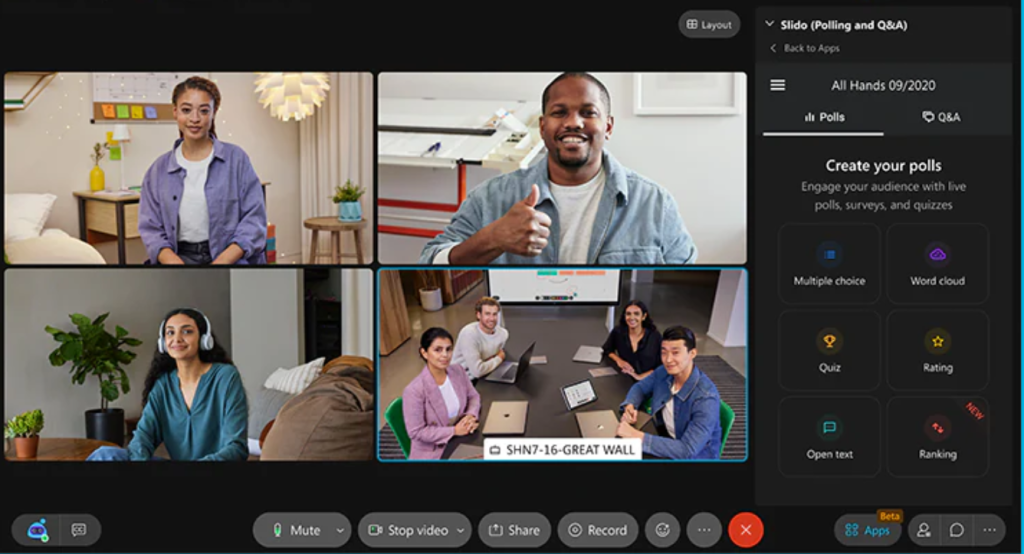
Cisco Webex is a professional communication platform built for secure video meetings, team messaging, and enterprise collaboration. It is commonly used by large organizations that require high security, compliance, and reliability. Webex supports meetings, webinars, calling, and internal messaging in one system.
The platform is designed to handle large meetings and global teams with strong performance. Webex also includes advanced security features, making it suitable for regulated industries such as finance, healthcare, and government organizations.
Best features
Enterprise-level video and audio quality
Advanced security and encryption controls
Team messaging and file sharing
Large meeting and webinar support
AI-powered meeting summaries and noise removal
Limitations
Interface may feel complex for new users
Higher cost compared to simpler meeting tools
Less casual and social than virtual office platforms
Best suited for structured business environments
Pricing
Cisco Webex offers several pricing options:
Free plan with limited meeting features
Webex Meet plan starting at $14.50 per user per month
Business plans with advanced controls and storage
Custom enterprise pricing for large organizations
Pricing depends on meeting size and feature needs.
Ratings and reviews
Cisco Webex is well rated for security, reliability, and enterprise readiness. Users appreciate its strong performance and professional tools. Some reviews mention a learning curve, but overall feedback is positive for organizations that need dependable and secure communication.
Upgrade Your Virtual Collaboration With Corexta
Corexta helps teams move beyond basic virtual offices by bringing everything they need into one connected workspace. Instead of switching between chat apps, project tools, spreadsheets, and HR systems, teams can manage daily work from a single platform. Tasks, projects, conversations, files, and team updates stay linked, which reduces confusion and saves time. This makes collaboration smoother, especially for remote and hybrid teams that rely on clear structure and visibility.
With built-in chat and video communication, teams can discuss work while viewing tasks and deadlines in real time. Project management tools allow managers to assign work, track progress, and balance workloads without extra software. Ready-to-use templates help teams start faster, while automation and smart workflows reduce manual effort. Corexta also supports growing teams by scaling features across departments like operations, finance, and HR.
If your team wants fewer tools, better focus, and stronger collaboration, Corexta offers a practical upgrade. It helps teams stay aligned, productive, and organized from anywhere. Explore Corexta today, experience a more connected way to work, and take the next step toward smarter virtual collaboration.
Read More: 12 Best No-Code Tools for Product Managers in 2026