The world of business communication is rapidly evolving — and by 2026, artificial intelligence has become a core part of how companies engage with customers. Messaging apps are no longer just tools for casual chats; they are powerful commerce, support, and relationship platforms. With over 3 billion people using messaging apps globally, incorporating AI into these conversations lets businesses respond faster, personalize experiences, and streamline support without adding extra staff.
Meta AI represents one of the most accessible and widely adopted artificial intelligence systems embedded into everyday messaging platforms. Because it’s integrated right where people are already active (WhatsApp, Messenger, Instagram), it can help businesses engage more meaningfully — from drafting replies to generating creative ideas and automating repetitive tasks. In this guide, you’ll learn exactly what Meta AI is, how to access it across core platforms, and how it can transform business messaging workflows in 2026.
What Is Meta AI?
Meta AI is an artificial intelligence assistant developed by Meta Platforms that leverages large language models to understand and generate human-like text, answer questions, and assist with a variety of tasks. It’s built into multiple social and messaging apps, making it one of the most accessible AI tools for both consumers and businesses.
At its core, Meta AI combines natural language processing with contextual awareness so users — including business teams — can:
Ask questions in plain language and receive useful, conversational responses
Generate written content such as replies, summaries, or creative messages
Get help brainstorming ideas, plans, and campaigns
Create visuals and simple media assets (in supported environments)
Collaborate in real-time within chats without leaving the app
Unlike standalone generative AI platforms, Meta AI is deeply integrated into messaging interfaces across Meta’s ecosystem, including WhatsApp, Messenger, and Instagram. This means businesses don’t need separate software to tap into conversational AI — they can instigate AI help directly within the platforms they already use.
In 2026, the strategic focus for Meta has shifted toward supporting AI features that enhance structured business interactions — such as customer support, order management, and messaging automation — while restricting general-purpose AI chatbots on certain business APIs. This ensures that AI improves business workflows without distracting from core messaging functions.
How to Access Meta AI on Messaging Platforms
In 2026, Meta AI has become one of the most widely available generative AI assistants across the major messaging platforms businesses use to interact with customers: WhatsApp, Messenger, and Instagram. Rather than requiring separate software or plugins, Meta AI is now embedded within these apps themselves — allowing business teams to ask questions, generate content, or get creative help directly where conversations already happen. This makes it easier to integrate AI into everyday workflows without disrupting how your team already works.
Accessing Meta AI on WhatsApp has been designed to be intuitive and fast. When you open the app, you’ll see a distinct AI icon at the top of your chat list — typically a small circle that signals the assistant is ready to help. You can tap this icon to begin a conversation with Meta AI whenever you need assistance drafting messages, answering questions, brainstorming ideas, or preparing quick responses on the fly.
If your business is using the WhatsApp Business app, Meta AI works directly within the same interface. This means you don’t need a separate account or third-party service just to get creative or language support — it is part of the standard experience. However, there is an important distinction: Meta AI conversations are separate from your customer chats. When you ask Meta AI for help, it’s in a private interface used by your team, not something that automatically interacts with customers in live chats.
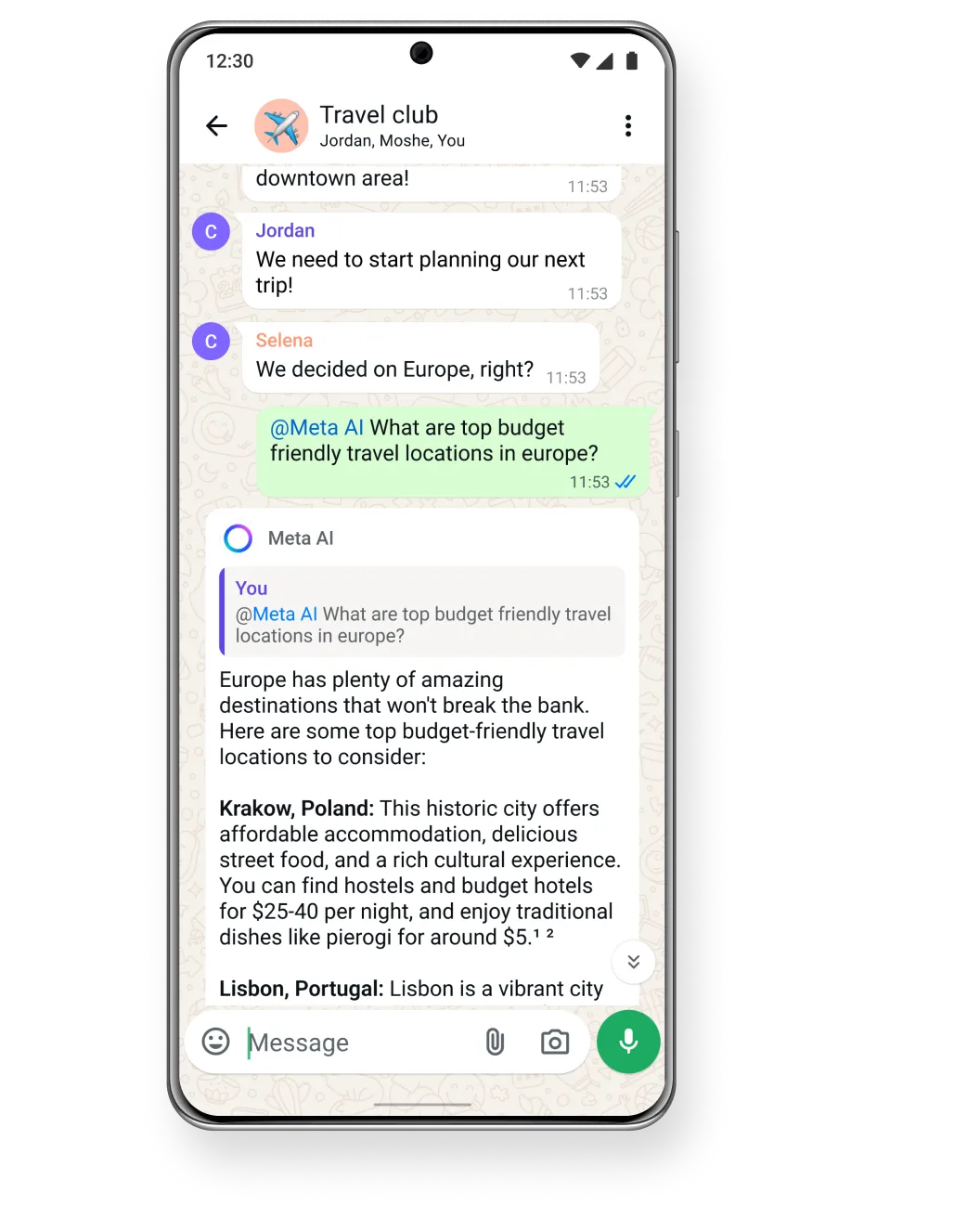
That said, you can bring Meta AI into your team discussions within group chats. Simply type @Meta AI followed by your question or prompt, and the AI will generate responses directly in the group conversation. This makes it a collaborative tool for drafting ideas, refining content, or exploring different messaging strategies without leaving WhatsApp.
It’s important to note that general-purpose AI chatbots external to Meta – like third-party assistants you might be used to – are no longer permitted to operate via the WhatsApp Business API as of early 2026. This change means that Meta’s integrated AI assistant is now the primary way businesses can leverage generative AI within WhatsApp itself. For other automated workflows, like support bots or transactional automation, you must still use structured API tools designed specifically for business use.
Messenger
Meta AI on Messenger offers many of the same advantages as on WhatsApp, but with a user interface that reflects Messenger’s design and feature set. When you open Messenger, you can tap the AI icon in the search bar — or start a new message and search for “Meta AI” — to begin interacting with the assistant. This gives you quick access to a powerful writing and ideation tool directly inside one of the most widely used chat platforms for customer engagements.
Once you’re in the AI chat interface, you can ask Meta AI to draft responses, craft promotional messages, suggest creative content, or help with strategic messaging questions. Because Messenger also supports media sharing, you can even ask Meta AI to help you generate simple visuals or captions to accompany your text.
Like on WhatsApp, you can also mention Meta AI within group discussions by typing @Meta AI. This enables your team to call on AI assistance without leaving the conversation flow, which is particularly useful during collaborative planning or when refining outreach strategies in real time.
The key difference from automated bots is that Meta AI does not independently send or manage replies to customers on behalf of your business. Instead, it helps the people handling the messages to work faster and with more creativity. Automated response bots set up through the platform’s business tools remain a separate capability designed for predefined workflows.

On Instagram, Meta AI lives within Direct Messages (DMs) and can be accessed similarly to Messenger. When you open your DMs, you’ll see an AI icon or search for “Meta AI” to begin a conversation. Once you start a session, the assistant can help draft quick responses, brainstorm caption ideas, or generate creative visuals — all within the familiar Instagram interface.

For businesses that use Instagram as a key communication channel, this has major implications. Instead of juggling multiple tools to prepare answers, captions, or content ideas, Meta AI brings that functionality straight into the conversations you’re already managing. Just like other platforms, you can also call on the assistant inside group chats by using @Meta AI, making it easy to collaborate with teammates.
One note for Instagram users is that any content generated by the AI — especially visuals or imagery — will be automatically labeled as AI-generated. This transparency helps your audience understand the nature of the content they’re seeing and keeps your messaging compliant with platform standards.
Ways to Use Meta AI for Business Messaging
Meta AI isn’t just an assistant for casual questions — it has practical, high-impact applications that help businesses scale their messaging, support operations, creative output, and customer interactions more efficiently. Below, we explore some of the most valuable ways businesses can leverage Meta AI in 2026.
Automate Customer Service Responses
Handling customer messages — especially repetitive questions — is one of the biggest drains on time for many businesses. Meta AI can dramatically reduce that workload by helping your team draft responses to common support inquiries quickly and consistently.
For example, instead of manually typing out the same reply about shipping times or return policies over and over, you can prompt Meta AI with a detailed instruction like:
“Generate a professional response to a customer asking about shipping times to Canada, highlighting express and economy options.”
Meta AI will produce a ready-to-use reply that your team can post directly to the customer. Because it understands context, tone, and intent, these responses can be tailored to fit your brand voice — whether formal, conversational, or promotional.
In group conversations between support agents, Meta AI makes it easy to collaborate on tricky or escalated cases. By referring to it with an @Meta AI prompt, team members can brainstorm phrasing options, troubleshoot messaging style issues, and ensure consistency across replies — all within the chat. This keeps the workflow fast and reduces the frustration that comes from shifting between separate tools or documents.
Additionally, in cases where support teams receive feedback about tone or clarity, Meta AI can quickly refine existing replies. Simply ask it to “make this explanation more friendly” or “shorten this to one sentence” and it will adjust the content on the fly — saving time and improving customer satisfaction.
Generate Quick Reply Templates
One of the biggest organizational challenges in business messaging is maintaining a library of quick reply templates that teams can reliably use. Meta AI can help here in two ways:
Template Creation: Ask Meta AI to generate a set of reply templates based on real customer needs. For example:
“Write five different responses to a customer asking about bulk order discounts.”
“Provide alternative replies for customers asking about product warranty terms.”
Meta AI will produce variations with different tones, lengths, and levels of detail — giving your team flexibility without manual drafting.
Template Optimization: If you already have existing replies, ask Meta AI to refine or standardize them. For instance:
“Rewrite these 10 replies to have a more professional tone.”
“Convert these responses to fit our friendly brand voice.”
Once generated, these templates can be stored in your internal messaging library, making them easy for all team members to retrieve and use. Over time, this builds up a structured repository that improves efficiency and ensures messaging quality stays consistent across platforms.
Brainstorm Messaging Content and Campaigns
Beyond quick replies, Meta AI is a powerful ideation partner for your broader messaging strategy. When you’re planning a campaign — whether it’s holiday greetings, promotional blasts, or new product launches — you can prompt it for creative concepts, content hooks, and message frameworks.
Examples of useful prompts include:
“Generate five ideas for an Instagram DM campaign promoting our summer sale.”
“Suggest engaging subject lines for a Messenger blast about free shipping.”
“Provide creative message hooks for WhatsApp stories connected to a new product launch.”
Meta AI integrates knowledge about communication patterns, customer psychology, and marketing best practices — helping your team think through strategic messaging challenges more quickly than traditional brainstorming sessions alone.
This can be especially helpful in planning phases. Instead of waiting for weeks of internal meetings, teams can draft initial proposals with Meta AI’s help, refine them together, and roll out campaigns with confidence.
Create Visuals for Chat Conversations
In addition to generating text, Meta AI can help create simple visuals that support your messaging. For example, within Instagram DMs, you can ask the assistant to generate images to accompany campaign messages or design quick graphic replies to share with customers.
This capability is especially useful for businesses that use visual elements as part of their communication — whether it’s a product highlight, event announcement, or illustrative response. Instead of using separate design tools or hiring graphic support for every small visual need, you can quickly generate imagery directly in the messaging interface and share it with your audience.
These visuals are typically designed to be engaging and contextually relevant — whether you’re highlighting a promotional offer, illustrating product features, or creating on-brand imagery for social engagement.
In all these use cases, Meta AI acts as an assistant to your team — not a replacement for dedicated automated systems. It helps your people work faster, more creatively, and with greater consistency across platforms like WhatsApp, Messenger, and Instagram. As business messaging volumes grow, integrating Meta AI into daily workflows helps keep response quality high while reducing fatigue and repetitive tasks.
Manage Your Business Messaging Workflows With Corexta

Managing business messaging effectively is about more than quick replies — it’s about creating a cohesive, structured workflow that aligns communication with projects, clients, tasks, and outcomes. That’s where Corexta comes into play: a unified business management platform designed to centralize key operational tools — including messaging — into one organized workspace.
Instead of juggling separate apps for messaging, task tracking, client management, and project work, Corexta brings everything together. This unified approach helps businesses avoid information silos, reduce context switching, and ensure messaging is always aligned with real business objectives — whether you’re communicating internally or engaging with customers.
A Central Hub for Business Messaging and Workflows
At its core, Corexta isn’t just a typical CRM or messaging app — it’s a full business work management platform that includes built-in communication alongside project, client, and task management. This means your messaging isn’t floating separately in another tool: it lives in the same environment where your teams plan, execute, and track work.
Here’s how Corexta enhances your business messaging workflows:
1. Integrated Internal Chat for Real-Time Collaboration
Corexta includes a native internal chat system that lets team members communicate directly within the platform. Instead of switching to external chat apps, you can discuss tasks, clarify customer queries, or brainstorm responses right where your team tracks work. This centralization eliminates scattered conversations and ensures messages are tied to project context.
Group and one-on-one chats for team coordination
Chat tied to specific tasks, projects, or clients
Searchable message history keeps context accessible
2. Real-Time Notifications Keep Conversations Moving
Automated notifications from Corexta — powered by systems like Pusher and OneSignal — alert team members instantly when there’s new activity: a message, task update, client reply, or deadline change. These live alerts ensure that important messaging never goes unnoticed, helping teams respond quickly and stay aligned.
3. Link Conversations to Work Items
Corexta allows teams to turn discussions into actionable tasks seamlessly. When a conversation reveals a new action item — such as a support follow-up, client request, or content task — you can convert that message into a task within Corexta. This prevents ideas or commitments from being lost in chat threads.
4. Messaging Integrated with Project Context
By integrating messaging directly with task lists, timelines, client records, and dashboards, Corexta ensures that communication stays context-aware. For example:
Messages about deliverable changes appear alongside that project’s timeline
Customer questions can be linked to CRM records
Task assignment notices can be communicated automatically through messages
This reduces confusion and ensures messages support real work rather than float separately.
Blend Customer Communication with Internal Workflows
Corexta isn’t just about internal team messaging — it also supports structured client communication. Through WhatsApp Business integration, you can manage customer outreach and marketing campaigns alongside project activities. This lets you automate client notifications, segment audiences, schedule broadcasts, and track interactions from the same platform you use for internal work.
In this setup, your business messaging flows become part of a larger workflow that includes task assignments, follow-ups, reporting, and performance tracking — all in one central hub. There’s no need to copy and paste messages between disparate tools or lose context as conversations evolve.
Reduce Fragmentation, Boost Efficiency
One of the biggest challenges in modern business communication is fragmentation — scattered chats, unread messages, and context lost across platforms. Corexta solves this by unifying communication with core business processes:
Everyone sees the same context: team members don’t have to dig through separate tools to understand what’s happening
Communication becomes actionable: chats can become tasks or part of client records
Notifications are purposeful, not disruptive: alerts occur within the broader workflow logic of your business
This consolidation reduces time wasted on context switching and gives your team a clear, organized workflow where messaging supports productivity rather than distracts from it.
Useful Features That Support Messaging Workflows
Here are some of the exact capabilities Corexta offers that directly support business messaging and workflow management:
Built-in internal chat that lives alongside tasks and projects
Real-time notifications from messaging, tasks, and project updates
Client and lead tracking with messaging history tied to CRM data
Task creation from conversations so nothing slips through the cracks
Integration with Slack to bring external messaging into your workflow
Push alerts via OneSignal to keep teams informed on mobile devices
Webhook support for customizing automated messaging triggers
WhatsApp Business outreach for structured client communication
By structuring messaging within a broader operational context, Corexta helps businesses transform reactive communication into strategic workflow — where every message becomes part of a coordinated process rather than an isolated exchange.
Use Meta AI for Speed — But Build a System for Scale

As powerful as Meta AI is for accelerating individual tasks like drafting replies or brainstorming messages, the real competitive advantage comes when you embed that AI assistance into a scalable messaging system. Relying solely on on-the-fly responses won’t support long-term growth. What you need is a framework that leverages Meta AI where it’s strongest — speed and creativity — while pairing it with process, structure, and tools built for scale.
Speed Is a Strength — But Context Is King
Meta AI is incredibly useful for generating content and ideas quickly. Whether you’re crafting customer responses, producing marketing copy, or ideating campaign themes, the assistant dramatically reduces the time from concept to execution. It turns hours of writing into minutes of refinement.
However, Meta AI alone doesn’t solve one of the biggest challenges in business messaging: consistency across teams and channels. Without a system to archive, standardize, and deploy your messaging — including approved templates, tone guides, and escalation protocols — fast responses can quickly become inconsistent or misaligned with brand strategy.
That’s why the first step in scaling with Meta AI is to combine its speed with structured workflows that ensure uniformity and quality.
Build Messaging Templates and Knowledge Repositories
Instead of treating Meta AI as a stand-alone answer machine, use it to help you build foundational messaging assets:
A library of approved reply templates for common customer questions
A repository of brand-aligned phrases, greetings, and sign-offs
Pre-written scripts for different platforms (WhatsApp vs Messenger vs Instagram)
Once Meta AI generates draft templates, your team reviews and refines them. Then store these templates in a centralized place — such as a CRM, shared document library, or a messaging workflow tool — so everyone can apply them consistently. This transforms Meta AI from a reactive assistant to a proactive content generator that fuels scalable communication.
Embed AI Into Your Workflow, Not Outside It
To scale effectively, integrate Meta AI into existing business processes, rather than leaving it as an isolated tool. Some best practices include:
1. Define Clear Usage Guidelines
Establish protocols for when and how to use AI assistance — for example, for first-draft writing, creative ideas, or tone variants — and when to refer to human expertise (e.g., sensitive customer issues).
2. Integrate With Tools That Support Scale
Use business platforms like Corexta or similar work management systems to embed messaging tasks into broader workflows. For instance:
Link AI-assisted response drafts to assigned support tickets
Automate follow-up reminders based on message outcomes
Track response performance and customer satisfaction metrics
This ensures that Meta AI outputs become part of a trackable workflow, not just one-off replies.
3. Review and Update Regularly
Scale means adaptation. Regularly audit your messaging templates, campaign outputs, and AI usage patterns to ensure they still reflect company goals, customer needs, and platform changes. Use insights from real interactions to fine-tune future AI prompts and templates.
Prioritize Human Oversight for Quality
Although AI speeds up content generation, human oversight remains essential — especially in sensitive interactions. For example:
Escalate complex or emotional customer situations to trained agents
Use AI to draft replies but have humans review for accuracy and brand tone
Ensure compliance with legal or data privacy standards
This hybrid approach — where AI accelerates but human judgment still governs final delivery — allows businesses to scale messaging without sacrificing quality or trust.
Use Metrics to Drive Continuous Improvement
Scaling messaging isn’t just about sending more messages — it’s about sending better messages that lead to measurable outcomes. Track key metrics such as:
Customer response times
Message resolution rates
Engagement levels across platforms
Template performance (which scripts lead to better results?)
Operational efficiency gains
By tying Meta AI usage to real performance data, you can prioritize improvements that directly impact your business goals.
Build a Framework That Outlasts Any Tool
AI tools will continue to evolve, but well-designed messaging workflows are durable. When you pair Meta AI’s capabilities with structured processes — clear templates, integrated management systems, performance tracking, and human oversight — you create a scalable messaging ecosystem that adapts as your audience grows and platforms change.
In 2026 and beyond, the most successful businesses won’t just use AI for speed — they’ll use it to accelerate smart, structured, and measurable messaging systems that support long-term growth.
Frequently Asked Questions
Is Meta AI free for business use?
Yes — Meta AI’s core features are currently free to use across messaging apps like WhatsApp, Messenger, and Instagram as of 2026. Businesses can access the assistant without paying subscription fees for basic AI assistance such as drafting replies, generating copy, or brainstorming ideas. While Meta is exploring paid premium AI tiers that may offer enhanced capabilities or priority performance in the future, the standard AI tools remain available at no direct cost.
However, it’s important to understand that “free” refers to the AI assistant’s functionality itself, not the broader infrastructure costs associated with enterprise tools. For example, businesses using messaging APIs or more advanced automation systems may incur platform usage or message delivery fees separate from Meta AI. Also, in specific cases where regulators require third‑party chatbot support, there are reports that Meta plans to charge developers per AI message response.
You don’t need to pay to use Meta AI’s base conversation, writing help, or image creation tools — but integrating AI into scalable business processes (such as automated customer service systems) may involve additional costs from messaging platforms or API providers.
Can you use Meta AI without a Facebook account?
Partially — yes. To use Meta AI within the main Meta social and messaging apps (WhatsApp, Messenger, Instagram), you typically need a Meta account. In most cases this means having a verified profile on one of these apps, which may be tied to a phone number or email rather than a traditional Facebook login.
For example:
On WhatsApp, Meta AI can be accessed via phone number verification without requiring a Facebook profile.
On Messenger and Instagram, a Meta account is required — but it doesn’t have to be a legacy Facebook account; many people today use Instagram or Messenger with an email login or phone number instead.
There may also be stand‑alone access options via web interfaces that let users interact with Meta AI in limited capacities without logging in, but these usually offer reduced features and aren’t tied directly into messaging apps.
So while you don’t necessarily need a Facebook account in the traditional sense, you do need a Meta‑linked identity of some kind to use the AI assistant within Meta’s ecosystem.
How does Meta AI differ from a WhatsApp chatbot?
Meta AI and WhatsApp chatbots serve very different purposes in business messaging:
Meta AI
Acts as a generative AI assistant that helps people think, write, and create content — not as a direct representative responding to customers.
Assists users (including business staff) in drafting messages, brainstorming ideas, or providing information based on prompts.
Is accessed interactively within apps like WhatsApp, Messenger, and Instagram through a special interface or command (for example, tagging
@Meta AIin a chat).Does not automatically respond to customer messages on its own behalf. It generates content that people can choose to use or modify.
WhatsApp chatbots
Are automated systems built to handle customer interactions without human intervention.
Respond to incoming customer queries according to predefined logic, rules, and structured conversational flows.
Are usually deployed through WhatsApp’s business tools or APIs to automate tasks like customer support, order updates, or information retrieval.
Operate on behalf of the business, sending replies directly to customers without requiring a team member to write each response.
A key difference in 2026 is policy: Meta has restricted general‑purpose AI chatbots on the WhatsApp Business API, meaning chatbots that function like open‑ended AI agents (similar to large language models) are no longer permitted on that platform’s business interface. Structured chatbots focused on specific business tasks (like FAQ replies) are still allowed, but broad conversational bots powered by external AI are being phased out.
Read More: How to Choose an AMS Provider: Expert Guide for IT Leaders [2026]