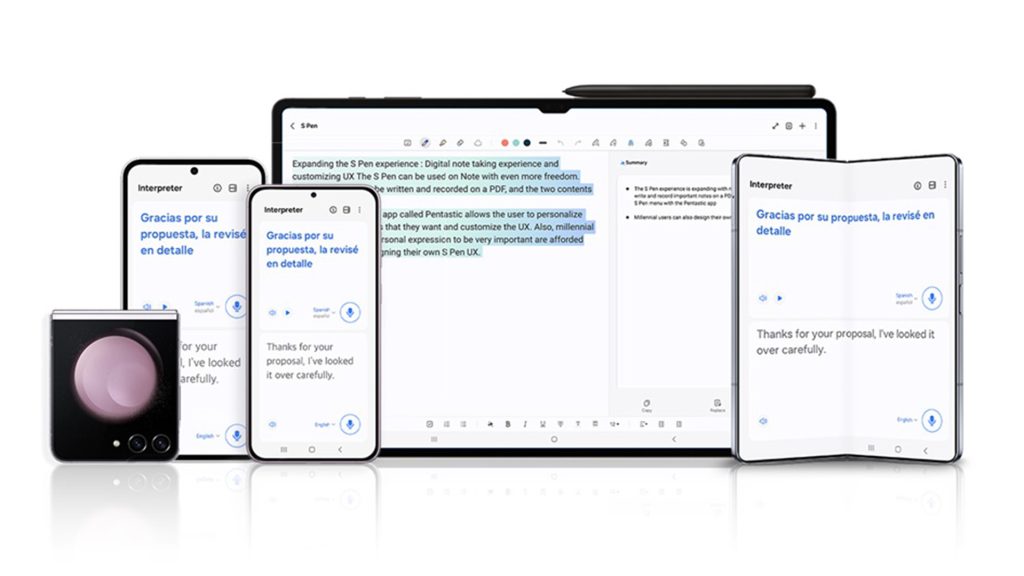
Artificial intelligence is no longer something that lives only in the cloud or behind business dashboards. Today, mobile AI assistants are sophisticated enough to help with writing, planning, translating, brainstorming, and even generating visuals — all from the screen of your smartphone or tablet. One of the most notable implementations of this trend is Galaxy AI, Samsung’s built-in generative intelligence platform available on Galaxy devices. With intelligently crafted prompts, Galaxy AI can become a powerful creativity and productivity partner, helping users generate content, organize thoughts, edit media, plan workflows, and accelerate complicated tasks — all with simple natural-language instructions.
In this guide, we’ll explore what Galaxy AI is, how its prompts work, why they matter, and how they can help you unlock more productive and creative workflows on your devices. Whether you’re a student drafting outlines, a creator ideating visuals, or a professional streamlining everyday work, understanding how to use Galaxy AI prompts effectively can dramatically reduce friction and time spent on repetitive tasks while boosting the quality of your output.
What Is Galaxy AI?

Galaxy AI is Samsung’s integrated artificial intelligence ecosystem built into its Galaxy line of smartphones, tablets, and laptops. Rather than being a single tool, it’s better understood as a suite of AI-powered features that work directly on your device — and in many cases, with cloud support — to assist with a wide range of creative, productivity, and utility tasks.
Unlike standalone AI apps, Galaxy AI’s capabilities are woven into the operating experience. This means you can easily invoke AI assistance while editing a photo in Gallery, rewriting text in Messages, summarizing long documents in Notes, or even translating conversations in real time during calls. Its core strength is the prompt-driven interface — you describe what you want in natural language, and Galaxy AI interprets that request to generate useful output across writing, imagery, planning, and more.
Here are some examples of what Galaxy AI can do on supported Galaxy devices:
Live Translate — real-time translation of conversations and text in messaging.
Chat Assist — rewrite messages in a different tone for effective communication.
Note and Transcript Assist — summarize notes and audio recordings with automatic formatting.
Circle to Search — highlight or circle anything on your screen to instantly get information or context.
Image Generation & Editing — refine photos, remove objects, or create new visuals from text prompts.
AI Keyboard Assist — smart text suggestions and corrections as you type.
Samsung continues to expand the capabilities of Galaxy AI through software updates — including AI-enhanced features in One UI that are designed to be more responsive, multilingual, and context aware. For example, recent updates have broadened language support to over 20 languages, making AI tools more accessible globally.
In essence, Galaxy AI transforms your device into a creative and productivity co-pilot that responds to well-crafted prompt instructions — saving you time and adding intelligence to your workflows.
Why Galaxy AI Prompts Are Useful
Galaxy AI prompts act as the input instructions that tell the system what you want to generate or achieve. The effectiveness of Galaxy AI depends heavily on how clearly and specifically you phrase these prompts — the more context and constraints you provide, the better and more relevant the results you’ll get.
Here’s why using well-designed Galaxy AI prompts can be valuable:
1. Clarity of Output
Prompts help Galaxy AI understand the desired tone, format, and structure of what you need. For instance, specifying length, audience, or purpose leads to better writing, summaries, or outlines than vague instructions.
2. Time Savings
Instead of manually drafting text or brainstorming ideas from scratch, Galaxy AI can produce drafts, create lists, generate outlines, and even suggest hooks or captions in seconds — allowing you to focus on refinement rather than initial creation.
3. Idea Expansion
Prompts enable creative ideation by asking the AI to offer alternatives — such as multiple headline options, stylized copy variations, or diverse visual concepts — expanding your ideas beyond what you might generate alone.
4. Enhanced Image Generation
When generating visuals, clear prompts help define style, composition, mood, and elements — ensuring the images you get match your creative intent. Without precise direction, visual AI can produce generic or unfocused outputs.
5. Consistency Across Tasks
Whether you’re planning content calendars, writing lesson plans, summarizing research, or organizing projects, prompts help standardize outcomes so that your outputs follow a consistent structure and quality.
Galaxy AI prompts bridge your intention and the AI’s output — guiding the model toward productive and creative solutions tailored to your goals. Mastering prompt design turns Galaxy AI into a reliable assistant that accelerates work and sparks imagination.
Types of Galaxy AI Prompts

Galaxy AI prompts can be broadly categorized based on the type of task you want the AI to assist with. Each category serves a different purpose, but they all rely on the same core principle: clear, context-rich instructions lead to better results. Below is a detailed breakdown of the most common and effective types of Galaxy AI prompts, along with how and why they work in real-world scenarios.
Content Creation Prompts
Content creation prompts are among the most widely used Galaxy AI prompts. These are designed to help users generate, refine, or restructure written material quickly and effectively. Whether you’re drafting from scratch or improving existing text, Galaxy AI can act as a collaborative writing assistant.
With content creation prompts, you can ask Galaxy AI to:
Write blog post introductions, outlines, or full drafts
Rewrite content in a different tone (professional, casual, persuasive, friendly, etc.)
Summarize long passages into concise versions
Expand bullet points into detailed paragraphs
Correct grammar, clarity, and flow
For example, instead of a vague instruction like “Write about AI”, a well-structured prompt would specify the audience, tone, and purpose. This helps Galaxy AI generate content that is more relevant and polished. Because Galaxy AI is deeply integrated into apps like Notes, Messages, and the Samsung Keyboard, content creation prompts can be used seamlessly while you’re already typing or editing text.
These prompts are especially useful for bloggers, copywriters, students, and professionals who need high-quality drafts quickly but still want control over the final output.
Marketing and Social Media Prompts
Marketing and social media prompts focus on persuasion, engagement, and brand communication. They help transform raw ideas into compelling messages tailored for specific platforms and audiences.
Using Galaxy AI, marketers and creators can generate:
Social media captions for platforms like Instagram, LinkedIn, or X
Ad copy with different emotional angles
Product descriptions optimized for clarity and appeal
Campaign ideas and content calendars
Call-to-action variations for testing performance
What makes these prompts powerful is their ability to adjust tone and format based on platform norms. For instance, a prompt can instruct Galaxy AI to create a short, punchy caption with emojis for social media, or a longer, benefit-driven post for professional networks.
Because Galaxy AI can instantly rewrite content in multiple tones, marketers can quickly test different messaging styles without rewriting everything manually. This speeds up ideation and helps maintain consistent brand communication across channels.
Education and Learning Prompts
Education and learning prompts are designed to support understanding, retention, and explanation of information. These prompts turn Galaxy AI into a personalized learning assistant that adapts content to the user’s level of knowledge.
With the right prompts, Galaxy AI can:
Explain complex topics in simple language
Break down concepts step by step
Create study notes or summaries from long material
Generate practice questions and quizzes
Translate or rephrase academic content
For example, a student can ask Galaxy AI to explain a scientific concept as if teaching a beginner, or to summarize lecture notes into key points. Because Galaxy AI supports multiple languages and real-time translation, learning prompts are particularly helpful for multilingual learners or those studying international material.
These prompts are valuable not only for students but also for professionals learning new skills, educators creating teaching material, and lifelong learners who want quick clarity without searching through multiple resources.
Productivity and Workflow Prompts
Productivity and workflow prompts focus on organization, planning, and execution. They help users structure tasks, manage time, and reduce cognitive load in daily work.
Galaxy AI can respond to productivity prompts by:
Creating to-do lists from unstructured notes
Prioritizing tasks based on urgency or importance
Generating daily or weekly schedules
Summarizing meeting notes or voice recordings
Turning ideas into actionable steps
For example, after a meeting, a user can prompt Galaxy AI to extract key decisions and action items from notes or transcripts. This eliminates the need to manually review long documents and ensures nothing important is missed.
These prompts are especially useful for professionals juggling multiple responsibilities, remote workers managing digital tasks, and anyone looking to streamline repetitive planning activities. By clearly defining goals and constraints in prompts, Galaxy AI can produce structured outputs that make execution easier.
Image Generation Prompts
Image generation prompts are used to create or modify visuals using natural language descriptions. Galaxy AI supports image-related tasks such as generating new visuals, enhancing photos, or removing unwanted elements.
With detailed image prompts, users can:
Generate visuals based on style, mood, or theme
Edit photos by removing or replacing objects
Enhance images with AI-driven refinements
Create concept visuals for presentations or content
The quality of image outputs depends heavily on prompt specificity. A prompt that describes visual style, colors, perspective, and subject matter will result in more accurate and aesthetically pleasing images than a generic request.
These prompts are particularly valuable for creators, designers, marketers, and everyday users who want quick visual assets without using advanced design software. Because Galaxy AI integrates image tools directly into the Gallery and editing experience, users can apply prompts in context without switching apps.
Why Prompt Categorization Matters
Understanding these different prompt types helps users choose the right approach for each task. Instead of using one generic prompt style, categorizing your intent — whether creative, educational, or operational — allows you to tailor instructions more effectively.
When you align your prompts with these categories:
Outputs become more accurate and relevant
Less time is spent refining results
Galaxy AI feels more like a collaborative assistant than a generic tool
As Galaxy AI continues to evolve, prompt-driven interactions will become even more central to how users create, learn, and work. Mastering these prompt type
Tips for Optimizing Galaxy AI Prompts

Using Galaxy AI effectively isn’t just about what you ask—it’s about how you ask it. Even though Galaxy AI is designed to understand natural language, the quality of its output depends heavily on how clearly your intent, constraints, and expectations are communicated. The following advanced prompt-optimization techniques will help you get more accurate, useful, and consistent results for both creative and productivity tasks.
Front-Load Your Constraints
One of the most effective ways to improve Galaxy AI responses is to place your most important constraints at the very beginning of the prompt. Galaxy AI, like most generative systems, prioritizes early context when interpreting instructions.
Constraints can include:
Audience type
Output format
Length
Tone or style
Purpose or goal
Instead of embedding these requirements later in the prompt, clearly state them upfront. This ensures Galaxy AI frames the entire response around your expectations rather than retroactively trying to adjust.
For example, specifying “Write a concise, professional summary for senior leadership” at the start leads to a more focused result than adding those details at the end. Front-loading constraints reduces ambiguity and minimizes the need for follow-up corrections, saving time and effort.
This technique is especially useful for:
Business writing
Educational explanations
Marketing copy
Structured planning outputs
Use the ‘Bad Example’ Technique
The “bad example” technique involves telling Galaxy AI what you do not want alongside what you do want. This helps narrow the AI’s output space by eliminating common but undesirable patterns.
By explicitly stating what should be avoided—such as vague language, generic phrasing, overly promotional tone, or unnecessary emojis—you guide Galaxy AI away from low-quality or irrelevant outputs.
This approach is particularly effective when:
You’ve received repetitive or generic responses before
You want to maintain a specific brand or voice
You’re refining content for professional or formal contexts
For instance, instructing Galaxy AI to “avoid clichés, filler phrases, and overly dramatic language” leads to cleaner, more direct content. This technique works well because it reduces guesswork and prevents the AI from defaulting to common but unhelpful patterns.
Add a Quality Checkpoint
A quality checkpoint is an instruction that asks Galaxy AI to evaluate or refine its own output before finalizing the response. This adds an extra layer of precision and polish to the result.
Quality checkpoints can include requests to:
Ensure clarity and logical flow
Check for missing steps or gaps
Improve readability
Verify tone consistency
Simplify complex language
By asking Galaxy AI to “review the response for clarity and completeness” or “refine this output for accuracy and usefulness,” you encourage a more thoughtful final version. This technique is particularly useful for long-form writing, instructional content, or planning outputs where coherence matters.
Quality checkpoints reduce the need for manual editing and help ensure that the final output meets your standards on the first pass.
Layer Complex Prompts
When dealing with complex tasks, it’s often better to layer your prompts rather than attempting to accomplish everything in one instruction. Layering means breaking a large request into multiple, sequential steps.
Instead of asking Galaxy AI to:
Generate content
Optimize tone
Structure output
Add examples
…all at once, you guide it step by step. Each layer builds on the previous one, allowing you to refine direction as you go.
This technique is especially effective for:
Strategy development
Detailed content creation
Workflow planning
Educational material
Layered prompts give you greater control over the output and reduce the risk of the AI overlooking important details. They also allow you to intervene and adjust instructions mid-process, ensuring the final result aligns closely with your goals.
Test with Edge Cases First
Edge cases are scenarios that sit outside the “average” use case—such as extreme constraints, unusual audiences, or uncommon formats. Testing Galaxy AI with edge cases helps you understand how flexible and reliable your prompts are.
For example, you might test:
Very short or very long output requirements
Highly technical vs. beginner-level explanations
Uncommon formats like checklists, frameworks, or templates
By starting with edge cases, you can identify weaknesses in your prompt structure early. If a prompt works well under extreme conditions, it’s more likely to perform consistently in standard scenarios.
This technique is particularly useful when:
Designing reusable prompt templates
Creating workflows for teams
Relying on Galaxy AI for repeated tasks
Testing edge cases ensures your prompts are robust, adaptable, and less prone to failure when requirements change.
Why These Optimization Techniques Matter
Galaxy AI is powerful, but it’s not mind-reading. These optimization techniques help translate your intent into clear instructions that the AI can act on effectively. By applying them consistently, you’ll notice:
Higher accuracy in outputs
Reduced need for rewrites
More predictable results
Better alignment with your goals
As Galaxy AI continues to evolve, prompt optimization will become an increasingly valuable skill. Mastering these techniques allows you to move beyond basic usage and unlock Galaxy AI’s full potential as a creativity and productivity partner.
Common Mistakes to Avoid
Even though Galaxy AI is designed to be intuitive, many users fail to get high-quality results because of avoidable prompt-writing mistakes. Understanding these common errors — and knowing what to do instead — can dramatically improve the accuracy, relevance, and usefulness of Galaxy AI outputs. The table below breaks down the most frequent mistakes, what typically goes wrong, and the better approach to take.
| Mistake ❌ | What Goes Wrong 🚩 | Do This Instead ✅ |
|---|---|---|
| Using vague or generic prompts | Galaxy AI produces broad, unfocused, or generic responses that lack depth or relevance | Be specific about the goal, audience, tone, and format right from the start |
| Giving too many instructions at once | The AI misses key requirements or delivers a cluttered, inconsistent output | Break complex requests into layered or step-by-step prompts |
| Ignoring context | The output feels disconnected or doesn’t align with the situation you’re working in | Provide background information or explain the scenario before asking for results |
| Forgetting to define tone or style | The content sounds robotic, overly casual, or inappropriate for the audience | Clearly state the desired tone (professional, friendly, persuasive, educational, etc.) |
| Relying on one-shot prompts | Initial responses may be incomplete or not fully aligned with expectations | Iterate and refine prompts by adjusting constraints and feedback |
| Not setting boundaries | The AI may include unnecessary details, filler language, or off-topic content | Define length limits, structure, and exclusions early in the prompt |
| Skipping quality checks | Outputs may contain unclear phrasing, missing steps, or inconsistent logic | Add a quality checkpoint asking Galaxy AI to review and refine its own output |
| Treating Galaxy AI like a search engine | Results may feel shallow or fact-listing rather than solution-oriented | Use instructional prompts that focus on explanation, structure, or application |
| Overusing default phrasing | Repetitive sentence structures reduce originality and engagement | Ask for varied phrasing or multiple versions with different angles |
| Not testing prompts across use cases | Prompts work in one situation but fail in others | Test prompts with edge cases and adjust for flexibility and reuse |
Why Avoiding These Mistakes Matters
Avoiding these common mistakes helps transform Galaxy AI from a basic assistant into a reliable productivity and creativity tool. Well-structured prompts reduce friction, eliminate guesswork, and ensure outputs align closely with your goals. Over time, consistently applying best practices will allow you to build reusable prompt frameworks that work across content creation, planning, education, and visual tasks.
By treating prompts as a skill rather than a one-time input, you’ll unlock more consistent, high-quality results from Galaxy AI — with fewer revisions and less manual effort.
Limitations of Galaxy AI

While Galaxy AI offers impressive on-device intelligence and seamless integration with Samsung’s ecosystem, it is not without limitations. Understanding these constraints is essential for setting realistic expectations and knowing when Galaxy AI is the right tool—and when supplementary AI solutions may be needed.
Limited Customization and Control
Galaxy AI is designed for broad usability rather than deep customization. While users can influence outputs through prompts, there is limited control over advanced parameters such as reasoning depth, response variability, or domain-specific fine-tuning. This can be restrictive for professionals who need highly specialized outputs or consistent results across complex workflows.
Context Retention Is Short-Term
Galaxy AI typically operates within the immediate context of a task or interaction. It does not maintain long-term memory across sessions or deeply track project-specific history. As a result, users may need to repeatedly reintroduce background information, goals, or preferences—especially for ongoing or multi-stage projects.
Prompt Sensitivity and Inconsistent Outputs
Galaxy AI’s performance is highly dependent on prompt clarity. Small changes in phrasing can lead to noticeably different outputs, which may feel unpredictable for users expecting consistent results. This sensitivity makes it harder to reuse prompts at scale without frequent adjustments.
Limited Workflow Automation
Although Galaxy AI can assist with individual tasks—such as summarizing notes or generating text—it lacks robust workflow automation features. Users cannot easily chain tasks, trigger actions across tools, or create repeatable AI-driven processes. This limits its effectiveness for teams or users managing complex, multi-step operations.
Surface-Level Reasoning for Complex Tasks
Galaxy AI excels at quick assistance and lightweight tasks but may struggle with deep analytical reasoning, strategic planning, or nuanced decision-making. For advanced problem-solving, outputs can remain high-level and require significant human refinement.
Ecosystem Dependency
Galaxy AI works best within Samsung’s device ecosystem and supported apps. Users outside this environment—or those relying on cross-platform tools—may find its capabilities less accessible or harder to integrate into existing workflows.
Privacy and Offline Constraints
While on-device processing enhances privacy, some advanced features still rely on cloud support. Additionally, offline capabilities are limited, meaning certain functions may not work without an internet connection or may deliver reduced performance.
Why These Limitations Matter
Galaxy AI is optimized for convenience, speed, and everyday productivity—but it is not a full-scale AI workspace. For users who need deeper customization, persistent context, collaborative workflows, or advanced automation, Galaxy AI may feel restrictive.
Recognizing these limitations helps users decide how to best leverage Galaxy AI alongside other tools—using it as a powerful assistant for quick tasks while relying on more flexible AI platforms for complex, long-term, or team-based work.
How Corexta AI Solves Galaxy AI Limitations
Galaxy AI is excellent for quick, on-device assistance, but as discussed earlier, it has clear limitations when it comes to customization, long-term context, workflow automation, and team collaboration. This is where Corexta AI steps in—not as a replacement, but as a complementary AI platform designed to handle deeper, more structured, and scalable work scenarios that Galaxy AI is not built for.
Below is how Corexta AI directly addresses the key gaps in Galaxy AI and extends AI-powered productivity beyond basic assistance.
Advanced Customization and Prompt Control
One of Galaxy AI’s biggest limitations is its lack of fine-grained control. Corexta AI is built with prompt precision and customization in mind. Users can define detailed constraints, reusable prompt templates, tone rules, output formats, and quality benchmarks—making AI outputs far more predictable and aligned with specific business or creative needs.
This is especially valuable for:
Content teams maintaining brand voice consistency
Marketers running repeatable campaigns
Educators creating structured learning material
Instead of rewriting prompts every time, Corexta allows users to standardize high-performing prompts, reducing variability and saving time.
Persistent Context and Project Memory
Galaxy AI operates largely in short, task-based contexts. Corexta AI, on the other hand, is designed to support ongoing projects. It retains contextual information across sessions, allowing users to build upon previous outputs without constantly reintroducing background details.
This persistent context enables:
Multi-step content creation workflows
Long-term planning and documentation
Iterative strategy development
By remembering project goals, constraints, and previous decisions, Corexta AI behaves more like a long-term collaborator rather than a one-off assistant.
Workflow Automation and Task Chaining
Galaxy AI focuses on single actions—summarize this, rewrite that, generate an image. Corexta AI goes further by enabling AI-driven workflows. Users can chain tasks together, automate repetitive processes, and structure AI outputs into actionable systems.
For example, Corexta AI can:
Turn brainstorming ideas into structured plans
Convert meeting notes into tasks and timelines
Generate, review, and refine content in sequential steps
This makes Corexta AI particularly powerful for professionals, remote teams, and creators who need end-to-end productivity, not just isolated AI responses.
Deeper Reasoning and Structured Outputs
Galaxy AI performs best with lightweight tasks, but complex reasoning often requires additional human effort. Corexta AI is optimized for deep thinking tasks, such as strategy building, frameworks, comparisons, and analytical breakdowns.
It excels at:
Long-form content structuring
Step-by-step reasoning
Decision support and planning models
By encouraging layered prompting and built-in quality checkpoints, Corexta AI helps produce outputs that are not only informative but also logically sound and execution-ready.
Team Collaboration and Shared AI Intelligence
Galaxy AI is primarily a personal assistant tied to individual devices. Corexta AI is built for collaborative environments, allowing teams to work with shared prompts, shared outputs, and unified AI-driven workflows.
This enables:
Consistent AI usage across departments
Faster onboarding with ready-made prompt libraries
Reduced duplication of effort
Teams can align on how AI is used, ensuring everyone benefits from the same standards, insights, and efficiencies.
Cross-Platform Flexibility
Galaxy AI works best within Samsung’s ecosystem, which can limit flexibility. Corexta AI is designed to be platform-agnostic, making it easier to integrate into existing digital workflows regardless of device or operating system.
This flexibility allows users to:
Use AI across tools, projects, and environments
Maintain continuity between devices
Scale AI usage without ecosystem lock-in
A Smarter Way to Use AI Together
Rather than choosing between Galaxy AI and Corexta AI, the most effective approach is to use them together. Galaxy AI excels at fast, on-the-go assistance and device-level tasks, while Corexta AI fills the gap for structured thinking, automation, collaboration, and long-term productivity.
By pairing Galaxy AI’s immediacy with Corexta AI’s depth and scalability, users can unlock a more complete AI-powered workflow—one that supports both everyday efficiency and advanced creative or professional goals.
FAQs
What are Galaxy AI prompts?
Galaxy AI prompts are natural-language instructions that tell Galaxy AI what task you want it to perform. These prompts guide the AI to generate text, summarize information, translate content, plan tasks, edit images, or assist with learning and productivity. The clarity and structure of a prompt directly affect the quality of the output.
Do I need technical skills to use Galaxy AI prompts?
No technical or coding skills are required. Galaxy AI is designed for everyday users and understands plain language. However, learning basic prompt optimization techniques—such as adding context, constraints, and tone—can significantly improve results and make the AI more useful for advanced tasks.
Which Galaxy AI features rely most on prompts?
Prompts are especially important for text-based features like writing assistance, note summarization, translation, tone rewriting, planning tasks, and image generation or editing. While some Galaxy AI tools work automatically, prompt-driven features give users greater control over outcomes.
Can Galaxy AI prompts be reused for repeated tasks?
Yes, prompts can be reused, but Galaxy AI does not store them as templates or remember them across sessions. For recurring tasks, users typically need to manually reuse or slightly adjust prompts each time, which can be limiting for long-term or team-based workflows.
How detailed should a Galaxy AI prompt be?
A good prompt should include the goal, audience, tone, format, and any important constraints. Overly short prompts may lead to generic results, while overly complex prompts should be broken into steps. The best approach is to be clear and specific without overwhelming the instruction.
Can Galaxy AI handle professional or business-level work?
Galaxy AI can support professional tasks such as drafting emails, summarizing meetings, organizing notes, and generating ideas. However, for complex projects requiring long-term context, deep reasoning, automation, or collaboration, Galaxy AI may need to be supplemented with more advanced AI platforms.
Does Galaxy AI work offline?
Some Galaxy AI features operate on-device, which enhances privacy and allows limited offline use. However, many advanced capabilities still depend on cloud processing, meaning full functionality may require an internet connection.
How is Galaxy AI different from general AI chat tools?
Galaxy AI is tightly integrated into Samsung devices and apps, making it highly convenient for quick, contextual tasks. Unlike standalone AI platforms, it focuses on speed and accessibility rather than deep customization, automation, or cross-platform workflows.
Can Galaxy AI be used alongside other AI tools?
Yes, and this is often the most effective approach. Galaxy AI works well for fast, on-device assistance, while other AI platforms can handle structured workflows, long-term projects, and collaborative use cases. Using them together allows users to balance convenience with depth.
How can I consistently improve results from Galaxy AI?
The key is practice and refinement. Test different prompt styles, apply optimization techniques like front-loading constraints and adding quality checkpoints, and learn from what works best for your specific tasks. Over time, this turns prompt writing into a repeatable skill that boosts both creativity and productivity.
Read More: 10 Best Screencast Software in 2026 (Free & Paid)