In our increasingly busy world, simply having lots of tasks doesn’t guarantee productivity. What matters most is knowing which tasks to focus on—and when. One of the most effective frameworks to help you with that is the Eisenhower Matrix (also called the Urgent-Important Matrix or Priority Matrix). At its core, it helps you categorize tasks by two dimensions: urgency and importance—and then act accordingly.
In this blog, we’ll explore what the matrix is, where it came from, how the four quadrants are defined, how you can apply it in personal and professional domains, some common tips to get the most out of it, and finally the challenges and how to overcome them. By the end, you’ll be ready to integrate this into your work and life to improve clarity, reduce overwhelm and focus on what truly moves you forward.
What is the Eisenhower Matrix?
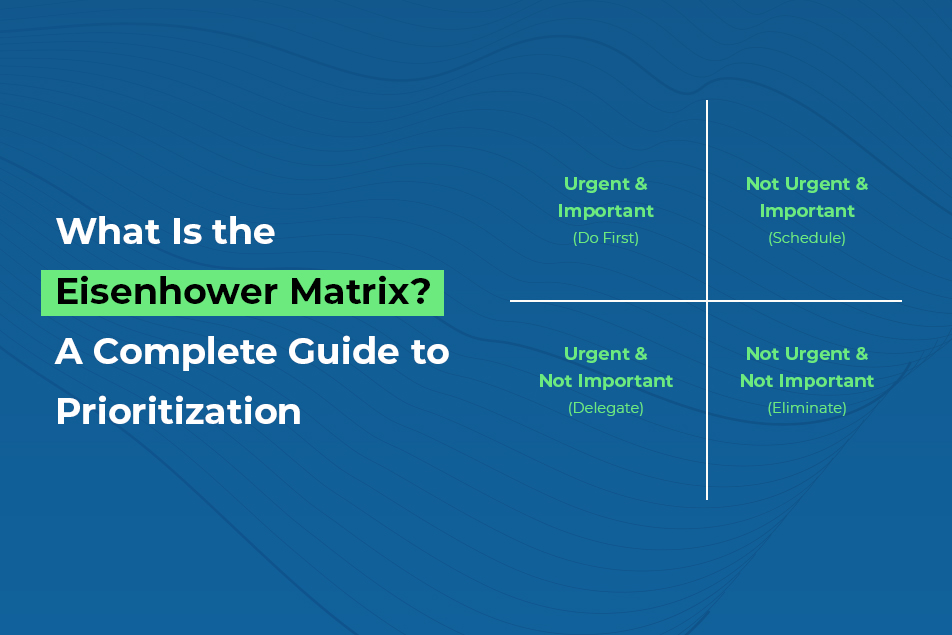
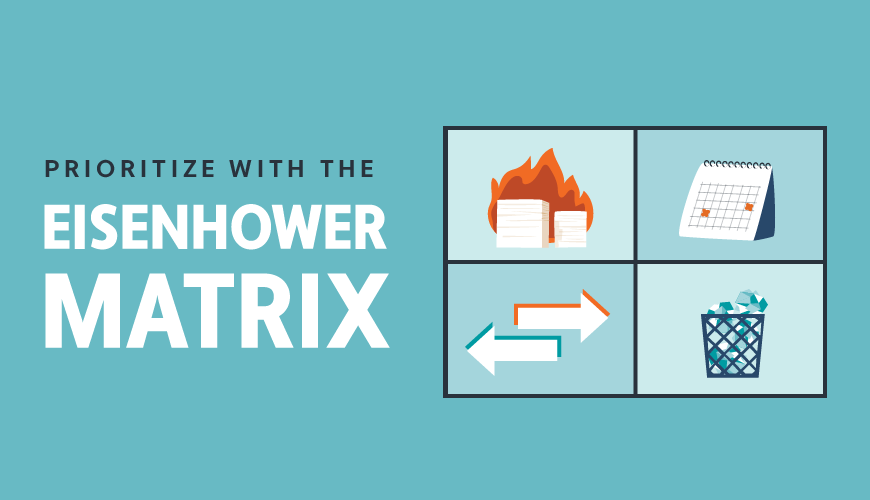
The Eisenhower Matrix is a tool for prioritizing tasks by placing them into four categories (or quadrants) based on two criteria: urgency (does it require immediate action?) and importance (does it contribute to meaningful outcomes or long-term goals?).
When you map your day-to-day tasks into those four quadrants, you get a visual (and conceptual) view of what you need to do now, what you should schedule, what you should delegate, and what you might eliminate. This helps you manage your time and attention more deliberately rather than being reactive.
Because often, we end up doing tasks simply because they seem urgent—phone calls, emails, immediate interruptions—while neglecting tasks that, although less urgent, are more important (thinking, long-term planning, skill development). Research shows that people tend to choose urgent tasks over important ones—because deadlines and visible pressure push them—but often the important tasks pay higher dividends in the long run.
By giving you a framework to sift through and decide what to do (and what not to do), the matrix helps free up capacity, prevent you from being stuck in crisis mode all the time, and give more attention to meaningful work.
Why It’s Called the “Eisenhower” Matrix
The name comes from Dwight D. Eisenhower (34th President of the United States and previously a high-ranking U.S. Army general) who reportedly said something along the lines of: “What is important is seldom urgent and what is urgent is seldom important.”
Eisenhower led major military operations, had to deal with innumerable conflicting priorities, emergencies and long-term strategic decisions. The thinking attributed to him is that powerful results come when you can distinguish between what must be done now vs what should be done because it matters. Later this idea became more formalised in productivity literature (e.g., The 7 Habits of Highly Effective People) and adapted into the four-quadrant matrix system.
Because of that, the matrix is sometimes also called the Time Management Matrix, Eisenhower Box, or Urgent-Important Matrix.
The Four Quadrants: Urgency vs Importance

Let’s dive into the meat of the framework: the four quadrants you use when you plot urgency on one axis and importance on the other.
Quadrant 1: Urgent & Important (“Do it now”)
These are tasks that require immediate attention and have significant consequences if not done. They are deadlines, crises, pressing problems that cannot be ignored. Example tasks: finalising work for a launch that is tomorrow; resolving a sudden customer issue that could escalate; handling a personal emergency.
Because these tasks carry both urgency and importance, it’s natural that you must act on them. The risk: if you spend all your energy here, you might constantly be in “fire-fighting” mode—reacting rather than planning or growing. Over time this leads to stress, depletion, and neglect of bigger-picture goals.
Quadrant 2: Important but Not Urgent (“Schedule it”)
This quadrant holds the tasks that truly drive long-term success and meaningful outcomes, but they don’t scream for attention right now. Because there’s no pressing deadline, we tend to postpone them. Example tasks: strategic planning; skill development; building relationships; personal health and wellness; working on major, non-immediate projects.
This is the gold quadrant: if you can live mostly here, you’re operating proactively, growing, improving. The challenge: because the urgency meter is low, these tasks often get deprioritized in favour of the urgent.
Quadrant 3: Urgent but Not Important (“Delegate it”)
Here lie tasks that demand attention soon, but that don’t contribute significantly to your long-term goals or core responsibilities. Example tasks: certain emails; meetings that don’t add value; administrative tasks; interruptions that look urgent but aren’t impactful.
The key strategy: delegate, outsource, or at least reduce your involvement. These are time-wasters for your unique strengths and focus. Spend too much time here and you’ll feel busy, but you won’t be moving the needle where it matters.
Quadrant 4: Neither Urgent nor Important (“Delete / Drop it”)
These are activities that bring little value, no real deadline, and minimal (or negative) impact. Example: aimless social media scrolling; attending meetings with no clear purpose; low-value busy work.
The idea here is to eliminate or minimise time spent here. That time could better be used on quadrant 2 tasks (important, not urgent) or even just restful rejuvenation. Ignoring this quadrant helps free mental bandwidth and leaves space for what matters.
How to Use the Matrix: Practical Steps
Putting this into action is straightforward but requires discipline. Here is a step-by-step process you can follow.
List your tasks
Begin by writing a comprehensive list of your current tasks—both professional and personal. Don’t worry about the quadrant yet; just get everything out of your head and down on paper or digital.Determine urgency and importance
For each task ask:Does this need to be done now (or very soon) to avoid negative consequences? → urgency.
Does this task help me achieve a meaningful goal, or align with my values/mission? → importance.
Plot into one of the four quadrants
Use the answers to the two questions to assign each task to one of the quadrants:Urgent + Important → Q1
Not Urgent + Important → Q2
Urgent + Not Important → Q3
Not Urgent + Not Important → Q4
Act accordingly
Q1: Do immediately (or within your next time-block).
Q2: Schedule time to work on these tasks (block them, commit).
Q3: Delegate or find someone/thing to handle. If you must do it, limit and constrain it.
Q4: Eliminate, postpone indefinitely, or restrict to minimal time.
Review regularly
Your tasks, priorities and contexts change. Set aside time (weekly or bi-weekly) to review your matrix, move tasks between quadrants if needed, remove items that are no longer relevant, and re-focus your schedule. Tracking how much time you spend in each quadrant is very helpful.
Use Cases: Where the Matrix Applies
Personal Productivity
You might pay attention only to urgent emails, crises, and deadlines—while skipping things like learning a new skill, exercising regularly, planning your future. Using the matrix, you can carve out time for important but non-urgent tasks (exercise, reading, planning) rather than always reacting. You also identify low-value tasks (Q4) and reduce them, giving more room for growth and rest.
Professional / Project Management
In projects you have deadlines, deliverables, resources, risk. The matrix helps you identify urgent and important tasks (Q1: bug fixes, deliverable deadlines), schedule strategic work (Q2: roadmap, team development), delegate administrative or non-core tasks (Q3: routine emails, reporting), and eliminate time-sinks (Q4: unnecessary meetings, redundant paperwork).
Team Collaboration
Teams often struggle when everyone is working on what feels urgent but not aligning on what’s actually important. Using the matrix as a shared framework helps create a common language: define what’s truly important for the team’s mission, what must be done now, what can wait or be delegated. This fosters clarity, less wasted effort, better alignment and less burnout.
Tips for Maximizing the Value
Here are some practical tips to make the most of it:
Avoid oversaturating one quadrant: If you dump too many tasks into one quadrant, it becomes cluttered and unhelpful. Some recommend putting no more than a manageable number of items in each quadrant (say ~10 tasks) so it stays actionable.
Use visual cues: Color-code tasks, create a visual board or grid, use sticky notes, tags—anything to make the quadrants visible. Visual differentiation helps your brain quickly grasp what to act on.
Separate personal vs professional matrices: Often mixing personal and professional tasks in the same grid conflates priorities and dilutes focus. It can help to maintain separate matrices so you treat your professional goals and personal goals distinctly.
Eliminate first: Before organising, take out the obvious Q4 items (neither urgent nor important). Removing these frees space mentally and practically and sharpens the rest of your focus.
Track time after the fact: After implementing the matrix for a week or two, review how your actual time was spent—what quadrant did most tasks fall into? Are you spending too much in Q1 (constant crises) or Q4 (waste)? Adjust accordingly.
Refine and adapt: The matrix isn’t a static tool—you’ll mis-classify tasks, priorities will shift, unexpected events will occur. Be open to refining your categorisation, moving tasks between quadrants, revisiting what “important” means for you.
Common Challenges & How to Address Them
Even though the matrix is powerful, it’s not perfect. Here are some of the common pitfalls and how to deal with them:
Nuances get lost: Some tasks may straddle the boundaries of urgency/importance or shift over time. For example, responding to a client email may be urgent and important, or just urgent but low strategic value. The matrix simplifies complex reality.
Work-around: Accept some tasks will need reevaluation, and build in reviews. Accept grey zones and use judgment.Subjectivity in classification: What’s “important” for one person or team may not be for another. Same with “urgent”. Mis-classification can undermine the whole system.
Work-around: Develop a shared or personal definition of “important”. Use criteria like “Does this contribute to our core mission or my long-term goals?” to lessen subjectivity.Not dynamic / static snapshot: A task that is not urgent today may become urgent tomorrow. The matrix as drawn is a snapshot, but priorities evolve.
Work-around: Treat the matrix as a living tool. Conduct regular reviews (daily or weekly), move tasks as needed, and treat categorization as provisional.Over-focus on Q2 becomes complacency: While Q2 is where growth happens, too much of it without adequate Q1 action may lead to missed deadlines.
Work-around: Maintain balance. Ensure you’re still managing essential operational work (Q1) while growing (Q2), not ignoring one for the other.Ignoring Q4 is misunderstood: Some may think “delete everything in Q4 and enjoy unlimited free time.” But healthy leisure/rest matters. It’s just that low-value tasks under the guise of “rest” may steal time from meaningful rest or growth.
Work-around: Use Q4 elimination to free space; then intentionally allocate time for genuine rest, reflection, relationships and renewal (which might well be important even if not urgent).
Why This Framework Matters
Why is this worth your time when there are many task-management or productivity systems out there? Here are a few reasons:
Clarity of decision-making: Instead of reacting to whatever screams the loudest, you get a structured way to ask: “Is this important? Is this urgent?” and act accordingly.
Focus on what matters: It shifts you away from being busy toward being effective. Tasks that drive growth and mission (even if not urgent) get their rightful place.
Better time allocation: You become aware of where your time goes (which quadrant) and can shift from crisis mode (lots of Q1) or busy-work (lots of Q3/Q4) toward more proactive focus (Q2).
Reduced stress and overwhelm: When you’re constantly in Q1 you’re always firefighting. When you’re able to plan and schedule Q2 tasks, you reduce the number of looming emergencies and increase control.
Improved delegation and elimination: Using the matrix explicitly helps you identify tasks you shouldn’t be doing yourself (Q3) and those you shouldn’t be doing at all (Q4). That frees up capacity for your strengths.
Adaptable across domains: Whether you’re an individual, team lead, manager, or working in operations, you can apply it to both personal life and professional projects.
Example Scenarios
Here are some concrete examples of how tasks might be placed in each quadrant in different contexts.
Example: Project Manager
Q1 (Urgent & Important): Client deliverable due tomorrow; major bug in production system; emergency meeting due to regulatory issue.
Q2 (Important but Not Urgent): Planning next quarter’s roadmap; team training on a new methodology; optimizing team workflows.
Q3 (Urgent but Not Important): Routine status-update meetings with little action; responding to low-value emails; minor administrative tasks.
Q4 (Neither Urgent nor Important): Excessive internal social chat; browsing emoji reactions; attending optional meetings that don’t contribute to goals.
Example: Personal Productivity
Q1: Paying overdue bills today; addressing a medical issue; emergency with family/friends.
Q2: Exercising regularly; reading a book to improve your skillset; setting long-term personal goals; building a side-project.
Q3: Accepting an errand for someone else that takes time but doesn’t align with your goals; attending a social event you’re not invested in because you feel obligated.
Q4: Scrolling social media without purpose; watching random videos late into the night; disorganised browsing that wastes time.
How to Make It Work Long-Term
It’s one thing to create a matrix once, it’s another to live by it and keep it useful. Here are keys for long-term effectiveness:
Block time for your Q2 tasks
Schedule dedicated time on your calendar for the important but not urgent tasks (Q2). This might mean reserving morning hours for deep work, or weekly slots for strategic thinking, learning, or personal development.
Make review a habit
Set aside time (end of week/Friday afternoon) to review:
Which tasks you moved into each quadrant?
How much time you spent in each quadrant?
Are you staying stuck in Q1 or Q3 too much?
Any unexpected tasks that arrived? Do they shift quadrant?
Refining your matrix regularly keeps it aligned with your reality.
Limit tasks per quadrant
If you overpopulate one quadrant it becomes cluttered and loses value. For instance, aim to keep your visible Q1 tasks manageable, and likewise manage Q3/Q4 so they don’t overwhelm. Think “what can I remove” as much as “what do I add”.
Clarify what “important” means for you
Importance is value-driven. Clarify your goals, mission, values—both personally and professionally. Then ask: “Is this task aligned with that?” Helps you reduce subjectivity and stay on track.
Delegate and automate
For tasks in Q3 (urgent but not important), ask: Who else can do this? Can it be automated? Can it be scheduled rather than done ad-hoc? Freeing you from low-value urgent tasks lets you focus on higher-impact work.
Don’t neglect rest and renewal
Although Q4 contains “neither urgent nor important” tasks, be mindful that rest, recharge, relationships and reflection are important though often not urgent. So distinguish between meaningful non-urgent downtime and mindless habitual distraction.
When the Matrix Might Not Be Enough
While powerful, the framework isn’t a silver bullet. Recognise its limits and combine it with other tools when needed.
Complex projects have many overlapping dimensions: Big projects may include tasks that are partly urgent/important, partly long-term, and dependent on many variables. The matrix simplifies this complexity and sometimes misses nuances.
Teams with shifting priorities: In dynamic team environments, priorities might change quickly, making static matrices less adaptive.
Tasks evolve: What starts as “not urgent” may become urgent. If you don’t revisit your matrix, you risk misplacing tasks.
Ambiguous classifications: What counts as “important” can vary widely. Without clarity, different stakeholders may categorise tasks differently and get mis-aligned.
To address this, consider pairing the matrix with additional frameworks like the 80/20 principle (Pareto), or MoSCoW (Must/Should/Could/Won’t) for prioritising features, or Kanban boards for dynamic flow. Use the matrix for clarity then layer other tools for execution.
How to Implement the Eisenhower Matrix in Corexta
Corexta provides an intuitive platform to put the Eisenhower Matrix into action seamlessly. Instead of manually sorting tasks on paper or spreadsheets, you can visually organize, track, and manage them across quadrants with just a few clicks. Here’s how you can do it effectively:
1. Create Four Priority Categories
Start by setting up four task categories or boards within Corexta, matching the quadrants of the Eisenhower Matrix:
Do Now (Urgent & Important)
Plan (Important but Not Urgent)
Delegate (Urgent but Not Important)
Eliminate (Neither Urgent nor Important)
This structure helps you and your team instantly recognize what deserves immediate focus, what to plan for later, and what to minimize.
2. Add and Tag Tasks
Enter your tasks directly into Corexta’s task list. Use priority tags or labels to mark them according to their quadrant. You can also add due dates to highlight urgency and link each task to relevant goals or projects for better context.
3. Use Visual Boards for Clarity
Corexta’s Kanban-style boards allow you to drag and drop tasks across quadrants as priorities change. This flexibility helps you keep your workflow dynamic—perfect for shifting project timelines or sudden urgent demands.
4. Assign and Delegate
For Quadrant 3 tasks (urgent but not important), assign them to teammates using Corexta’s task delegation tools. Set clear instructions, attach files, and track progress without micromanaging.
5. Schedule Quadrant 2 Tasks
Use Corexta’s calendar integration to schedule “important but not urgent” tasks. By setting reminders and recurring timelines, you ensure critical growth or strategic work never gets neglected.
6. Track and Review Progress
Every week, review your quadrant distributions inside Corexta’s dashboard analytics. This helps identify whether you’re spending too much time in reactive (Q1) or low-value (Q3/Q4) zones and shift focus back to proactive (Q2) work.
7. Optimize Over Time
The Eisenhower Matrix works best when it evolves with your goals. As your team’s priorities change, regularly reclassify tasks in Corexta and refine your definitions of “urgent” and “important.” The visual overview keeps your focus where it matters most.
By implementing the Eisenhower Matrix through Corexta, you build a balance between short-term responsiveness and long-term progress—turning daily chaos into structured productivity.
Final Thoughts
The Eisenhower Matrix is a deceptively simple yet remarkably effective tool for prioritisation. By asking two questions—“Is this urgent?” and “Is this important?”—you get a framework to decide, act, delegate or delete, enabling you to step out of reactive mode and into intentionality.
If you apply it consistently, you’ll likely notice:
fewer last-minute crises
more time dedicated to growth and planning
less time wasted on low-value tasks
improved clarity of focus and aligned action
The real benefit lies not just in plotting tasks, but in using the plot—making choices, scheduling, delegating, reviewing and refining. Start with your tasks list today: classify them, act on Quadrant 1 and 2 tasks, delegate or delete the rest, and commit to reviewing your matrix weekly.
Read More: How to Create the Perfect Personal Wiki