Managing business relationships is becoming more complex every year. With more communication channels, higher customer expectations, and a growing volume of interactions, organizations can no longer rely on spreadsheets or outdated tools to keep track of contacts. That’s why contact management software has evolved into a core part of modern business operations—helping companies centralize customer information, streamline communication, and improve team collaboration.
In 2026, contact management systems are more intelligent, automated, and customizable than ever. Many platforms now use AI to predict customer needs, automate manual tasks, and offer real-time insights on leads and interactions. Whether you’re a small business needing a simple tool to track clients or an enterprise requiring advanced workflow automation, choosing the right platform can significantly improve productivity and customer satisfaction.
This guide explores what businesses should look for in contact management software and reviews the best tools of 2026 based on features, pricing, usability, and overall value.
What Should You Look for In Contact Management Software?
Choosing the right contact management solution depends on your workflow, team size, and business goals. However, certain features are essential for almost every organization. Below are the most important factors to consider in 2026:
1. Centralized Contact Database
A quality platform should store all customer, client, and lead information in one place. This includes contact details, communication history, deals, notes, files, and activity timelines. A centralized database prevents duplicate entries and ensures your team always has accurate information.
2. Automation Capabilities
Automation saves time and reduces human error. Look for tools that can automate:
-
Data entry
-
Follow-up reminders
-
Email sequences
-
Lead assignment
-
Pipeline updates
AI-powered automation is becoming a major differentiator, helping businesses focus more on customer relationships rather than administrative tasks.
3. Communication Tracking
Your software should automatically log interactions from multiple channels, such as:
-
Email
-
Phone calls
-
SMS
-
Social media
-
Live chat
Having all communication in one place makes it easier to understand client behavior and personalize future interactions.
4. Integrations With Other Tools
Consider whether the system integrates with your existing tech stack. Essential integrations usually include:
-
Email providers (Gmail, Outlook)
-
Marketing tools
-
Project management apps
-
Accounting platforms
-
Calendar and scheduling tools
Good integrations eliminate the need to switch between apps constantly.
5. Ease of Use
A contact management tool must be intuitive. If your team struggles to use it, adoption will be low. Look for clean dashboards, simple navigation, and minimal onboarding time.
6. Mobile App Availability
Remote and hybrid work makes mobile access essential. A strong mobile app ensures team members can update and view data anytime, anywhere.
7. Customization Options
Every business works differently. Your software should allow you to customize:
-
Fields
-
Pipelines
-
Workflows
-
Views
-
Dashboards
The more flexible the system, the easier it will be to adapt it to your internal processes.
8. Data Security & Privacy
Protecting customer data is critical. The best tools offer:
-
End-to-end encryption
-
Role-based access controls
-
Regular backups
-
GDPR and global compliance
9. Pricing & Scalability
Consider both your current needs and future growth. The ideal platform should offer flexible plans so you can upgrade features as your business expands without switching tools.
The Best Contact Management Software of 2026
1. Corexta
Best for:
Small to medium-sized agencies and service businesses looking for an all-in-one platform — combining CRM / contact management with project management, finance, HR, and other back-office tools.
Best Features:
-
Unified Client & Lead Management: Corexta allows you to store detailed client profiles, track leads, manage contracts, generate invoices and estimates — all in one place.
-
Project & Task Management: Built-in task tracking, project roadmaps, Kanban-style task boards, and time tracking make it possible to manage client work and internal operations from the same dashboard.
-
Finance & Billing Integration: You can create invoices, track payments, manage expenses, and convert estimates to invoices — helpful especially for agencies working for clients on a billing or project basis.
-
HR & Team Management: Useful if your business also handles employees — Corexta supports HR features like attendance, leaves, payroll, and employee data.
-
Centralized Hub: Because it covers CRM, projects, finance, HR, and more — you don’t need separate tools for each area. That reduces complexity and helps every team stay on the same page.
-
Affordability + Free Plan: There is a free plan (with basic features) and paid plans starting at US $9.99/month for small businesses.
Limitations:
-
Feature Overload / Learning Curve: Because it combines so many functions (CRM, HR, finance, project management, etc.), some users report a steeper learning curve at first.
-
Basic Free Plan: The free version offers limited storage (e.g. 500 MB) and capped user access — might not suffice for larger or growing teams.
-
Integration Limitations: Some users note that integration with third-party tools is limited, which may restrict workflow flexibility.
-
Not Pure CRM: Since Corexta is an “all-in-one” business management tool rather than a dedicated CRM, some advanced CRM-specific features (e.g. advanced lead scoring, marketing automation, very deep analytics) may be less mature compared to specialized CRM software.
Pricing:
-
Free Plan — basic features, limited storage, up to a small number of users.
-
Small Business Plan — starts at US $9.99/month (for up to 15 employees, with more storage and full feature access).
-
Medium / Enterprise Plans — higher storage, more users, full feature set (project, CRM, finance, HR, etc.) at higher monthly pricing.
Ratings & Reviews:
-
On a review site, users often praise Corexta as a “game-changer” — citing that its integration of project management, client relations, and finance “saved countless hours” and streamlined operations.
-
A typical review highlights that once you overcome the initial setup and learning curve, the platform “becomes a breeze” to use.
-
In aggregate, Corexta scores very high on ease of use, value-for-money, and feature completeness among small and mid-sized agencies.
When Corexta Makes Sense:
If you run a small or medium-size agency (marketing, consulting, creative services, etc.) and you want one unified platform to manage not just contacts and clients — but also projects, finances, HR, and team workflows — Corexta is among the most compelling all-in-one solutions today. Its low starting price, free plan option, and broad feature set make it especially appealing for businesses wanting to avoid juggling multiple tools.
2. Bigin by Zoho CRM

Best for:
Small businesses and startups needing a simple, affordable CRM to manage contacts and deals — especially those transitioning from spreadsheets or manual contact lists.
Best Features:
-
Clean, intuitive interface and easy setup — many users highlight how simple it is to get started.
-
Visual sales pipelines, lead & contact management, task tracking, reminders, and basic automation — enough to manage day-to-day sales workflows without complexity.
-
Integration with email (and often other tools), plus customizable dashboards — useful for small teams working lean.
-
Affordable pricing, including a free (limited) plan — appealing to businesses with small budgets.
Limitations:
-
As your business grows — more users, complex workflows, more records — Bigin can feel restrictive. Reporting, customization, and automation stay basic compared to more advanced CRMs.
-
Integrations with non-Zoho or less common third-party tools can be weak or unreliable at times.
-
Some users report occasional bugs or glitches (for example, with form submissions or email/web-form integrations).
Pricing:
-
Free plan — limited to a single pipeline and up to 500 records.
-
Paid plans start at roughly US $7 per user/month (when billed annually) — adding more pipelines, greater record limits, improved automation and integrations.
Ratings & Reviews:
-
On SaaSworthy (and other review aggregators), Bigin holds a ~4.7/5 rating. Users praise its value-for-money, ease of use, and suitability for small teams.
-
Common praises: “affordable pricing,” “effective pipeline management,” “simple UI and setup.”
-
Common complaints: limited customization and automation capabilities; occasional software glitches; less suitability for complex or scaling operations.
3. Pipedrive
Best for:
Small to medium-sized sales teams needing a visually-driven, pipeline-focused CRM that helps track deals, leads, and sales progress — with more power than ultra-basic tools but without enterprise-level complexity.
Best Features:
-
Visual drag-and-drop sales pipelines and deal tracking — very intuitive for sales workflows.
-
Strong lead and contact management, with activity logging, reminders, and deal history to help salespeople stay organized.
-
Solid integrations: able to connect with many third-party apps and tools (marketing, email, analytics, etc.), which makes it flexible for teams with more complex stacks.
-
Good balance between usability and features: capable enough for growing teams but easier than heavy enterprise-focused CRMs.
Limitations:
-
Base plan is somewhat limited; many useful marketing/email features or advanced automation often require add-ons or higher-priced tiers.
-
Pricing can escalate if you need more advanced features or additional integrations, which can be a downside for budget-sensitive small businesses.
-
For very complex workflows or large teams needing deep customization, Pipedrive may still feel less flexible than enterprise-grade CRMs.
Pricing:
-
Entry-level pricing starts at around US $14.90 per user/month.
-
Multiple tiers available, allowing scaling as business needs grow (though higher tiers cost more and unlock more features).
Ratings & Reviews:
-
According to one aggregated review analysis, about 88% of Pipedrive users recommend it, based on over 6,400 user reviews across major platforms.
-
Users often praise Pipedrive’s ease of use, clean UI, and effectiveness in managing sales pipelines and deals.
-
Some complaints center around limited built-in marketing automation and needing add-ons (which raises cost) to get more powerful features.
4. Less Annoying CRM
Best for:
Very small businesses, solo entrepreneurs, or startups who want a minimalist, low-friction CRM — focusing on essential contact and pipeline management without extra bells and whistles.
Best Features:
-
Extremely simple and intuitive interface — minimal learning curve; ideal for teams with no dedicated CRM admin.
-
Basic contact & lead management, task and calendar integration, pipeline visualization, email and note logging — enough for straightforward sales or client management workflows.
-
Flat pricing model (single plan), making budgeting predictable and simple.
-
Good for exporting data — some users report easier export of contacts and pipelines compared to more complex CRMs.
Limitations:
-
Very limited in advanced features: no built-in marketing automation, limited reporting/analytics, basic customization, minimal integrations. Not ideal for businesses with complex sales cycles or growth plans.
-
Less suitable for teams with moderate-to-high volume of interactions or those who need robust lead scoring, advanced workflows, or multi-channel communication tracking.
-
As business grows, many companies outgrow the simplicity and may need to migrate to more full-featured CRMs.
Pricing:
-
Flat-rate plan: US $15 per user/month (billed monthly).
-
Simple pricing with no confusing tiers or hidden costs.
Ratings & Reviews:
-
According to one review summary, Less Annoying CRM enjoys a high user satisfaction rate — around 96% of users recommend it, based on hundreds of reviews.
-
Users consistently praise its simplicity, ease of use, and straightforwardness — ideal for those who want “set and forget” contact management without complexity.
-
Common downsides: lack of advanced features, limited reporting and analytics, minimal integrations — which restricts scalability.
5. Airtable
Best for:
Small to medium-sized teams that want a highly flexible, spreadsheet-database hybrid — particularly when you need to customize your contact management, workflows, project tracking, or client data beyond a conventional CRM structure.
Best Features:
-
Airtable combines spreadsheet familiarity with database power: you can store contact data, link contacts to projects or deals, and build relational databases so a contact can belong to multiple deals, projects, tasks, etc.
-
Multiple view types: grid (spreadsheet-style), calendar, Kanban, gallery, etc., giving flexibility in how you view contacts, follow-ups, pipelines or project tasks.
-
Collaboration & real-time editing: multiple users can work on the same base simultaneously, with shared commenting, change history, and permissions at base/table level.
-
Integrations & automation: Airtable supports integrations (via Zapier, native connectors, etc.) and automation — you can trigger record updates, notifications, or other actions when certain conditions are met.
-
Versatility beyond CRM: Because it’s essentially a flexible database and workflow tool, you can use Airtable not only for contact management, but also for project tracking, content calendars, inventory, task management, etc.
Limitations:
-
Not a “dedicated CRM”: Airtable does not offer out-of-the-box features specific to advanced CRM workflows — e.g. lead scoring, sales automation, built-in deal pipelines, or client lifecycle automation are absent. Many CRM-specific features must be manually built.
-
Learning curve: While basic spreadsheet-style use is intuitive, fully leveraging relational databases, automations and custom workflows can be technical and overwhelming for non-technical users.
-
Scalability & performance: With very large datasets or many linked records, performance may degrade, and mobile / offline support is weaker compared to desktop.
-
Limited built-in CRM features: Things like detailed contact history logs, pipeline analytics, or sales-focused dashboards are minimal or missing — meaning you may need add-ons or manual work.
Pricing (as of 2025–2026):
-
Free Plan — $0: unlimited bases; up to ~1,200 records per base; basic features and collaboration.
-
Plus / Team Plan — roughly US $10–20 per user/month (annually billed): more records per base, better attachment & storage limits, more advanced views.
-
Pro / Business Plan — ~ US $45–54 per user/month (annual billing): larger record & attachment capacities, more automation runs, enhanced sync and admin controls.
-
Enterprise Plan — custom pricing for large organisations needing high records limits, advanced security, SSO, etc.
Ratings & Reviews:
-
Airtable is widely appreciated for flexibility, ease of use (especially for those familiar with spreadsheets), and ability to adapt to many use cases — not just contact management.
-
According to one review aggregate, Airtable scores ~ 4.7 / 5 with high “would recommend” and “value for money” ratings among small/medium businesses.
-
Common feedback: excellent for organizing data and simple workflows; less optimal when you need CRM-specific features (automation, reporting, pipelines), or when the dataset grows large — at which point performance and maintenance can become challenging.
6. EngageBay CRM
Best for:
Small to mid-sized businesses (SMBs), agencies and startups that want an affordable all-in-one CRM combining sales, marketing, and support — without the complexity and cost of enterprise-level tools.
Best Features:
-
Integrated sales, marketing, and service: EngageBay bundles contact and lead management, deal pipelines, email marketing/automation, landing pages, and basic support/help-desk — letting you manage the full customer lifecycle from one platform.
-
Automation & email sequences: Paid tiers offer email campaigns, autoresponders, automated workflows tied to CRM data — useful for outreach and nurturing leads without manual effort.
-
Ease of onboarding & usability: Many users report that setup is quick, interface intuitive, and you can start using core features within minutes.
-
Free forever plan: For small teams or solo entrepreneurs, the free plan (with limited contacts / users) is often enough to start with CRM + marketing.
-
Balanced cost-to-features ratio: EngageBay tends to offer solid automation and CRM capabilities at lower price points compared to many full-feature CRMs.
Limitations:
-
Comparatively limited third-party integrations vs enterprise CRMs: for niche tools or specialized workflows, you may hit integration limits.
-
Reporting and analytics are more basic compared to advanced CRMs — may not satisfy organizations needing deep insights or complex dashboards.
-
Less ideal for very large enterprises or highly complex needs: custom workflows, advanced automation, AI-driven processes, or heavy data loads may stretch its design limits.
-
Smaller ecosystem and fewer training / community resources than large players (less documentation, smaller user base).
Pricing (2025–2026):
Based on the publicly available pricing:
| Plan | Price (approx) / user / month* | Adequate For |
|---|---|---|
| Free | $0 | Very small teams / trial users (basic CRM + 250 contacts) |
| Basic | ~$11.95 – $12.99 | Small teams needing basic CRM + email/templates/features beyond free plan |
| Growth | ~$42.49 – $49.99 | Growing teams needing automation, multi-currency support, more contacts |
| Pro | ~$67.99 – $79.99 | Teams needing full CRM + marketing + service stack; larger contact volumes |
* Depending on billing frequency (monthly, yearly, etc.).
Ratings & Reviews:
-
According to recent reviews and analysis, EngageBay enjoys strong satisfaction: many reviewers highlight its breadth (sales + marketing + support), ease of use and value-for-money for SMBs.
-
Compared with similar CRMs, it often ranks highly for “best CRM software for small business” due to its all-in-one nature and strong free/entry-level plan.
-
Common complaints: limited integrations, simpler reporting/analytics, and may not scale well for large enterprises or those needing advanced custom workflows.
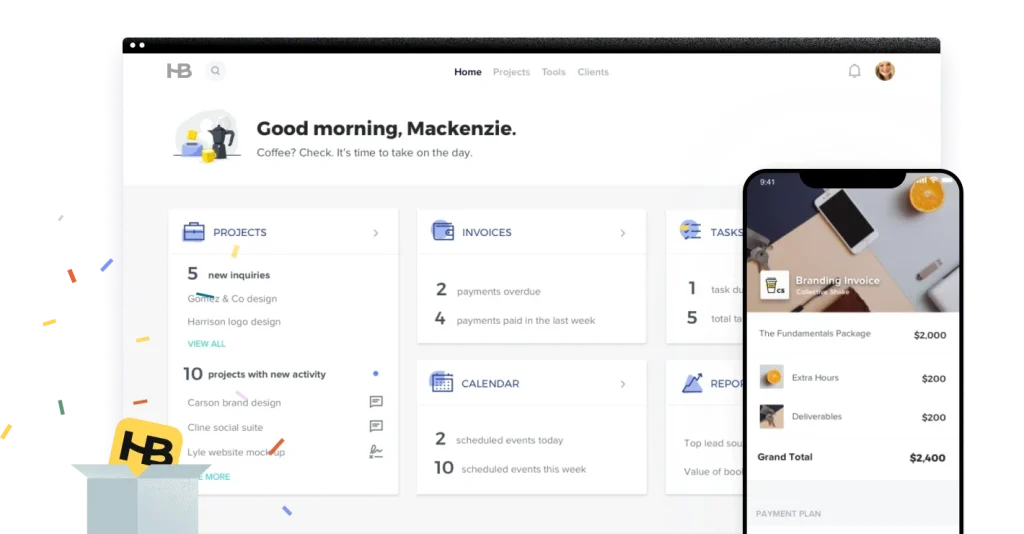
7. HoneyBook
Best for:
Freelancers, solopreneurs, creatives (photographers, designers, event planners), consultants — i.e. small businesses focused on client work, contracts, invoicing, project-based services, rather than large-scale sales pipelines or enterprise CRM features.
Best Features:
-
All-in-one client management: HoneyBook combines contact management, client communication, proposals/contracts, scheduling, invoices/payments, project tracking — making it possible to run your client business from a single platform.
-
Professional templates and client-facing documentation: You get customizable templates for proposals, contracts, invoices — good for businesses that need to present a polished look to clients.
-
Payment & booking integration: Accept payments, allow online booking, manage project timelines — useful for service-based freelancers/creatives who need to collect payments and schedule tasks.
-
Auto-workflows & scheduling: Automate follow-ups, reminders, deliverables; built-in calendar/scheduler; helps reduce admin overhead.
-
Ease of use: Many users find HoneyBook intuitive and suited for non-tech users — good for creative professionals or freelancers without dedicated operations staff.
Limitations:
-
Limited CRM functionality: HoneyBook’s focus is on clients/projects/contracts — it’s not ideal for complex sales pipelines, lead scoring, or enterprise-level CRM needs.
-
Less suitable for larger teams: While it offers team features, its access controls can be coarse, and multi-user workflows are less flexible — better for solo or small teams.
-
Limited advanced reporting/analytics and fewer integrations compared to more mature CRM ecosystems.
-
Pricing may be high for freelancers just starting out — and some users report that as they scale, they outgrow HoneyBook’s simplicity.
Pricing (late 2025):
-
Starter Plan — ~$29/month (billed annually). Includes unlimited clients/projects, invoicing, contracts, proposals, basic scheduler/forms.
-
Essentials Plan — ~$49/month (billed annually). Adds automation, scheduling, integrations (e.g. QuickBooks), team access (small team), SMS reminders, more lead-form capacity.
-
Premium Plan — ~$109/month (billed annually). Supports unlimited team members, multi-brand/companies, priority support, advanced reporting, unlimited lead-forms.
-
Free trial: 7 days, no credit card required.
Ratings & Reviews:
-
According to recent aggregated reviews, HoneyBook scores around 4.6 / 5 overall. Users appreciate its user-friendly interface, comprehensive templates, and streamlined client workflows.
-
Many freelancers and small businesses say it significantly reduces administrative overhead because proposals, contracts, invoicing, scheduling — all live in one place.
-
On the flip side, common critiques include limited flexibility for customization, fewer built-in integrations, and basic reporting/analytics — which may hamper larger or scaling businesses.
Benefits of Using Contact Management Software
Contact management software has become essential for businesses of all sizes — from solo freelancers to large teams — because it consolidates customer information, streamlines communication, and improves your overall workflow. Here are the key benefits in detail:
1. Centralized Database for All Contacts
Instead of storing customer details across spreadsheets, emails, and notes, contact management software gives you one unified database.
You can store:
-
Full contact details
-
Interaction history
-
Notes and reminders
-
Documents (contracts, invoices, proposals)
-
Lead stages and deal status
This eliminates data silos and ensures your entire team has access to accurate, up-to-date information.
2. Stronger Customer Relationships
Effective contact management helps you understand customer behavior and needs.
Most tools include:
-
Activity timelines
-
Follow-up reminders
-
Communication history
-
Engagement tracking
This makes it easy to personalize interactions, provide timely responses, and maintain long-term customer trust.
3. Automated Workflows & Follow-Ups
Missed follow-ups are a major reason leads go cold.
Contact management tools automate:
-
Email reminders
-
Task assignments
-
Lead status updates
-
Drip messages
-
Notifications
This ensures nothing slips through the cracks and sales teams stay consistent.
4. Better Team Collaboration
Your team gets shared visibility into every client or lead.
This means:
-
No duplicated tasks
-
Faster support response
-
Smoother sales handoffs
-
Clearer accountability
Everyone works from the same playbook, reducing chaos and miscommunication.
5. Improved Sales & Lead Tracking
Modern systems include powerful pipelines and dashboards.
You can track:
-
Deals by stage
-
Revenue forecasts
-
Conversions
-
Pipeline bottlenecks
By visualizing progress, you can identify where deals get stuck and optimize your sales process.
6. Enhanced Productivity
Automated tasks + centralized data = major time savings.
Teams avoid:
-
Manual data entry
-
Searching through emails
-
Repetitive follow-ups
-
Switching between tools
This leads to faster workflows and higher overall efficiency.
7. Data-Driven Decision-Making
Most contact management platforms offer analytics like:
-
Deal conversion rates
-
Employee performance
-
Email engagement
-
Revenue predictions
-
Customer lifetime value (CLV)
Businesses can use this data to make better marketing and sales decisions.
8. Scalability for Growing Businesses
As your business grows, contact management software evolves with you.
You can:
-
Add more users
-
Expand pipelines
-
Integrate new tools
-
Upgrade automations
-
Add more advanced CRM features
This makes the software a long-term asset rather than a temporary solution.
Contact Management Software FAQs
1. What is contact management software?
Contact management software is a digital tool used to store, organize, and track customer or lead information. It centralizes contact data, communication history, follow-ups, tasks, and sales activity — helping teams build stronger customer relationships and close more deals.
2. What is the difference between contact management and CRM?
Contact Management Software focuses mainly on storing and organizing contact information.
CRM (Customer Relationship Management) includes contact management but adds:
-
Sales pipelines
-
Automation
-
Analytics
-
Marketing tools
-
Lead scoring
-
Forecasting
Contact management is a basic version of a CRM. Many small businesses start with contact management and later upgrade to full CRM systems.
3. Who should use contact management software?
It’s ideal for:
-
Small businesses
-
Freelancers
-
Consultants
-
Agencies
-
Sales teams
-
Customer support teams
-
Service businesses
Any business that interacts with clients regularly will benefit.
4. Does contact management software improve sales?
Yes. By improving organization, visibility, and follow-ups, businesses can:
-
Qualify leads faster
-
Close deals more consistently
-
Reduce missed opportunities
-
Build stronger customer loyalty
Sales success often depends on timely communication — which contact management tools automate and simplify.
5. Is contact management software expensive?
Not at all. Many tools start with:
-
Free plans
-
Low-cost tiers ($5–$15 per user/month)
-
Scalable pricing based on team size
Even premium tools are relatively affordable compared to the value they deliver.
6. Can I integrate contact management software with other tools?
Yes. Most platforms integrate with:
-
Email (Gmail, Outlook)
-
Calendars
-
Project management tools
-
Marketing automation tools
-
Payment systems
-
Communication tools (Slack, WhatsApp, SMS)
Integrations help streamline workflows and make everything more efficient.
7. What features should I prioritize when choosing a platform?
Look for:
-
Easy-to-use interface
-
Pipeline management
-
Strong search & filter options
-
Automated reminders
-
Email integration
-
Mobile app support
-
Reporting and analytics
-
Affordable pricing
-
Scalability
If your business is service-based, choosing platforms like Corexta or HoneyBook can offer additional workflow tools.
8. Is my customer data safe in contact management software?
Reputable platforms use:
-
End-to-end encryption
-
Secure cloud servers
-
Role-based permissions
-
Automated backups
Always check the vendor’s security certifications (e.g., GDPR, SOC 2) to ensure compliance.
Read More: Best PEO Software for 2026: Top Picks Compared