

Product management in 2026 looks very different from what it was just a few years ago. With growing product complexity, faster release cycles, and higher customer expectations, product managers are under constant pressure to make smarter decisions in less time. This is where AI tools for product managers have become essential—not optional.
Modern AI-powered tools help product managers streamline workflows, analyze customer feedback, automate repetitive tasks, improve collaboration, and turn raw data into actionable insights. From managing roadmaps and documenting requirements to summarizing meetings and generating design assets, AI is reshaping every stage of the product lifecycle.
However, not all AI tools are created equal. Some focus on productivity and collaboration, others specialize in design, transcription, automation, or customer behavior analysis. Choosing the right tools can significantly improve efficiency, decision-making, and overall product success.
In this guide, we tested and reviewed the 10 best AI tools for product managers in 2026. Each tool is evaluated based on its real-world use cases, standout features, limitations, pricing, and user feedback—so you can confidently choose the tools that best fit your product team’s needs.
1. Corexta – Best for Project Management, Team Collaboration, and Productivity

Best Features
Corexta is a powerful all-in-one business management platform that helps product managers and teams streamline not just project workflows but virtually every operational area of a business. At its core, Corexta unifies tools for project planning, task execution, collaboration, client management, HR, finance, and more — removing the need to toggle between multiple apps. This centralization is a major advantage for product teams who juggle cross-functional coordination and transparency across departments.
From a project management perspective, Corexta offers robust capabilities such as:
-
Task visualization tools like Kanban boards for agile tracking and Gantt charts for planning project timelines and dependencies.
-
Real-time status tracking of tasks, timelines, and team progress to spot bottlenecks early and adjust accordingly.
-
Integrated communication with in-platform messaging, real-time notifications, and support for third-party tools like Slack — ensuring synchronous team collaboration without context switching.
-
Unified CRM and client project workflows that link customer records, proposals, contracts, and project tasks in a single workspace.
-
Time, finance, and HR management integrated directly into task and project workflows, enabling teams to track billable hours, expenses, and even employee attendance and payroll without leaving the platform.
Because all these areas live under one roof, teams benefit from stronger visibility into project performance, tighter alignment between departments, and fewer errors caused by fragmented tools.
Limitations
Despite its strengths, Corexta does have some limitations worth considering:
-
Learning curve: Its broad, comprehensive feature set can feel overwhelming for smaller teams or individuals who are new to all-in-one management systems. Some users have noted that onboarding and initial setup may take more time compared with single-purpose project tools.
-
Integration depth: While internal modules are well integrated, connecting with external third-party tools beyond popular platforms may require extra customization, which can be a hurdle for teams relying on specialized tools.
-
Feature breadth vs. specialization: Because it aims to cover project, CRM, finance, HR, and more, certain specialized functions (like advanced analytics or niche third-party automation workflows) may not be as deep as dedicated standalone software in those respective categories.
Pricing
Corexta uses a tiered subscription model designed to be affordable for small to enterprise teams:
-
Free Plan: Offers basic project management, task tracking, and limited storage — suited for solo users or small teams experimenting with all-in-one platforms.
-
Small Business: Around $9.99 per user/month, with expanded storage and most core modules included.
-
Medium Business: Around $19.99 per user/month with additional user support, storage, and features such as payroll management.
-
Enterprise: Around $29 per user/month with unlimited users, full feature access, and premium support like a dedicated account manager.
Pricing is structured to scale with an organization’s needs, and a free trial is typically available so teams can test features before committing.
Ratings and Reviews
Corexta is generally well-received in user reviews, often praised for its comprehensive feature set and ability to consolidate multiple management workflows into a single platform. On several review sites, it holds high ratings — frequently scoring at or near the top for ease of use, value, and overall functionality.
Users highlight that having project tasks, client management, finance tracking, and HR tools in one place has significantly improved team productivity and operational clarity. However, many also note that mastering the full depth of features takes time, especially for teams switching from simpler, standalone apps.
Corexta is a solid choice for product managers and teams looking for an all-in-one solution that supports project execution, team collaboration, and cross-departmental productivity without relying on an ecosystem of separate tools.
2. Jam – Best for AI Debugging Assistant

Best Features
Jam is a specialized AI-powered debugging assistant designed to make bug reporting and resolution far easier for product teams, developers, and quality assurance professionals. Instead of manually gathering screenshots, system logs, and reproduction steps, Jam automatically captures all technical details — such as console logs, network requests, device specifications, and browser context — in a single shareable link as soon as an issue occurs. This drastically cuts down the guesswork and back-and-forth communication between QA, product managers, and developers, making debugging far more efficient.
One of Jam’s standout capabilities is AI-driven analysis and debugging assistance. The AI layer can generate clear reproduction steps and detailed summaries of bugs, and for teams using its advanced features, it can even suggest likely code fixes or root causes based on the data captured. This means product managers — even those without deep technical expertise — can understand issues more quickly, participate in prioritization conversations more effectively, and provide developers with higher-quality tickets.
Jam also supports instant replay of bug occurrences, allowing reviewers to visually see exactly what happened leading up to an issue. Combined with annotation tools (such as blurring sensitive information or adding comments), this makes bug reports clearer and less ambiguous. Integrations with popular project management and development systems — including GitHub, Jira, Notion, Slack, and Linear — ensure that reports generated in Jam fit right into existing workflows without extra manual effort.
Limitations
While Jam dramatically streamlines the debug process, several limitations are worth noting. Since it operates primarily through a browser extension, its functionality is best suited for web-based applications, making it less effective for native mobile or desktop environments that require different capture mechanisms.
Some advanced AI-assisted features — like deep code fix suggestions — can require paid plans, and teams that capture very long sessions or need extensive video support might find that basic plans impose constraints on recording length or usage limits.
Finally, because Jam’s strength lies in capturing technical context automatically, teams still need clear internal processes for triaging and resolving tickets; Jam doesn’t replace human judgment or technical expertise, it enhances the information available.
Pricing
Jam offers multiple pricing tiers to fit varied team sizes and usage levels. There is a Free plan that allows individuals and small teams to start capturing unlimited basic bug reports and use the AI debugging assistant at a limited level. Paid plans unlock more advanced features and greater usage allowances:
-
Free: Unlimited basic bug reports with core captures and basic integrations.
-
Pro: Around $12–15 per user/month — includes unlimited bug captures, expanded session recording, full AI analysis with JamGPT, and broader integration support.
-
Team: Around $14+ per user/month — adds workspace management, access controls, backend logs integration, and priority support.
-
Enterprise: Custom pricing — ideal for large organizations needing tailored integrations, compliance features, and dedicated support.
This flexibility allows both small teams and larger engineering organizations to scale Jam usage based on their needs and budgets.
Ratings and Reviews
Jam has received very positive feedback from users across development and product management communities. Reviewers often emphasize that the tool saves significant time — in many cases cutting bug resolution time by 15 to 60 minutes per ticket — by automating both the capture of technical details and the generation of reproduction steps.
Users appreciate its intuitive interface, seamless integration into existing workflows, and ability to centralize bug information in a way that removes ambiguity and reduces repetitive back-and-forth communication. Product managers and QA leads especially note that even non-technical team members can now contribute to bug reporting with confidence, helping foster stronger cross-team collaboration.
3. ChatGPT – Best for Optimizing the Product Development Process

Best Features
ChatGPT is an incredibly versatile conversational AI that helps product managers optimize almost every aspect of the product development process. At its core, ChatGPT combines advanced natural language understanding with generative capabilities to accelerate research, documentation, planning, and decision-making tasks that are traditionally time-intensive.
One of the most powerful applications is idea generation and refinement — whether brainstorming product features, writing user stories, creating marketing copy, or drafting specifications. By simply prompting ChatGPT with objectives or questions, product managers can produce detailed outlines, creative concepts, and structured frameworks much faster than writing from scratch.
ChatGPT also excels at summarizing and interpreting data, such as user feedback, competitive analysis, and research reports. Instead of sifting through pages of text manually, you can feed data into ChatGPT and get concise summaries, actionable insights, or suggested priorities for the product roadmap. Its natural language interface helps reduce ambiguity and makes complex information easier to digest.
More advanced tiers offer features like code generation and debugging assistance, collaborative workspaces, shared projects, and integrations with internal tools, making ChatGPT a central productivity hub for product teams. It can generate prototypes, assist with logic flows, and even help experiment with data queries or simple code snippets.
Limitations
ChatGPT does have limitations. Because it generates responses based on patterns in training data, it can occasionally produce inaccurate or overly general suggestions, requiring human oversight and validation. This is especially important in high-stakes product decisions or technical analysis where precision matters.
Additionally, while the free tier offers substantial capabilities, more advanced features — such as expanded context windows, enhanced security options, or enterprise-grade integrations — are locked behind paid plans. For high-volume use or teams needing deep customization, these plans may incur higher costs.
Finally, ChatGPT’s performance depends on the quality of prompts and data provided; poorly framed queries can lead to generic or underwhelming outputs, so some learning and prompt engineering skills are beneficial.
Pricing
ChatGPT offers a range of subscription tiers to fit different users and organizational needs:
-
Free: Basic access to the chatbot with standard language capabilities, suitable for casual or exploratory use.
-
Plus: Mid-tier plan (around $20 per month) with faster responses, priority access, and improved model performance.
-
Pro / Business: Enhanced capabilities designed for professional workflows, including apps, shared projects, expanded context windows, and advanced AI features tailored to team collaboration.
-
Enterprise: Custom plans for large organizations with strict security, compliance, and admin controls.
This flexibility makes ChatGPT approachable for single users while scaling well into an enterprise context.
Ratings and Reviews
Product managers, developers, and business professionals regularly cite ChatGPT as a game-changer for productivity and creativity. Users praise its ability to quickly generate drafts, summarize complex information, and aid in decision making, significantly reducing manual workload.
Many reviews emphasize its ease of use, adaptability to various use cases, and seamless ability to switch between tasks — from writing strategic documents to generating code snippets or interpreting data. Organizations report tangible time savings and improved quality of outputs when product teams use ChatGPT as part of their development cycles.
4. Canva – Best for AI-Generated Graphic Design

Best Features
Canva is a widely used graphic design platform that leverages AI to help product managers quickly create visual content — from presentations and social media graphics to wireframes and mockups — without needing advanced design skills. Its intuitive drag-and-drop interface opens up professional-looking visuals to teams of all sizes.
One of Canva’s defining strengths is its AI assistant and Magic Tools, which can automate layout suggestions, generate graphics from text prompts, and adapt design elements to maintain brand consistency. These tools are particularly helpful for product teams needing polished visuals for stakeholder presentations, user onboarding materials, or marketing campaigns.
Canva also offers an extensive template library — thousands of customizable templates for virtually every category of visual content — and real-time collaboration features that let team members comment, adjust, and iterate together. Its cross-platform support ensures teams can design on web, mobile, or tablet environments seamlessly.
Limitations
Despite its utility, Canva has limitations. Its AI suggestions can sometimes produce generic output that requires refinement to avoid looking too templated or uniform across projects.
For users seeking advanced customization or precision design controls (such as vector editing or detailed layout manipulation), Canva can feel restrictive compared to professional tools like Illustrator or Figma.
Additionally, many of the most powerful AI features — including premium templates, Magic Design tools, and brand kit automation — require a paid subscription, making the free plan limited in scope.
Pricing
Canva offers multiple plans to accommodate different needs:
-
Free: Provides access to essential design features, basic templates, and some AI tools.
-
Pro: Around $12.99 per user/month — unlocks premium templates, expanded AI features, brand kits, and additional storage for professional work.
-
Business / Teams: Starts at about $14.99 per user/month — adds advanced collaboration, team workflows, and higher quotas for AI usage.
-
Enterprise: Custom pricing for large organizations with deeper brand controls and analytics.
These tiers allow individuals and teams to scale Canva’s capabilities as their design needs grow.
Ratings and Reviews
Users consistently rate Canva highly for its ease of use, versatility, and ability to democratize design. Product managers, marketers, and business professionals frequently highlight how quickly professional-grade visuals can be produced without specialized design skills.
Critics note the need for manual refinement of AI-generated content and occasional performance lags, particularly on complex projects, but overall Canva remains a top choice for teams looking to enhance visual communication without a steep learning curve.
5. TLDV – Best for Recording and Transcribing Meetings to Record Customer Feedback

Best Features
TLDV (short for Too Long; Didn’t View) is an AI-powered meeting recording and transcription platform tailored for product managers who need accurate meeting documentation, summaries, and insights—especially during customer calls, feedback sessions, and internal syncs. One of TLDV’s major strengths is its ability to automatically record meetings on virtual platforms like Zoom, Google Meet, and Microsoft Teams without manual intervention. Once the meeting ends, it generates accurate transcripts, AI-generated highlights, and actionable summaries, so product managers can quickly review key points without listening to full recordings. It also supports automatic speaker recognition, making it easier to attribute feedback and comments to specific participants—crucial when validating user needs or prioritizing product decisions.
Another standout feature is multilingual support, enabling teams with global customers or stakeholders to transcribe meetings in more than 30 languages. Its AI can also extract highlights, action items, and key moments from longer sessions, which can be shared as short clips or summaries to other team members across tools like Slack or email. This saves product managers from manually distilling long conversations into concise insights.
integrations with a broad ecosystem — including calendars, CRMs, and project management software — allow meeting outputs to flow into existing workflows, reducing context switching and improving follow-up consistency.
Limitations
Despite its strong suite of features, TLDV does have some limitations. Some users find that AI transcripts and summaries aren’t perfect, occasionally missing context or producing errors with highly technical terms, requiring manual review for accuracy. This is especially true in complex discussions where nuanced feedback is critical.
Another common critique is pricing flexibility. While the free tier allows unlimited recordings, advanced features like multi-meeting analytics, CRM automation, and enhanced export tools are typically locked behind paid plans, which can be relatively costly for smaller teams or individual product managers.
Additionally, because TLDV relies on bots to join and record virtual meetings, some participants may find the presence of an automated recorder intrusive or distracting — requiring communication and consent in certain environments.
Pricing
TLDV offers a tiered pricing model that accommodates a range of users — from solo professionals to enterprise teams:
-
Free Plan: Unlimited meeting recordings and transcripts, with a cap on AI-generated summaries and clips.
-
Pro Plan: Typically around $18 per user per month when billed annually — this tier unlocks unlimited AI notes, deeper integrations, more upload capacity, and priority support.
-
Business Plan: Around $59 per user per month (annual billing) — includes advanced features like CRM integrations, cross-meeting summaries, speaker insights, and multi-team management.
-
Enterprise Plan: Custom pricing with extended compliance, administration tools, and dedicated support tailored to large organizations.
Even the free plan provides a generous entry point for capturing and transcribing customer conversations, but the high-tier plans deliver the depth needed for data-driven product teams.
Ratings and Reviews
TLDV generally receives very high user ratings, often scoring around 4.7 out of 5 on review platforms. Users appreciate its accurate transcripts, automatic recording, seamless integrations, and powerful summarization capabilities. Many product managers highlight that TLDV saves hours of manual work by transforming long customer feedback sessions into easily digestible action items and insights.
Reviewers commonly praise the platform’s ability to keep entire teams aligned through shareable clips, searchable meeting libraries, and AI summaries that highlight the most important parts of customer conversations. The wide language support and speaker attribution features are also frequently cited as strong points.
However, some feedback mentions that the pricing can be a barrier for smaller teams, and occasional transcription errors require manual cleanup — though most users still find the productivity gains outweigh these drawbacks.
6. Notion – Best for Summarizing Notes and Creating Action Items

Best Features
Notion is a flexible all-in-one workspace that blends note-taking, documentation, project planning, and AI-powered assistance into a single environment. Its AI Meeting Notes feature enables product managers to capture spoken conversations, generate structured summaries, and extract actionable items directly within Notion pages. This means you can record meetings, team retrospectives, and stakeholder interviews without switching apps, then instantly see transcripts, summaries, and insights right alongside your project plans and task lists.
Notion’s strengths come from its deep integration with the wider workspace — meeting summaries can link directly to tasks, roadmaps, databases, and knowledge bases your team already uses. This reduces the friction between capturing information and turning it into work that gets done. Its AI can also be invoked anywhere within the workspace to summarize content, rewrite text, or extract key points from lengthy discussions.
Since Notion AI runs in-context with your workspace, you can search across your meeting notes, project pages, and knowledge bases, making it easy to revisit past decisions and connect them to new insights. This contextual awareness is particularly valuable for product managers who need to surface historical decisions or link customer feedback to backlog items and roadmaps.
Limitations
Notion’s meeting transcription tool is still evolving and comes with some limitations. Unlike dedicated meeting recorders, it does not automatically join virtual meetings for you — you must manually start the process in the Notion app. While it can capture audio from system and microphone sources, features like automatic speaker identification, video recording, and detailed meeting metadata are not yet as robust as some specialized tools.
Another constraint is access to the feature: Notion AI Meeting Notes is generally only available on higher-tier plans (such as Business or Enterprise), meaning individual users or small teams on basic plans may not have full access without upgrading.
Because it captures everything as a continuous transcript, speaker labels and timestamps may be absent, which can make parsing multi-participant conversations harder without manual editing.
Pricing
Notion’s pricing structure for its AI features, including meeting summaries, reflects its broader workspace positioning:
-
Free Plan: Basic workspace functionality without full AI Meeting Notes access; limited trial AI usage.
-
Plus Plan: Starting around $10 per user per month — includes enhanced workspace features but may not include AI Meeting Notes.
-
Business Plan: Around $20 per user per month, which enables AI Meeting Notes, automation, and advanced collaboration features.
-
Enterprise Plan: Custom pricing with advanced admin controls, security features, and broader AI capabilities.
Notion represents a strong option for teams already embedded in its ecosystem, as meeting outputs become part of the same workspace where roadmaps, feature specs, and documentation reside.
Ratings and Reviews
Notion is widely praised as a versatile workspace and knowledge management tool. Reviews emphasize how the AI features help reduce manual work — enabling product managers to settle into meetings without worrying about capturing every detail. Users particularly value how summaries and action items are automatically organized alongside project documentation.
Critics note that the meeting transcription feature, while promising, can feel simpler than standalone solutions. The lack of detailed speaker data, automatic recording, and dedicated meeting workflows means it may not fully replace a specialized tool for all use cases. Still, many teams appreciate the convenience of having meeting notes, summaries, and tasks all in one place.
7. Otter.AI – Best for Voice Meeting Notes and Real-Time Transcription

Best Features
Otter.AI is a well-known AI assistant focused on real-time transcription and meeting note creation, making it valuable for product managers who want to capture conversations as they happen. Otter can automatically join virtual meetings and generate live transcriptions and summaries, capturing dialogue and key points without requiring manual note-taking. It also creates searchable transcripts, so specific moments or keywords can be found quickly after the call.
Otter’s AI includes features like action item highlighting, basic speaker tagging, and integrations with major conferencing platforms like Zoom, Google Meet, and Microsoft Teams. These capabilities help teams stay synchronized and reduce the burden of manual notes while accelerating follow-up actions. Its simplicity and intuitive interface make it easy for product managers to adopt with minimal setup.
Limitations
Despite its longstanding presence in the meeting transcription space, Otter has several notable limitations. Many users report transcription inaccuracies, especially with heavy accents, background noise, or technical terminology, which can require time-consuming edits afterward. Its speaker attribution is also inconsistent, sometimes labeling participants generically rather than identifying who said what.
Moreover, Otter’s free plan imposes usage caps — such as a limit on transcription minutes per month and duration per session — which may not suffice for longer customer calls or continuous team discussions. Advanced features like unlimited file uploads and administrative controls are restricted to higher paid tiers, and video recording support is typically available only in enterprise-level plans.
Pricing
Otter.AI pricing is structured into multiple tiers:
-
Free: Limited transcription minutes each month and basic live notes.
-
Pro: Around $8.33 per user per month (annual billing) with increased transcription limits and advanced tools.
-
Business: Around $20 per user per month (annual) — adds team features, admin controls, and extended usage limits.
-
Enterprise: Custom pricing with enhanced security and large-scale admin features.
This tiered approach allows individuals to try Otter for free, while teams can scale up to access more robust capabilities.
Ratings and Reviews
Otter has historically received mixed to positive reviews. Users appreciate its real-time transcription, ease of use, and straightforward summaries, which help speed up meeting documentation and reduce manual workload. It scores well in use cases where quick capture and basic follow-ups are the priority.
However, recent user feedback highlights that Otter struggles to keep pace with more modern AI meeting tools. Criticisms include inaccurate transcriptions, limited language support, and a lack of advanced features like video recording on most plans. Some users also report limitations in speaker recognition and navigation tools, leading teams to explore alternatives for deeper analytics and smarter workflows.
8. Collato – Best for AI-Powered Search Engine

Best Features
Collato is an AI-powered search engine and knowledge platform designed specifically to help product teams eliminate information silos and surface critical data quickly. Rather than manually digging through tools and documents scattered across platforms like Confluence, Jira, Figma, Google Drive, Slack, or Notion, Collato can connect these sources and map them into an AI-searchable knowledge graph that delivers context-specific answers and summaries in real time. This means product managers can get immediate insights without wasting time navigating fragmented information.
A standout feature is its semantic search capability, which understands natural language queries and returns relevant results with bite-sized summaries, even if the information is buried deep across multiple tools. Instead of just returning links or file names, Collato synthesizes the content and gives teams actionable information at a glance. It also uses a visual map view that helps teams perceive how different datasets and references connect — useful for understanding dependencies, past decisions, and design assets connected to product plans.
Collato is built with security and compliance in mind, hosting data on encrypted, GDPR-compliant servers and offering secure authentication, which is important when working with proprietary internal documents and customer research.
Limitations
While Collato offers a compelling search model, it is not without limitations. Its effectiveness depends heavily on the quality and scope of the integrated data sources — if some tools or repositories are not connected, search results may miss important information. Additionally, some users find that the visual map interface and context summaries may need refinement to avoid information overload, especially in large organizations with extensive knowledge stores.
Critics also point out that Collato’s integrations with fewer third-party systems compared to broader AI platforms can limit its usefulness if teams rely on niche or specialized tools not presently supported. Finally, while the summarization saves time, summaries can occasionally lack deep context, so teams may still need to reference the original documents for full understanding.
Pricing
Collato typically offers a freemium model with basic access available at no cost, allowing individuals and small teams to start using core search functions and integrations without subscription fees. Paid plans begin at a modest monthly rate for added features, such as expanded tool connections, advanced search capabilities, and higher usage limits — making it accessible for teams of various sizes.
Because pricing can vary based on team size and the number of connected tools, many organizations opt for a trial to determine the right tier before committing.
Ratings and Reviews
User feedback for Collato reflects appreciation for its ability to eliminate information silos and drastically reduce time spent searching across platforms. Teams report significant productivity improvements when they can quickly locate design files, documentation, and research insights linked to product tasks without manual searching.
Some reviewers praise its intuitive natural language search and context summaries, especially for cross-functional teams that depend on varied sources of truth. At the same time, a few reviewers note that the tool’s integration ecosystem and visual features could expand further to support broader use cases.
9. Midjourney AI – Best for AI Art Generator App
Best Features
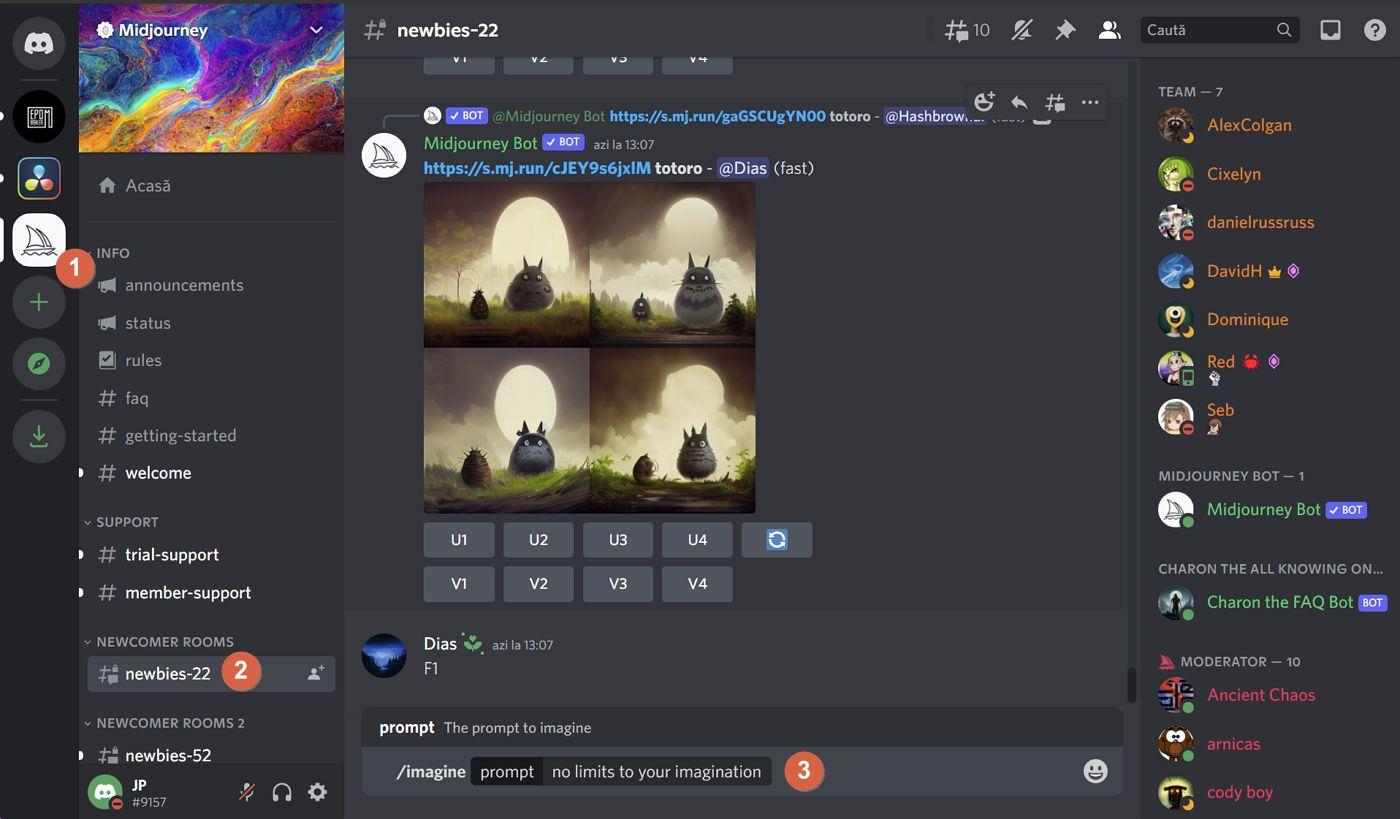
Midjourney AI is a leading generative AI art platform that transforms text prompts into unique and stylistic visual artwork. Its natural language interface allows users to describe their creative ideas in plain words, and the system generates multiple image variations in response. This makes it ideal for product managers who need visual mockups, concept art, UI inspiration, visual personas, or marketing images without relying on design teams. Midjourney’s models are known for producing rich, artistic renderings with varied styles and high aesthetic quality, helping teams explore creative options quickly.
A key strength of the platform is its creative flexibility — with the ability to refine, remix, or upscale images based on iterative prompts. This empowers product teams to experiment with multiple visual directions rapidly and integrate visual ideation into product planning. Midjourney also boasts a vibrant community, especially on platforms where users share prompts and results, which accelerates learning and inspiration for new visual projects.
Limitations
Despite its creative power, Midjourney has some notable drawbacks. It does not offer a free tier, meaning ongoing usage requires a paid subscription. This can be a constraint for product teams on tight budgets or those wanting to experiment lightly before committing. Midjourney’s primary interface is run through Discord, which can be non-intuitive for users unfamiliar with that platform, creating a learning curve for new adopters.
The platform is mainly focused on still image generation and offers only limited support for extended video or motion content, so it isn’t suitable as a complete multimedia generator. In addition, users sometimes report inconsistency in detailed output, especially when trying to generate precise text or specific product branding within images.
Pricing
Midjourney’s subscription structure includes multiple tiers designed around GPU generation time and feature access:
-
Basic: Entry-level access with limited fast render time per month.
-
Standard: Greater image generation limits and unlimited relaxed mode creation.
-
Pro: Expanded capabilities with more fast generation time and premium features like advanced editing.
-
Mega: Top tier with the highest monthly GPU allocation and priority processing.
Pricing varies based on the level of access and billing period, with annual plans typically offering savings over month-to-month options. Because there is no free ongoing plan, all regular users subscribe at one of these tiers.
Ratings and Reviews
Midjourney generally receives strong user ratings, often scoring above 4.0 out of 5 in community and software review platforms. Users highlight its quality of imagery, creative styles, and the ability to rapidly iterate on visual ideas as major benefits. Many teams report that Midjourney accelerates visual brainstorming and supports creative exploration better than many competitors.
However, reviews also include consistent feedback regarding pricing hurdles, occasional generation errors, and the Discord-based workflow’s initial complexity. Despite these caveats, many creative professionals and product teams consider Midjourney an indispensable tool for visual ideation.
10. H2O.AI – Best for Using Automation to Understand Customer Behavior

Best Features
H2O.ai is a comprehensive machine learning and AI automation platform that helps teams build, deploy, and manage predictive models, making it particularly valuable for product managers who need to analyze customer behavior, forecast trends, and automate insights from complex datasets. It includes powerful AutoML capabilities that automate model selection, tuning, and evaluation — reducing the need for extensive data science expertise while still producing high-quality predictive outcomes.
The platform supports a wide array of machine learning algorithms and integrates with major cloud environments — such as AWS, Google Cloud, or Azure — as well as on-premises deployments. Its support for programming languages like Python, R, and Java ensures that teams can integrate it into existing workflows and ML pipelines seamlessly. H2O.ai also offers features that assist with anomaly detection, time series forecasting, and customer segmentation, which help product teams understand user patterns, churn drivers, and engagement trends.
Limitations
Although H2O.ai is powerful, it’s designed for teams with at least a basic understanding of machine learning concepts. The platform can present a steep learning curve for non-technical users, and deeper customization of models may require coding skills and data expertise. Some users find that advanced deployment and model management features are less mature compared with specialized competitors, and working with large datasets might demand substantial computational resources to achieve optimal performance.
Pricing for advanced, enterprise-grade capabilities can also be significant, potentially making it less affordable for smaller businesses or teams without large analytics budgets.
Pricing
H2O.ai’s pricing usually depends on deployment type (cloud vs. on-premises), volume of usage, and included enterprise support. While an open-source edition of the core H2O platform may be available at no cost, the enterprise and cloud-based AutoML offerings are part of paid plans tailored to larger organizations that require advanced features, scalability, and support. Such pricing structures are often negotiated on a case-by-case basis.
Ratings and Reviews
Users of H2O.ai consistently praise its AutoML and predictive analytics capabilities, noting that it significantly speeds up the process of building accurate models compared to manual data science workflows. The flexible architecture and broad algorithm support make it a strong choice for enterprises needing robust AI automation for understanding customer behavior and operational trends.
Feedback also highlights that the platform’s support and community resources are solid, with many users finding the onboarding and learning experience easier than expected for full-scale ML platforms. However, some reviews point to limitations in customization flexibility and higher pricing for enterprise tiers as areas for improvement.
Automate Product Management with AI Product Tools
The AI era in product management is still in its early stages, and the potential ahead is far greater than what we’re using today. Even now, AI-powered product tools are proving how transformative they can be for resource planning, execution, and decision-making. These tools support nearly every aspect of a product manager’s role—from conducting market research and analyzing customer behavior to refining messaging and identifying the right audience. By turning large volumes of data into clear insights, AI helps teams work smarter and make more confident, data-driven decisions.
Whether it’s accelerating everyday workflows with Corexta, collaborating more effectively with engineering teams using Jam, or generating high-quality visuals in minutes with Midjourney AI, these tools dramatically expand what product managers can accomplish in less time. Adopting even one of these solutions can unlock a noticeable boost in efficiency, while combining several can fundamentally change how you manage products.
No matter if you’re a solo product manager handling documentation end-to-end or part of a large, cross-functional team, Corexta makes it easier to track priorities, align stakeholders, and maintain clarity throughout the product development lifecycle. And this is just the starting point—exploring these tools firsthand will help you fully leverage their capabilities and elevate your productivity to the next level.
Read More: 15 Proven Ways to Manage Multiple Clients









