

Project management tools are at the heart of every successful organization—whether you’re building software, managing clients, coordinating tasks across teams, or handling complex multi-department workflows. Jira has long been a popular choice for software development teams due to its strong issue-tracking and agile capabilities. However, as businesses evolve, many teams now require more holistic, all-in-one platforms that handle not just tasks—but clients, finances, HR, communication, contracts, and reporting.
This is where Corexta stands out. While Jira focuses primarily on software development processes, Corexta delivers a complete business management ecosystem that supports project management, client operations, HR, finance, team collaboration, and productivity tracking—all in one place.
This guide explains how Jira works, where teams struggle with it, and why Corexta presents a powerful alternative for companies seeking a unified, scalable platform.
What Is Jira Project Management?
Jira is a powerful project management and issue-tracking tool originally designed for software development teams. Over time, it evolved into a broader work management solution that supports:
-
Agile methodologies (Scrum, Kanban, hybrid)
-
Bug and issue tracking
-
Sprint cycles and backlog management
-
Cross-team development workflows
-
Customizable boards and workflows
Jira is particularly effective for technical environments where engineering teams need granular control over issues, versions, and releases. Its customization capabilities, automation, and integration ecosystem make it well-suited for DevOps and software lifecycles.
However, Jira is not an all-purpose business management solution. It does not include native modules for client management, financial tracking, workforce HR, or billing—areas many modern agencies and companies rely on daily.
How Jira Project Management Works
Jira organizes work into several key components:
1. Projects
A project houses issues, tasks, workflows, boards, permissions, reports, and configurations. Software teams use projects to track development features, bugs, sprints, and releases.
2. Issues
An “issue” in Jira refers to any work item—bug, story, task, epic, or improvement. Each issue includes fields like:
-
Description
-
Status
-
Assignee
-
Priority
-
Sprint allocation
-
Comments & attachments
3. Boards
Jira supports:
-
Kanban boards for continuous workflows.
-
Scrum boards for sprint-based development cycles.
Boards help teams visualize work and manage tasks from “To Do” through “Done.”
4. Workflows
Each issue moves through a predefined workflow. Jira workflows can be highly customized—useful for technical teams needing specific approval or development stages.
5. Backlog & Sprints
Scrum teams maintain a backlog of work items, plan upcoming sprints, and track sprint progress through burndown charts or velocity reports.
6. Reporting
Jira offers agile-specific reports such as:
-
Burndown charts
-
Velocity reports
-
Sprint reports
-
Cumulative flow diagrams
However, these reports primarily focus on engineering productivity—not company-wide business operations.
Jira Project Management Use Cases
Jira is widely used for:
1. Software Development
Feature development, bug tracking, release planning, sprints, and DevOps pipelines.
2. IT and Support Teams
Managing support tickets, incident tracking, and problem resolution.
3. QA and Testing
Quality assurance workflows, test cycles, and defect tracking.
4. Technical Project Management
Managing development cycles across cross-functional teams.
However, Jira is not built for:
-
Client management
-
Invoicing or billing
-
HR and employee management
-
Financial reporting
-
Contract management
-
Multi-department business operations (marketing, sales, operations, HR)
These gaps often require companies to integrate multiple external tools, increasing complexity and cost.

How to Use Jira for Project Management (Step-by-Step)
Step 1: Create a Project
Choose from templates like:
-
Software development
-
Scrum
-
Kanban
-
Service management
Step 2: Set Up Your Workflow
Customize issue types, statuses, and transitions to match your team’s process.
Step 3: Create Issues
Add stories, tasks, bugs, or epics to organize work.
Step 4: Build Your Backlog
Prioritize issues, break down epics, groom items, and prepare for sprints.
Step 5: Start a Sprint (for Scrum teams)
Assign tasks, set sprint goals, and track progress.
Step 6: Use Boards to Visualize Work
Drag issues across the board—To Do → In Progress → Done.
Step 7: Track Metrics
Use agile reports to monitor velocity, workload, and progress.
Step 8: Manage Releases (for development teams)
Track versions, deployment, and release notes.
Jira Project Management Tips and Best Practices
-
Keep workflows as simple as possible to avoid confusion.
-
Regularly groom your backlog to prevent clutter.
-
Use labels and components to organize issues.
-
Automate repetitive tasks with Jira automation rules.
-
Make dashboards for teams to track key metrics.
-
Maintain consistent naming conventions for issues, versions, and epics.
-
Integrate tools like GitHub, Bitbucket, or Confluence for better alignment.
Common Challenges With Jira Project Management
Despite its strengths, Jira comes with several limitations—especially outside engineering-focused teams.
1. Complex Setup
Jira’s customization options can overwhelm non-technical users.
2. Not Built for Non-Technical Teams
Marketing, design, finance, HR, or client-service teams often find Jira rigid.
3. Requires Multiple Add-Ons
To perform tasks like:
-
Time tracking
-
Client billing
-
HR management
-
Financial reporting
-
CRM
you must integrate third-party apps.
4. Steep Learning Curve
Team onboarding can be lengthy, especially for non-technical departments.
5. Not Ideal for Agency Workflows
Agencies need:
-
Client portals
-
Contracts
-
Invoices
-
Payments
-
Team time logs
-
Profitability tracking
Jira does not include these features.
6. Limited All-in-One Functionality
Businesses want centralized operations—Jira focuses mainly on issue tracking.
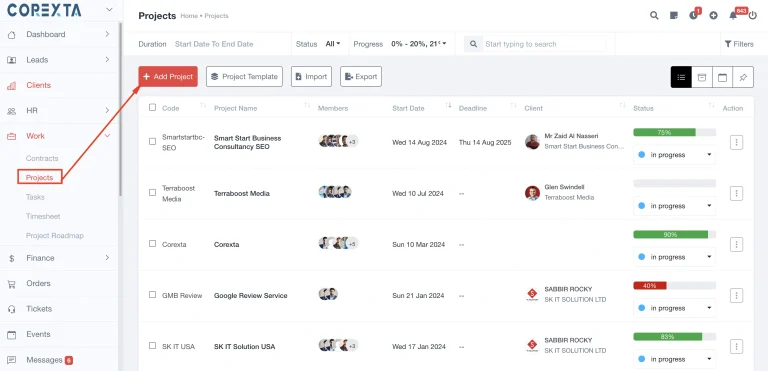
How Corexta Solves Jira’s Challenges and Supports Project Management
Corexta is an all-in-one business and project management platform designed to unify operations, project delivery, HR, finance, and communication. It eliminates tool fragmentation and simplifies management across the entire company.
Here’s how Corexta helps where Jira struggles:
1. Built for All Teams — Not Just Developers
Corexta supports:
-
Marketing
-
Design
-
Development
-
Sales
-
Finance
-
Client service teams
It’s flexible for both technical and non-technical workflows.
2. All-In-One Platform
Corexta includes modules Jira does not:
✔ Project management
✔ Client & contract management
✔ Invoices and payments
✔ Employee management & attendance
✔ Payroll
✔ Time tracking
✔ Financial reports
✔ Collaboration & communication
✔ File sharing
✔ Task automation
3. Better for Agencies & Service Businesses
Corexta supports full client lifecycle:
Lead → Project → Tasks → Time tracking → Invoice → Payment
Jira requires many plugins to achieve similar results.
4. Easier to Learn
Corexta’s interface is modern, intuitive, and simplified for any type of team.
5. Real-Time Team Collaboration
Built-in chat, notifications, and discussions keep everyone connected without needing Slack or extra tools.
6. Strong Financial & Business Management Tools
Corexta includes:
-
Profitability reports
-
Tracking expenses
-
Payment logs
-
Revenue breakdown
-
Budgeting tools
Jira does not offer native financial management.
7. Centralized Records & Data
With Corexta, all information—projects, clients, finances, staff—is housed in one system. No integrations needed.
Jira vs. Corexta Project Management Comparison
| Feature / Capability | Jira | Corexta |
|---|---|---|
| Primary Use Case | Software development & issue tracking | Complete business + project management |
| Ease of Use | Moderate to difficult | Easy, intuitive |
| Project Management | Yes | Yes (expanded with finance, HR, CRM, and more) |
| Client Management (CRM) | No (requires add-ons) | Built-in |
| Contracts & Proposals | No | Built-in |
| Invoices & Payments | No | Built-in |
| Time Tracking | Limited (plugin required) | Built-in with timesheets |
| Financial Reporting | No | Yes |
| HR & Attendance | No | Yes |
| Team Collaboration | Basic comments | Real-time chat, activity logs, internal messages |
| Customization | Very high | High but simpler to manage |
| Learning Curve | Steep | Beginner-friendly |
| Best For | Software development teams | Agencies, SMEs, technical + non-technical teams |
| Tool Ecosystem | Requires many integrations | All-in-one platform |
Get Started in Corexta
Getting started with Corexta is simple:
-
Set up your workspace
-
Add teams and client profiles
-
Create your projects
-
Assign tasks, deadlines, and team members
-
Track time, manage billing, send invoices
-
Monitor performance through dashboards
-
Use HR and finance tools for day-to-day operations
From project kickoff to final client payment—Corexta manages the entire lifecycle inside one platform.
Frequently Asked Questions (FAQ)
1. Is Corexta a replacement for Jira?
Yes—Corexta can replace Jira for most teams, especially those needing business management features like CRM, finance, HR, and billing.
2. Can development teams still use Corexta?
Absolutely. Corexta supports technical workflows, task management, timelines, collaboration, and project planning.
3. Does Corexta support agile project management?
Yes—Corexta includes task boards, status workflows, deadlines, time tracking, and planning tools suitable for agile teams.
4. Can Corexta manage clients and invoices?
Yes—this is one of its strongest features. Corexta provides client tracking, contracts, proposals, invoices, and payment management.
5. Do I need multiple tools with Corexta?
No. Corexta replaces:
-
Jira
-
CRM tools
-
Time tracking software
-
Invoice & billing systems
-
HR tools
-
Financial reporting apps
6. Is Corexta good for non-technical teams?
Yes—marketing, operations, design, HR, and admin teams can easily use Corexta without technical knowledge.
7. Does Corexta scale for growing companies?
Yes—Corexta is built for startups, agencies, SMEs, and growing organizations.
Read More: How to Handle a Construction Project Delay: Steps to Get Back on Track









